Product Updates | May 17th, 2022
🌱 A brand new Custify module | Touchpoints
Touchpoints bring all customer interactions together in one place, so you can easily search by keywords, tags, and status. And there’s more: with Touchpoints, you can access the emails that are waiting for your approval.
Read this article to learn more about touchpoints and email approval.
🌻File management
Custify becomes a one-stop shop for all your customer-related documents. With the latest release, you have the option to add files in notes, emails or tasks, or to add files only at the client or global level.
The following types of files can be added to Custify :
- Pictures
- Documents
- Video
- Audio
- Zip files
You can attach one or more files. The maximum size allowed for each file type is 16 MB.
You can use file attachments in multiple ways:
- Notes | Attach files when creating or editing existing notes
- Tasks | Attach files when creating or editing existing tasks
- Emails | Attach files when sending emails (individually or using Playbooks)
- Company-specific files | Each Customer 360° Profile has a new tab called “Files” where you can attach any type of file. The files saved here can also be used in notes, tasks and emails.
- Global files | In settings you have a Global Files Repository where you can store files that are relevant for your entire Custify account.
How to | Attaching files in notes
How to | Adding files at the company level
How to | Adding files to the Global File Repository
🏷 Tags | Add and display multiple tags
Company tags and people tags are amazing when you want to quickly categorize your portfolio.
We have improved the process to make it smoother and more relevant. Here are the updates:
- You can easily add multiple tags for people, companies, notes, tasks and every Custify module
- Multiple tags will be displayed in the Customer 360° Profile (the number of tags displayed depends on your screen resolution and the tag length)
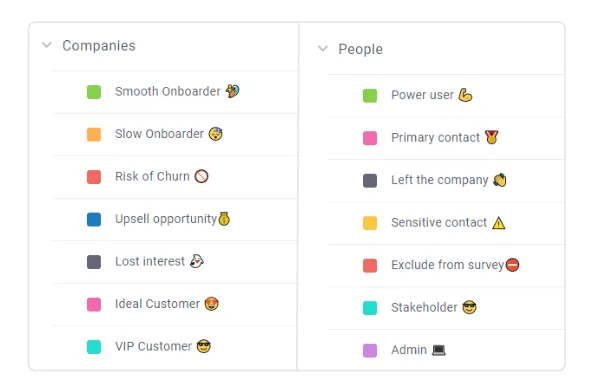
Here are some popular company and people tags:
🧮Calculated metrics | Historical values for attributes and metrics
Calculated metrics are more powerful, allowing you to apply multiple functions to both attributes and metrics.
Functions available for numerical attributes and metrics (e.g. MRR, Global Health Score, Open tasks):
- Historical attribute value
- Sum of attribute values over the last X days
- Average of attribute values over the last X days
- Minimum of attribute values over the last X days
- Maximum of attribute values over the last X days
Functions available for date attributes (e.g. Signed up at, Renewal at):
- Days since
- Days until
🎯 Use case | Not sure how to use this new feature? Our CS team came up with some use cases:
1. Identify the companies that have changed the MRR in the last 30 days (upsell or downgrade).
2. Track the week-over-week performance for your accounts in terms of Global Health Score. Check who is progressing, staying the same, or backtracking.
3. Trigger a notification for the assigned CSM when a new support ticket is received.
4. Track the evolution of your KPIs over the last 14 days.
⚗️Filters | Persistent filters throughout the application
The filtering applied anywhere in the application will persist when you refresh the page or navigate to another page and then return to the initial one. The filters are not public, they are persistent only for your user profile.
Here is a list of filters that will remember the last setup:
- Modules (List View, Segments, Health Scores, Tasks, Playbooks, Lifecycles, Touchpoints)
- Customer 360° Profile (all tabs: tasks, notes, tickets)
🧲 Playbooks | Dynamic data in notifications
Enhance and personalize your notifications using dynamic data. Any attribute, metric or health score can be used as dynamic data.
This spring release also brings bug fixes as well as multiple UI/UX and quality of life improvements. Enjoy!
Love using Custify? We would like to hear your feedback! Leave us a review on G2 Crowd!