Can I manually create attributes in Custify?
Yes, you can create a new custom attribute in Custify by going to:
Settings ➡️ Event-Attribute Editor ➡️ Add new attribute.
You will then have to fill in the following fields:
- Attribute for: People attribute or a Company attribute;
- Attribute type: String, numerical, boolean, date;
- Name: Display name of the attribute;
- Description (optional): details on how to use the attribute or what it represents.
Custify Tip: Whenever possible, use boolean attributes instead of the string ones to reduce the typos when filling in the values. For example, let’s say you want to create an attribute that tells you the status of a client: Active or Inactive. Instead of creating a string attribute , you can create a boolean attribute <Active?> that has 2 default values: TRUE/FALSE.
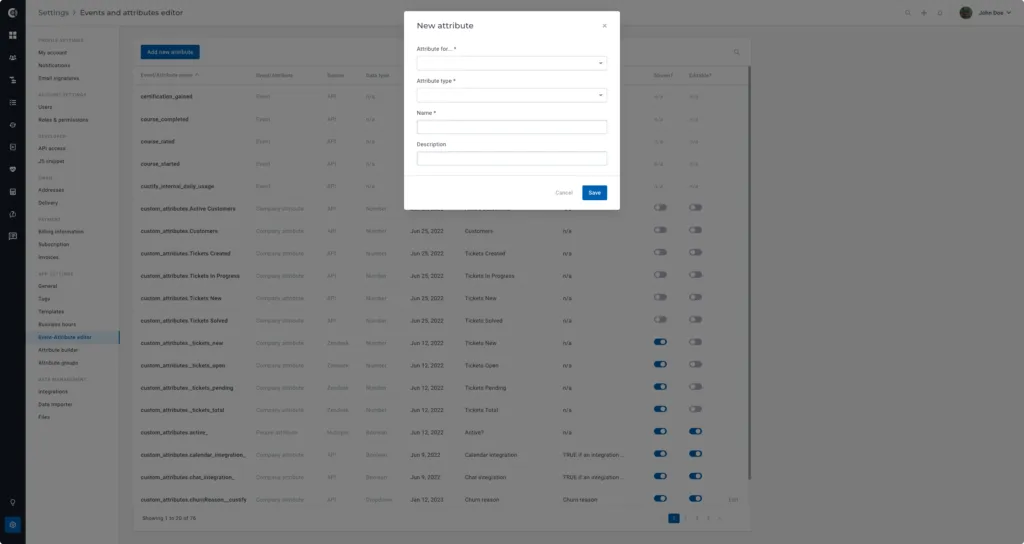
After it’s created, the attribute will show up in the Event-Attribute editor list, and you will be able to populate it for each customer.
You can populate your attribute in two ways:
Manually from the Customer 360° Profile: Click on the customer name in the List View and you will see a button (see screenshot) that allows you to add new manual attributes.
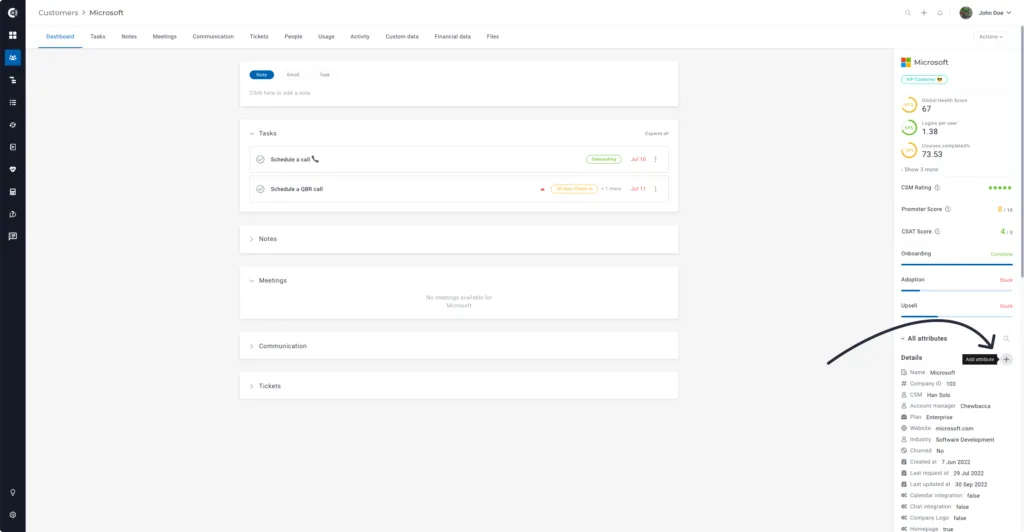
In bulk using Playbooks: Build a new Playbook and use the action Set attribute value, then select the attribute that you want to populate and its value.