Internal KB
Document your team's processes inside Custify so the right guidance is one click away from the work itself.
Overview
The Internal KB is your team's private documentation library, built directly into Custify. You write articles about your own customer success processes — onboarding playbooks, escalation paths, renewal motions, billing exceptions — and they live alongside the Playbooks, Lifecycles, and Segments those processes drive.
Most CS teams keep their internal documentation in a separate wiki — Confluence, Notion, Google Docs — and lose context every time someone has to open a second tab to look up "how do we handle a downgrade request" or "what does our health score really measure." The Custify Internal KB closes that gap by putting the article and the operational tool that uses it on the same page.
The Internal KB is different from Custify Foundation, the new AI grounding layer that ships in the same release. Custify Knowledge ingests your data sources so CustifyAI can reason about your account; the Internal KB is the human-readable article module that you and your team read and write in. The two pair well — Custify Knowledge can suggest draft articles for the Internal KB based on patterns it sees in your data — but they are separate features with separate purposes.
The module covers four things:
- A library of articles you author in a rich-text editor, organised into categories and subcategories.
- Bidirectional links between articles and the Custify entities they document — Playbooks, Lifecycles, Segments — so process documentation surfaces in the workflow that uses it.
- Permission-aware drafts and publishing so you can collaborate on a process before it goes live to the wider team.
- A dedicated module in the main sidebar with a categories pane on the left and an article reader on the right.
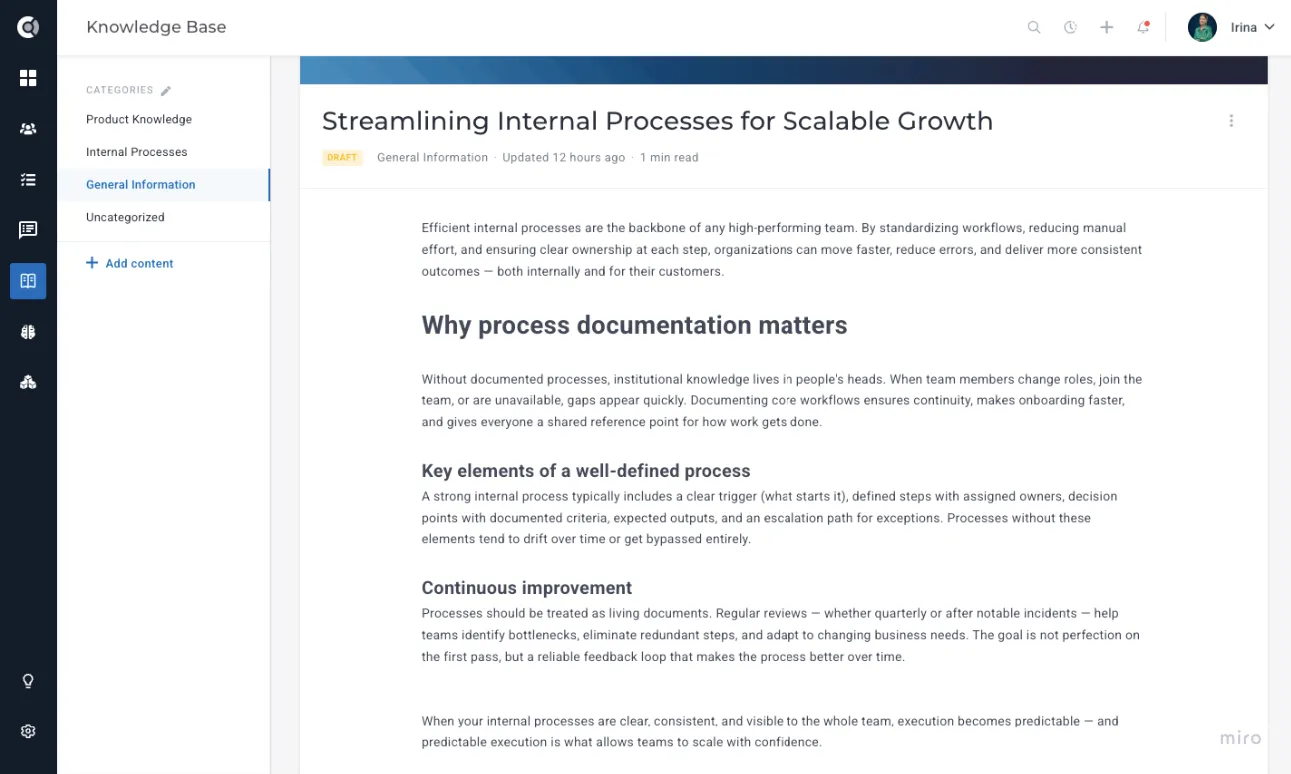
The first release focuses on the article-authoring experience and the cross-linking layer. AI-assisted drafting, conversational querying outside the app (Slack, email), and Training Mode for onboarding new hires are on the roadmap but are not part of this release.
Creating an article
You create articles from the dedicated Internal KB module in the main sidebar. The button to start a new article sits in the top-right corner of the categories sidebar.
To create your first article:
- Open Internal KB from the main sidebar.
- Pick the folder you want the article to live in, or click New Category first if you need somewhere to put it.
- Click Add Content.
- Give the article a title and start writing in the editor.
- When the draft is ready for review, switch the status from Draft to Published using the status selector in the top-right.
The editor is a Froala-based rich-text editor. You get headings, bold and italic formatting, ordered and unordered lists, tables, links, code blocks, and inline images. Pasted content from other tools keeps its formatting where possible.
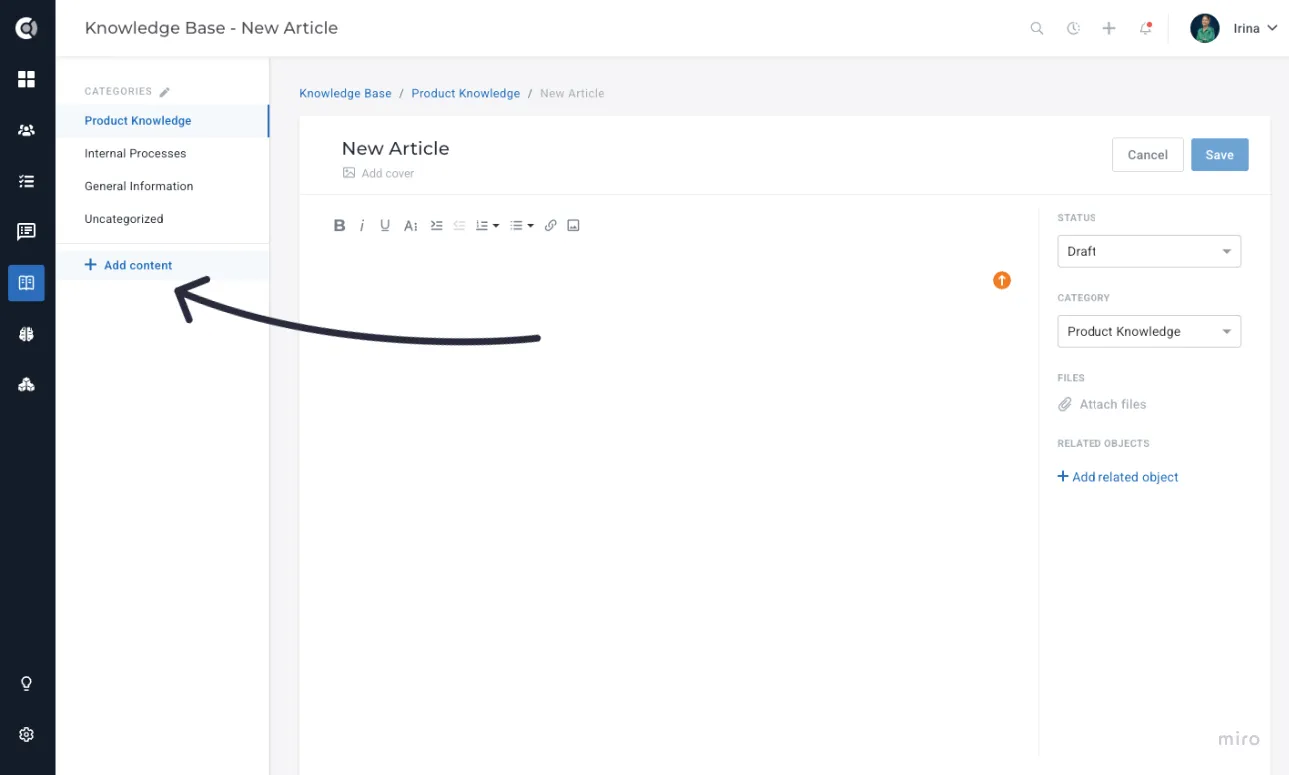
Each article carries the following fields:
- Title: The display name of the article. Shown in the categories sidebar and in any place the article is linked from.
- Body: The full article content, written in the rich-text editor.
- Status: Either Draft or Published. Drafts are visible only to users with edit permission on the Internal KB; published articles are visible to everyone in the account.
- Category: Where the article lives in the categories tree. Can be moved later.
- Linked entities: The Playbooks, Lifecycles, and Segments this article documents. Set when you link from inside one of those features (see below).
Custify Tip: Start with the article rough and switch to Draft. Drafts are private to editors, so you can iterate with a co-author without anyone in the wider team seeing half-finished guidance.
Observation: Image upload in the editor is supported, but very large images can slow down the article preview. If a screenshot is heavier than a few hundred kilobytes, resize it before uploading.
Linking articles to Playbooks, Lifecycles, and Segments
The point of the Internal KB is that articles do not live in isolation — they sit next to the operational features they describe. Linking is bidirectional: a Playbook can list its related articles, and an article can list every Playbook, Lifecycle, and Segment it relates to.
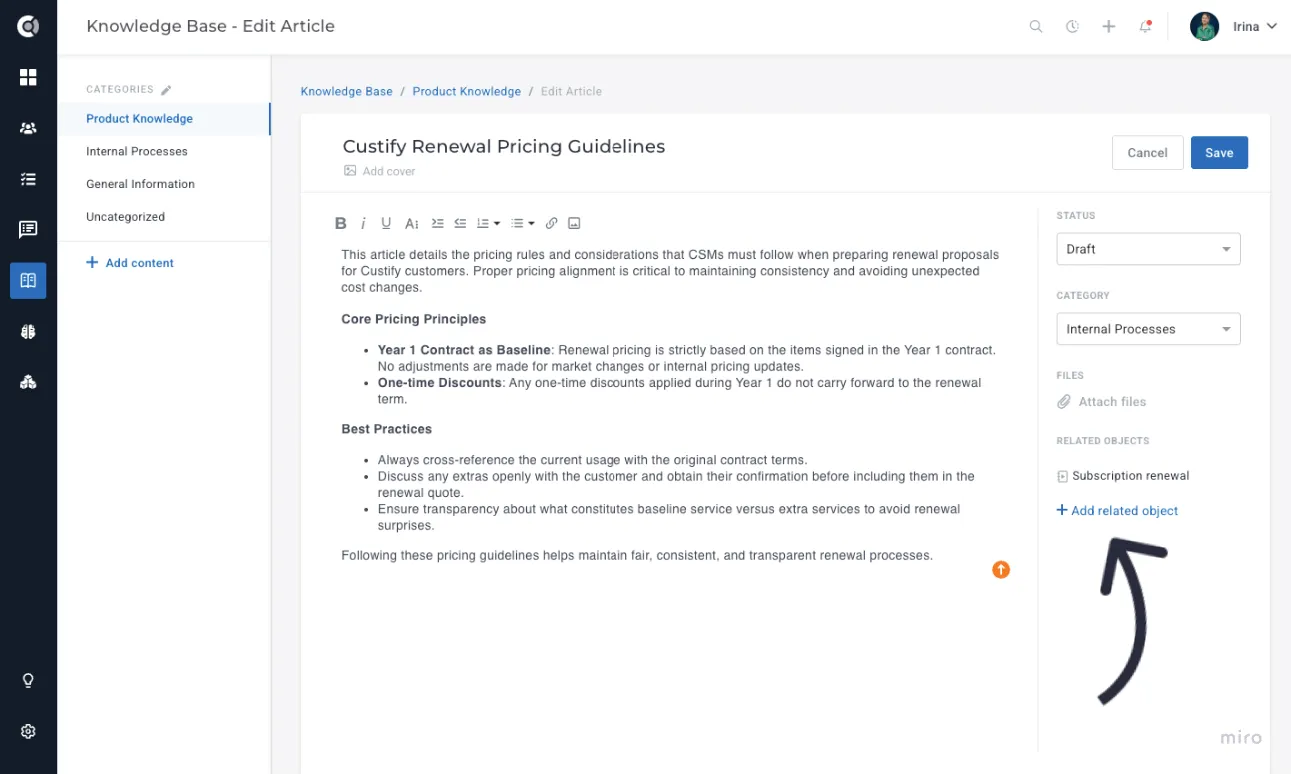
The links are created from inside an Internal KB article - open the Linked entities panel on the right side of the editor and add the entity you want this article to document.
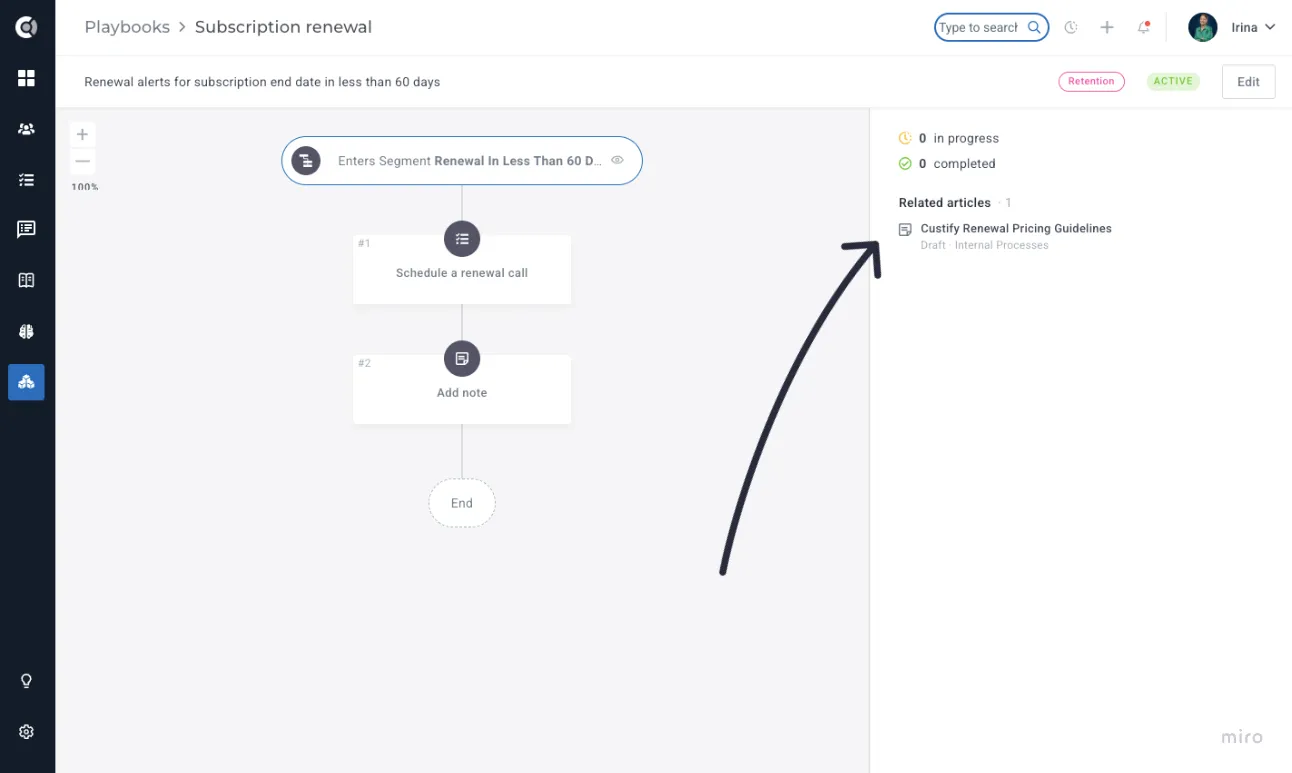
Once linked, the relationship shows up everywhere the entity appears. A CSM viewing a Playbook on a customer's Customer 360 Profile sees the related articles in the same panel as the Playbook itself, and can easily navigate to learn more about the process behind the flow.
Custify Tip: When you build or edit a Playbook, write the article first, then link it. The article gives you a place to document the strategic reasoning ("we send this email at day 14 because that's when our trial-to-paid drop-off happens") that does not fit inside the Playbook UI itself.
Querying the Internal KB
The Internal KB has its own search bar at the top of the module. Search runs against article titles and body text. Results show the matching article, the category it lives in, and a short snippet of the matched text.
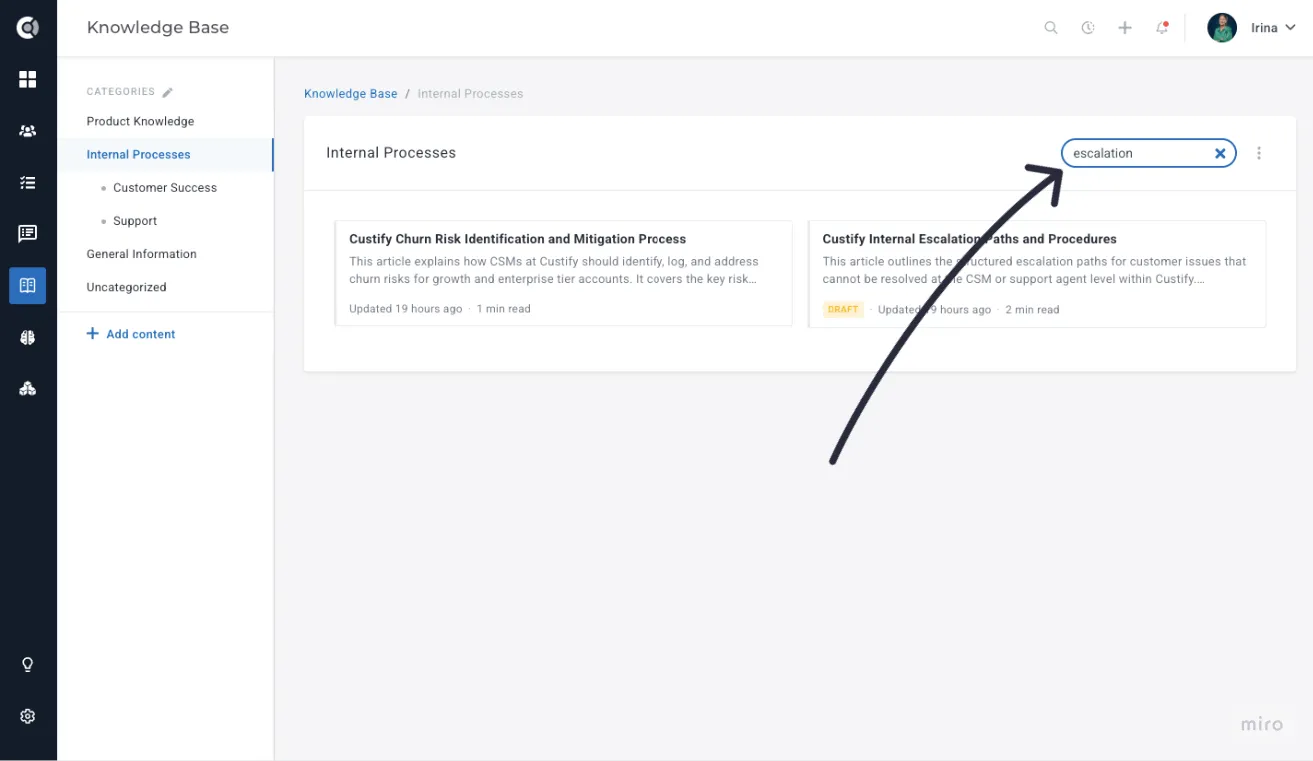
In a future release, the same article corpus will be queryable from CustifyAI's conversational interface — typing a question like "what is our refund process for annual customers" and getting the relevant article surfaced inline, grounded by Custify Knowledge. For now, search and the categories tree are the primary ways to find articles.
Custify Tip: Cross-link articles to each other freely. The Internal KB works best as a web of small, focused articles — one per process — rather than a few large all-encompassing pages. Smaller articles are easier to update and easier to link from a Playbook step.
Managing the library
The Internal KB respects your account's role and permission setup. Three things are guarded:
- Viewing draft articles is limited to users with edit access on the Internal KB. Published articles are visible to everyone.
- Creating, editing, and deleting articles is limited to users with the corresponding permission on the Internal KB. View-only users can read but not change anything.
- Reorganising folders (creating, renaming, moving, deleting) is also gated by the edit permission.
You configure who has edit access from Settings - Roles and Permissions - Internal KB. The default for new accounts is that admins and CS leaders have full edit rights, and regular users have view-only access; adjust this to match how your team divides authoring and reading.
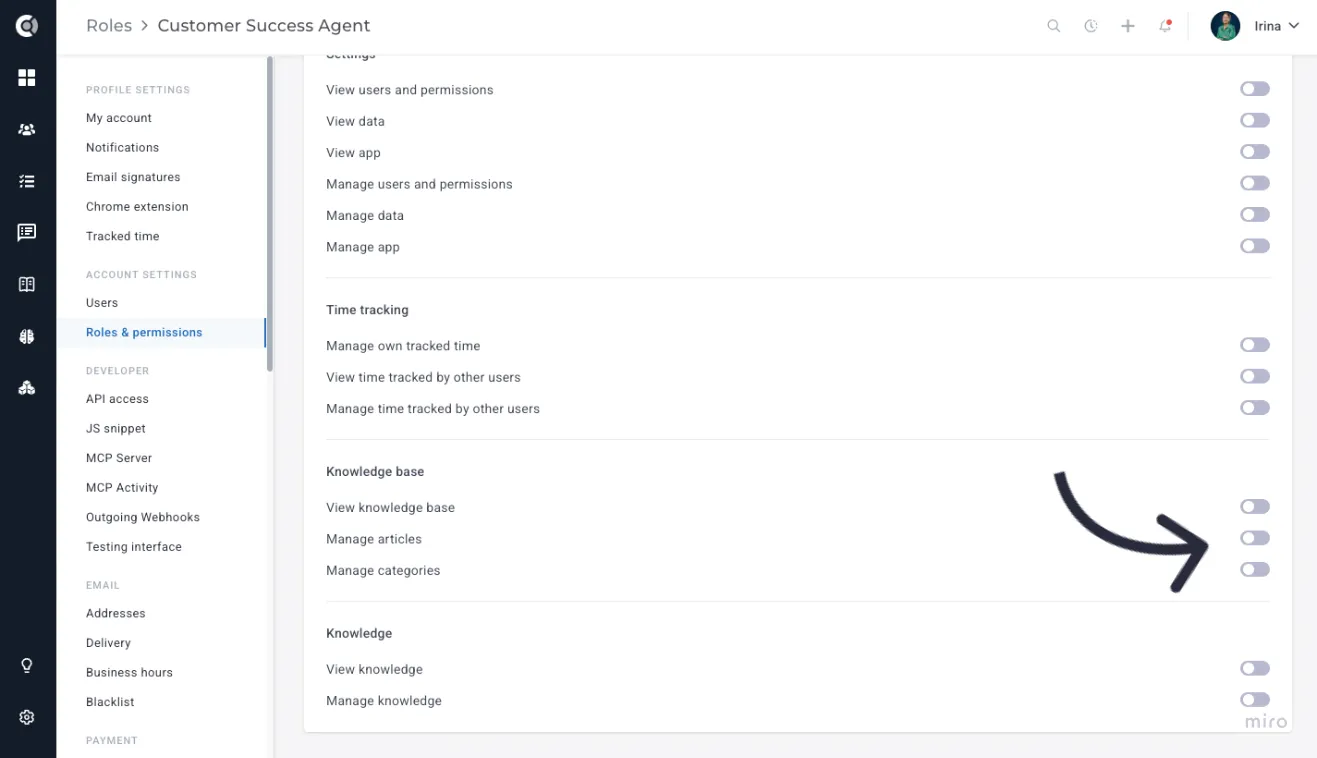
Archived articles remain visible in the categories tree but are visually marked as archived and are excluded from the related-articles pickers in Playbooks, Lifecycles, and Segments. This keeps superseded guidance available for reference without offering it up to a CSM looking for a current process.
To archive or delete an article, open it and use the action menu in the top-right corner. Archiving is reversible; deletion is not.
Observation: Deleting an article also removes every link to it from any Playbook, Lifecycle, or Segment it was attached to. The entity itself is unaffected, but the Related Articles entry disappears. If you only want to retire the article temporarily, archive it instead.