What is a Parent-Child relationship?
A parent-child relationship refers to the way you structure your customer database. Here are some scenarios where a parent-child relationship can be useful:
- You have customers that have different subsidiaries, and you want to keep them as separate accounts
- You have customers that use the product differently depending on the department/team, and you want to track health per department
- Each of your customers has different products/projects/campaigns that you want to track individually, so you need a third entity to be tracked as a child of the parent company.
This type of structure is common, especially if you want to track Health Scores, Lifecycles, usage, renewals, and so on for both the parent and child entities.
Assigning Companies in a Parent-Child Relationship
There are multiple ways of assigning companies in a parent-child relationship.
Through an API
You can find more details in our API documentation.
Through a CSV Import
You can bulk assign the child companies under the corresponding parent companies using the data importer tool available under Settings —> Data importer.
The type of import you need to use is Company CSV, and the only prerequisite is that the parent company needs to exist in Custify. In the CSV file, it is mandatory to add the parent company’s ID.
When mapping the company attributes, make sure to map the parent company ID under the attribute Parent company for the relationship to be correctly created.
Directly from the UI
There are a few different ways to assign the parent company directly from the interface.
- From the Customer List View, select the company/companies you want to assign under a particular parent —> Actions —> Add parent company
Child-Parent Data Flows
Child Companies
Once you assign one or multiple companies to a parent, you will be able to see the list of child companies under the Child companies tab on the parent Company 360° Profile. There is also a default Custify metric named Child companies count that returns the number of child companies a parent has assigned.
Events
Events will bubble up from the user to the company they are assigned to. If this company is assigned as a child company to another company, the events will also bubble up to the parent company.
Company-only events (events that are sent at the company level and are not generated by users) also bubble up from child to parent company.
Attributes
The parent company’s attributes will not be influenced in any way by the child companies’ attributes. If you decide to structure your data using the parent-child relationship, you need to send attribute values for both entities.
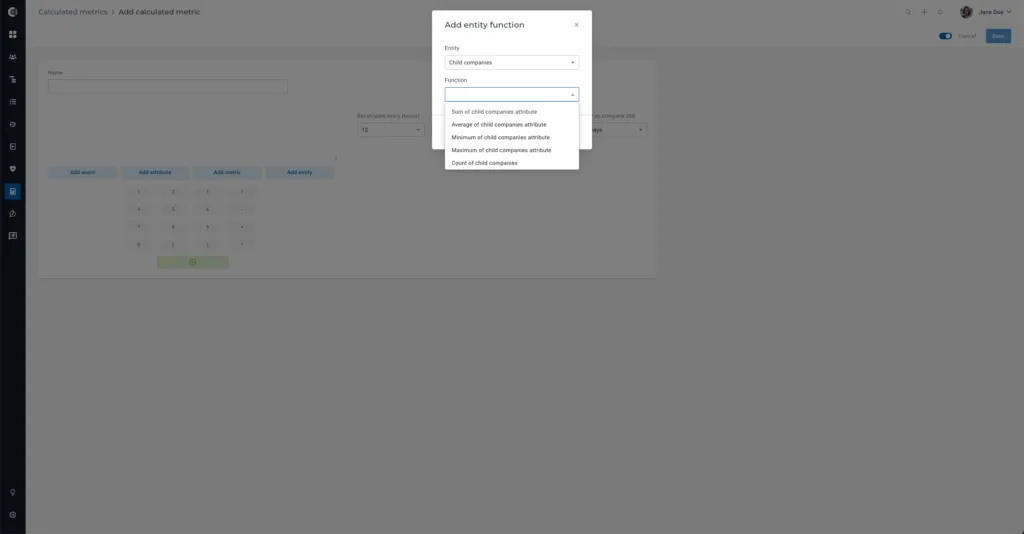
Alternatively, you could use the Calculated Metrics module (function Add entity) to build metrics based on the child companies attributes (E.g., Average of Child companies attributes, Sum of Child companies attributes etc.)
Email Communication
- Sending emails: you can send emails from Custify only to the people directly assigned to that company.
- Mapping emails: emails sent through Gmail/Outlook are being mapped to the person in Custify, as well as the company/companies they are directly assigned to.
If a user is assigned to a child company and is not assigned to the parent company, you will not be able to send emails from the parent company to the people assigned to the child company.
Also, you will not see the emails sent/received to/from the users assigned to the child company at the parent level.
Depending on how your processes are built, you can consider assigning the users to both parent and child companies.
Tasks
The tasks you create for a child company do not bubble up to the parent company.
Notes
The notes you add on a child company do not bubble up to the parent company.
Tickets
Tickets sent through integrations are mapped based on the email address of the user. The ticket will also bubble up to the company the user is assigned to, but not to the parent company.