Dynamic 360° Views
Overview
The Dynamic Customer 360 provides a flexible, role-based view of customer data in Custify, allowing teams to tailor the interface to their specific needs. Key capabilities include:
- Customizing tabs within the Customer 360 view, including renaming, reordering, and creating new ones.
- Assigning role-based views ensures each team member sees the most relevant information.
- Configuring the sidebar to display targeted attribute groupings per view.
- Designing custom tabs with modular content blocks for specialized insights.

This feature helps reduce information overload and ensures that Customer Success Managers, team leads, and executives can access the data most relevant to their responsibilities, enabling greater focus, clarity, and operational efficiency.
Configure your Custom Views
To start configuring your Views, go to Settings - Customer 360 section. Two new subsections will be available - Views and Tabs.

Manage Tabs
The first step before creating Dynamic 360 Views is to define your Tabs. Just like the default Tabs (e.g., Notes, Tasks, Meetings, Activity, Usage, Custom Data), you can create additional Tabs for both Companies and People.
To start building your own tabs, click New Tab, choose the tab type (Company or People), and begin defining your sections.

When creating a new tab, you can choose to build from scratch or start from a template — a great way to move faster while drawing inspiration from industry best practices.
If you choose the Custify-proposed templates, you can browse by category or filter by use case (Onboarding, Renewal, Churn Prevention) and CS motion type (SaaS B2B, PLG) to find the right fit. Click Use Template to load it directly into the matching editor — pre-populated and ready to customize.
Nothing is saved until you click Save — so you can explore, adjust, and preview completely risk-free before committing to anything.
You can add a variety of section widgets to structure and display the content you need:
- Heading – Add headings to organize and improve the visibility of sections.
- Text – Provide descriptive text or guidance to help users understand how to use each section.
- Notes – Display notes with support for various filters.
- Files – Show relevant files using configurable filters.
- Health Score – Display health score values and their evolution over time.
- Meetings – List meetings with filtering options to tailor visibility.
- Embed – Embed videos or documents via direct links or attributes containing URLs to online resources.
- Attribute – Visualize the historical evolution of a specific attribute over a selected time period.
- Form – Create input sections for team members to enter values for existing manual attributes; submitted data is shown at the Company or People level.
- Tickets – Display support tickets based on applied filters.
- People List – Show a filtered list of people using Tags or Segments.
- Communications – Surface customer communications, filtered by tag or source.
- Custom Data – Display available Custom Data associated with the account.
- Attribute value displayed by color — Highlight specific attribute values using color coding for faster visual scanning across accounts.
- Value Realization — Displays the progress of value realization based on the current objectives’status. Helps surface customer progress toward their goals directly in the account view.
- Child Entities — Shows related child accounts or entities linked to a parent account. You can filter by segment, control the sort order (e.g. by sign-up date), filter by relationship type, and set the maximum number of entries displayed.
- Usage - Events over time – Visualizes usage events within a configurable date range, with options for detailed or summary view and control over which initial events are shown. Both the date range and view type can be made editable directly in the c360 view.
- Usage - Active users – Tracks user activity over time.
- Usage - Segments – Displays usage broken down by segment.
- Usage - Event metadata over time – Charts metadata values associated with specific usage events over a configurable date range. You can configure one or more data series, each defined by an event, a metadata field, and an aggregation method (e.g. MAX). Additional series can be added with + Add series. The date range can be set as editable in Customer 360, and individual series can be toggled as visible by default. Trending over time applies only to numerical metadata values. String, boolean, and categorical metadata are not graphable as time series and will not appear in the chart selector.
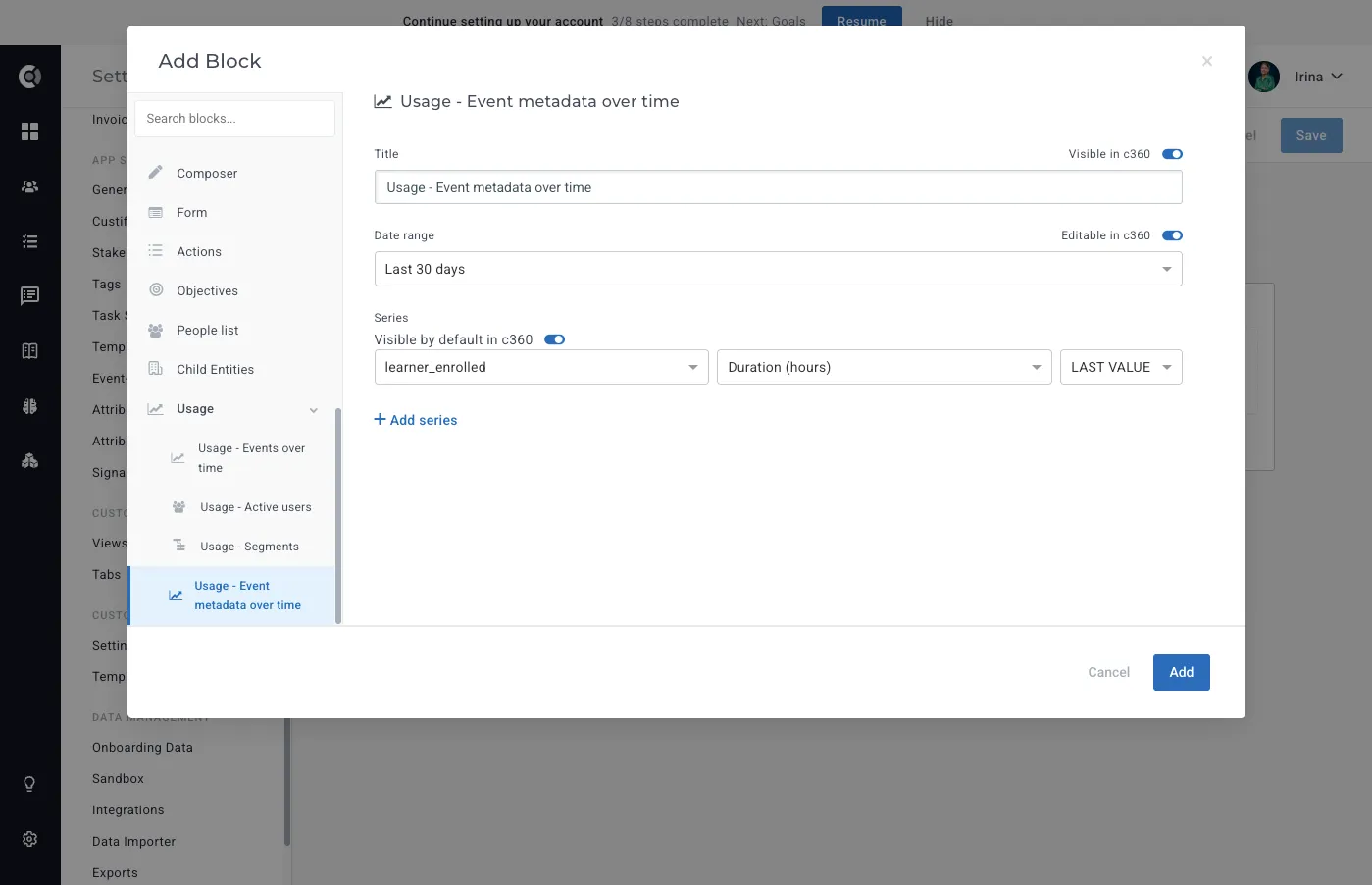
Each block supports customizable data bindings, positioning, and visibility rules.
Gridster Editor
Custom Tabs now use a flexible gridster grid in edit mode, replacing the legacy fixed row/column layout. Each section is an independent 3-column grid where blocks can be dragged, resized, and repositioned freely. This gives you full control over how content is arranged inside a tab without being locked into a predefined column count.
To start customizing, open the tab in Settings - Customer 360 - Tabs and click Edit. The section now renders as a gridster surface with empty cells where you can place new blocks.
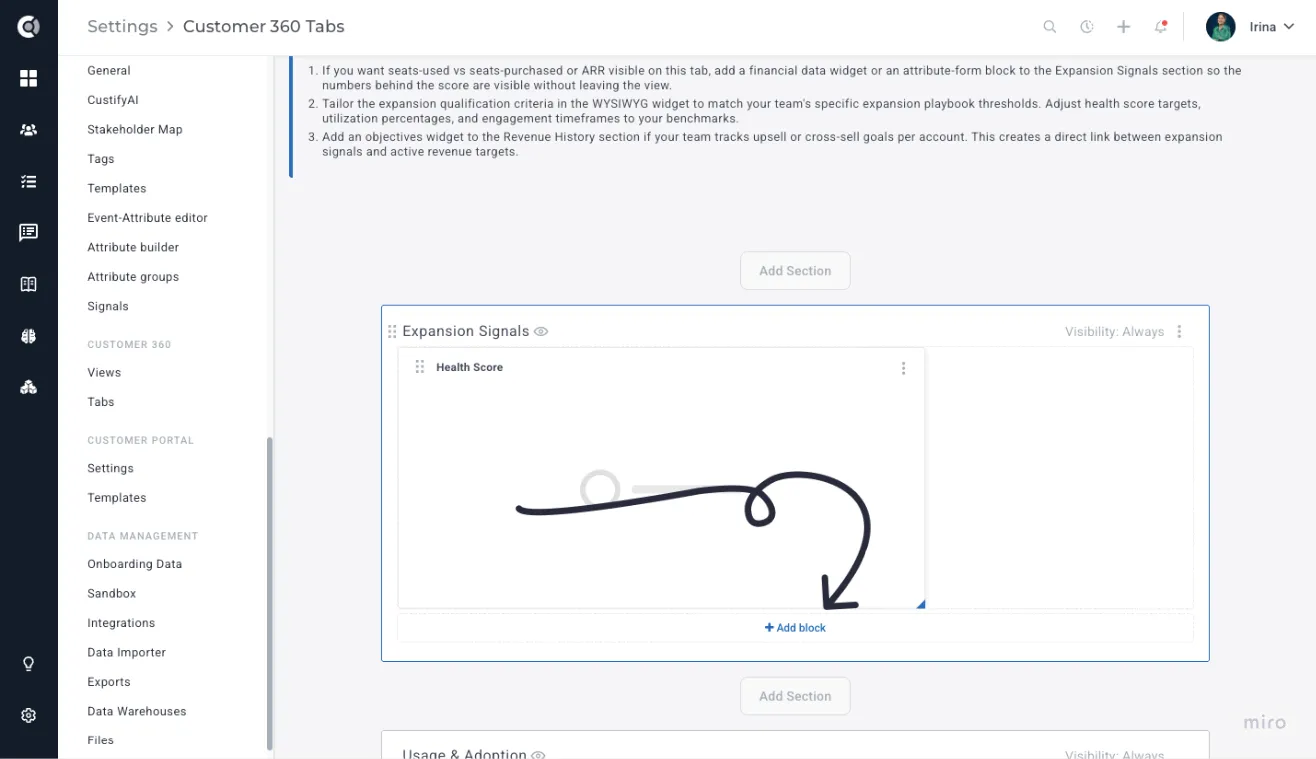
You can interact with the grid in several ways:
- Drag and drop: Click anywhere on a block's title bar to drag it to a new position. The block-type icon on the left of the title bar is replaced by the drag handle on hover.
- Resize: Drag the resize handle at the bottom-right corner of a block to change its width or height. Each block type respects its own minimum and maximum size constraints.
- Click an empty cell: Click any empty cell to open the Add Block modal. You can also drag-select across multiple empty cells to pre-fill the position and size; block types that don't fit the selected area are disabled in the picker.
- Insert and delete empty rows: Hover the gap between two block rows to reveal the insert-row overlay; click to add an empty row. Empty rows show a delete indicator on hover and can be removed with a single click.
- Duplicate: Use the 3-dot menu on any block to duplicate it. The copy lands in the nearest available space, at or just below the original, rather than pushing the rest of the layout down.
Every action in the editor supports full undo and redo. Press Ctrl+Z (or Cmd+Z on Mac) to revert the last drag, resize, add, or delete; Ctrl+Shift+Z re-applies the change. The editor keeps up to 50 history steps per session.
When you click Add Section, a new empty gridster section is added to the tab. The column picker is no longer shown — blocks are positioned freely within the 3-column grid.
Custify Tip: WYSIWYG blocks auto-resize to fit their content after migration. If a block looks taller than expected on first load, save the tab once, and the height will settle to match the actual content.
Auto-migration of existing tabs
Tabs created with the legacy row/column layout migrate automatically the first time you open them in edit mode. The original layout is preserved on the backend for rollback, and a migration timestamp is stored on each section. You don't need to rebuild your existing tabs — block positions, types, and settings carry over to the gridster grid.
Observation: Migration runs once per tab on first load in edit mode. If you have many tabs, expect a brief one-time delay the first time each tab is opened after the feature is enabled.
When you open a tab in the Customer 360 detail page, the layout is driven by your content — blocks resize to fit what's inside them, so there are no awkward empty gaps. A short notes block sits tight; a longer block takes the space it needs.
The layout uses a 3-column grid, and wider blocks span across it naturally — a 2-column block takes up two-thirds of the width, just as you'd expect.
Default Tabs cannot be renamed in the master Tabs list, but their names can be customized within individual custom Views.
🎯Use Case Ideas
- Personalized Workflows: Different teams or individuals often require unique views tailored to their specific workflow.
- Example: A custom "Renewal Metrics" tab could include blocks for usage metrics, tagged meeting notes, customer health score evolution, and attachments from quarterly meetings - summarizing renewal potential and streamlining call preparation.
- Consolidation of Key Information: Bring together key blocks of information from disparate places into one cohesive, easy-to-navigate tab.
- Example: A Product Adoption tab with usage insights, health score trends, and key feature adoption metrics gives CSMs a clear view of how customers are engaging with the product.
Manage Views
Once the tabs are created, you can build your preferred views.
To create a View, go to Customer 360 - Views - New View. Select the type of view (Company or People).

The following sections will be available:
- Name: Assign a clear and relevant name to the view to ensure intuitive use and easy recognition.
- Tabs: Select the most relevant tabs for this view based on the role it’s intended for. You can use default tabs (renaming them if needed) or custom tabs created in the previous step.
- Use as Default View: Enable this option if you want the view to be the default for all Custify users.
- Restrict Access: Limit access to this view by assigning it to specific roles—for example, to hide financial data from view-only roles.
- Sidebar Attribute Groups: Choose the sidebar configuration to display. The sidebar includes the list of attributes and metrics shown on the Customer 360 page. These groups can be configured under Settings > App Settings > Attribute Groups.

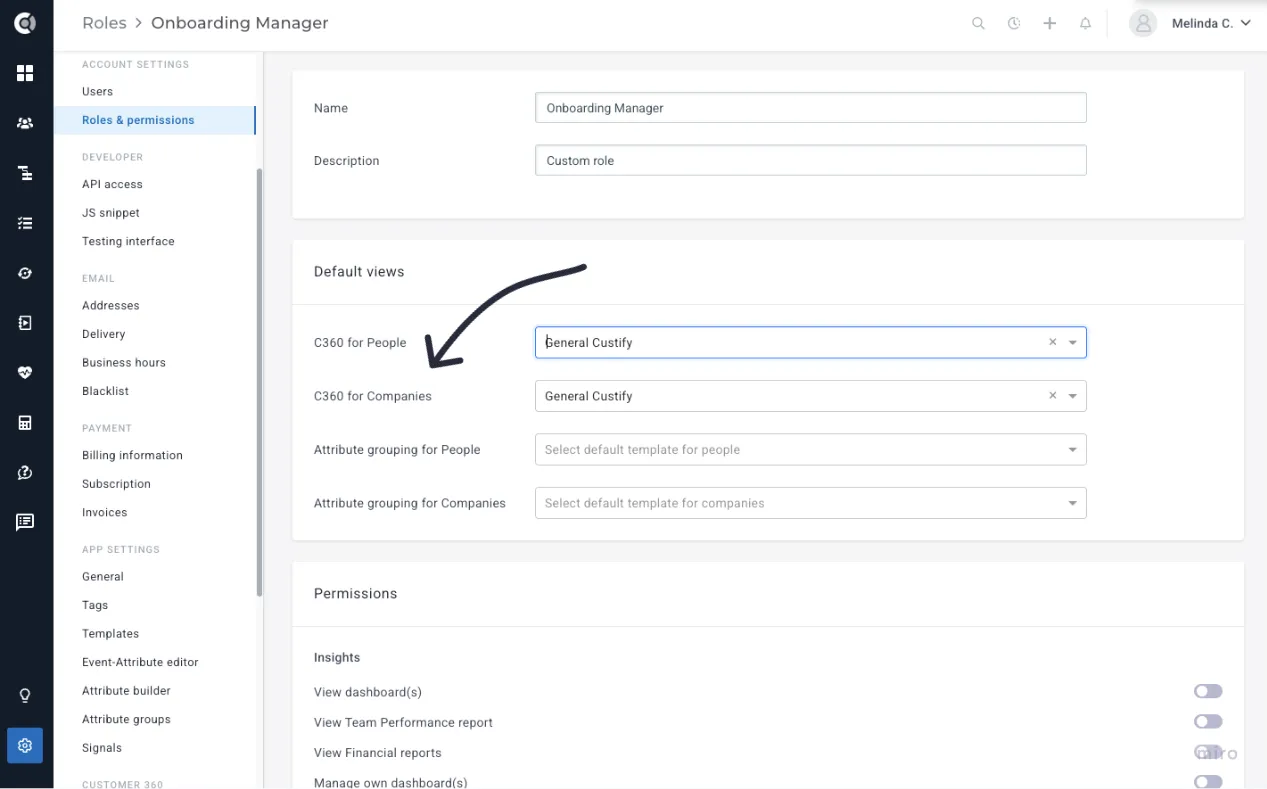
You can set default views by role in Settings > Roles & Permissions > Default Views, ensuring each team member sees the most relevant data when opening Customer 360.
To switch views manually, just go to any Customer 360 page and select a view from the list available to your role.

🎯Use Case Ideas
- Standardized Workflow for Teams: Role-specific views allow for standardization, so each team member sees the same structure, reducing confusion and improving onboarding efficiency.
- Example: A Management View could contain just two tabs—"Financial Overview" and "Key Metrics" - while a Support View could focus on "Tickets" and "Communication".
- Improving Focus by Limiting Information: Higher-ups do not need granular data such as activity logs. By configuring views specific to each role, Dynamic Customer 360 ensures everyone has just the right amount of information.
- Example: An executive might have a view with only "Performance Metrics" and "Contracts," eliminating the noise of detailed operational logs.
Problems Solved with Dynamic Customer 360
Dynamic Customer 360 not only helps solve existing pain points but also opens new opportunities for cross-functional collaboration, personalized customer engagement, and efficient workflows across different roles in the organization. It empowers users to fully configure and personalize customer views, tailoring content, layout, and access based on roles, use cases, and individual preferences. Here's how the feature works:
For CSMs:
- Too much irrelevant data? Customize views to show only what matters.
- QBR prep takes too long? Create a QBR view with usage, notes, and health in one place.
- Missing context during calls? Combine tasks, notes, and segments into a single dashboard.
- Hard to track progress? Add a timeline tab to monitor milestones and trends.
For CS Leaders:
- Inconsistent team workflows? Standardize views for common tasks like renewals or onboarding.
- No high-level insights? Build a management view focused on metrics like MRR and churn.
- Cross-team misalignment? Create tailored views for support, finance, and CS to stay aligned.
For Executives:
- Hard to get strategic insights? Use executive views for revenue, renewals, and health summaries.
- Need quick risk visibility? Add a churn risk tab with red flag indicators.
- Generic reports not helpful? Customize dashboards to match strategic needs.
For Everyone:
- Fragmented data? Reusable views make reporting consistent and fast.
- Complex onboarding? Role-based default views simplify training.
- Slow to adapt? Quickly reconfigure views as workflows change.