Sending Data to Custify
A customer success platform is only as powerful as the data that goes into it. To achieve your goals, you need to make sure you have all the data you need.
As part of our Concierge Onboarding, you will have a couple of calls with our CS team who will suggest what data you should use and how you can send it to Custify.
The important data points that you need to have in mind are:
- Customer portfolio: Which Companies and People (users) do you want to send to Custify?
- Hierarchy: What is your data structure? Do you use Parent-child relationships? Do you have People assigned to multiple Companies? Do you have other entities that you want to track as Child companies (e.g. projects)?
- Attributes: What are the important attributes for Companies and People that you want to have in Custify?
- Events: What actions do you want to track? Do you want to track them at People or Company level? Do you want to see them in real-time or aggregated under a daily event? What metadata is important for each event?
Custify Tip: Attributes do not bubble up from People to Companies in a Parent-child relationship and are not affected by events. For example, if you have a “login” event and a “number of logins” attribute, you need to update the attribute as well in addition to sending the event to Custify. Events bubble up from People to Companies.
Once you determine what data points are relevant to you, you can send it to Custify in the following ways.
Send Data Automatically via an External Integration
The ideal way is to send and update data automatically by connecting Custify with an external data source.
Sending data automatically eliminates the possibility of human error and compromising your data, which can occur when you input data manually.
Here are your options for automatically sending data to Custify:
- API integration: With a custom API integration, you can create/update People, Companies, events, notes, tags, custom data, and more.
- Segment integration: To set up a Segment integration, add the API key from Custify to your Segment settings. You can use Segment to push your customer portfolio and tracked events, as well as send the traits from Segment as attributes to Custify.
- CRM Integration in Full Mode: Using any of the available CRM integrations in Full Mode will create and continuously update entities in Custify, such as People, Companies, and attributes. This scenario works best when you don’t have a lot of time for development and want to push your customer portfolio in a short amount of time.
- JavaScript snippets: A simple and quick integration via a JavaScript snippet is also possible with a code block that you can insert into your app’s pages. This allows you to send data to Custify app and track events like button clicks, menu item clicks, and time spent in your product.
Send Data Manually via Data Imports
Although it’s not the best solution, there are situations where you need to add data to Custify manually. This is how you can do this:
- Add People and Companies one by one: Use the Add company / Add people buttons available in the product. Please note that this feature is not enabled by default for all the accounts.Iif you do not see this option, reach out to your dedicated CSM.
- Upload People/Companies in bulk: Using our CSV Data Importer tool, you can create People and Companies in Custify in bulk, as well as add new attributes or update existing ones.
- Add/update attribute values: You can create manual attributes via Settings —> App Settings —> Event-attribute Editor. After the attribute is created, you can add values for it from the Customer 360° Profile or automatically through a Playbook.
- Upload events: You can also use the CSV Data Importer tool to upload events to Custify. Download the template and make sure to add the required information to the file before uploading it to Custify.
Here is a summary of the different data points and how you can send them to Custify:
| API | Segment | Java Snippet | CRM integration in full mode | Custify UI | Data importer |
|---|---|---|---|---|---|---|
Create Companies/create People | ✅ | ✅ | ✅ | ✅ | ✅ | ✅ |
Assign People to Companies | ✅ | ✅ | ✅ | ✅ | ✅ | ✅ |
Create Parent-Child relationships | ✅ | ✅ | ❌ | ❌ | ✅ | ✅ |
Create/update attributes | ✅ | ✅ | ✅ | ✅ | ✅ | ✅ |
Send events | ✅ | ✅ | ✅ | ❌ | ❌ | ✅ |
Historical MRR Imports
The CSV Data Importer now supports a dedicated Historical MRR import type, designed for accounts that want their first revenue dashboards to show months of history rather than starting from a flat line. This is most useful when you onboard onto Custify and your billing data lives elsewhere — you can backfill the MRR timeline retroactively in a single import, and the Revenue dashboard rebuilds MRR movements to match.
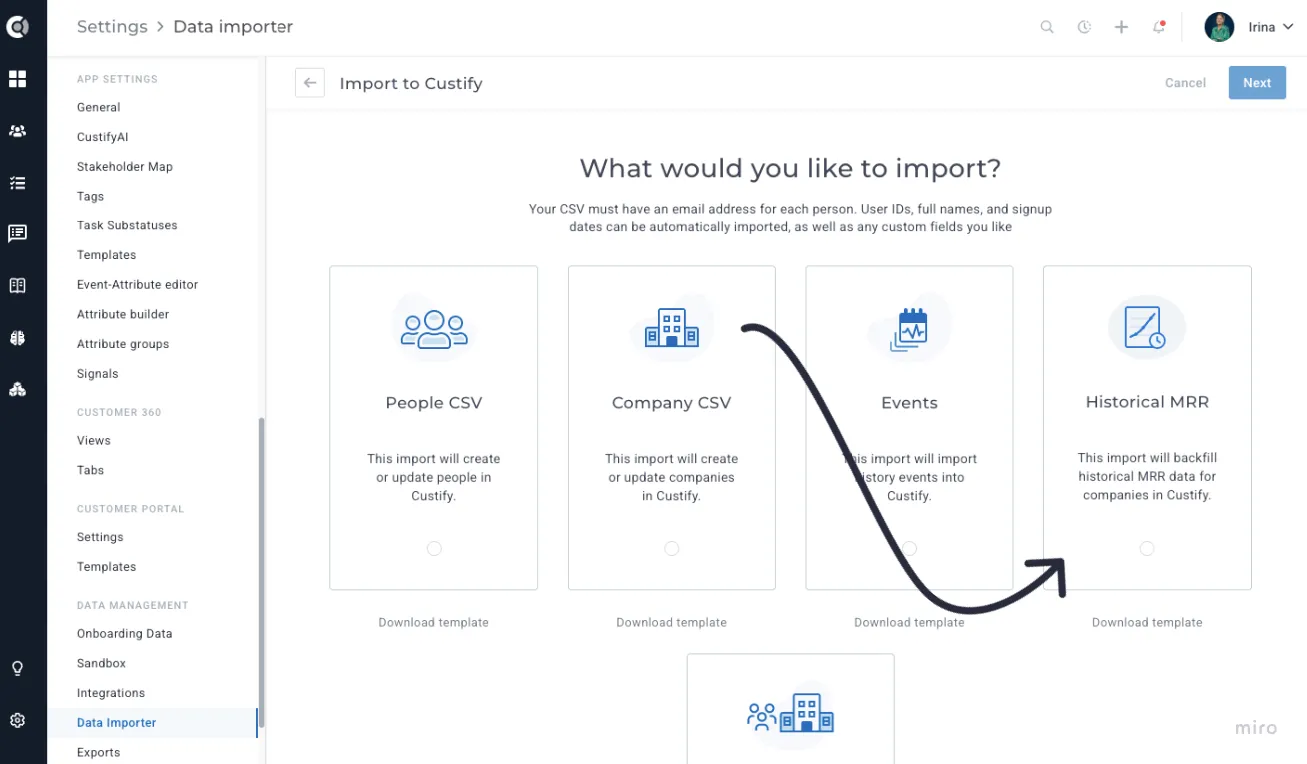
To use it, navigate to Settings - Data Importer - New Import and select the Historical MRR card. Download the template, which contains three columns: company_id, mrr, and date. Each row represents a point in time when the MRR for a company changed. Custify fills in the daily values between dates and forward-carries the last value to today, so you only need one row per change rather than one row per day.
After mapping the three required columns, an Existing MRR History options panel appears with four choices for how to treat data that is already in Custify:
• Clear history from first imported record onward (default): for each company in the file, deletes existing records from the earliest CSV date through today.
• Clear all MRR history for imported companies: wipes all stored history for the companies present in the file.
• Clear all MRR history for all companies: removes MRR history account-wide. This option is locked behind a confirmation checkbox.
• Keep existing MRR history: only upserts the imported rows, no deletion.
Observation:
The account must have an MRR attribute configured under Settings - General before you run this import. Rows referencing a company_id that does not exist in Custify, or carrying an invalid MRR or date value, are rejected per row and surfaced in the import summary. The current MRR attribute value on each company is not changed by this import — only the historical timeline is populated.
Feel free to reach out to your dedicated CSM for any further questions or to contact us at [email protected].