CustifyAI
CustifyAI is the AI layer built into Custify for Customer Success teams — it takes the manual work of assessing risk, prepping for meetings, summarizing accounts, and tracking down follow-ups, and reduces it to a few clicks. Ask a question in plain language and get a sourced answer, let a background agent catch risk signals before you would otherwise notice them, or delegate an entire workflow to a playbook step.
CustifyAI Home — Chat, Agents, Feed
CustifyAI Home is where you go for almost anything AI-related, and it's built around three views, each suited to a different way of working. It can also be opened from the company 360 page directly, by accessing Ask CustifyAI.
- Chat — your starting point when you're not sure exactly what you need. Ask a plain-language question like “which customers need attention before Friday?” and Chat figures out the rest, pulling data or running the right agent for you. Pinned and recent sessions keep the questions you ask often just one click away.
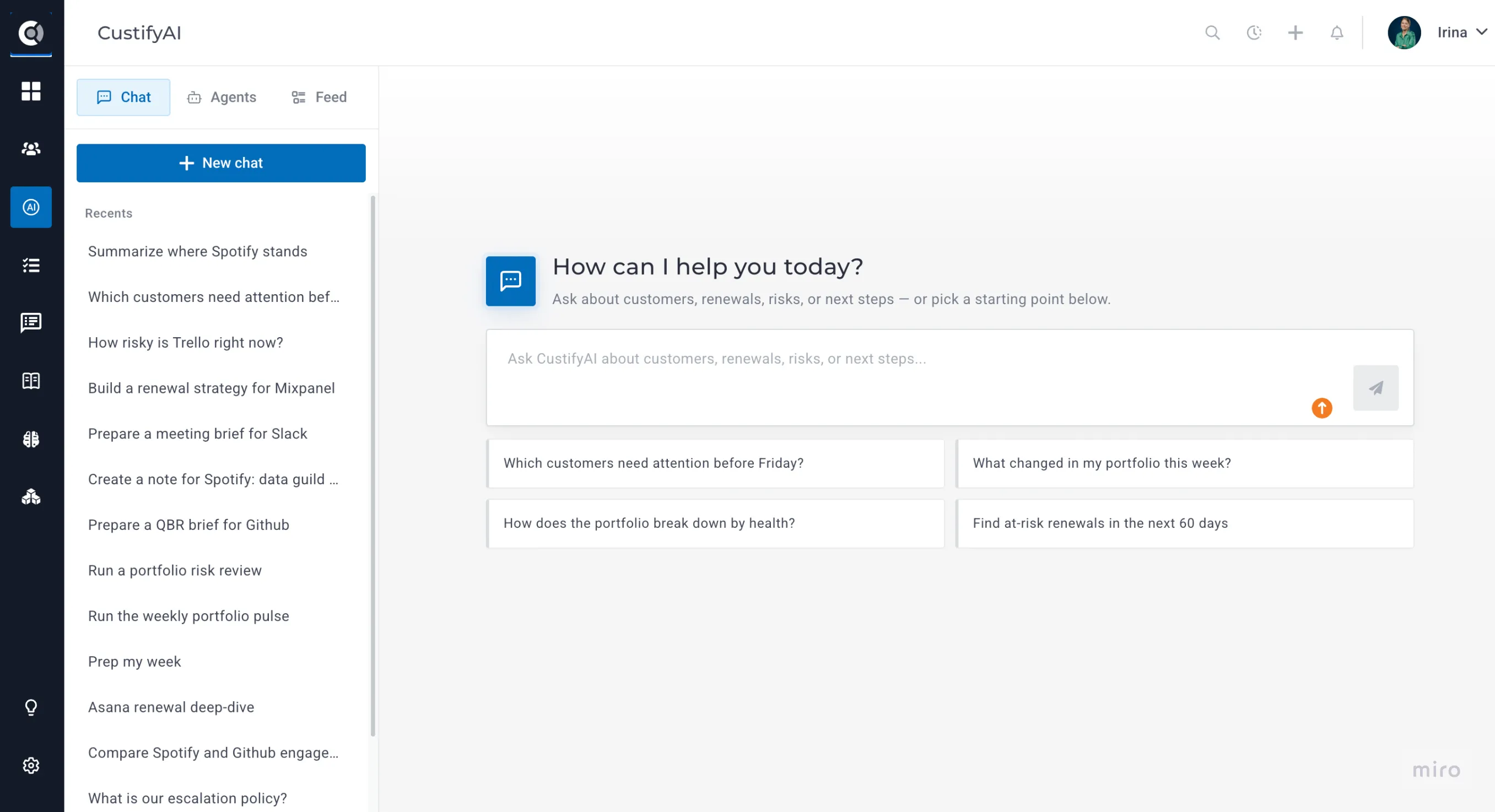
- Agents — lets you access the full list of agents, pick the one you need, and trigger a new chat that uses it directly; it also helps you see its track record: 30-day stats (runs, success rate, failed runs, high-impact results, credits used, activity trend), a list of its recent runs, and structured result pages (risk scores, SWOT, talking points, follow-up tasks).
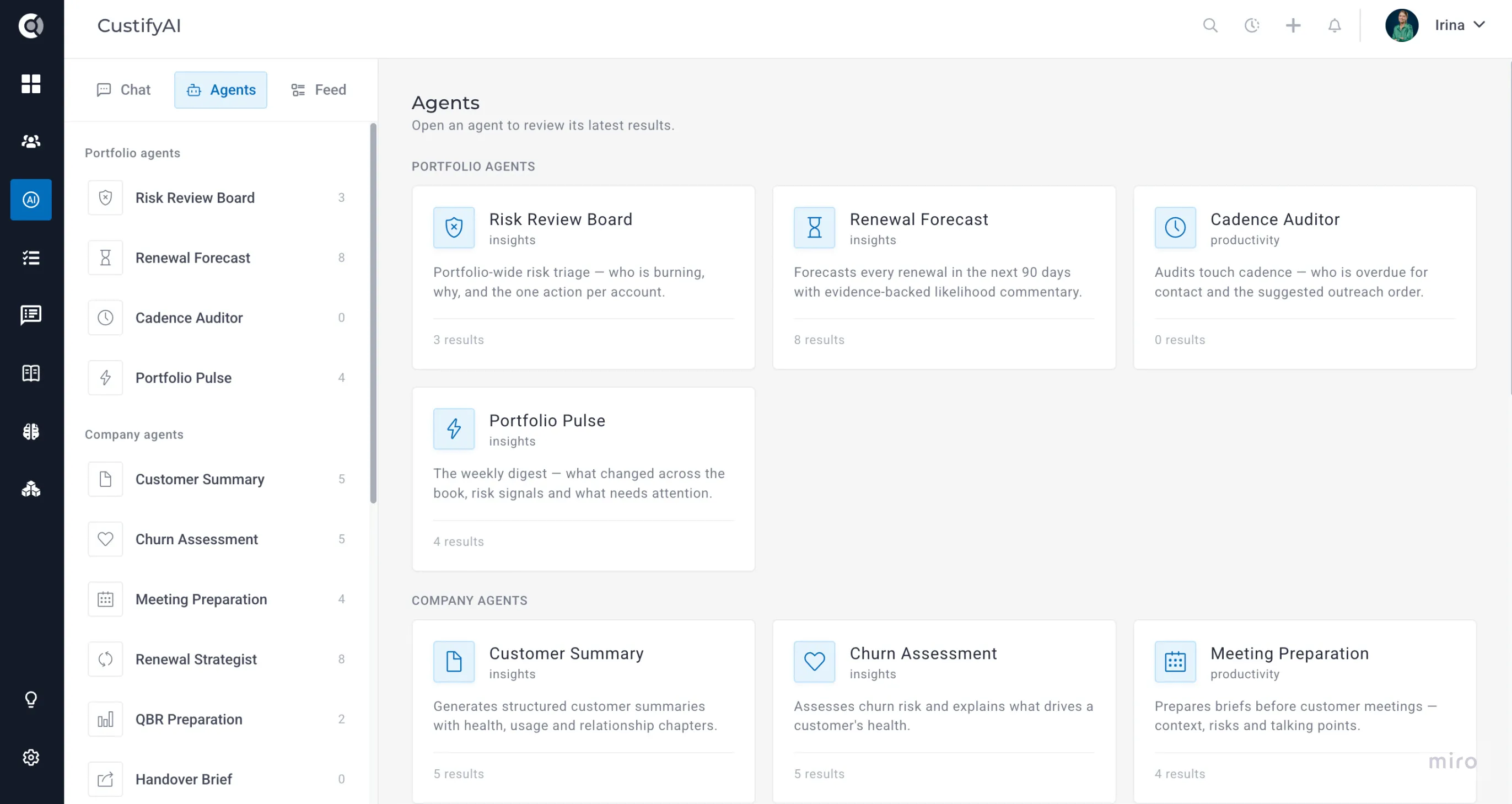
- Feed — the place where you can review everything your agents have produced, in one live, filterable timeline with deep links into every result. It's the natural place to look for background-agent output, since there's no other spot it would otherwise surface — treat it as your daily AI digest.
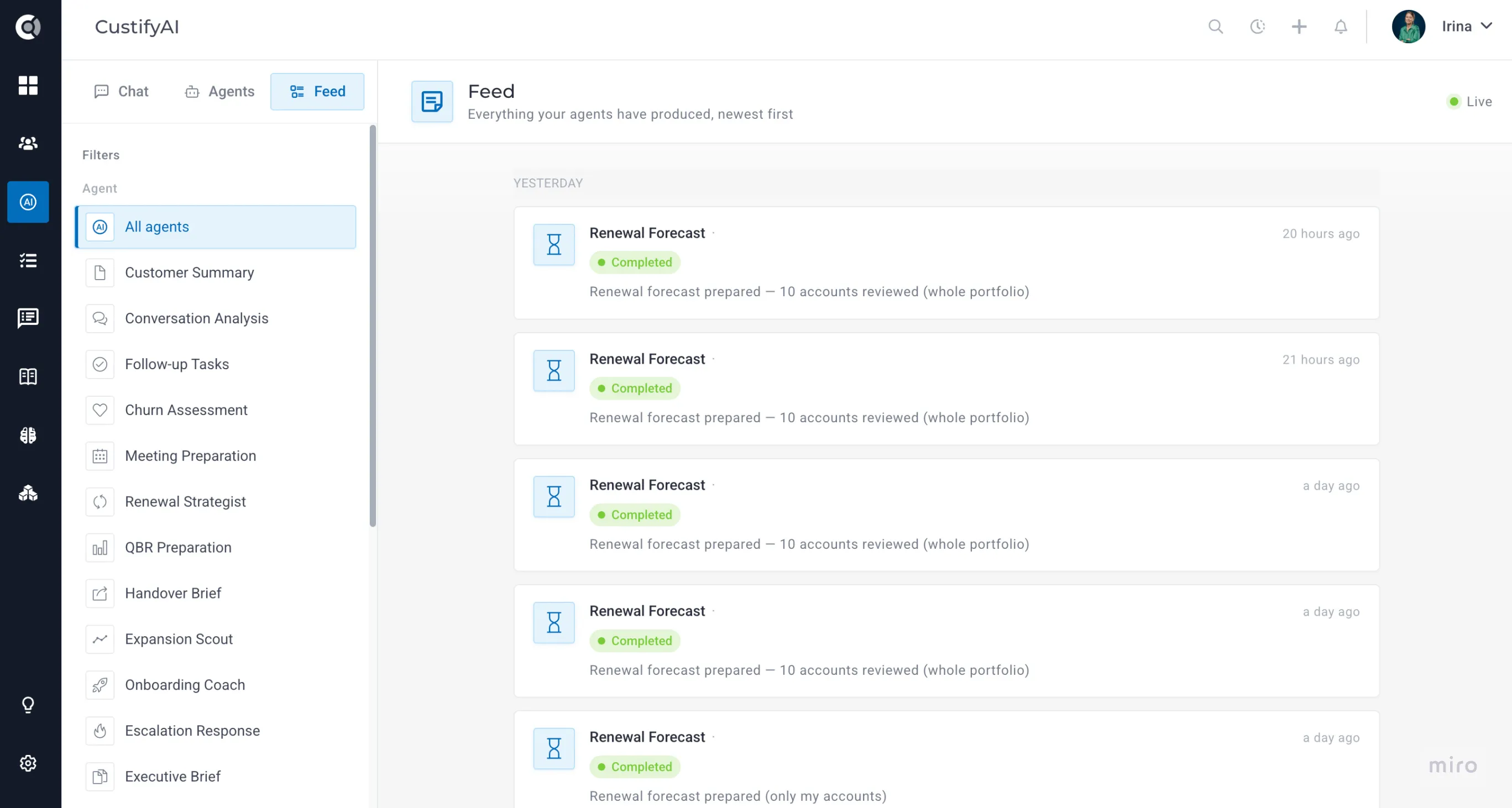
The CustifyAI Chat is metered by actual usage — 1 credit per 10,000 normalized tokens — since a short question and a long back-and-forth naturally cost different amounts. Every answer shows its own cost breakdown, split between the chat itself and any agent run it may have triggered.
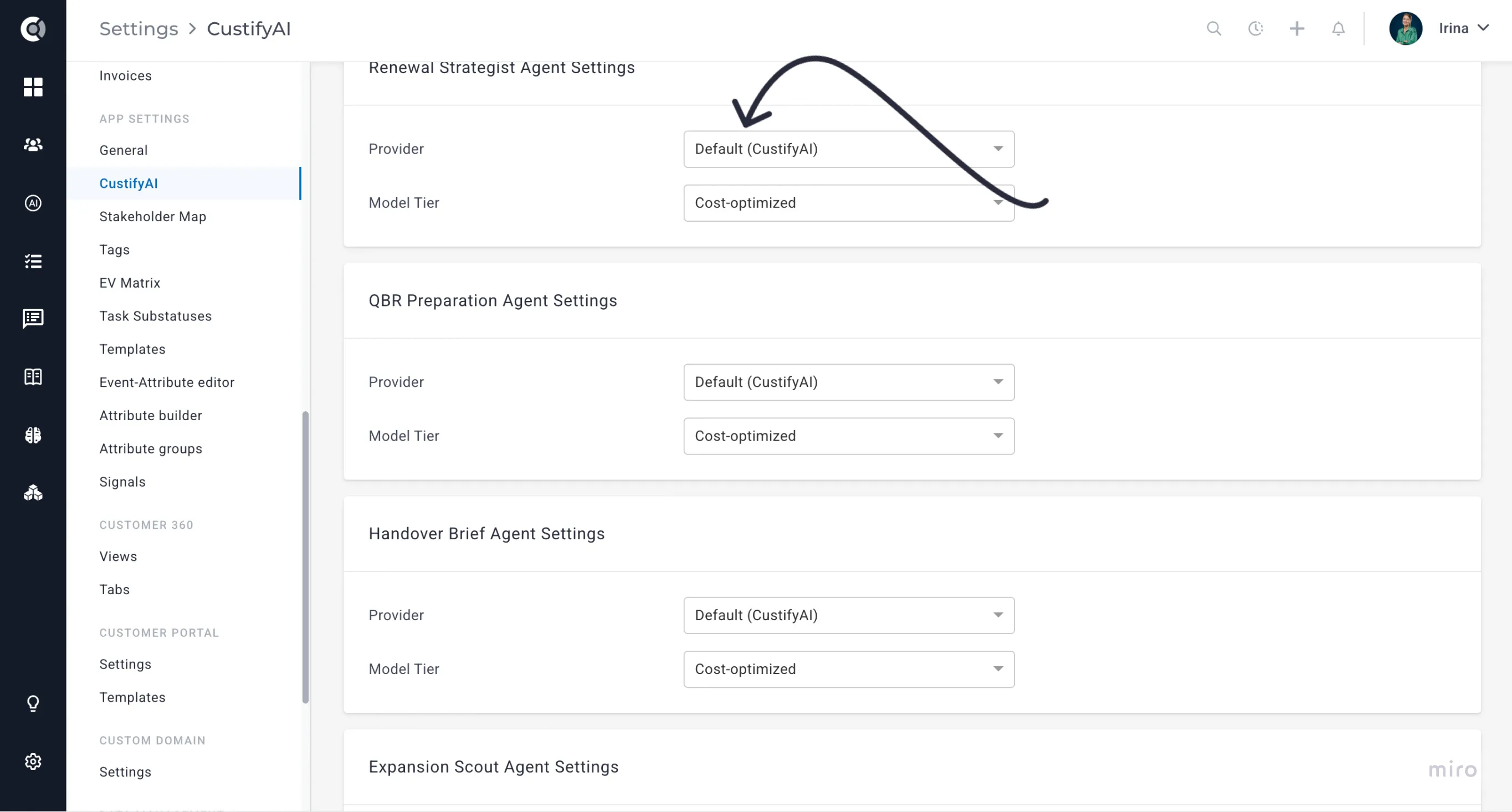
Every agent can be set to run on one of three model tiers, which trade off speed and cost against depth of analysis.
The Agent Fleet
There are currently 18 Agents to pick from. Every agent falls into one of three categories — Portfolio, Company, and Background Agents — so you can scan the fleet and find the right one quickly.
Each agent can be turned on or off individually, and its AI provider and model tier are configured separately, all from Settings - CustifyAI.
Quick picker: which agent do I need?
Not sure where to start? Match your situation to an agent below.
- Prepping for a call or QBR → Meeting Preparation, QBR Preparation
- Judging risk or health → Churn Assessment, Risk Review Board, Conversation Analysis
- Working a renewal → Renewal Strategist, Renewal Forecast
- Handing off or closing out an account → Handover Brief, Win-Back Strategist
- Growing an account → Expansion Scout, Advocacy Scout
- Getting a new customer ramped → Onboarding Coach
- Something's on fire → Escalation Response
- Reporting up to leadership → Executive Brief, Customer Summary
- Keeping on top of your whole book → Portfolio Pulse, Cadence Auditor
- Never losing a commitment from a call → Follow-up Tasks
Portfolio agents
Portfolio agents are built for the moments you need to see across your whole book at once rather than one account at a time.
- Risk Review Board — run this when you need a triage list, not sixty individual health checks: who's burning, why, and the one recommended action per account. Run it on your own book or across all companies to get a portfolio health summary followed by a “Burning Now” list — each account with its health score, open issues, and last touchpoint.
- Renewal Forecast — check this whenever you need a forward look at renewal health: every renewal in the next 90 days with evidence-backed likelihood commentary, so you know where to focus before it's urgent.
- Cadence Auditor — use it to catch the accounts that have quietly gone dark: who's overdue for contact across your portfolio, with a suggested outreach order.
- Portfolio Pulse — read this weekly to stay current without checking every account yourself: a digest of what changed across your book, risk signals, and what needs attention.
Company agents
- Customer Summary — reach for this any time you need a fast, reliable answer to “where does this account stand?” without digging through history yourself. Pick from four ready-made templates — General Customer Summary (all-purpose), Executive Brief (a short leadership snapshot), CSM Manager Review (account management and team performance), or Revenue Snapshot (renewal, expansion, and commercial health) — or build your own from chapter types like Health, Key Insights, Potential Risks, Recommendations, Churn Risk Analysis, and SWOT. Save the result straight to a note, or let a playbook step (Generate CustifyAI Summary) generate it automatically ahead of every periodic review. Costs 3 credits per generation.
- Churn Assessment — run this when you need to know how worried to be about an account, and why. Returns a risk score with a confidence level, the concrete drivers behind it, and recommended counter-actions — useful before a risk review, a 1:1 with your manager, or any time an account feels off but you can't pin down why.
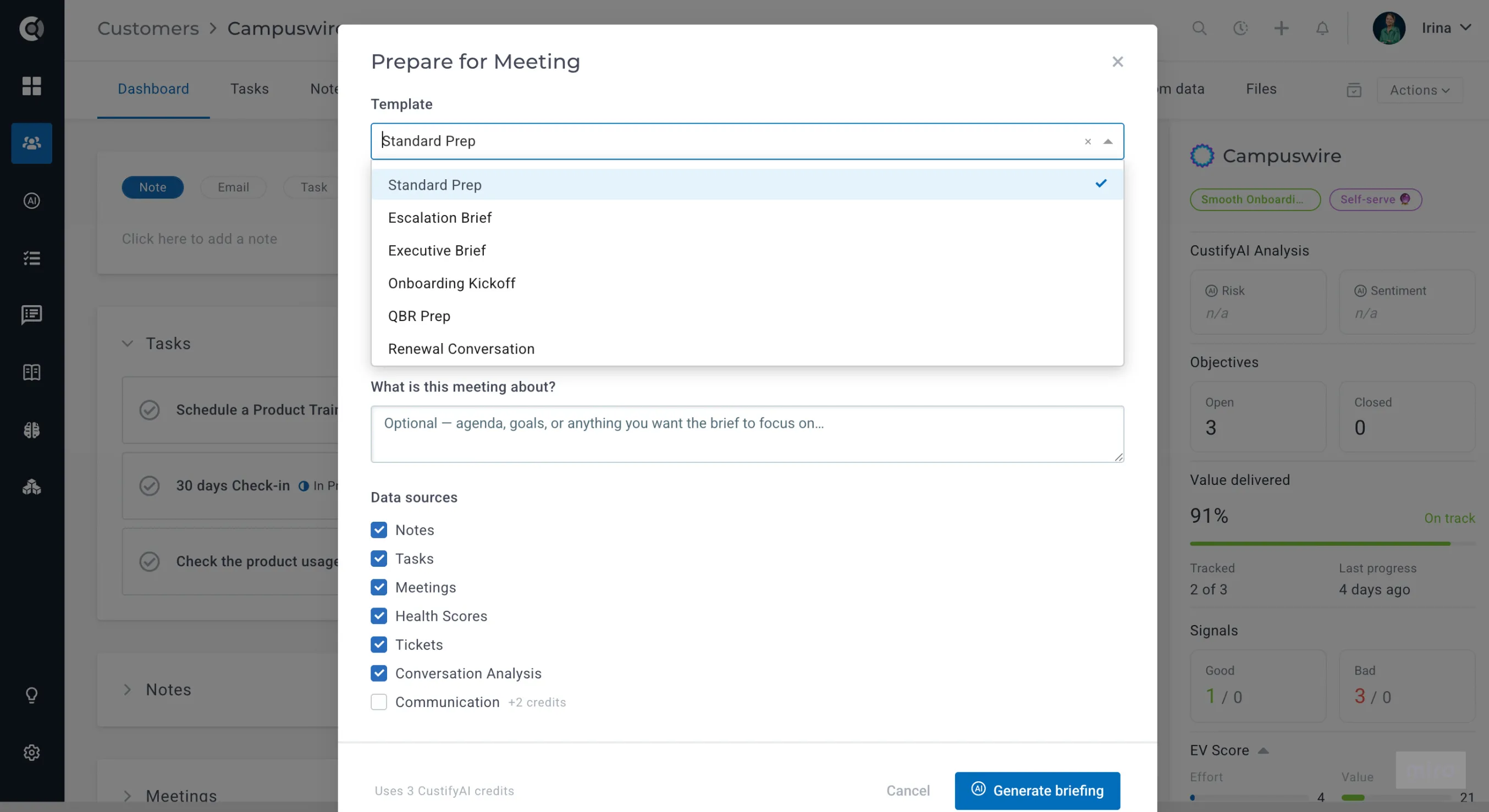
- Meeting Preparation — use it before any customer call so you walk in caught up instead of scrambling through notes beforehand. Choose a timeframe, focus, and one of six prep templates, and it surfaces what's changed since your last touchpoint, open risks, and talking points. Available from the Company 360 view, per meeting, or as a playbook step ahead of every scheduled call.
- Renewal Strategist — use it once a renewal comes into view and you need an actual plan, not just a risk score. Builds a strategy from usage, sentiment, and commercial signals: risk level, value at stake, days to renewal, and a sequenced action plan for the conversation.
- QBR Preparation — use it instead of building your Quarterly Business Review deck from scratch. Prepares a ready-to-present brief covering the quarter in review, value delivered, and the plan for next quarter.
- Handover Brief — run this whenever an account changes hands, so the new owner doesn't start from zero. Prepares a brief across four handover types — relationships, state of play, watch-outs, and open threads — so nothing gets dropped in the transition.
- Expansion Scout — use it to find growth opportunities you might otherwise miss: evidence-backed expansion potential — seats, upgrades, new teams — plus a suggested play to develop it.
- Onboarding Coach — use it to keep new customers moving toward first value. Reviews onboarding progress, flags blockers, and lays out the path to get an account fully ramped.
- Escalation Response — reach for this the moment an account escalates and you need to respond fast and coherently. Builds a de-escalation plan: a situation timeline, root causes, a response plan, and a ready-to-edit outreach draft.
- Executive Brief — use it when you need something a C-level exec will actually read: a one-page brief covering the value story, strategic risks, and the specific asks for executives.
- Win-Back Strategist — use it when a churned account resurfaces as a possibility. Reconstructs why the customer left and designs an honest win-back play — including telling you plainly when the honest answer is that it isn't worth pursuing.
- Advocacy Scout — use it when you're hunting for a reference, case study, or testimonial. Finds advocacy-ready accounts and plans the actual ask.
Naming heads-up: “Executive Brief” now refers to two different things — the Executive Brief template inside the Customer Summary agent (a chapter-based account snapshot), and the standalone Executive Brief agent above (a one-page brief built specifically for C-level readers).
Background agents
Background agents run continuously rather than on demand — you don't trigger them, you just benefit from what they've already noticed. Their output surfaces mainly through the Feed and through the other agents and features that read their signals.
Conversation Analysis
Continuously analyzes synced emails, conversations and tickets in the background for sentiment, risk and summaries — the signal layer many other agents read from. The agent is described in detail in a dedicated section below.
Follow-up Tasks
Extracts action items from notes, meetings, conversations, and tickets - detailed also below.
How it works
The CustifyAI Chat is the fastest way to get an answer without leaving the flow of your work — and unlike a generic AI assistant, it's answering from your actual account data. It can search, filter, and count companies, read attributes and health history, dig through notes, check your Foundation knowledge, and pull evidence straight from synced conversations.
Chat can take action, not just answer. Ask it to create a note, create a task, tag a batch of companies (up to 20 at once), or draft an email, and it will — but nothing happens silently. Every action shows up first as a confirm card so you can review it before it's actually written. Drafted emails hand off to the 360 email composer rather than sending directly from chat, and any action you approve runs under your own permissions, the same as if you'd done it yourself.
It can also trigger agents. If your question calls for a full agent run — say, a risk assessment or a renewal strategy — chat can kick that off too. It won't run it silently, though: you'll see a confirm card with the agent, the target account, and the credit cost before anything executes. Once you confirm, the result lands back in the same conversation, so you can keep iterating — "make it shorter," "why is the risk high?" — without starting over.
Sessions stick around. Conversations scoped to a specific company stay pinned to that company; conversations started from the general Chat view respect whatever company permissions you already have. Either way, sessions are saved indefinitely — auto-titled, pinnable, and each answer shows exactly how many credits it used.
CustifyAI isn't limited to CustifyAI Home — you'll run into it in a few other places too, right where the work already happens:
- On the Company 360 page, the Prepare-for-Meeting modal lets you generate a briefing on the spot — pick a template, a time period to analyze, and a focus, and CustifyAI pulls it together from your chosen data sources. The same thing can also run automatically as a playbook step ahead of scheduled calls.
- The Company 360 page is also where you'll find the company-scoped version of Ask CustifyAI, so you can chat without leaving the account you're looking at.
- In Notes, anything CustifyAI writes — a saved summary, a generated brief — is clearly attributed to "CustifyAI" as the author, and you can filter your notes list by it just like you would for a teammate.
- In Foundation, any knowledge rules you've approved (your account operating policy) become part of what CustifyAI knows. Both the chat and the agent briefs draw on them, so the answers you get reflect how your team actually works, not just generic best practice.
CustifyAI Agents
On top of the agents described above, there are additional agents that exist outside CustifyAI Home.
AI-Generated Playbooks
The AI-generated playbooks empower you to transform your ideas into actionable strategies.
In certain situations, you may find yourself needing to create a process flow using playbooks but feel unsure about where to begin. This is where the AI-generated playbooks feature comes to the rescue. Designed to simplify the process creation journey, simply input your desired process suggestions and provide hints about the steps you want to incorporate. Then, sit back and let the AI work its magic. In no time, you’ll witness the generation of playbook steps tailored specifically to your needs.
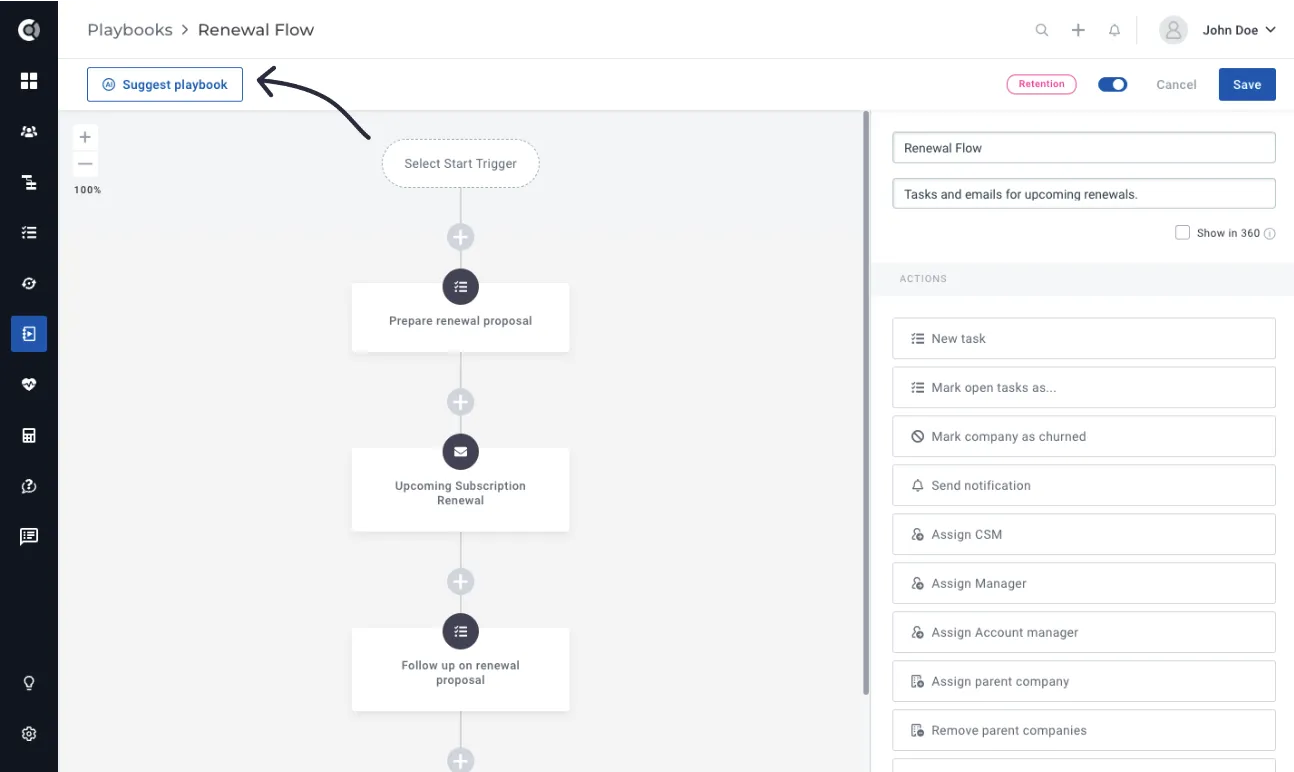
To build AI-Generated Playbooks, you will simply go to Playbooks – New Playbook and you will see a Suggest Playbook button.
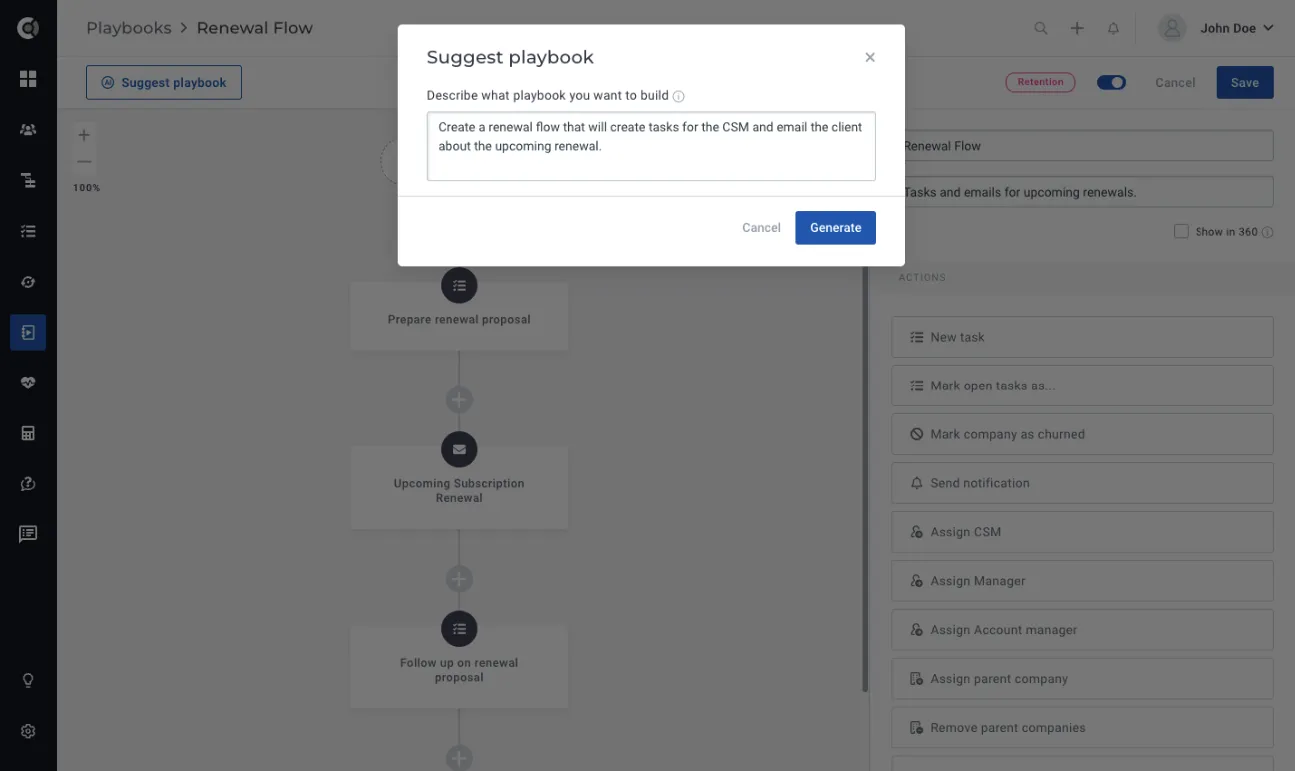
Simply click on it and provide a description of the playbook you require. After a short wait of a few seconds, the playbook steps will be automatically generated for you. If you wish to further refine the suggestions, you can click on Suggest Playbook again and enhance the initial suggestion. The text you initially entered will be preserved, eliminating the need to re-write it.
Custify Tip! Your suggestions have to be clear and precise, but not too detailed – the system will build the flows based on the use cases that it learned. Let it be creative!
Example of a good suggestion text: Create a renewal flow that will create tasks for the CSM and email the client about the upcoming renewal.
Example of a suggestion text that might be too detailed (hence a very granular flow, with too many steps): Create a playbook for the renewal flow that would alert both the CSM and the customer that their renewal is due in 90, 60, 30 days and that would reach out to the customer 2 weeks before renewal to schedule the renewal call. Add a task to the CSM to prepare the renewal presentation.
Example of a suggestion text that might return errors/irrelevant flow (being too general): Send best practices.
When the suggestion you entered is too general, you might see this message:
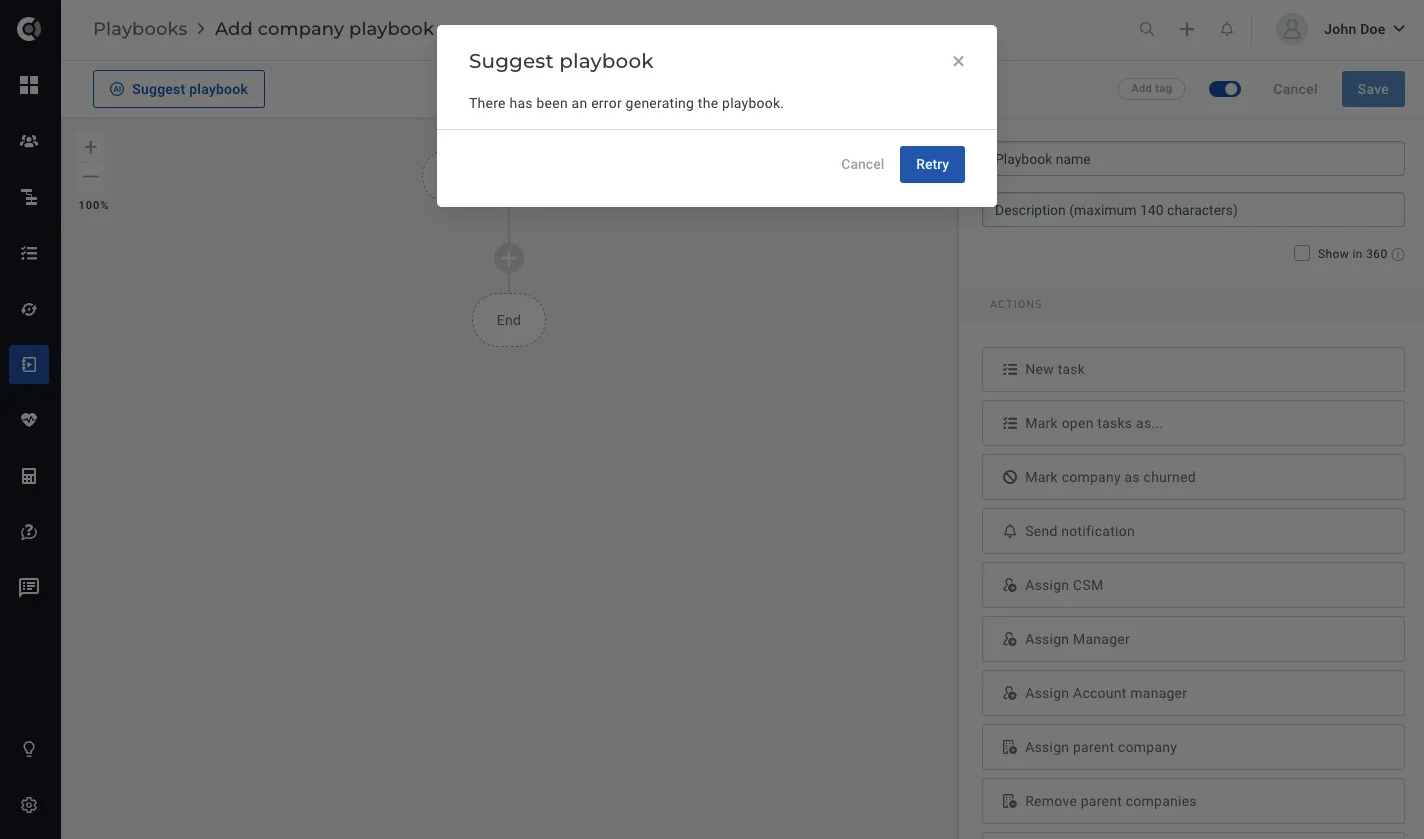
In that situation, refine your suggestion and re-generate the playbook.
For now, the steps that can be generated through AI playbooks are:
- Tasks: Whenever the AI generates tasks, they will be automatically assigned to the company’s CSM. The title, text, and due dates of the tasks will be generated based on the AI’s assessment of how the flow should be structured.
- Emails: The emails that are generated will be sent from the assigned CSM to “All people of the company.” The AI will determine the email subject and body content based on its understanding of the flow. By default, no signature is selected, and the approval setting is configured to “on error.” The unsubscribe link is also included by default.
- Notifications: In-app notifications are always generated and directed to the assigned CSM of the company. The body content of the notification is automatically generated by the AI.
- Waiting steps: The AI may add waiting steps based on the suggested flow, or the system may automatically include them by default after email steps. This is done to prevent multiple emails from being sent consecutively.
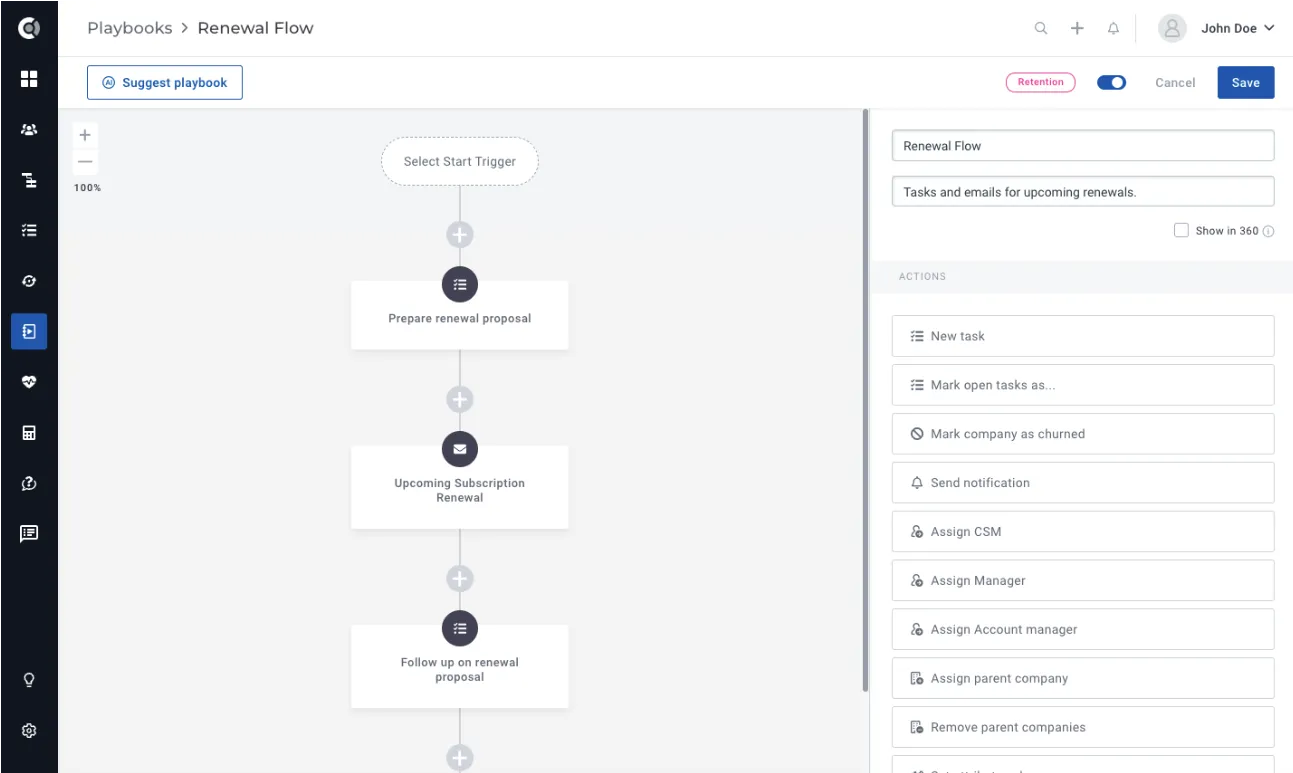
Observation! The AI generator does not create conditions or complex flows automatically. If you wish to incorporate these elements, you will need to manually edit the playbook structure. Also, currently, the tasks, emails and notifications will not contain any dynamic data.
Custify Tip! It’s important to note that the generated playbook flow does not have to be the final version of the playbook. The purpose of the AI-generated suggestions is to provide you with ideas and inspiration for building a playbook, rather than delivering a playbook that is ready to be used immediately. To refine and customize the playbook, you have the flexibility to make necessary adjustments to meet your specific requirements.
Read File
— use it to skip manual data entry whenever a customer sends over a document. As part of a playbook, the
Playbook Step Read File
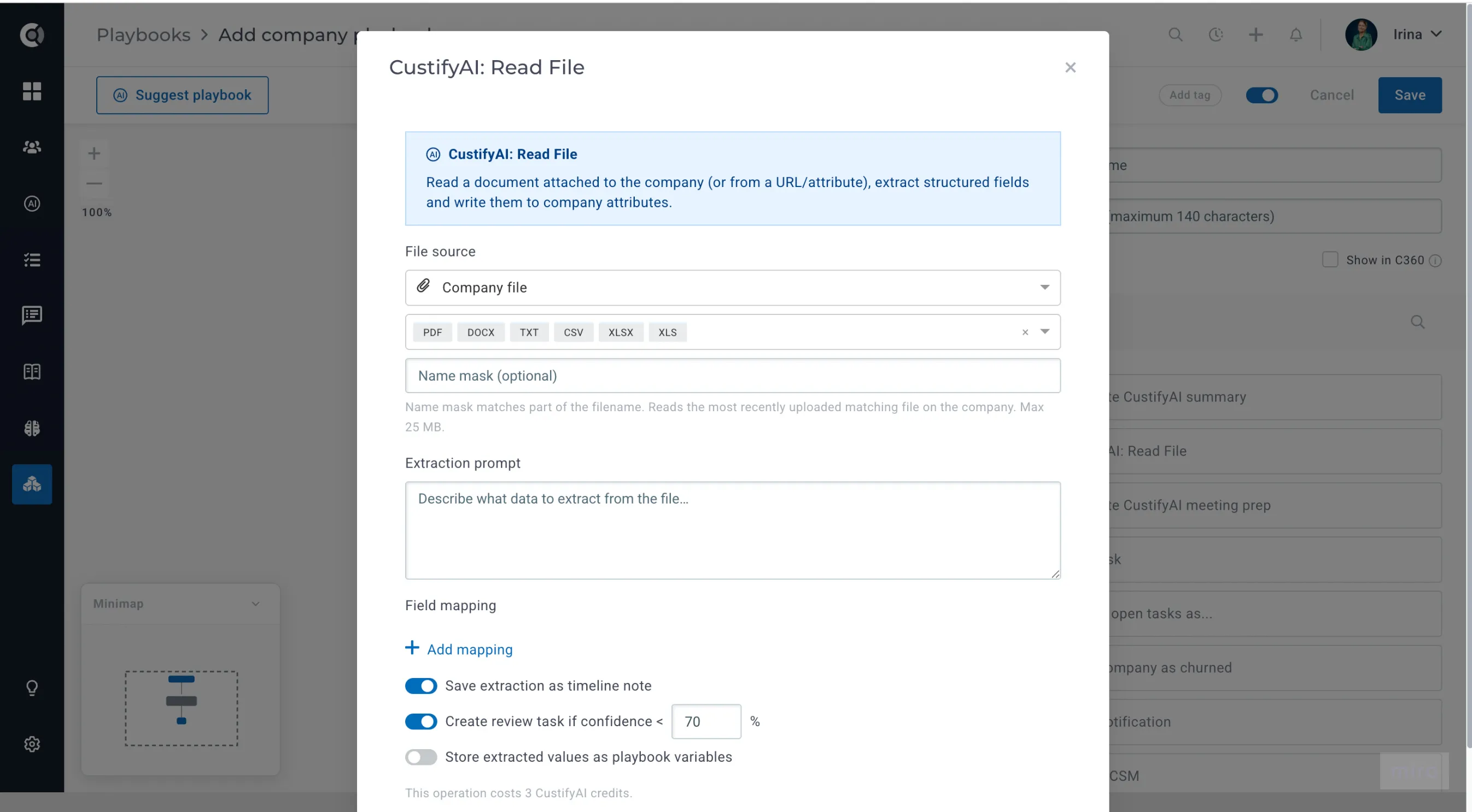
This Playbook step lets CustifyAI read a document and turn it into company data automatically. Point it at a contract, invoice, or intake form, and it extracts the fields you ask for and writes them straight onto the company's attributes — no manual data entry.
- Where the file comes from — the newest matching file already on the company, a public URL, a company attribute that holds a file or URL, or the attachment on the email that triggered the playbook.
- What it reads — PDF, DOCX, TXT, CSV, XLSX, and XLS files up to 25 MB.
- What you configure — a plain-language extraction prompt, and a mapping from each extracted field to a company attribute, with a conflict rule (overwrite, skip if already populated, or append).
- Built-in safety net — every extraction is logged as a timeline note; you can optionally trigger a CSM review task whenever a field comes back with low confidence or can't be found, and a failed extraction never blocks the rest of the playbook.
AI-Generated Customer Summaries
This feature is designed to help you effortlessly compile and review customer details, providing a comprehensive summary of the entire account. No more scrolling through account histories and manually writing summaries – CustifyAI handles it all for you!
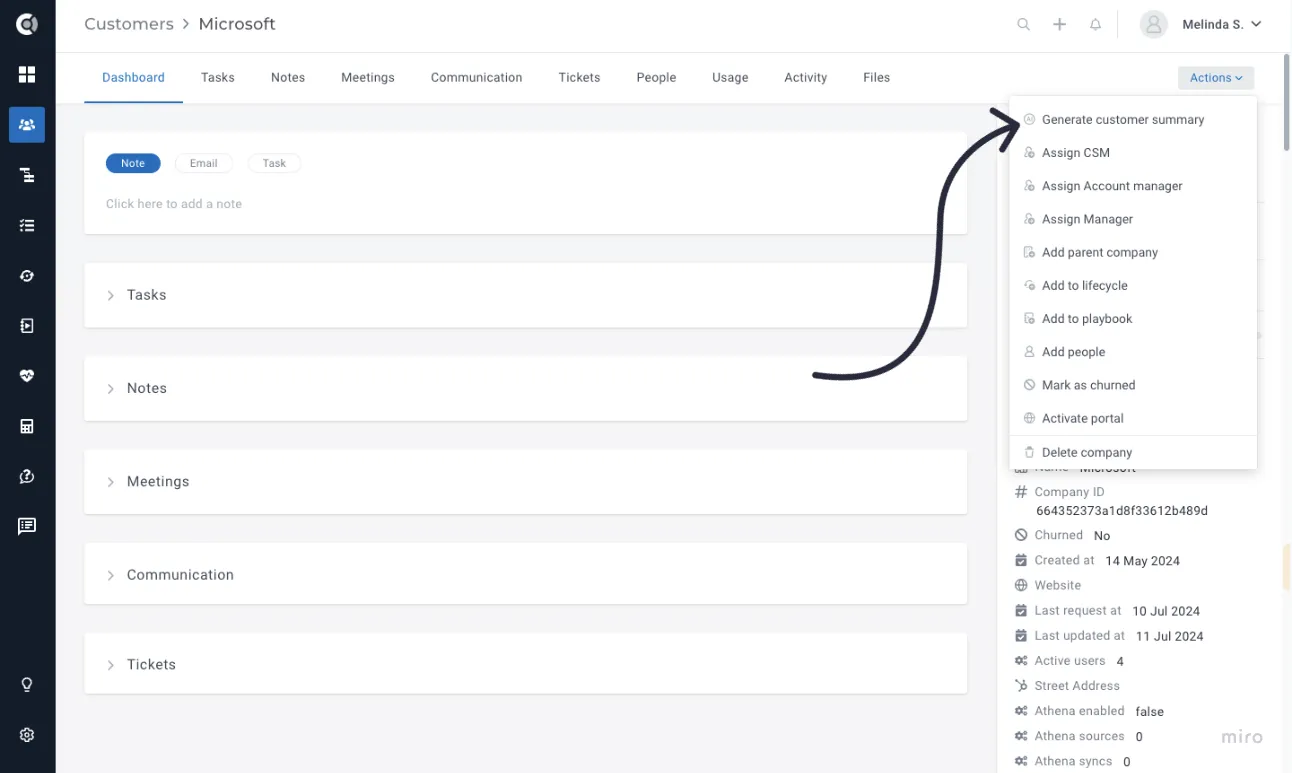
To generate a customer summary, simply:
- Go to a customer account.
- Select
- Wait a few seconds for the summary to be displayed.
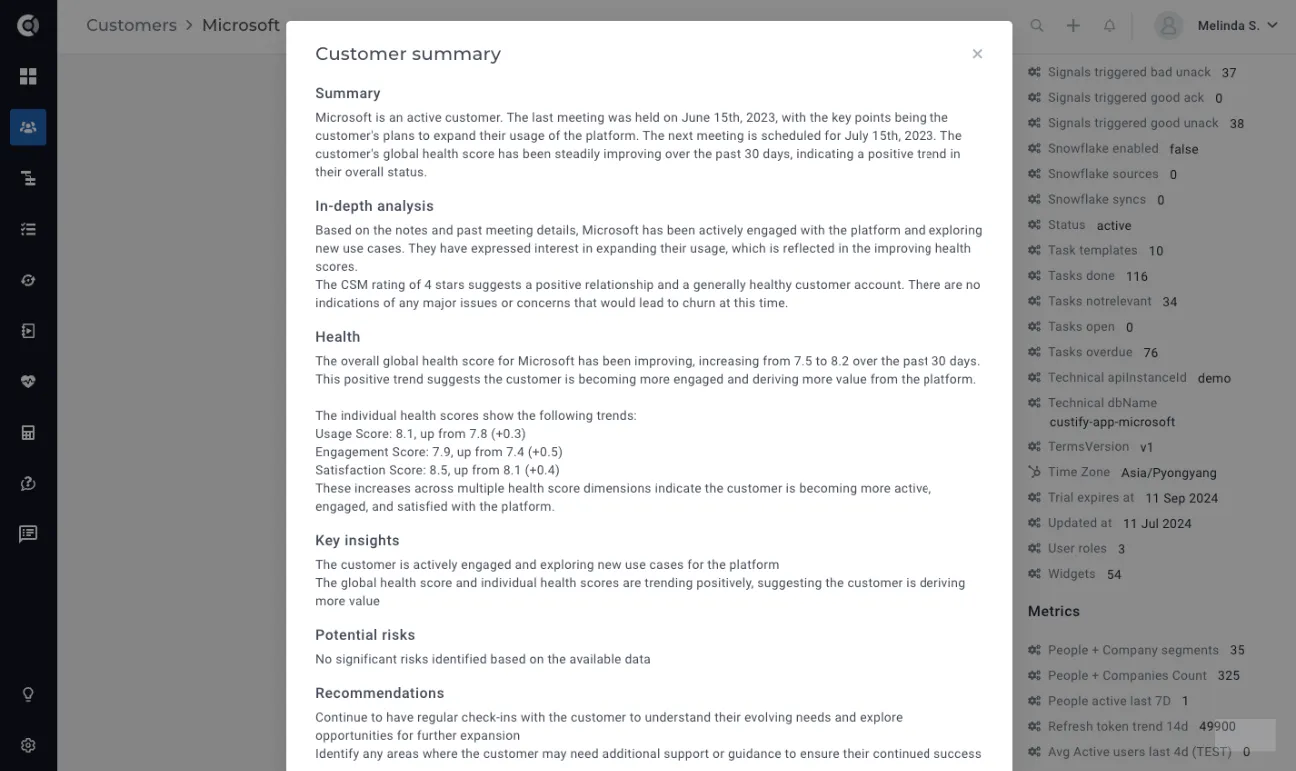
The generated summary consolidates insights from multiple data points across each customer, encompassing the following sections:
- Summary: A quick overview of the account’s evolution.
- In-depth Analysis: Detailed information about the account evolution, key touchpoints, customer feedback, satisfaction levels, progress, and next steps.
- Health: Comprehensive health score analysis.
- Key Insights: Important observations about the account.
- Potential Risks: Identified risks that might affect the account.
- Recommendations: Suggested actions to improve the account.
- Churn Risk Analysis: Evaluation of the churn risk.
- SWOT Analysis: Account Strengths, Weaknesses, Opportunities, and Threats analysis.
Once generated, the customer summary can be saved as a note, allowing you to quickly post a comprehensive update on your customers’ accounts.

Customer Summaries – Custom Templates
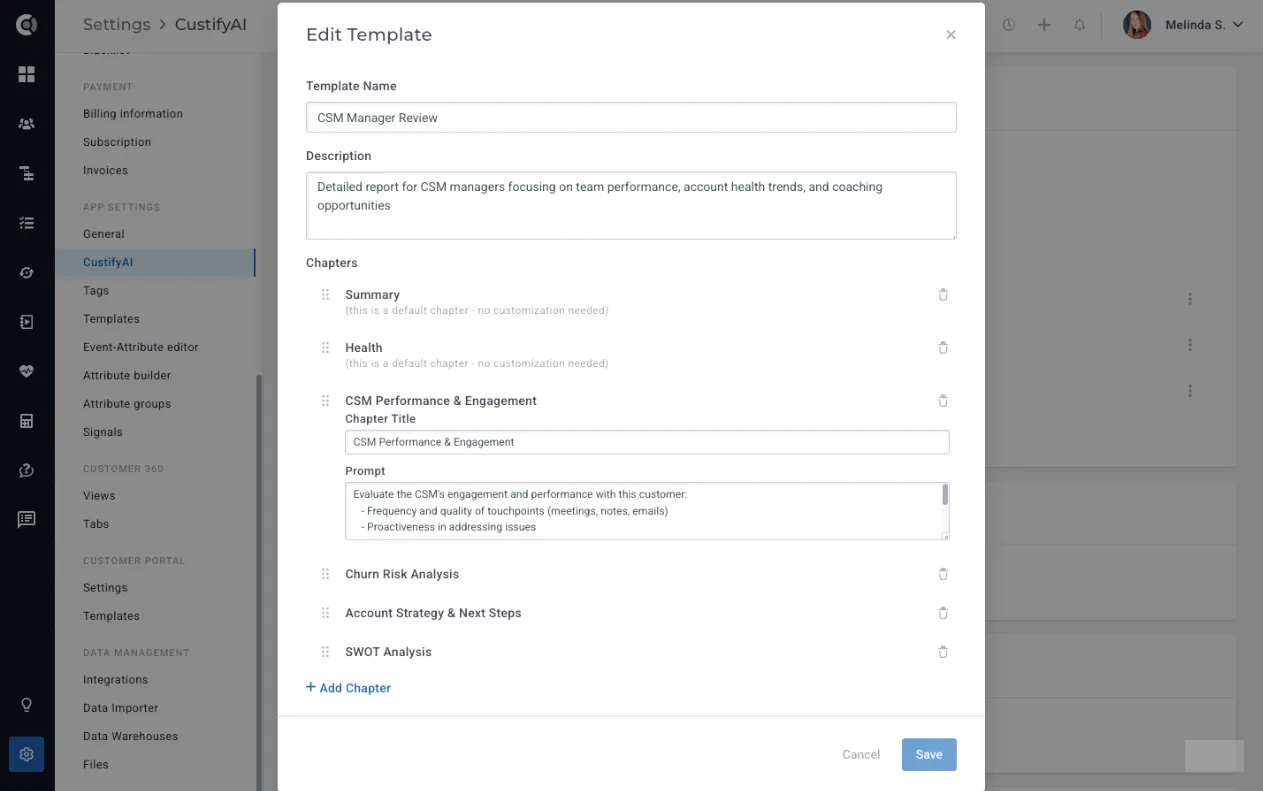
The Customer Summaries agent supports fully customizable templates, allowing different teams to generate summaries tailored to their specific needs. You can create multiple templates, define the chapters that make up each one, and choose from a set of built-in chapter types such as Summary, Health, Key Insights, or Potential Risks.
To help teams get started quickly, Custify includes four pre-built templates:
- General Customer Summary, a detailed, all-purpose overview
- Executive Brief, a short and high-level snapshot for leadership
- CSM Manager Review, focused on account management and team performance
- Revenue Snapshot, centered around renewal, expansion, and commercial health
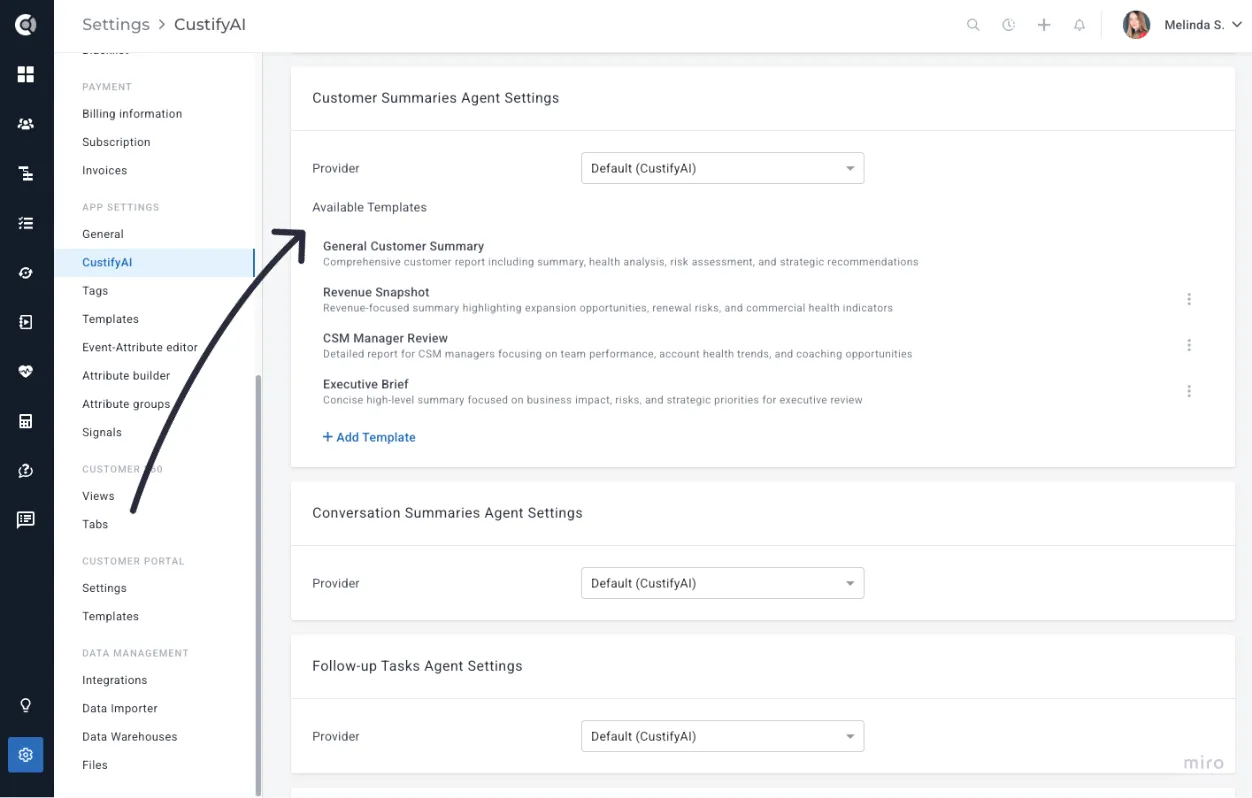
These templates offer immediate value while still giving you the flexibility to create your own.
You can also add your own custom templates/chapters with custom prompts, giving you complete control over the structure and level of detail.
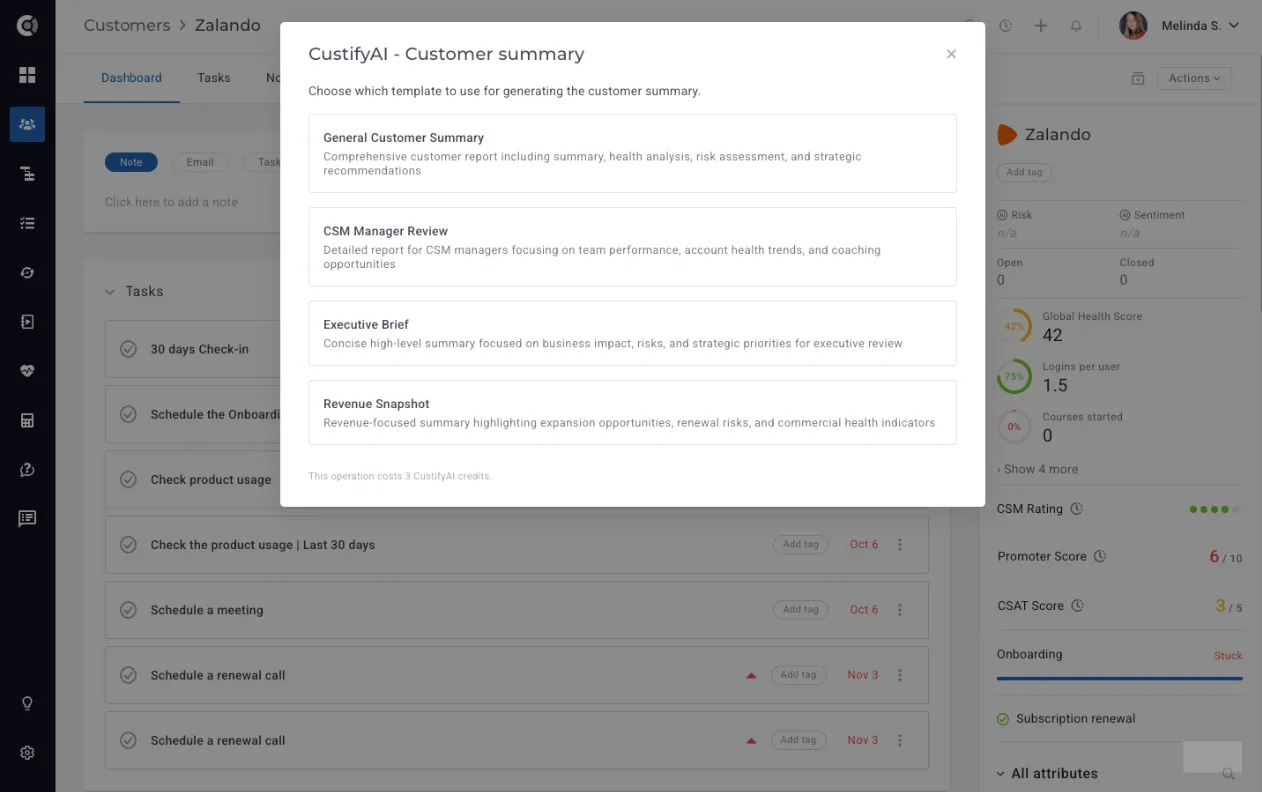
When generating a summary, simply select the template you want to use, and CustifyAI will produce a version aligned with that format.
Playbooks - CustifyAI Summaries Saved as Notes
Playbooks can now automatically generate AI-powered customer summaries and save them as notes on the customer record.
When configuring a playbook, you can add a Generate CustifyAI Summary step.
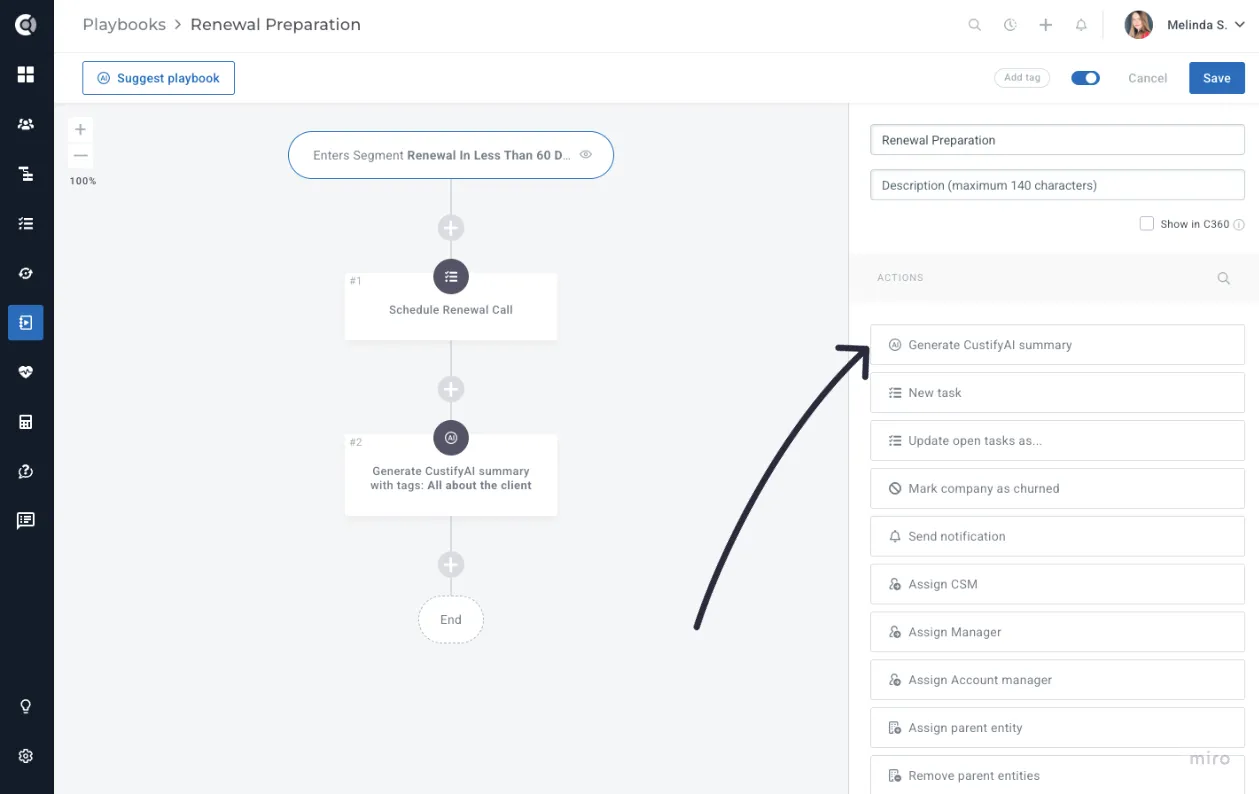
Select the template you want to use, and let CustifyAI create and attach the summary directly to the account.
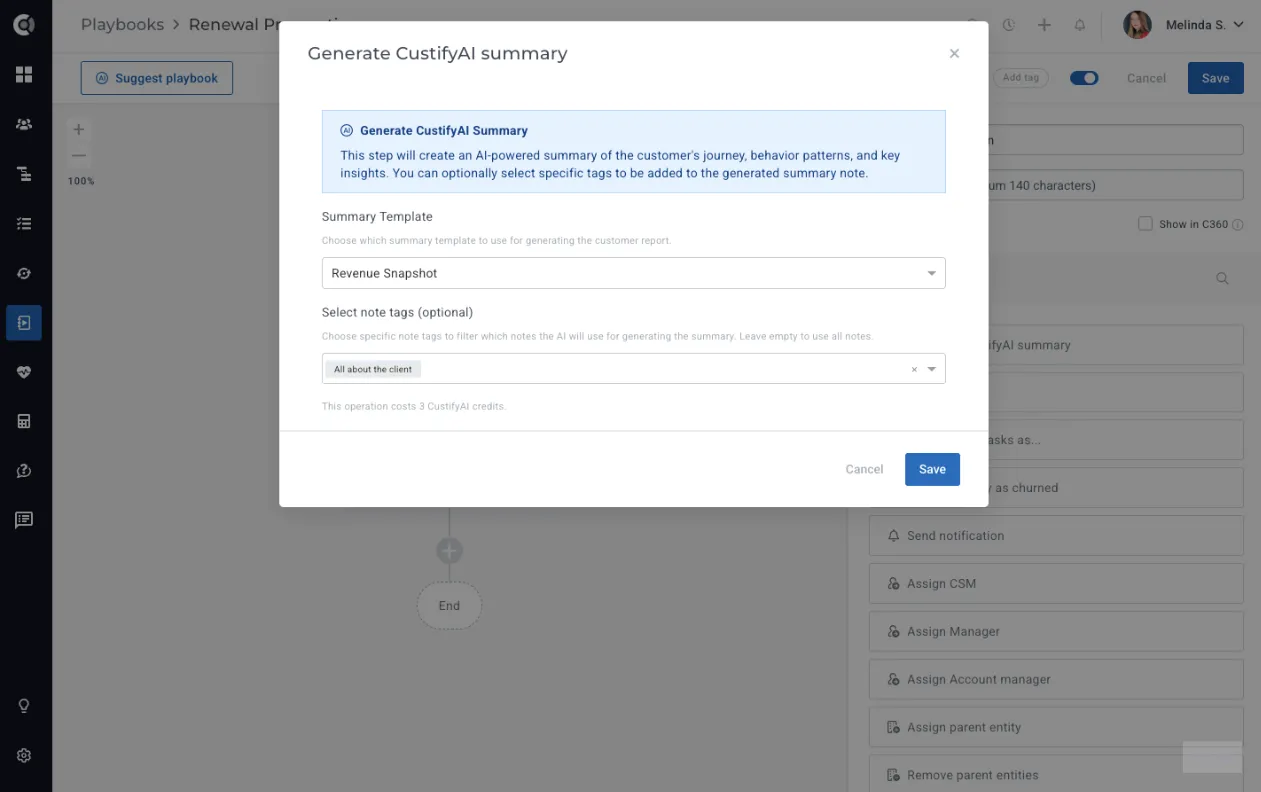
This capability is ideal for recurring cadences and periodic reviews, ensuring teams always have up-to-date, consistent context without needing to generate summaries manually. The playbook fully automates the summary creation and posting process, so teams simply review the information and use it in their customer calls.
Important Note! This action consumes 3 credits per summary generated. Before creating an automation that would post it for multiple companies, check your available credits and align with your CSM to ensure you have sufficient CustifyAI credits.
Follow-up Tasks
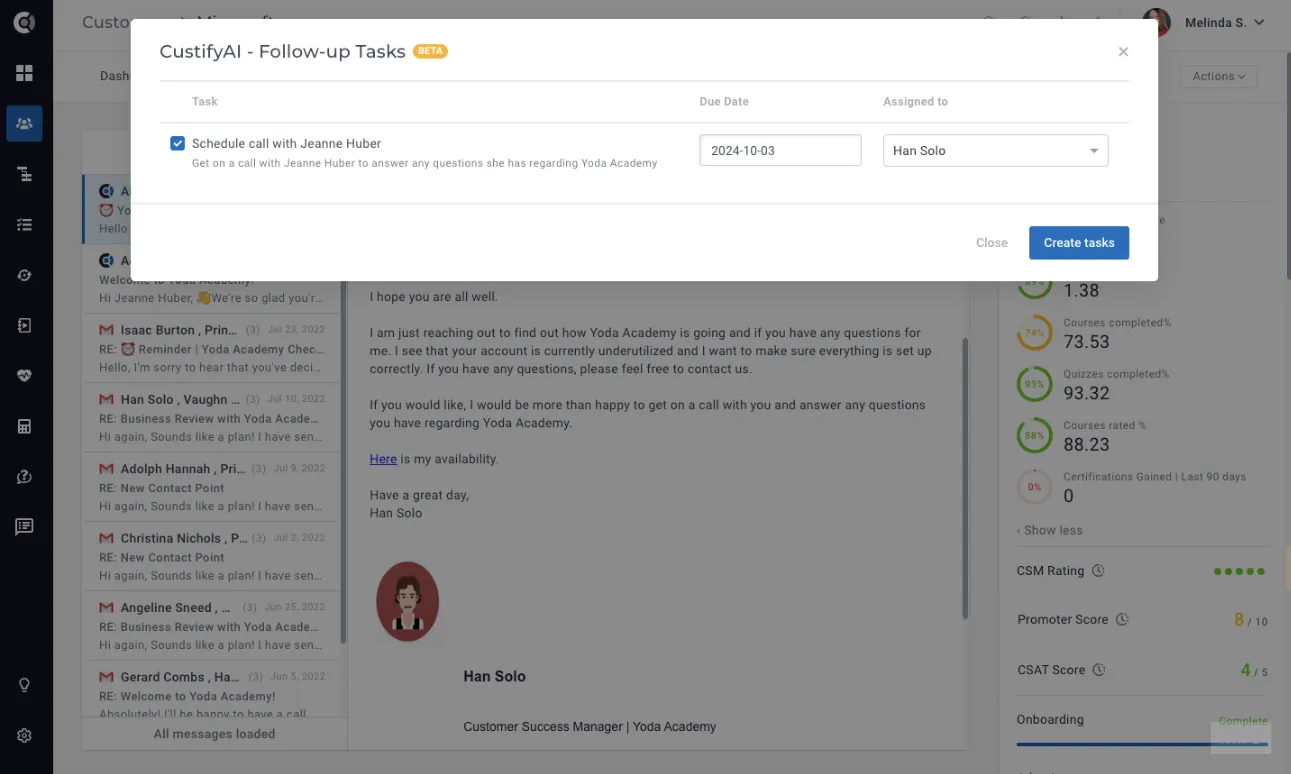
Managing follow-ups has never been easier. After sending a detailed email, posting a comprehensive note or handling a complex ticket, simply click Create Follow-up Tasks. CustifyAI will automatically generate tasks based on the email, note, or ticket content, streamlining your workflow.
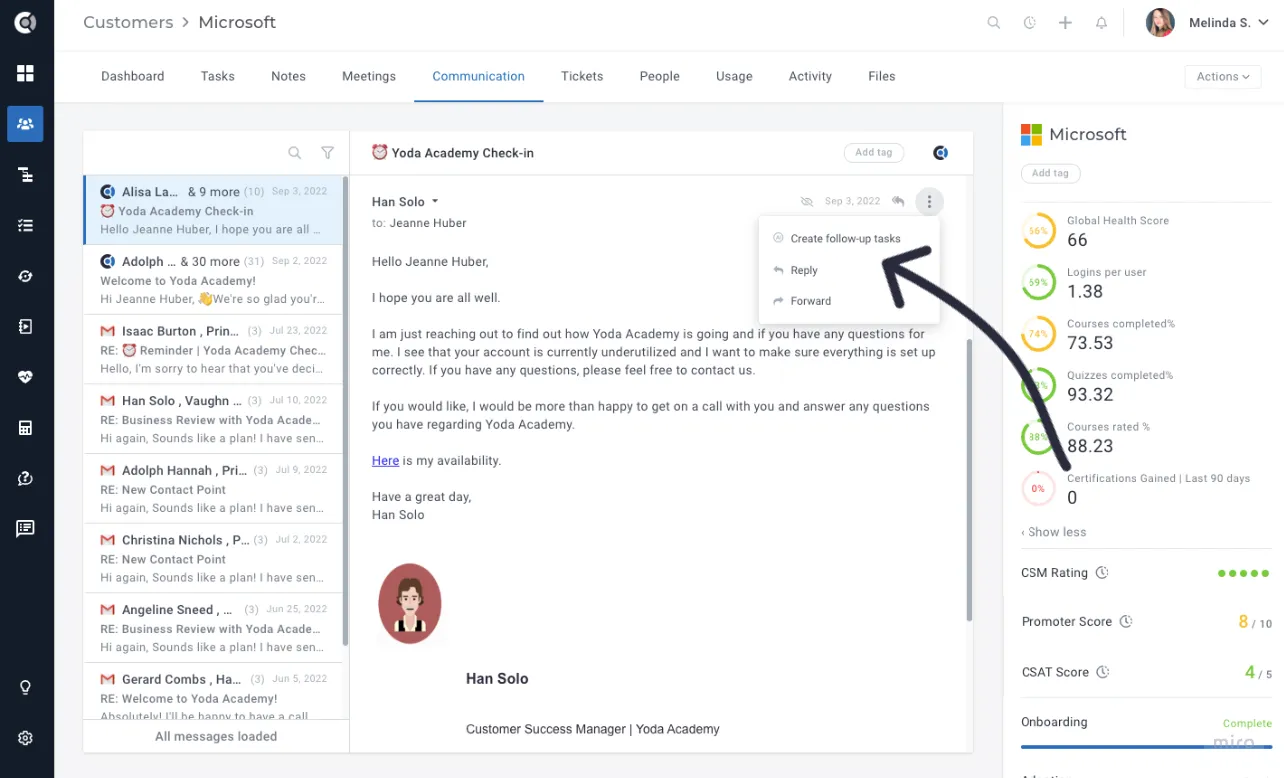
You can quickly refine, add details, and save these tasks, ensuring you stay organized and on top of every customer interaction without missing a beat. It's a faster, smarter way to manage your follow-ups and keep your workflow seamless and efficient.
Conversation Summary
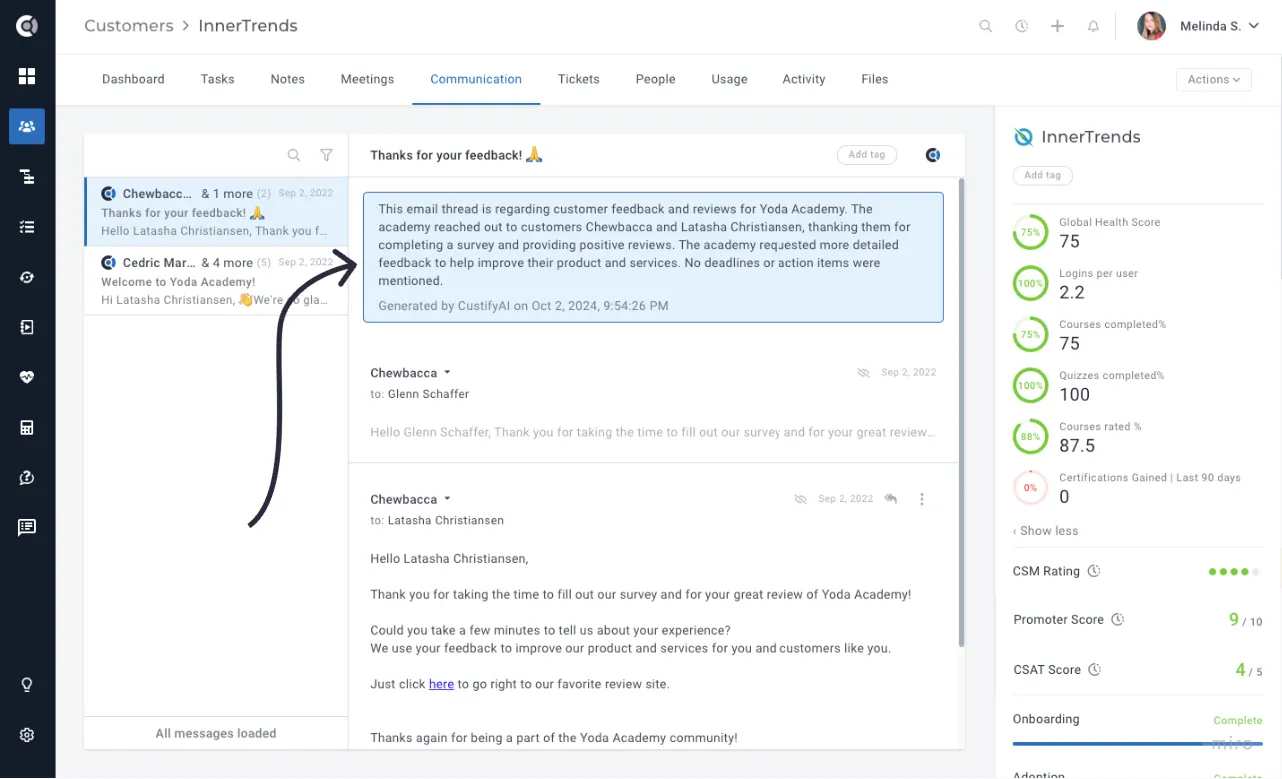
Are you tired of sifting through long email chains or trying to pinpoint key points from customer conversations? With CustifyAI's Conversation Summary feature, you can now generate an instant overview of any discussion. This AI-powered tool automatically captures the essence of your conversations, allowing you to quickly review key insights without the need to scroll through lengthy threads.
Save valuable time and stay focused on what matters most—driving results and improving customer relationships.
AI Summary for Tickets
CustifyAI can now summarize per-ticket activity. Each ticket gets its own AI-generated summary visible directly on the ticket record. The summary is generated when the ticket is created or updated and refreshes as new messages or comments arrive. Ticket summaries are not rolled into an account-level summary — they live per-ticket, so CSMs can scan a single conversation quickly without opening every reply.
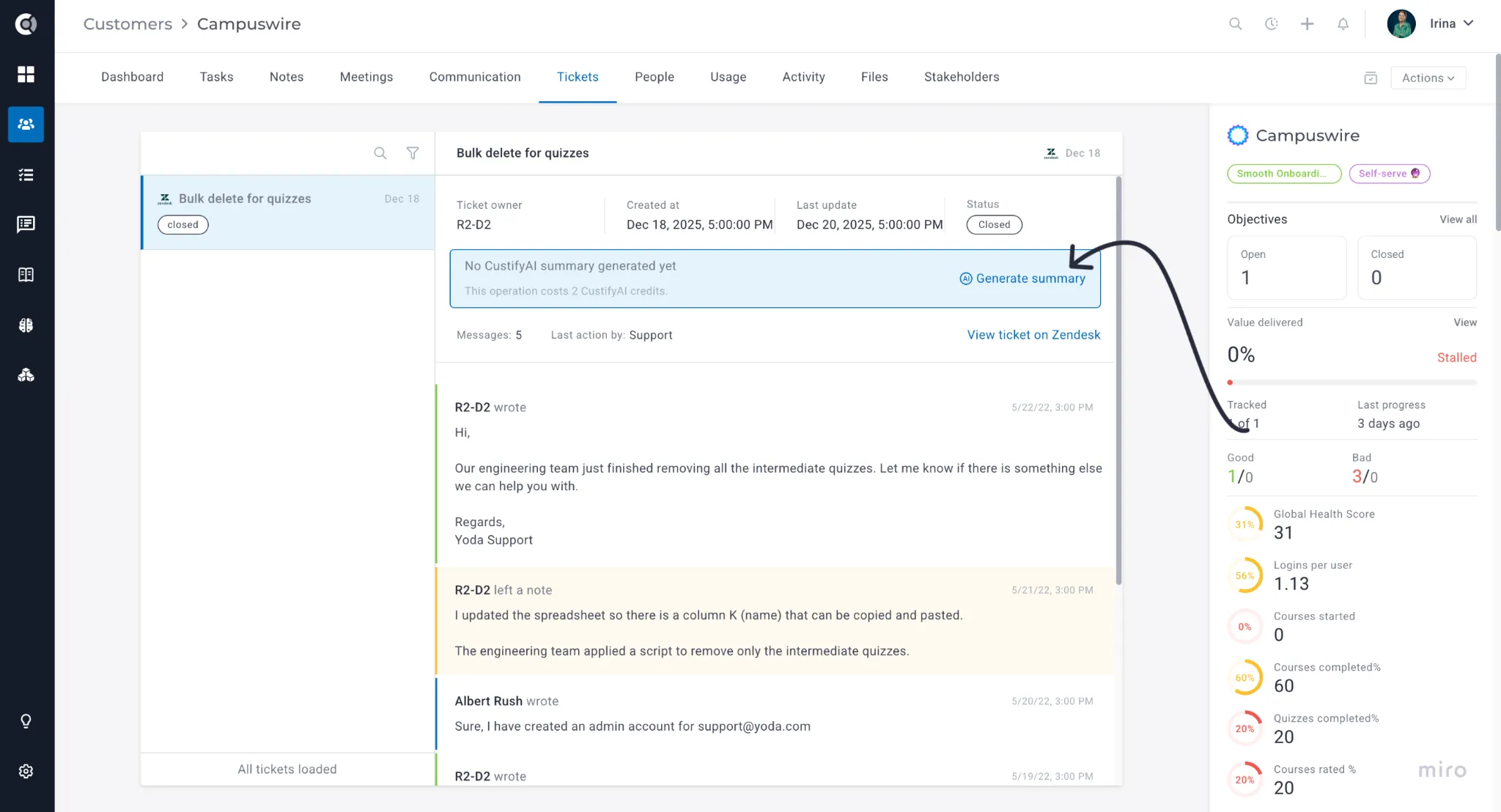
Observation! It has to be enabled first on the account level, in Settings - CustifyAI.
Text Assistant - AI in Every Text Editor
AI assistance is now built directly into text editors across Custify. When writing emails, notes, tasks, or even Customer Portal content, you can select any text and ask CustifyAI to improve, expand, summarize, or rewrite it based on your instructions, helping you communicate more effectively and save time on content creation.
You can ask AI to build the entire text from scratch, or you can highlight text and ask the AI to:
- Improve the tone or clarity
- Expand a short note into a structured summary
- Shorten a long message
- Rewrite a response in a more professional way
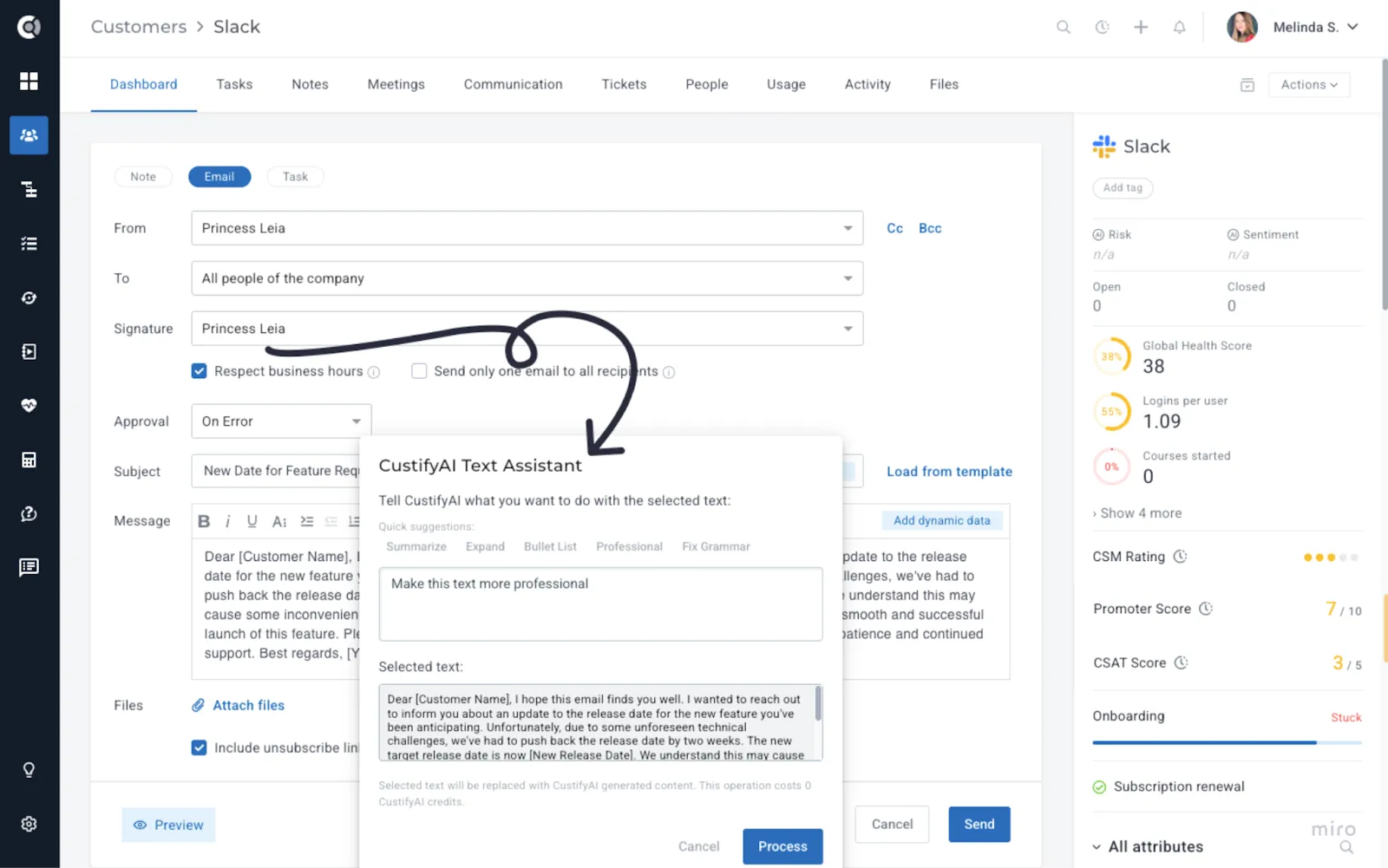
Use case idea: A CSM drafts a difficult email about a delay in a feature rollout. They write the key points in a rough style, then ask the Text Assistant to “make this more empathetic, clear, and professional.” The final message is easier to read and more aligned with the company’s tone of voice.
Conversational UI - “Ask CustifyAI” Everywhere
The conversational interface lets you talk to Custify in plain language, instead of building every view or rule from scratch. It removes the need to search, filter, or piece together information manually - giving teams instant answers and helping them make faster, more informed decisions.
Ask Questions in Customer 360
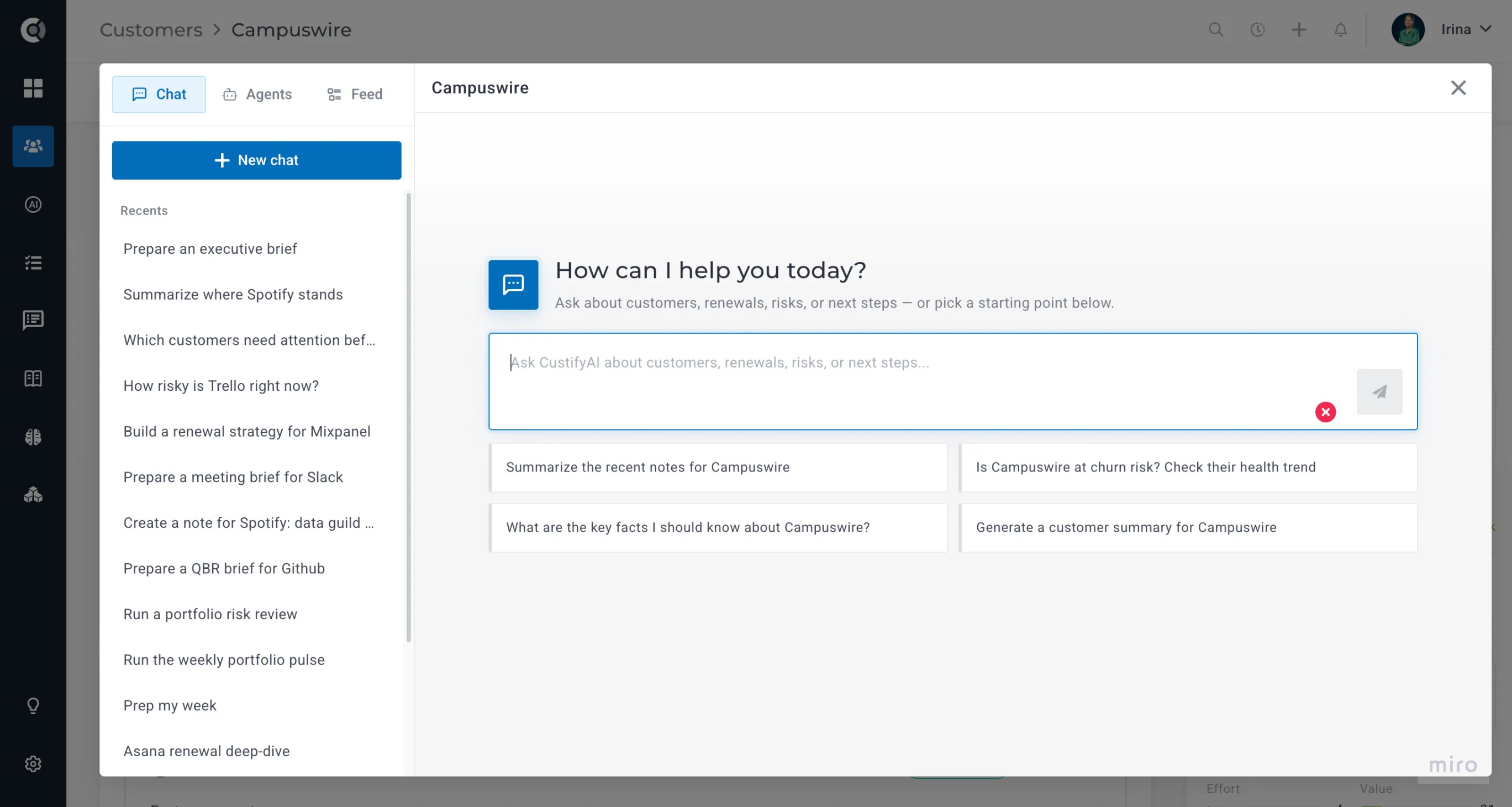
Inside Customer 360, you can open an “Ask CustifyAI” panel and ask questions directly about the account (e.g., “What changed since our last QBR?”, "Is this customer at risk?").
To start a conversation, simply go to the Company 360 Page - Actions - Ask CustifyAI.
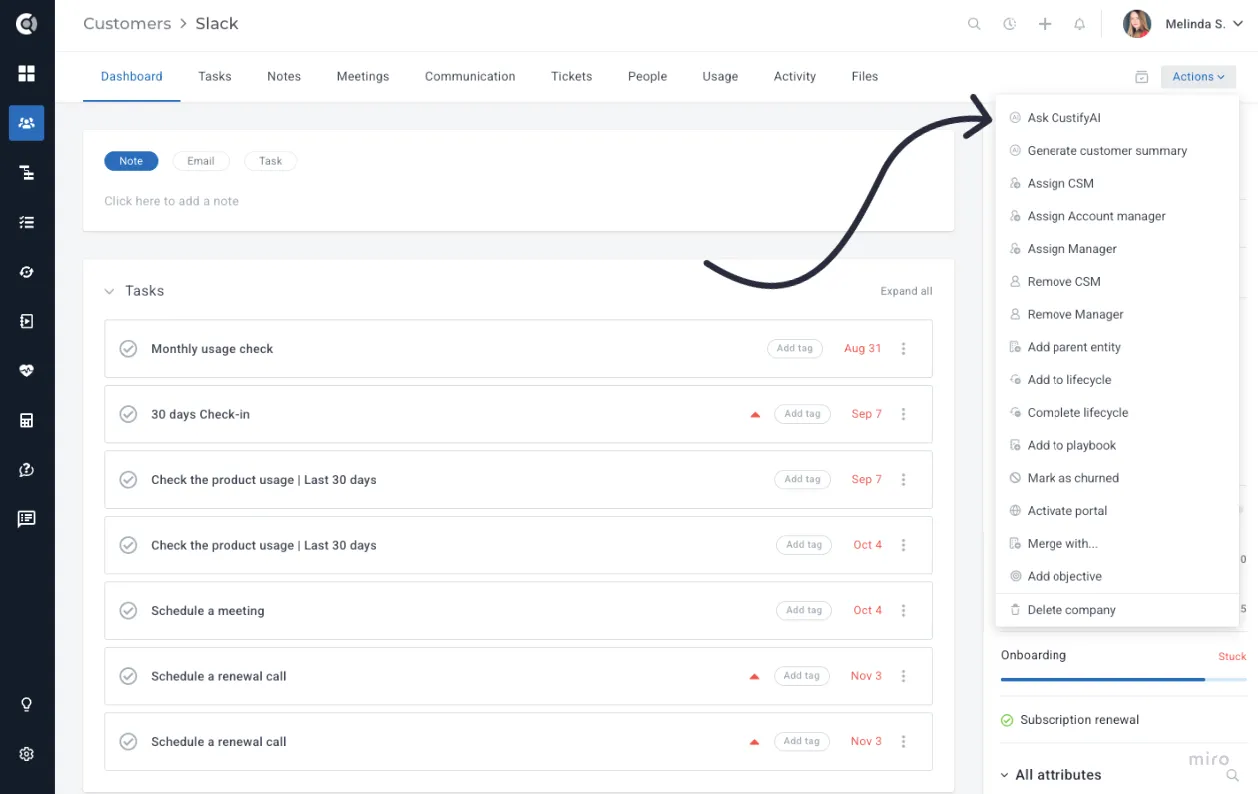
Ask a question, explore the response, and hit More Details to dive into the underlying data behind the answer.
Instead of digging through attributes, notes or health scores, CSMs and managers get a quick, AI-generated overview before each customer touchpoint or internal meeting.
Enhanced Filtering in Companies List View
In the Companies list, you can use conversational queries to find the right segment of accounts. Go to the Companies List View - Add Filter - AI Filtering.
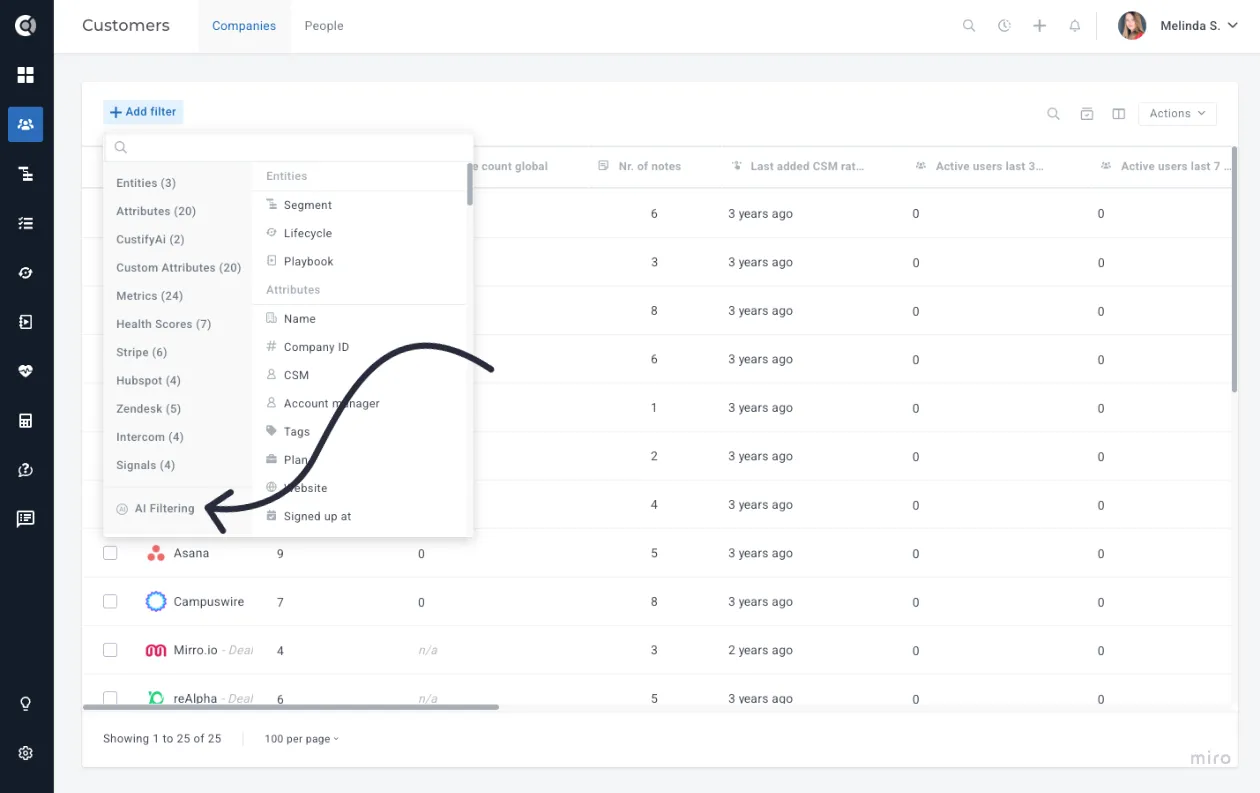
Queries like “Show me customers who haven’t logged in for 30 days” or “Show me accounts with high ARR and recent negative sentiment” will be automatically translated into filters, so users don’t have to remember every attribute or operator.
AI Filtering Configuration
You can control which attributes CustifyAI uses when interpreting data for AI-based filtering. Beyond leveraging Health Scores, default data points, and key metrics, you can define exactly which attributes the AI should consider and how they should be used.
To manage these settings, go to Settings - Event & Attribute Editor and select the attributes you want to include or exclude for the AI Filtering described above.
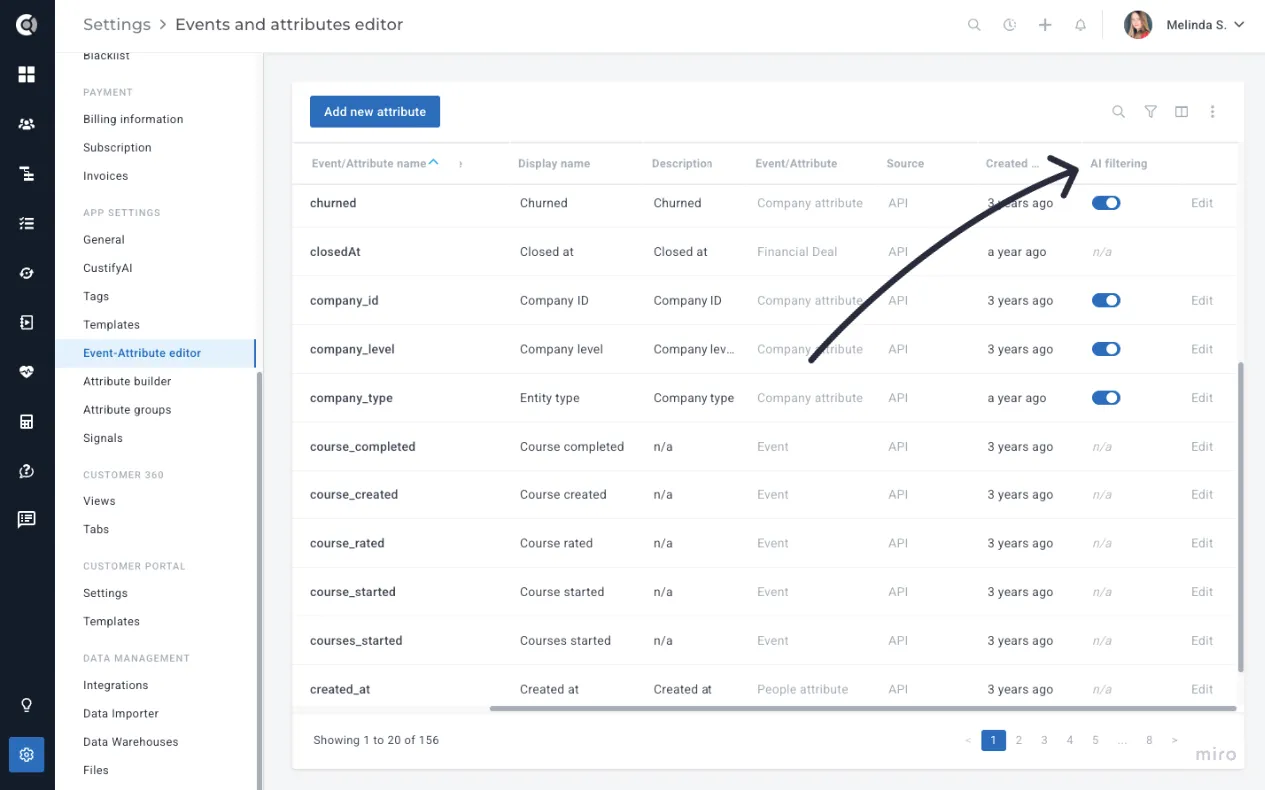
By clicking the Edit button next to any attribute, you can define its AI Context (providing additional details about the attribute’s purpose) and configure its Query Patterns, such as synonyms, related terms, example phrases, and usage notes. This helps CustifyAI better understand how the attribute should be interpreted during filtering and natural-language queries.
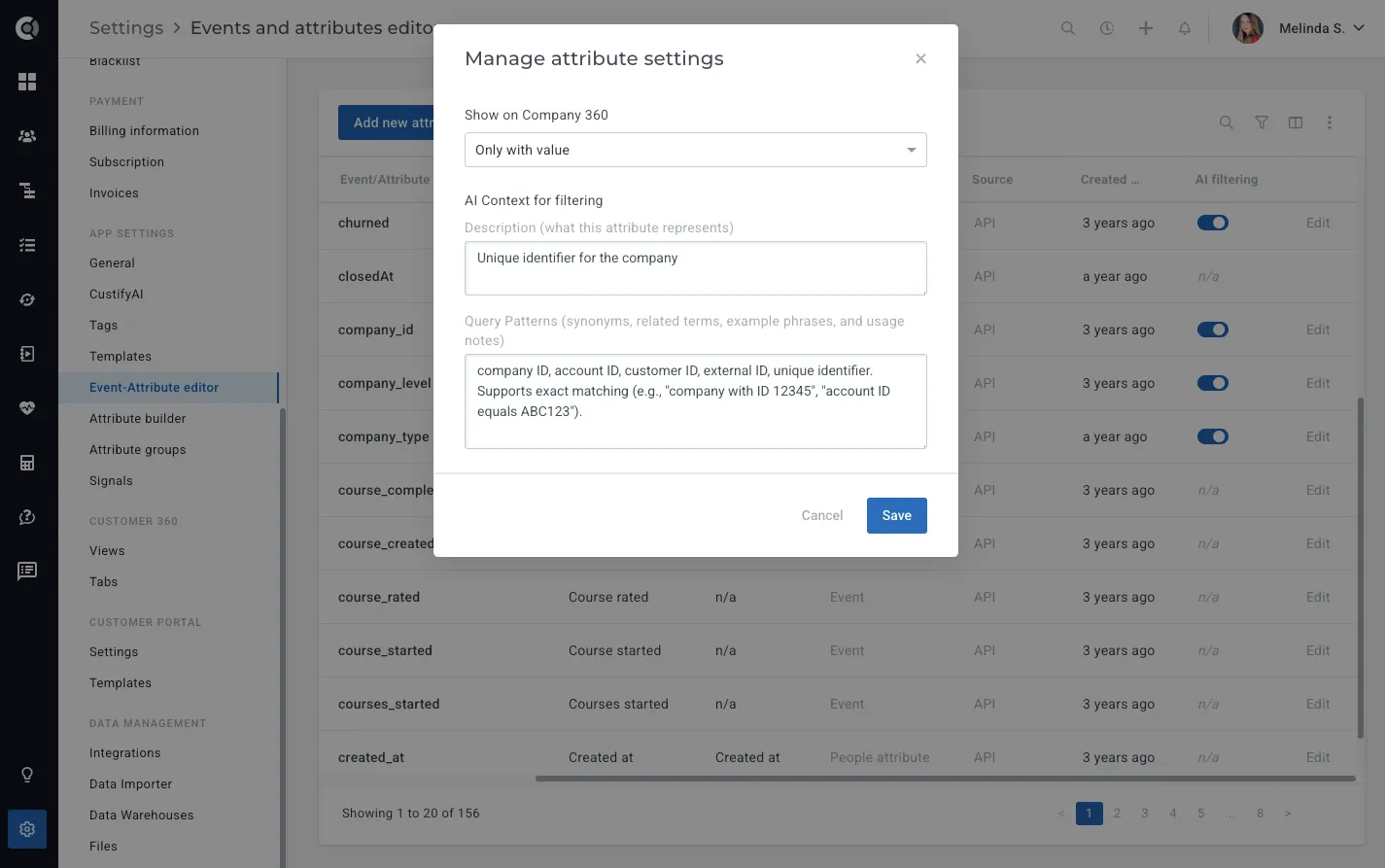
This ensures the AI works with the right information, reduces noise, and helps prevent confusion or inaccurate results.
Observation! CustifyAI will still interpret many default and financial attributes without added context, but defining context ensures the highest accuracy and the most reliable results.
AI Filtering context is available only for company-level attributes - it does not apply to people attributes or events.
CustifyAI Conditions in Playbooks
Company Playbooks can now include AI-based conditions that interpret unstructured data. Instead of a complex rule builder, you can ask a question like:
- “Has the customer mentioned budget concerns?"
- “Is the customer actively using the mobile app?”
- “Has anyone complained about onboarding recently?"
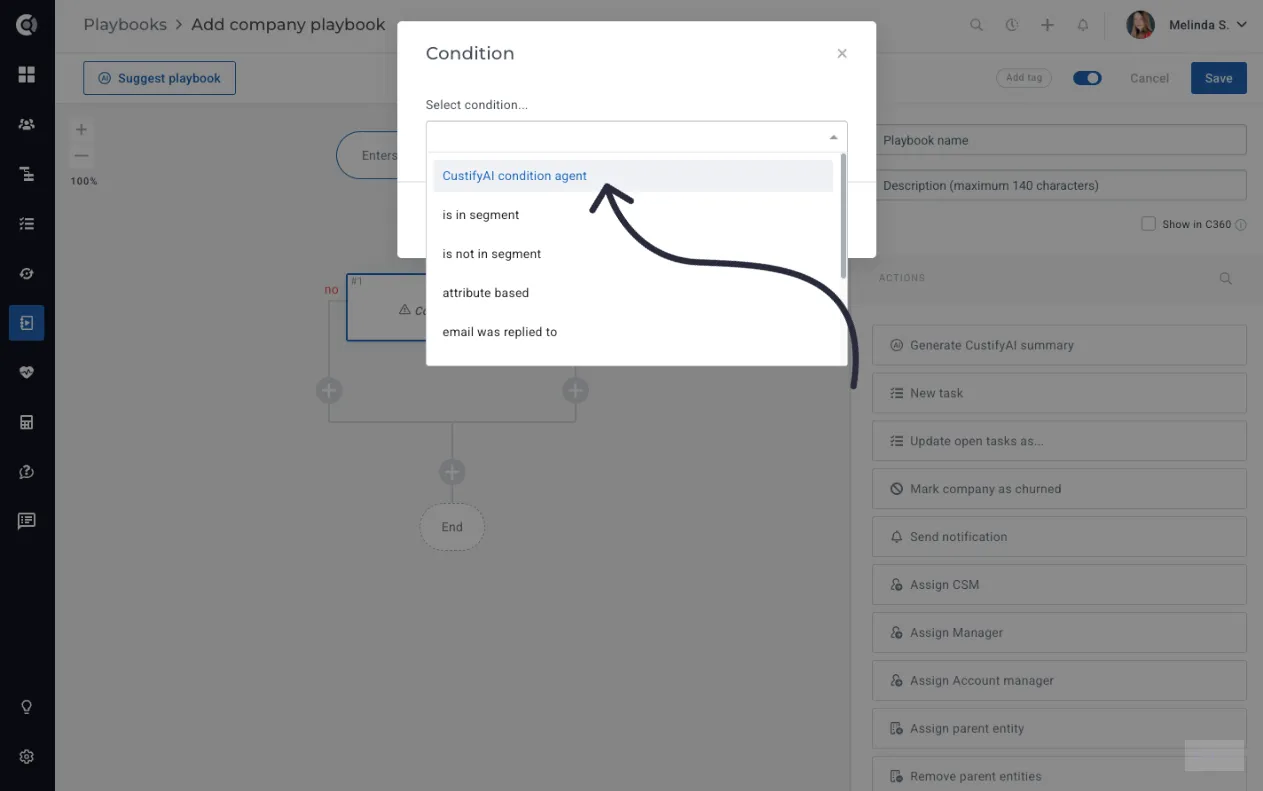
The CustifyAI will interpret attributes, health scores, segments, notes, past and future meetings details, subscription information and company tags to return a yes/no-style answer that the playbook can use for the branches. If the CustifyAI isn’t confident, you can define what happens next (continue on a default path, or choose a fallback branch), so automations remain predictable.
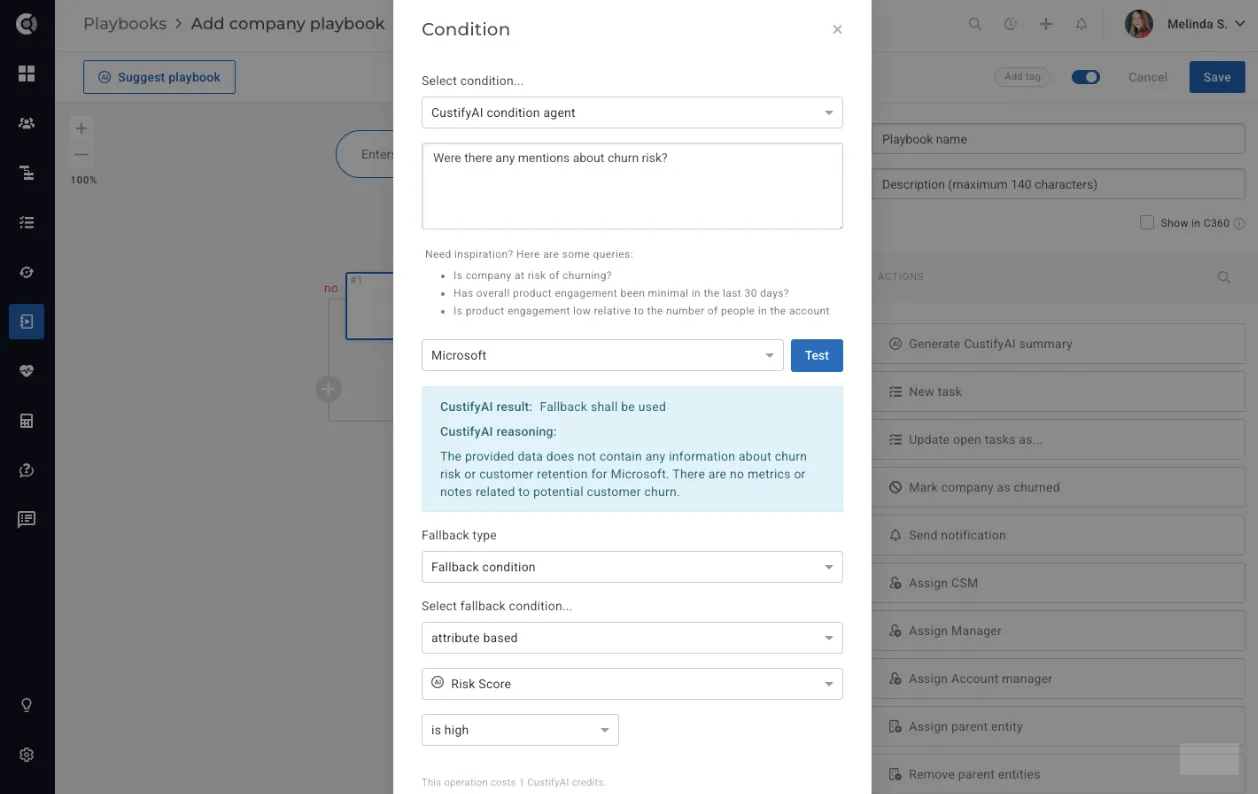
After entering your question, you can run a test on companies where you already know the expected outcome. This allows you to verify how the playbook condition behaves before enabling it in a live flow. Once the test succeeds, you’ll also need to configure a fallback option - either Default to No, Default to Yes, or Fallback Condition, which lets you define a more complex condition for the automation. Setting a fallback is essential, as there may be situations where the AI does not have enough data to return a confident answer.
Slack Integration
For teams using the Slack integration, Custify’s Conversational UI can be accessed directly from your Slack channels. CSMs can ask questions about a customer or segment during internal discussions and get instant answers - without switching back to Custify.
To enable the Slack CustifyAI Bot, ensure the Slack integration is active in Settings - Integrations - Slack, and add the CustifyAI bot to the channel where you want the responses to appear.
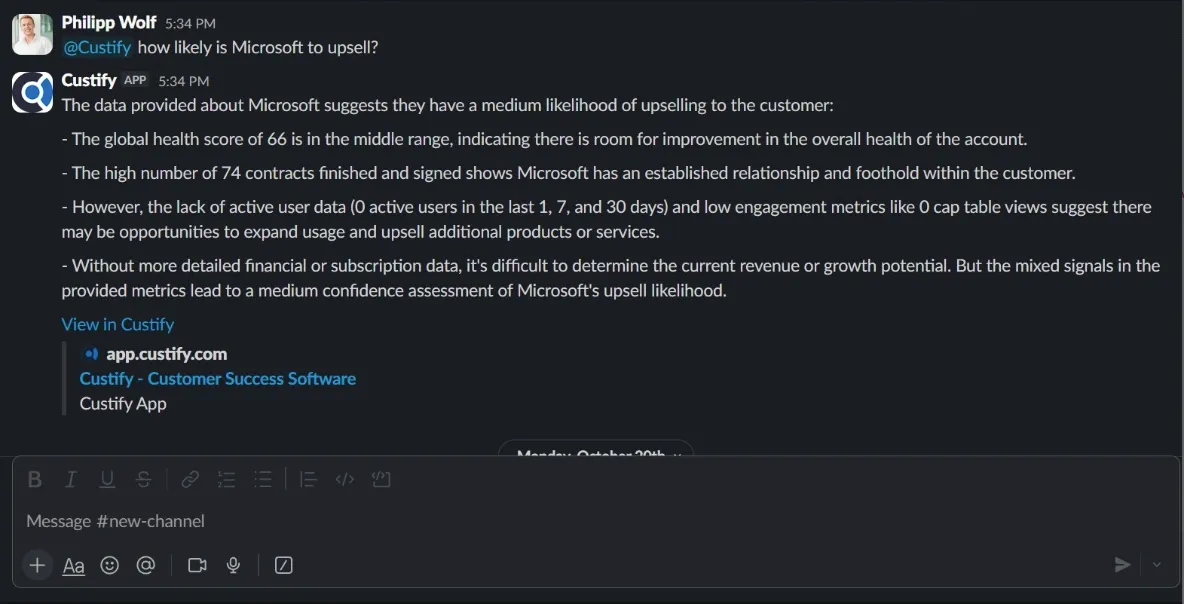
Note! Each query consumes 1 CustifyAI Credit.
Use case idea: Before a renewal meeting, you ask CustifyAI: “Give me a quick summary of this customer, key risks, and any open issues that might impact renewal.” In under a minute, you have a concise briefing that you can use as preparation for the call.
Conversation Analysis – Sentiment & Risk Scores
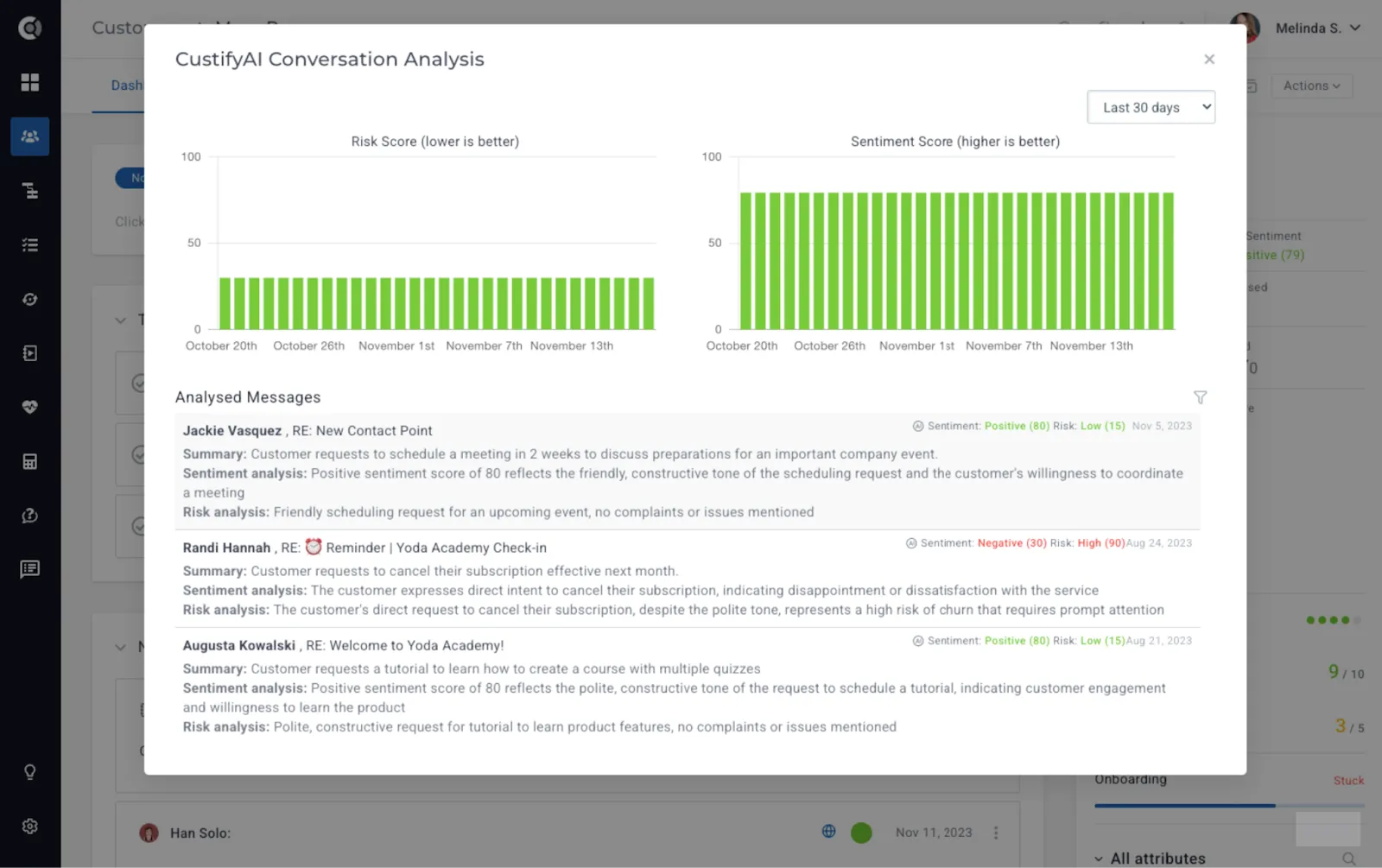
Conversation Analysis brings fully automated sentiment and risk scoring directly into Custify, helping teams understand customer tone, urgency, and emerging issues without manually reading through every email.
The system evaluates each message individually, rolls insights up to the conversation level, and then produces customer-level scores that update continuously as new conversations occur.
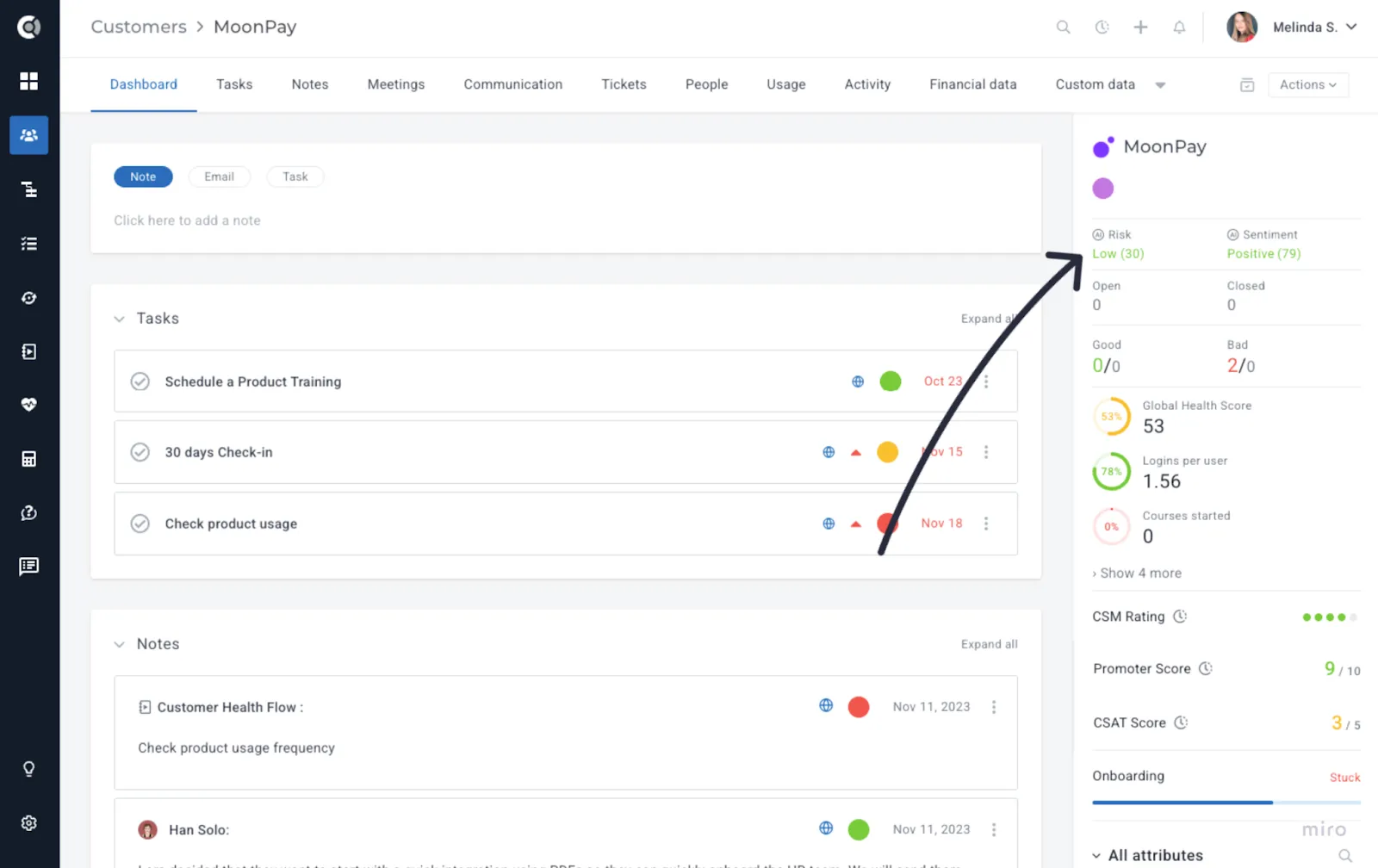
Sentiment indicates how happy or unhappy a customer sounds - it reflects the tone in which a message is written.
Risk, on the other hand, highlights whether anything in the message could jeopardize the relationship - it focuses on the actual content of the message.
For example, a customer might sound calm (neutral sentiment) but mention a blocker that stops them from using your product (high risk).
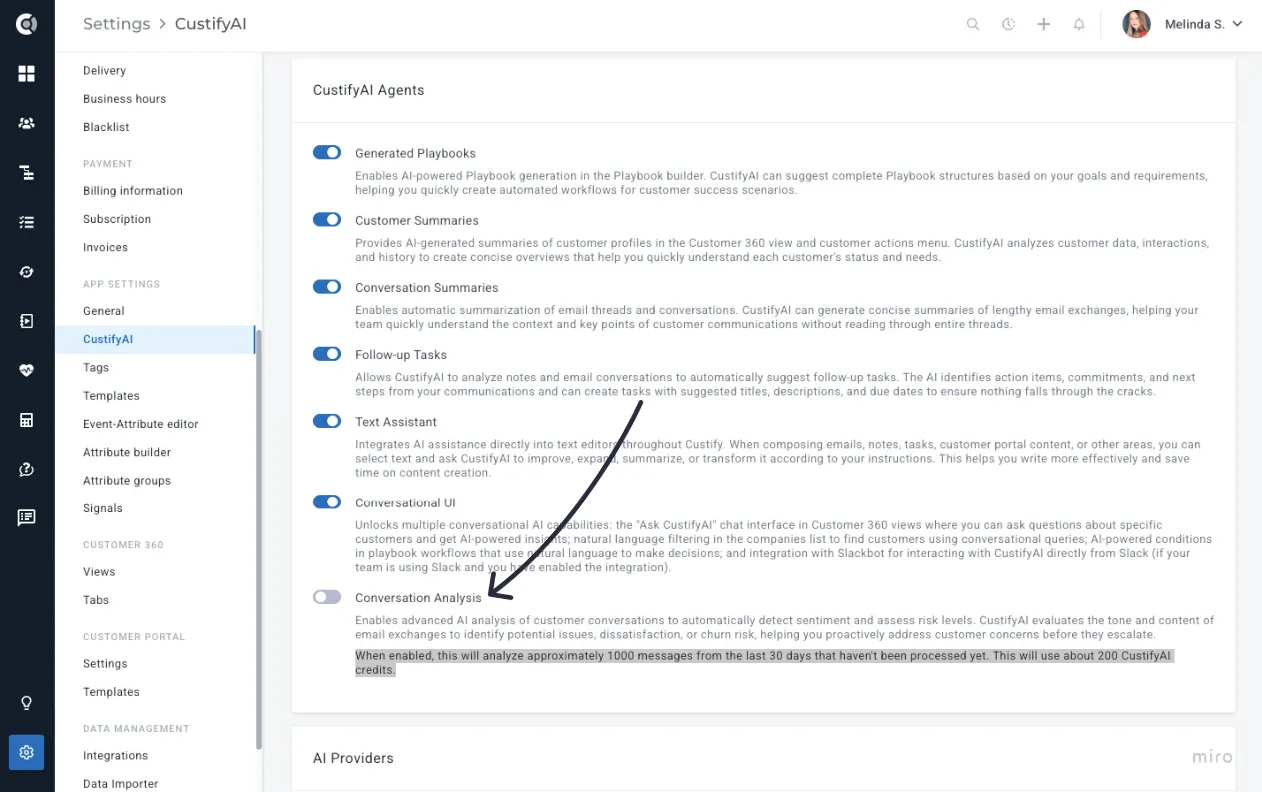
Important Note! The Conversation Analysis Agent is disabled by default for each account and must be manually enabled (otherwise, the scores in the screenshot above will not be available).
Once activated, the agent automatically analyses all incoming messages from the past 30 days to generate reliable Sentiment and Risk scores. Credit usage depends on the volume of messages processed - approximately 1,000 emails require 200 credits - and the credits are automatically consumed when the feature is enabled. The total number of messages and the corresponding credits are calculated automatically, as shown below.
How the scoring works
Conversation Analysis calculates sentiment and risk using a three-level structure:
- Message Level
Each email is analysed independently and receives its own sentiment score (0–100) and risk score (0–100).
- Conversation Level
All messages within a conversation are combined into a weighted score that reflects what matters most:
- Recent messages matter more - yesterday’s message influences the score more than one from a month ago.
- Longer messages matter more - detailed emails weigh more than short replies.
- Extreme sentiments matter more - very positive or very negative tones shift the score more strongly than neutral ones.
- Negative sentiment gets extra weight - negative messages count 20% more because they signal potential dissatisfaction.
- High-risk signals get exponential weight - critical risk messages can outweigh large volumes of neutral communication (15× for critical, 6× for high, 2.5× for medium).
- Customer Level
Conversation scores then roll up into customer-level sentiment and risk scores using the same intelligent weighting:
- Recent conversations influence the score more than older ones.
- Conversations with more messages carry more weight.
- Scores update automatically as new conversations arrive, giving you a living, dynamic view of customer health.
Conversation Analysis prioritizes recent, detailed, emotionally strong, and high-risk signals, and teams get accurate and actionable insights instead of averages that hide important context. A single concerning message from yesterday will not be buried under a month of neutral communication. The same logic is applied consistently across message, conversation, and customer levels, giving you predictable and trustworthy results.
CustifyAI Scores across Custify
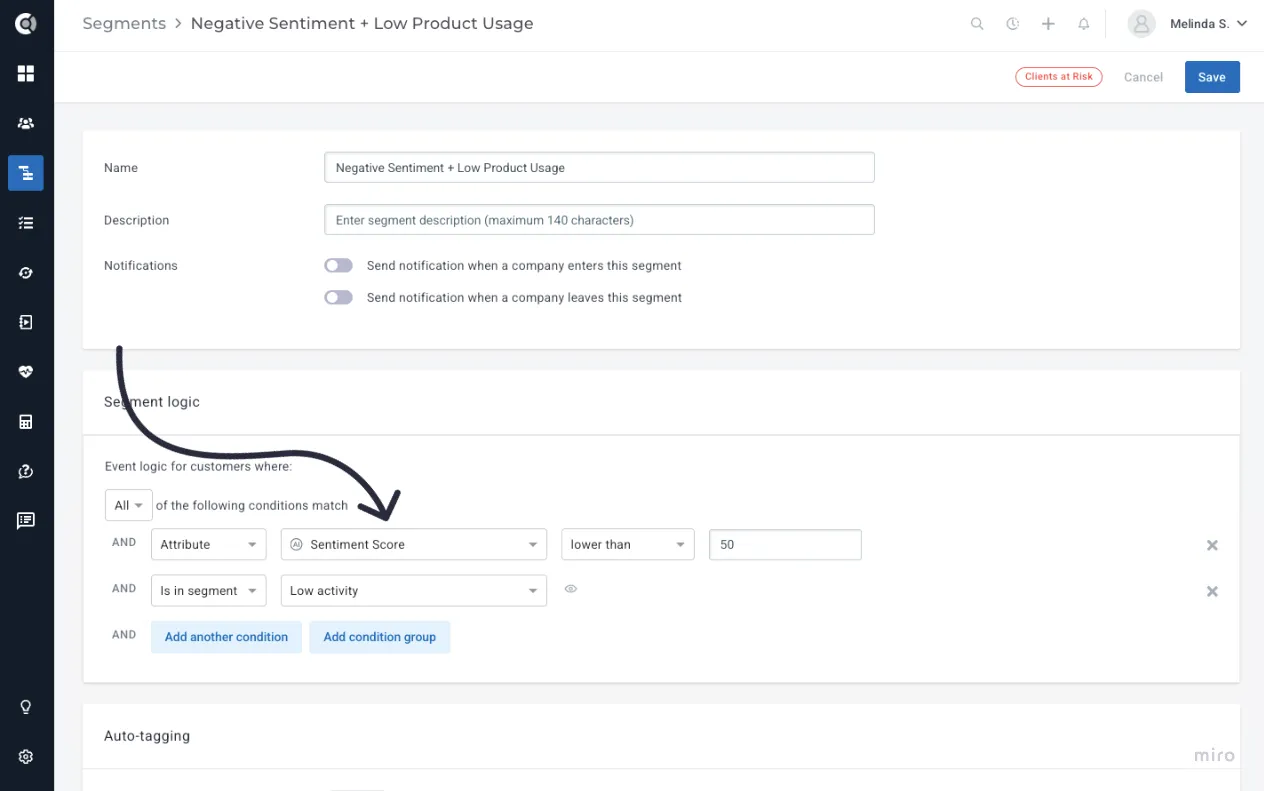
Sentiment and Risk scores now function as company-level attributes throughout the platform. This means you can filter, segment, sort, and automate using these scores anywhere you use customer data in Custify.
They can be used to:
- Filter customer lists by Sentiment or Risk.
- Build segments combining AI scores with revenue, usage, Health Score, or lifecycle data.
- Trigger playbooks based on Sentiment or Risk thresholds.
- Add these insights to dashboards, reports, and Calculated Metrics.
Common use cases:
- Create views such as “Customers with increasing risk in the last 7 days.”
- Build segments like “Detractors with high ARR” or “Negative sentiment + low product usage.”
- Trigger playbooks when Sentiment drops or Risk crosses a certain threshold.
- Monitor sentiment and risk trends across portfolios, lifecycle stages, or revenue tiers.
- Review the top messages influencing the score to understand what changed and why.
What happens when you run out of credits?
Emails received while your credit balance is at zero are skipped — they are not queued or automatically re-analyzed once you top up. Analysis resumes normally for new emails going forward.
To recover emails from the gap: After topping up, toggle Conversation Analysis off, then back on. Re-enabling triggers a scan of the last 30 days and will pick up any emails in that window that weren't analyzed yet. Already-scored emails are not recharged.
What happens when you disable and re-enable the feature?
The same 30-day backfill scan that runs on first enable also runs every time you re-enable the feature. It analyzes eligible emails from the past 30 days that don't already have a score — including any received while the feature was off — and skips anything already analyzed.
⚠️ Note: The 30-day window is a hard limit. Emails older than 30 days at the moment of re-enabling will not be back-filled.
Notes analysis
Sentiment and Risk scoring isn't limited to emails anymore; it now covers notes too. Once enabled, you choose which note tags should be analyzed — a note qualifies as soon as it carries at least one of the tags you've selected.
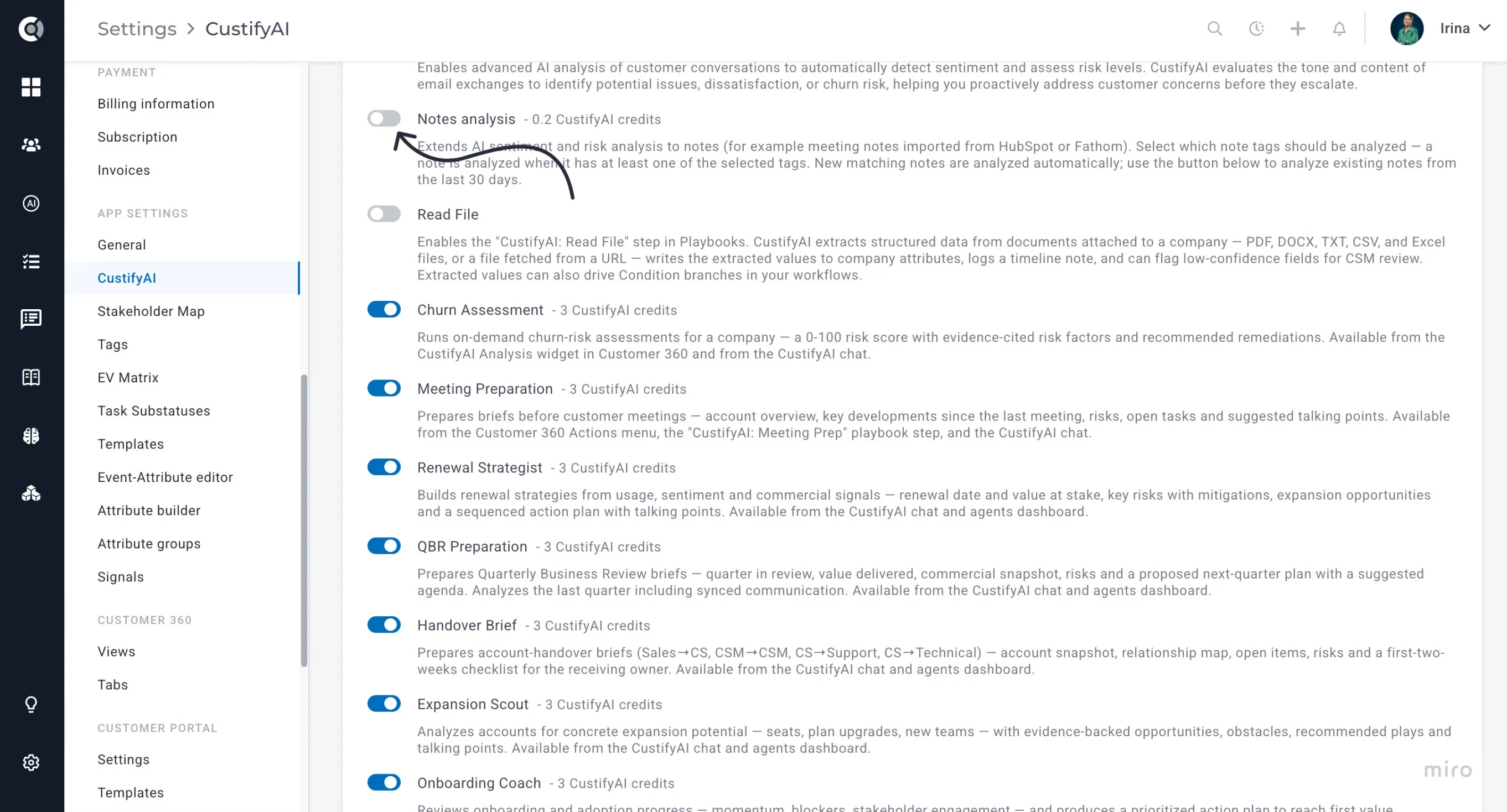
New notes that match are scored automatically going forward, and a one-time button lets you backfill the last 30 days of existing notes. Because notes now feed into the same scoring as email, a customer's overall risk and sentiment reflects the full picture — so a risky comment made in a meeting note doesn't get missed just because it never showed up in an inbox.
CustifyAI Settings
All CustifyAI configuration is centralized under Settings - CustifyAI, giving you a single place to manage every AI-related capability.
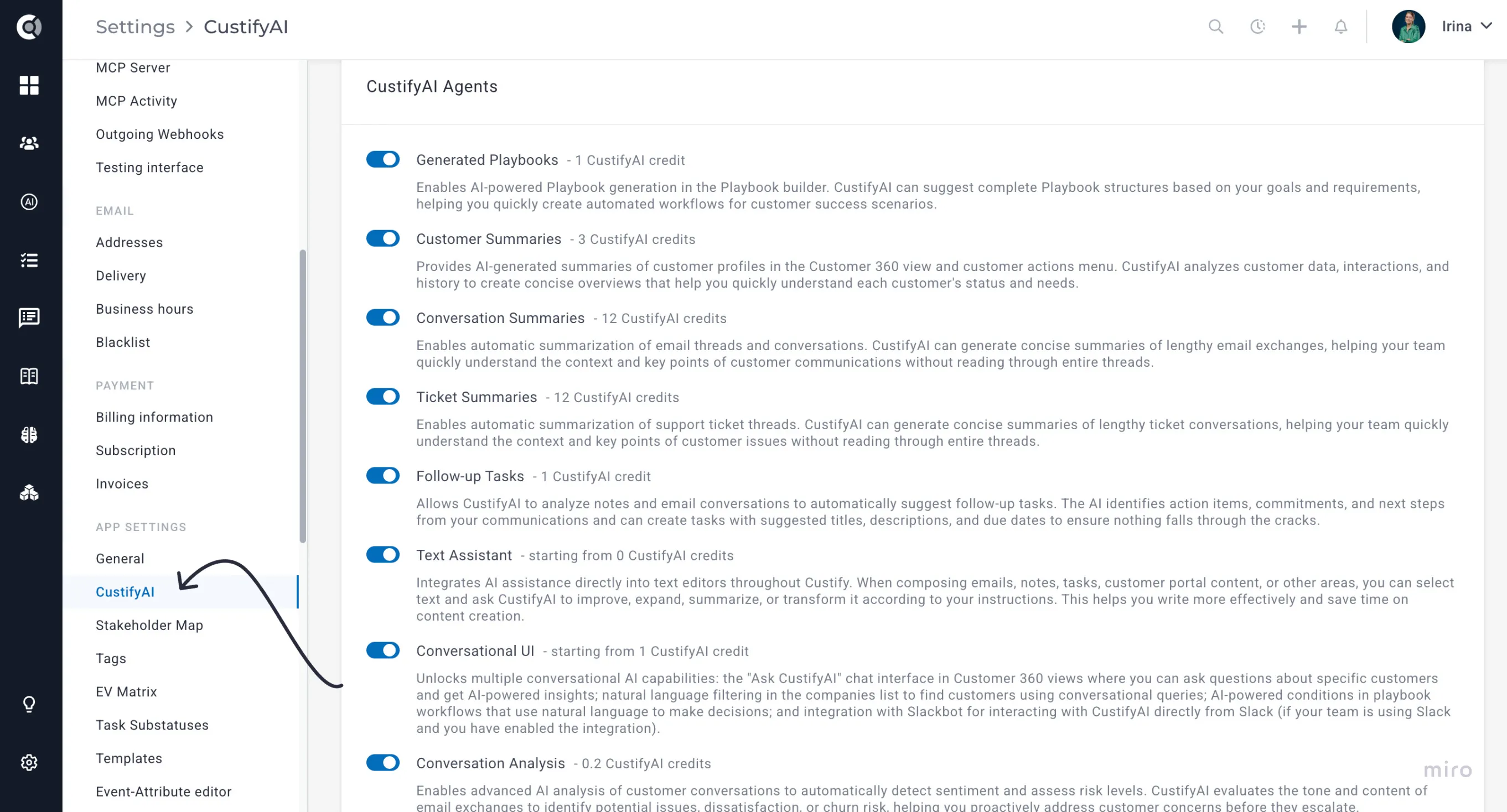
From this page, you can enable or disable individual AI agents, choose which AI provider each agent should use, set default providers, and fine-tune each agent’s behavior to match your team’s workflows. This unified configuration area makes it easy to control how CustifyAI operates across your entire Custify environment.
The default behavior for the new CustifyAI agents is as follows:
- At release, the Text Assistant and Conversational UI agents will inherit the settings of the Customer Summaries agent. If Customer Summaries was previously enabled for your account, these agents will be automatically enabled as well. Each agent can still be managed individually - for example, you can disable Summaries while keeping the Text Assistant active.
- The Conversation Analysis agent is disabled by default and must be manually enabled after acknowledging its higher credit consumption. Once activated, it automatically analyzes all incoming messages from the past 30 days to generate reliable Sentiment and Risk scores. Credit usage depends on the volume of messages processed - approximately 1,000 emails require about 200 credits.
CustifyAI Credits - Credits Consumption and History
With the rollout of the new CustifyAI agents, we’re introducing a credit-based system. This allows us to keep CustifyAI affordable, support automation, and cover the costs associated with the underlying AI provider. Additional information on how we handle AI and your data is available here.
You can choose whether your CustifyAI agents run on CustifyAI’s built-in provider or on your own (details are provided in the section below).
For customers using the CustifyAI provider, credit usage is made highly transparent across the platform.
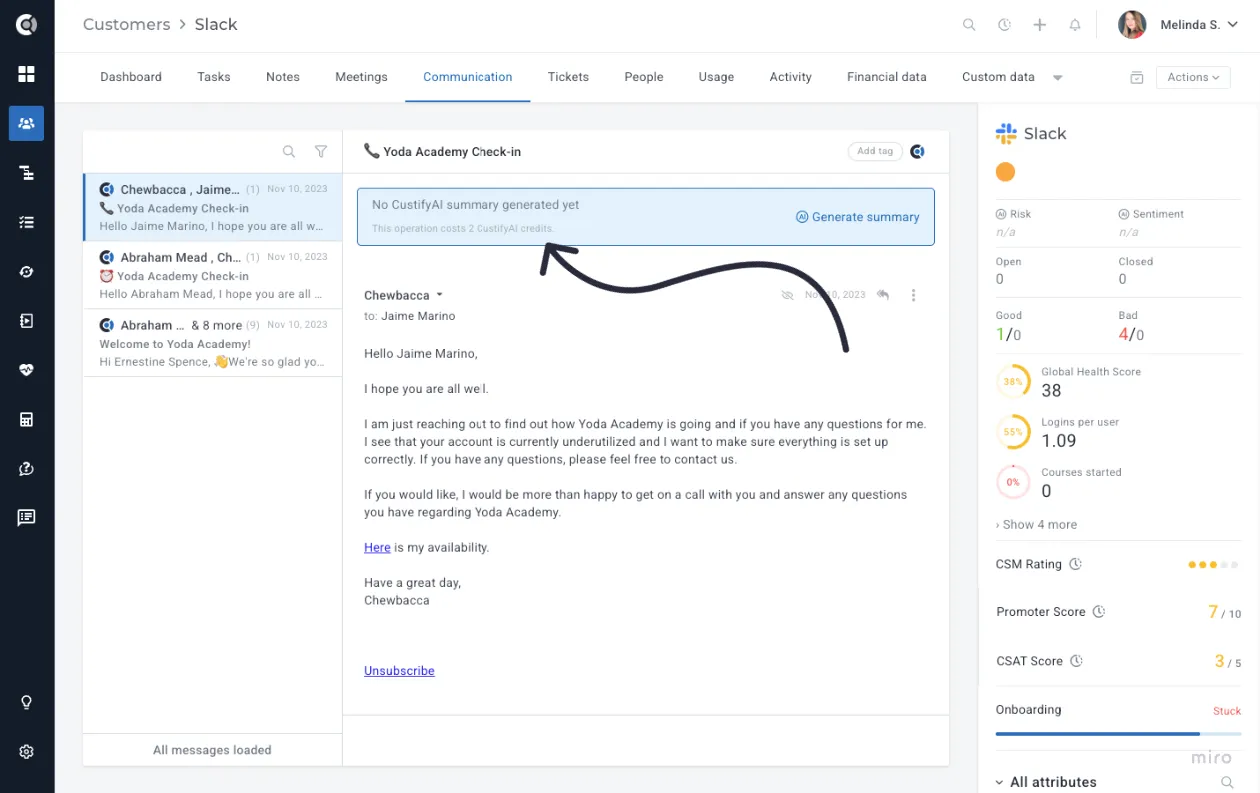
- Every CustifyAI feature clearly shows the number of credits it consumes directly within the feature window. The only exception is Create Follow-up Tasks, which consumes 1 credit per run and doesn’t show credit usage in the UI due to being a single-click action.
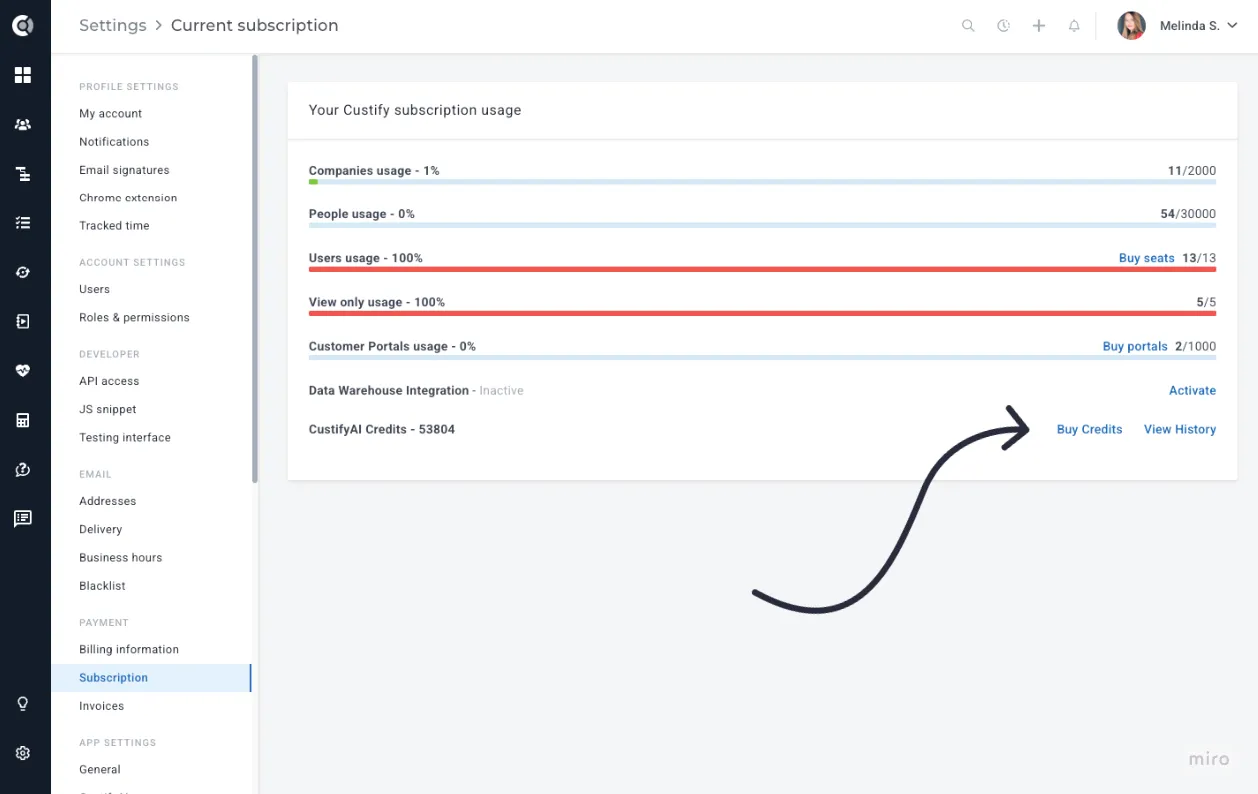
- In the Settings - Subscription page, you can see how many remaining credits you have, you can Buy Credits, or View History of the credits.
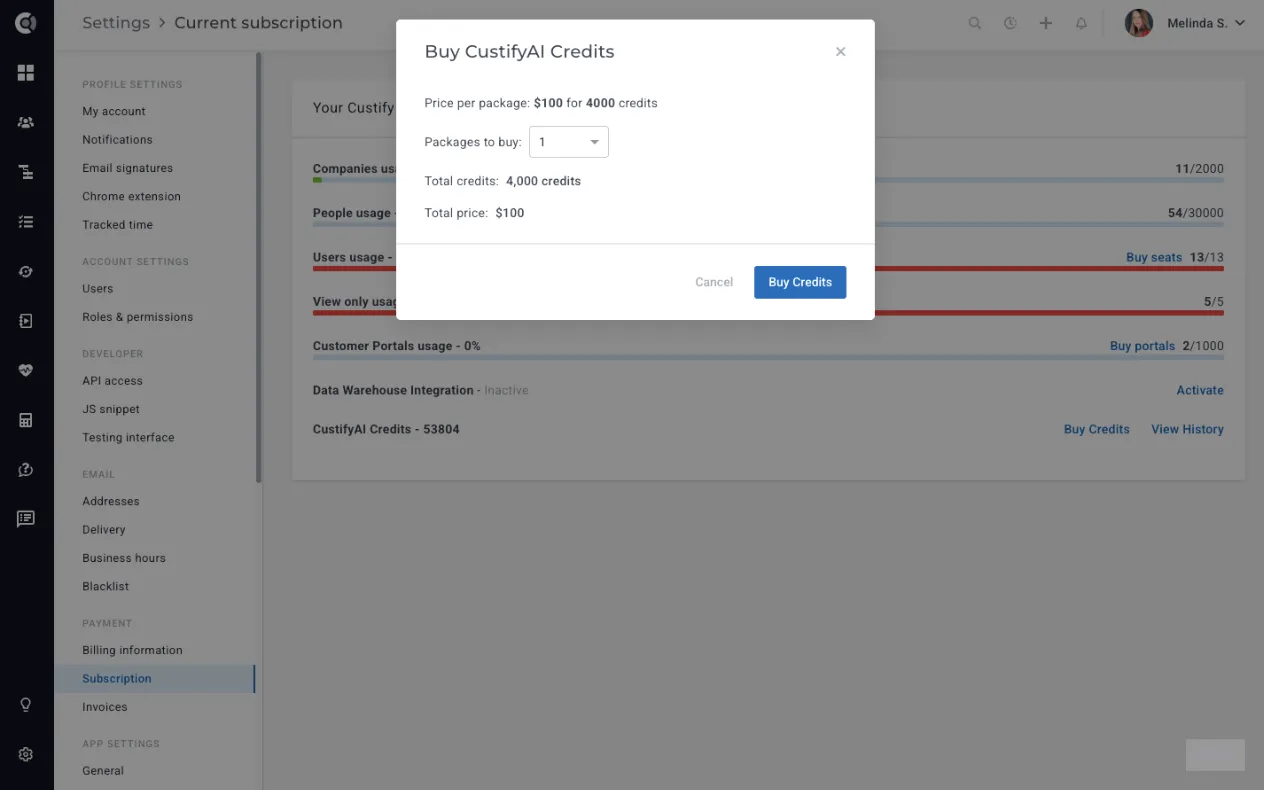
Each account includes a standard package of credits at no additional cost. When you run out, you can simply go to Buy Credits and purchase more as needed. A package of 4,000 credits costs $100, providing flexibility to use CustifyAI at a minimal cost.
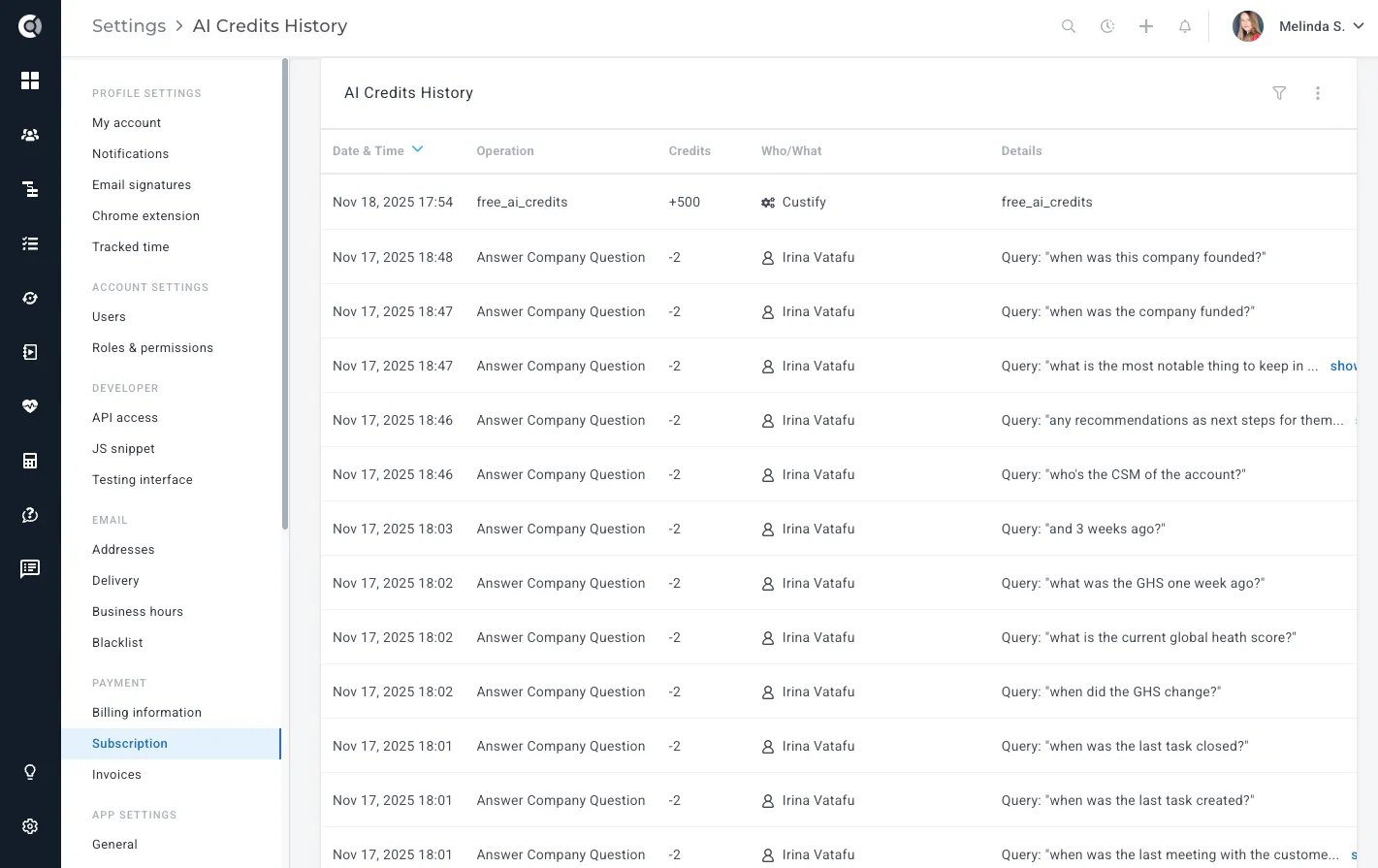
Under View History, you will see who triggered each AI action, which AI agent was used, how many credits were spent, and the usage over time, with the option to export it to .csv files.
Important Note: When you use your own custom AI providers (OpenAI, Anthropic, etc.), usage and billing are handled by those providers and do not consume CustifyAI credits.
Low credit notifications
To make sure you never run out of credits unexpectedly, Custify automatically sends email notifications when your balance drops below two thresholds:
- First notification — sent when your remaining credits fall below 100.
- Second, more urgent notification — sent when your remaining credits fall below 10.
Both notifications are sent to all admins on the account and include a direct Buy More Credits link, so you can top up before any CustifyAI feature is interrupted.
Bring Your Own AI Provider
You now have full flexibility in how you use AI within Custify. You can choose between Custify’s built-in AI provider - which uses a simple credit-based cost model - or your own custom AI providers like OpenAI or Anthropic, which incur no additional Custify charges and are billed directly through your existing AI subscriptions. This gives you the freedom to use the models you prefer, optimize costs, and meet any compliance or data-handling requirements your organization may have.
This option is turned off by default. Reach out to your CSM or to Custify Support in order to enable it.
This option may carry a small processing fee, depending on your subscription plan.
Once enabled, you can manage all providers in Settings - CustifyAI - AI Providers.
Select the provider, enter a name for the connection, add the API key (copied from the provider to establish the connection), specify the AI model (e.g., gpt-5.1), then Test & Save the connection.
Available AI Providers:
- OpenAI
- Anthropic
- Mistral
- OpenAI Compatible (meaning any provider designed to work with OpenAI’s APIs)
- Azure
- Gemini
- Grok
Each AI Agent has its own settings, and you can select the AI provider you want to use for each agent individually.
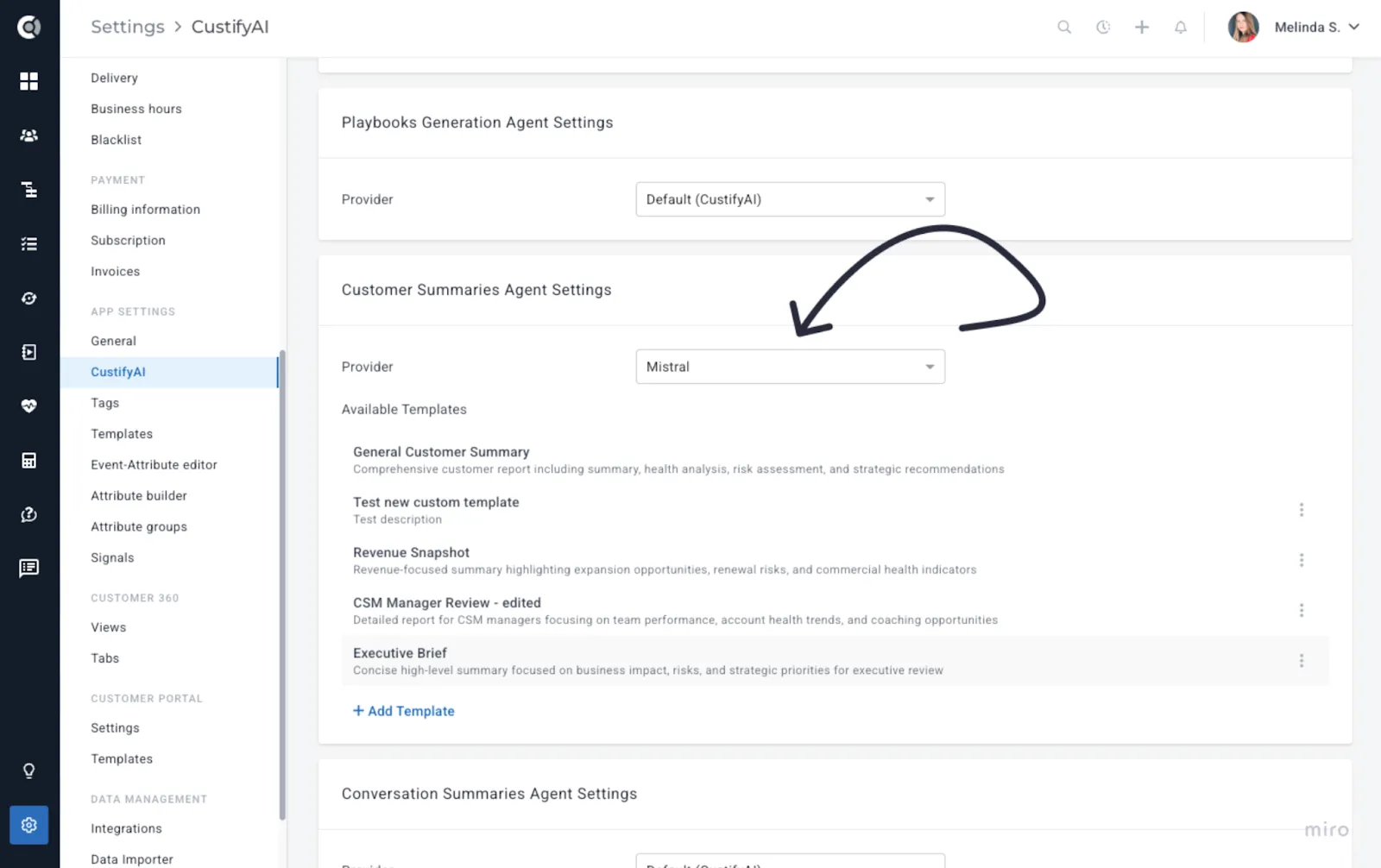
When you use your own AI provider (OpenAI, Anthropic, etc.), all usage is billed directly through your provider and does not consume CustifyAI credits. CustifyAI credit usage only applies when using Custify’s built-in AI provider.