Product updates | July 7th, 2022
In this update, we are happy to announce the introduction of a brand new attribute type, several improvements in the playbooks that allow you to automate interactions with your customers, and other small improvements.
New attribute type | Dropdown (single and multiple choice)
Clustering and segmenting customers is an essential step in any Customer Success strategy. From now you can not only add tags to easily categorize companies and people, but also define dropdown attributes where the values can be selected from a predefined list.
There are 2 types of dropdown attributes:
- Single-choice | Only one value can be selected
- Multiple-choice | Multiple values can be selected
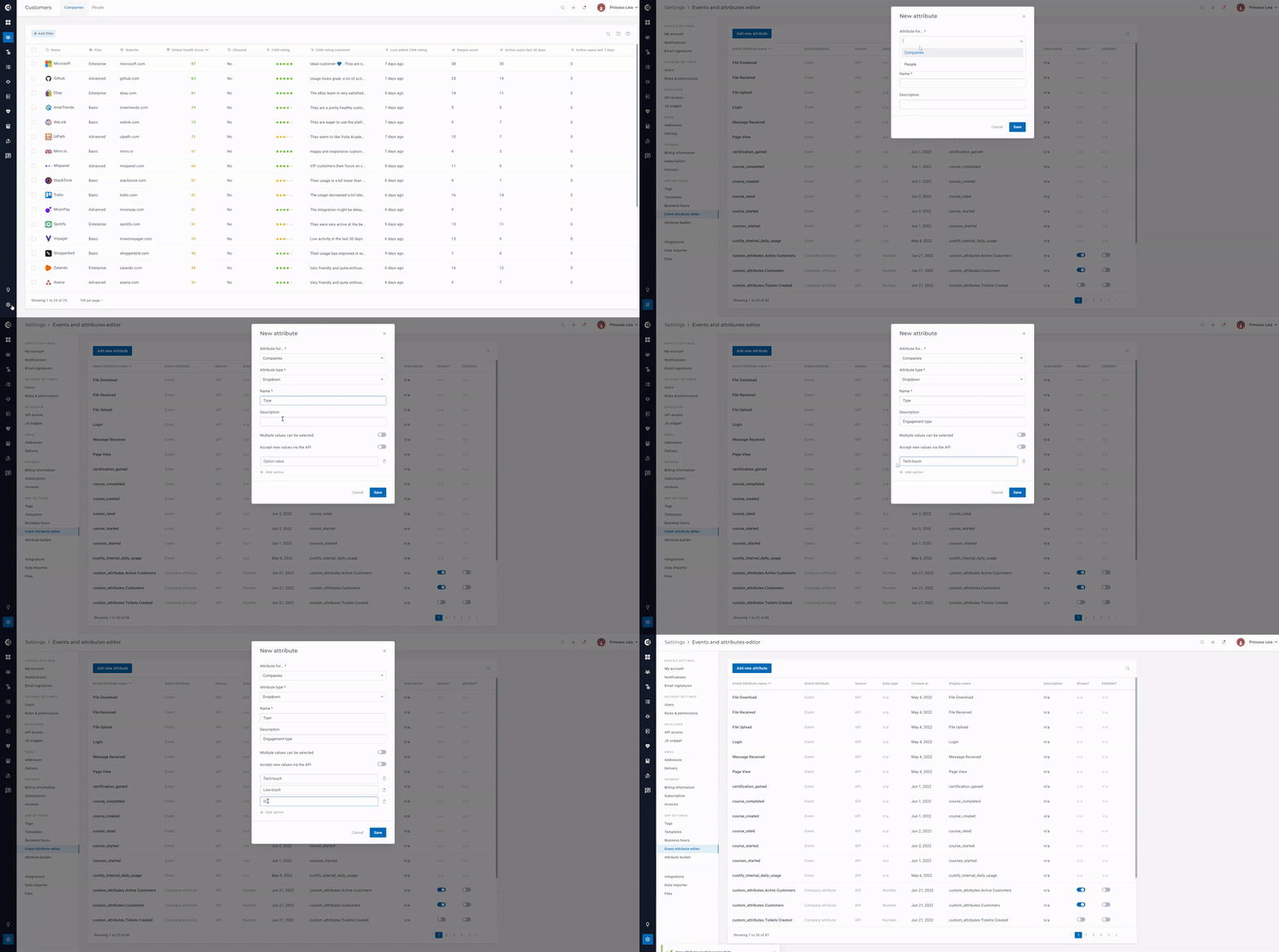
How to | Define a dropdown attribute
Go to Settings > Event-Attribute editor > Add new attribute > Select Attribute type is Dropdown. Choose your preferred setup:
- Attribute for | Companies or People [cannot be changed after]
- Name | mandatory
- Description | optional
- Multiple values can be selected | Single-choice or multiple-choice [cannot be changed after]
- Accept new values via the API | if enabled, new dropdown options can be sent via API
- Option values | define the list of options
How to | Edit a dropdown attribute
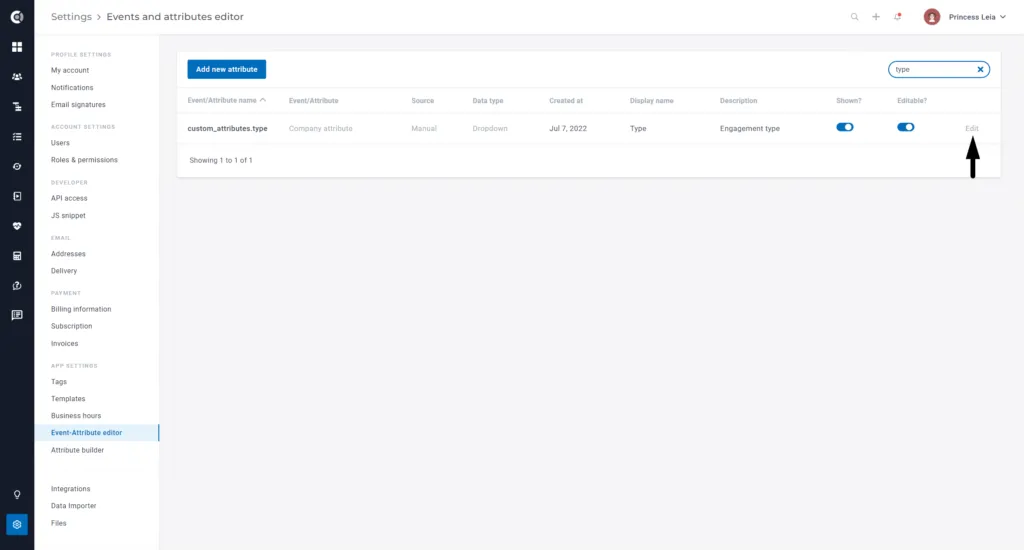
Go to Settings > Event-Attribute editor > search for the attribute > click on Edit
The following parameters can be edited:
- Name
- Description
- Accept new values via the API
- Option values
How to | Populate a dropdown attribute
- Option 1 | Using the list view, add the attribute to the list and double-click to select one or multiple values
- Option 2 | Using the Customer 360° Profile, add the attribute to the Details list and select one or more values

Playbooks | Email reply detection
Automate interactions with low-touch customers (sometimes referred to as Pooled CSM) with Custify’s latest Playbook enhancements. Use email reply detection to drive one-to-many communications at scale.
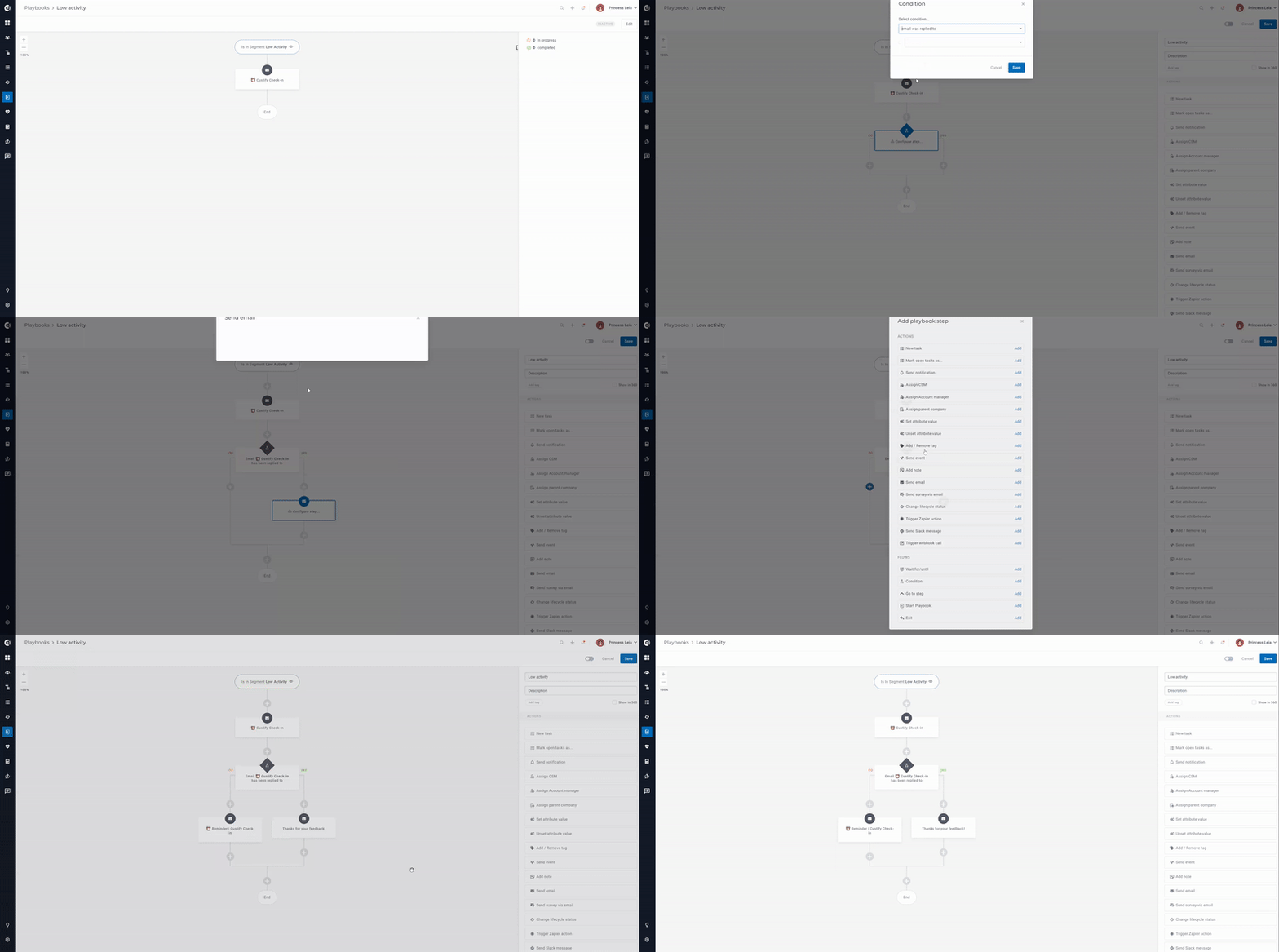
How to | Add Playbook conditions “Email was replied to”
Create different Playbook flows depending on what happens to a message after it is sent to a customer.
For example, you can create a drip-email campaign that includes conditions like:
- Email replied to: continue the sequence of emails
- Email not replied to: sends one or more email reminders
How to | Add a waiting step “ Wait until an email is replied”
Correlate Playbook action steps with waiting steps to send the right message at the right time. Here is the list of options available:
- Wait until email X is replied to
- Wait until email X is replied to, but don’t wait more than
Reply detection only works if the recipient of the reply has their Gmail or Outlook account connected to Custify.
Autoreply emails, including out of office ones, are ignored.
Playbooks | Advanced filtering for changing the status of a task
Tasks are a great way to focus on what’s important, but you can only do that if you have a reasonable number of tasks.
In addition to manually marking tasks as done or not relevant, you can also change their status in bulk, using a Playbook action step that has the following filters:
- Created at | absolute or relative dates
- Created by | a user, a Lifecycle or a Playbook
- Assigned to | any user
- Tags | any task tag

Playbooks | Additional flow actions
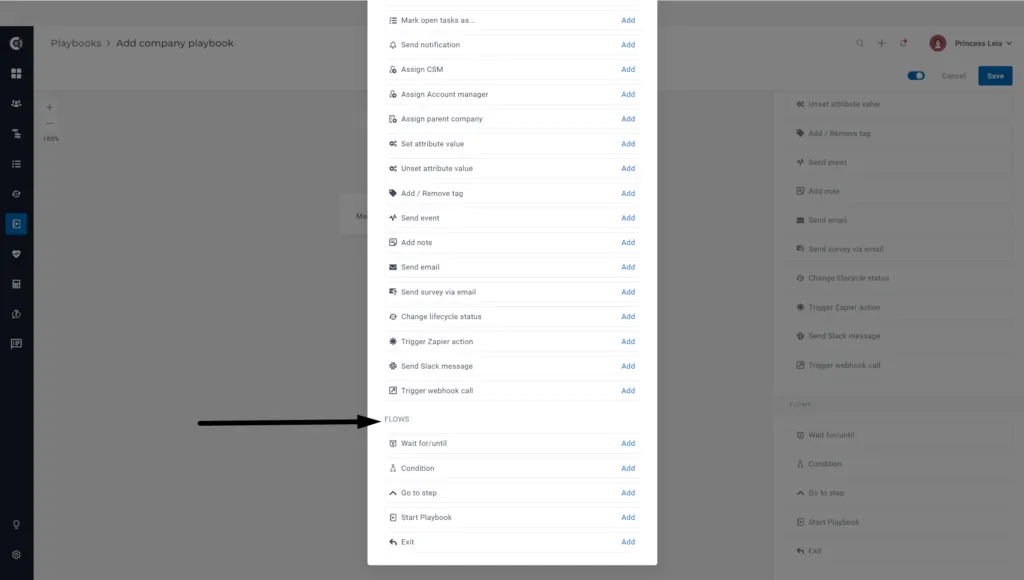
We’ve developed a set of actions to help you create Playbooks with multiple branches. Go to Playbooks > Add Playbook Step > Flow to discover them:
- Go to step | can be used to allow repetitive structures (with a max number of runs)
- Start Playbook |can be used to trigger another Playbook (as long as the Playbook is not a scheduled one)
- Exit | can be used as an exit trigger on a specific branch
Playbooks | Statistics
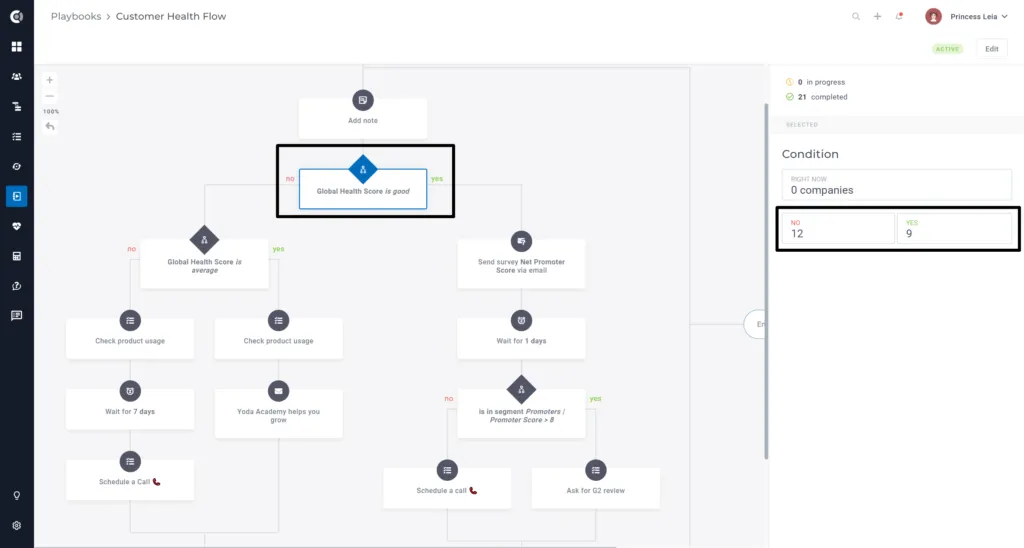
When you define playbooks with branches, you can check how many companies have checked the condition and how many have not by clicking on the condition step (in view mode).
API endpoints | New endpoint for Tasks
Create, update and list tasks on Companies using API requests. More details here.
Customer 360° Profile | Activity tab
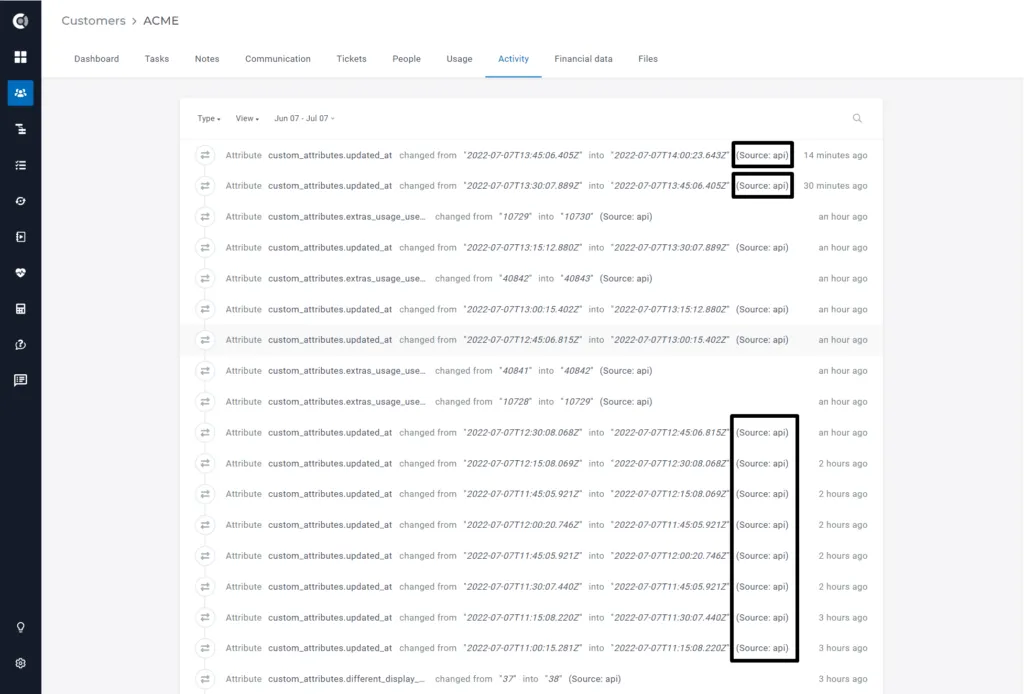
Not sure how an attribute got a certain value? We have prepared for you an advanced audit enhancement that shows the source of an attribute change in the Activity timeline: API, manual, which integration, or which playbook.
Customer 360° Profile | Clickable email and phone number
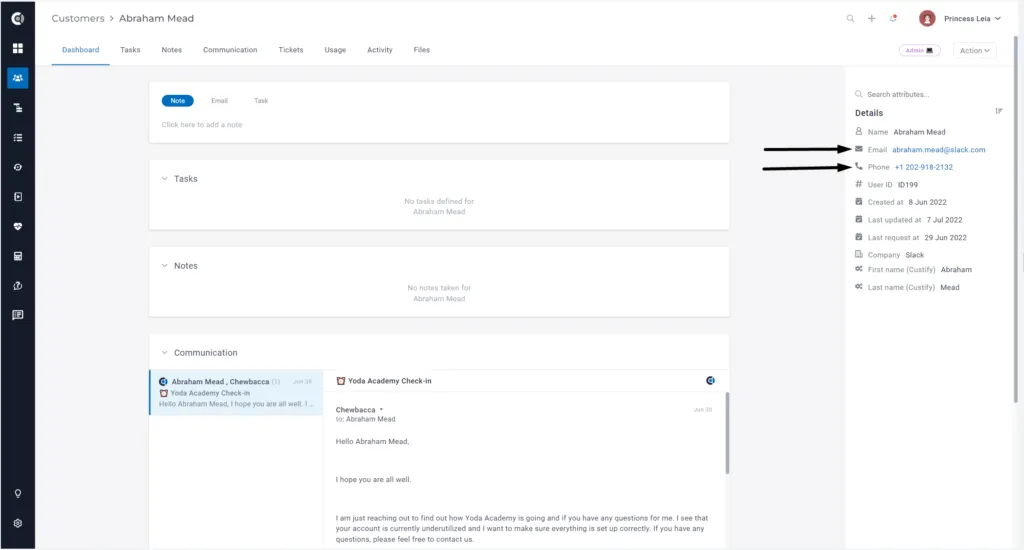
You can make a call or send an email faster by clicking on a person’s email address or phone number. Both are linked to your favorite email/phone app.
This summer release brings many quality of life improvements (bug fixes, performance enhancements, UI/UX improvements) such as:
- Improved UI/UX on the Add people/company screen
- Bug fix | When clicking on a notification 🔔 you will be redirected to that specific task/note.
- Ability to add checklists directly from the Task template
- Ability to have Health score group conditions (Good, Average, Bad) in segments
- Hubspot – Tickets – Statistics attributes based on the number of tickets
- Recurly – Currency attribute imported from Subscriptions