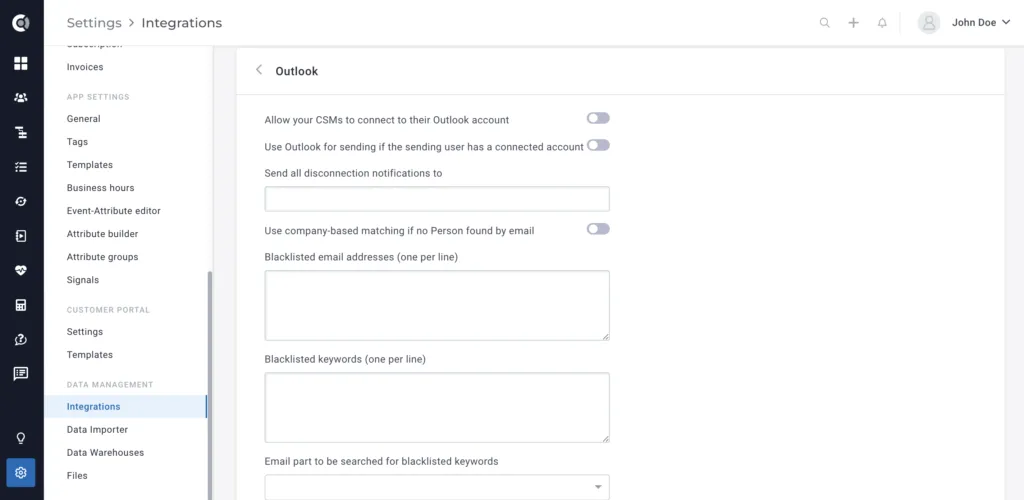
Outlook
3 min
Outlook is an email client that has been trusted by professionals for years. It has a refreshingly straightforward interface and tons of features to help you work efficiently with email, calendar, contacts, and tasks. Office integration lets you share attachments right from OneDrive, search and access contacts and view related LinkedIn profiles.
What can you do with Outlook in Custify:
- Email clients from Custify using Outlook
- On first connecting Outlook, the system checks the latest 10.000 messages (both received and sent) and will match those to their clients’ email addresses in Custify. Syncs are done every 30 to 45 minutes.
- Along with the last 10.000 emails, we’ll also bring the past and future meetings in Custify, from your Outlook Calendar
- For clients with matching email addresses, we display the full conversations in Custify within the “Communication” tab.
Activation
- Go to Settings – Integrations – Outlook, enable the option Allow your CSMs to connect to their Outlook account (this will trigger the import of Outlook emails to Custify) and Use Outlook for sending if the sending user has a connected account (this will also allow users to send emails from Custify through Outlook).
- Once activated, all the users need to sync their Outlook accounts within Custify (Settings > Profile Settings > My Account > External Accounts > Click Connect to Outlook button).
- Make sure you go to Settings > Internal communication domains > add any internal domain you’d want to be excluded from mapping.
- When a user gets disconnected from Outlook (due to password change, company policy, etc.), the user gets notified via email. However, you can also inform admins about users being disconnected by filling in the field Send all disconnection notifications to (enter here the email address that should also be notified. A fast reconnection of the Outlook account is critical, as it can affect the email import and sending.