Gmail
2 min
Gmail is a cloud-based email platform that allows individuals and businesses to send, receive, and organize their mails. Gmail currently has over 1.5 billion active users all over the world, making it the most popular email service provider, and is one of Google’s most popular products.
What can you do with Gmail in Custify:
- Email clients from Custify using Gmail
- On first connecting Gmail, the system checks the latest 10.000 messages (both received and sent) and will match those to their clients’ email addresses in Custify. Syncs are done every 30 to 45 minutes.
- Along with the last 10.000 emails, we’ll also bring the past and future meetings in Custify, from your Google Calendar
- For clients with matching email addresses, we display the full conversations in Custify within the “Communication” tab, while the meetings will be displayed in the “Meetings” tab.
Activation
- Go to Settings > Integrations > Add Integration. Check if Gmail is enabled for your account – if not, reach out to your CSM for activation.
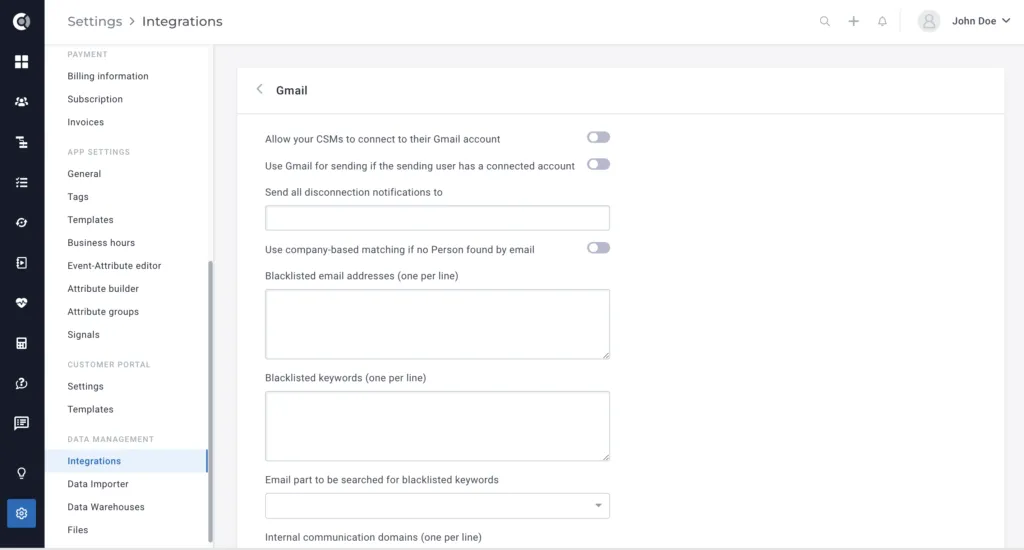
- Enable the option Allow your CSMs to connect to their Gmail account (this will trigger the import of Gmail emails to Custify) and Use Gmail for sending if the sending user has a connected account (this will also allow users to send emails from Custify through Gmail).
- Once activated, all the users need to sync their Gmail within Custify (Settings > Profile Settings > My Account > External Accounts > Click Connect to Gmail button).
- Make sure you go to Settings > Internal communication domains > add any internal domain you’d want to be excluded from mapping.
- When a user gets disconnected from Gmail (due to a password change, company policy, etc.), the user gets notified via email. However, you can also choose to notify admins about users being disconnected by filling in the field Send all disconnection notifications to (enter here the email address that should also be notified. A fast reconnection of the Gmail account is critical, as it can affect the email import and sending.