Product Updates | November 20th
CustifyAI – A Smarter, More Connected AI Experience for Customer Success
CustifyAI just levelled up.
This release introduces a new generation of AI agents that work together across your entire customer success workflow - interpreting conversations, highlighting risks, summarizing accounts, automatically generating filters and playbook conditions, and helping you craft better messages. Whether you're using Custify’s built-in AI or your own provider, you now get faster insights with far less manual digging.
For CSMs, that means text assistance in every editor, instant email analysis with risk scores, and one-click customer summaries before every QBR.
For all team members, it means a powerful Conversational UI that answers key customer questions on the spot - even directly from Slack.
Text assistance everywhere, conversational insights, risk detection, and a lot more.
👇🏼 Dive into the full article to see what’s new!
Text Assistant - AI in Every Text Editor
AI assistance is now built directly into text editors across Custify. When writing emails, notes, tasks, or even Customer Portal content, you can select any text and ask CustifyAI to improve, expand, summarize, or rewrite it based on your instructions, helping you communicate more effectively and save time on content creation.
You can ask AI to build the entire text from scratch, or you can highlight text and ask the AI to:
- Improve the tone or clarity
- Expand a short note into a structured summary
- Shorten a long message
- Rewrite a response in a more professional way
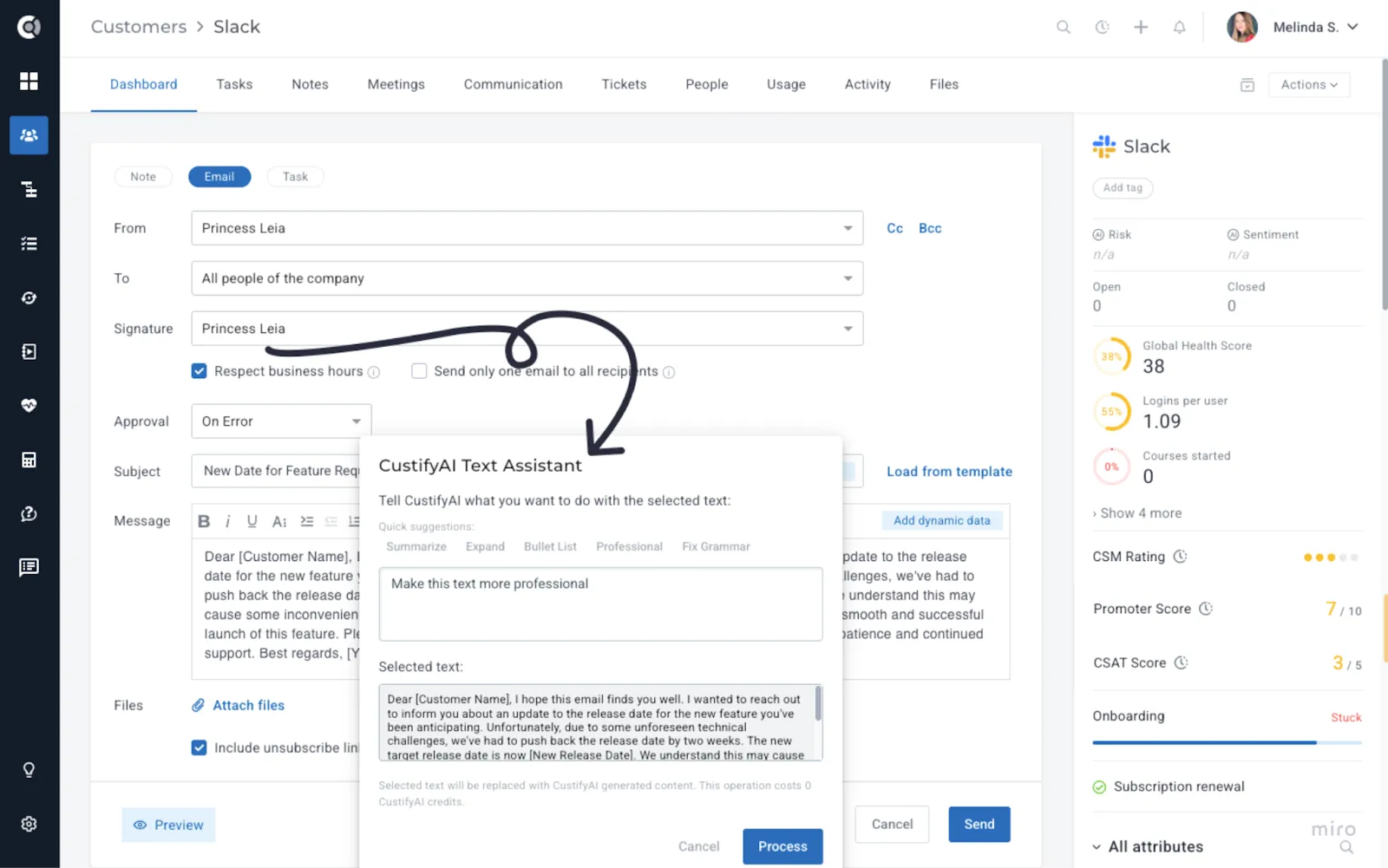
Use case idea: A CSM drafts a difficult email about a delay in a feature rollout. They write the key points in a rough style, then ask the Text Assistant to “make this more empathetic, clear, and professional.” The final message is easier to read and more aligned with the company’s tone of voice.
Conversational UI - “Ask CustifyAI” Everywhere
A new conversational interface lets you talk to Custify in plain language, instead of building every view or rule from scratch. It removes the need to search, filter, or piece together information manually - giving teams instant answers and helping them make faster, more informed decisions.
Ask Questions in Customer 360
Inside Customer 360, you can open an “Ask CustifyAI” panel and ask questions directly about the account:
- "Is this customer at risk?"
- “What changed since our last QBR?”
To start a conversation, simply go to the Company 360 Page - Actions - Ask CustifyAI.
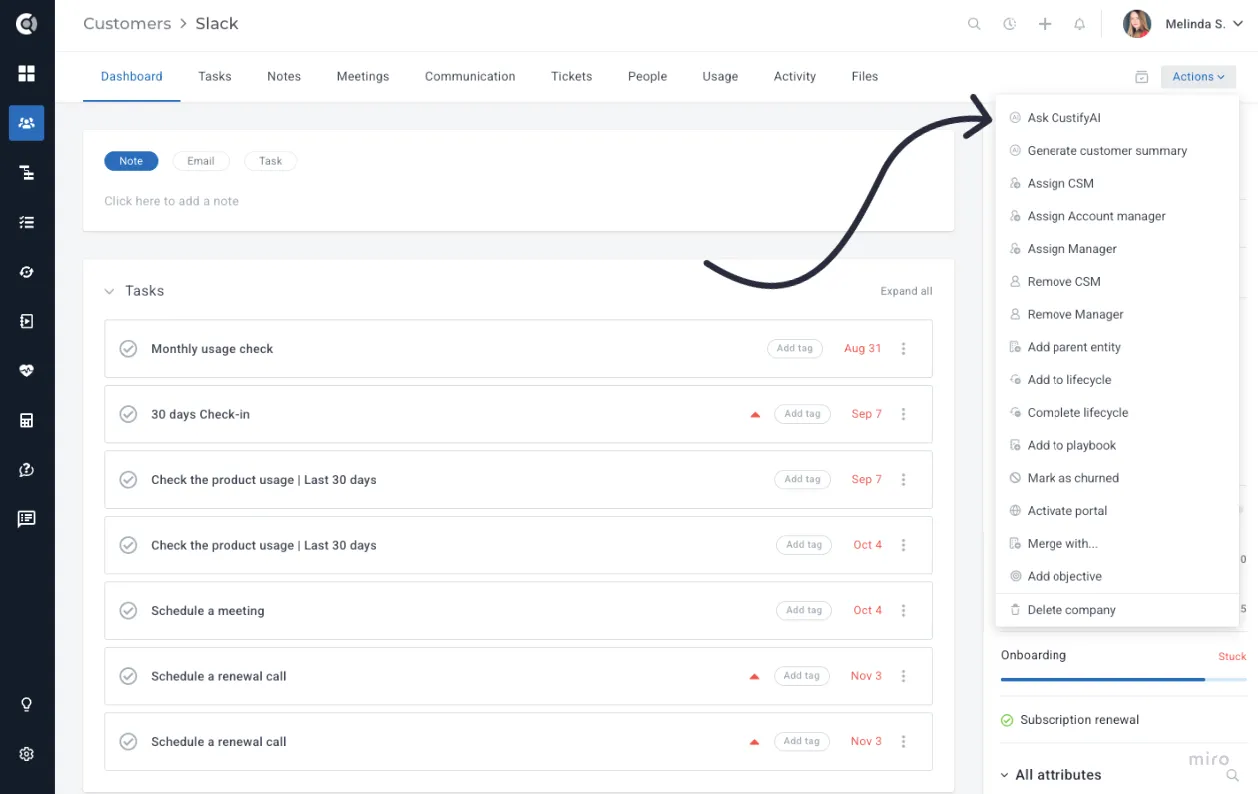
Ask a question, explore the response, and hit More Details to dive into the underlying data behind the answer.
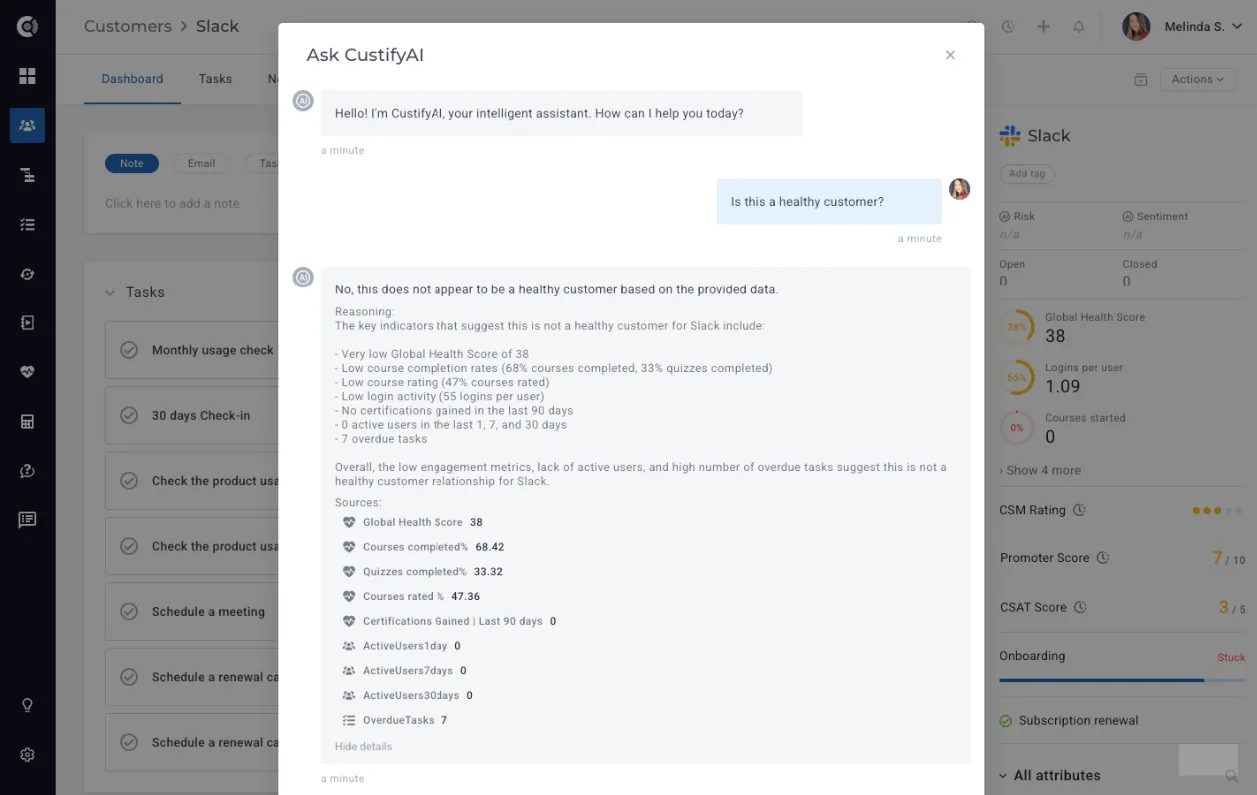
Instead of digging through attributes, notes, and health scores, CSMs and managers get a quick, AI-generated overview before each customer touchpoint or internal meeting.
Note! The results are based on company attributes, health scores, segments, past and upcoming meetings, subscription information, and company tags. The underlying data used may vary depending on how the question is formulated.
Enhanced Filtering in Companies List View
In the Companies list, you can use conversational queries to find the right segment of accounts. Go to the Companies List View - Add Filter - AI Filtering.
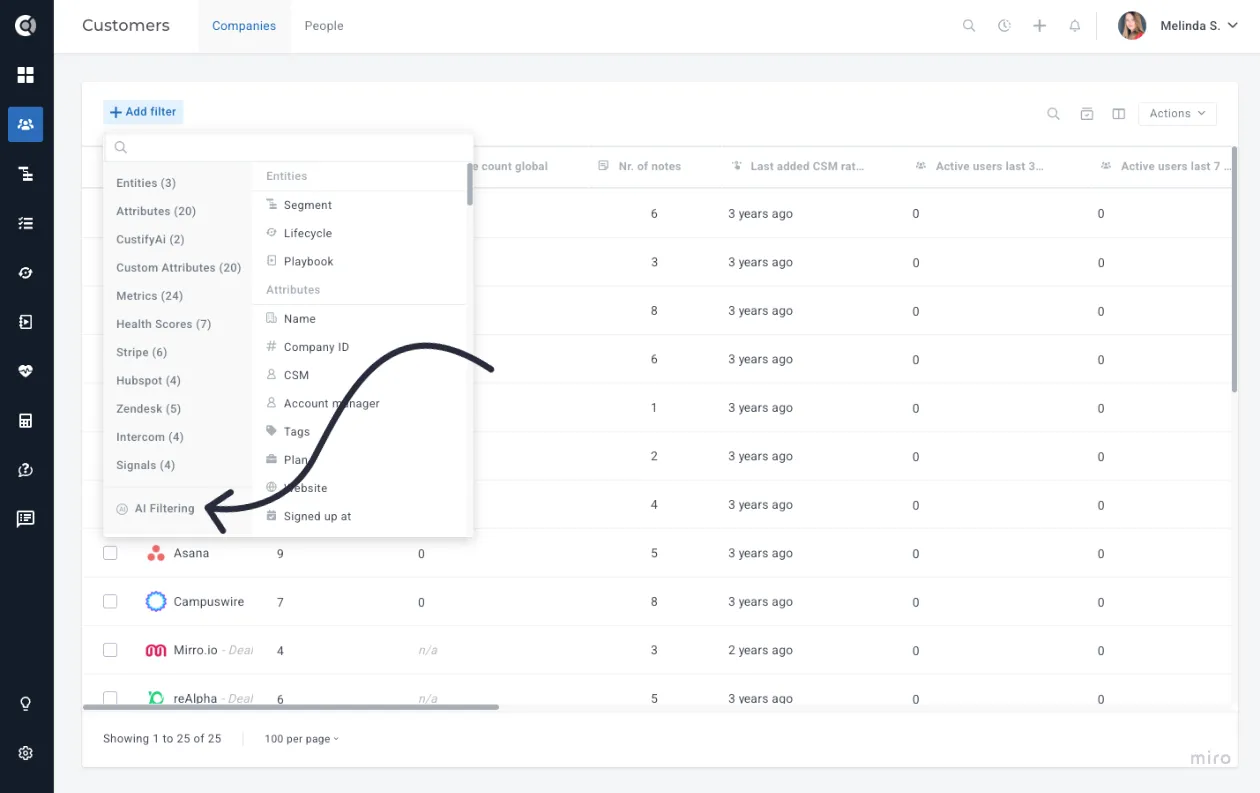
Queries like “Show me customers who haven’t logged in for 30 days” or “Show me accounts with high ARR and recent negative sentiment” will be automatically translated into filters, so users don’t have to remember every attribute or operator.
AI Filtering Configuration
You can control which attributes CustifyAI uses when interpreting data for AI-based filtering. Beyond leveraging Health Scores, default data points, and key metrics, you can define exactly which attributes the AI should consider and how they should be used.
To manage these settings, go to Settings - Event & Attribute Editor and select the attributes you want to include or exclude for the AI Filtering described above.
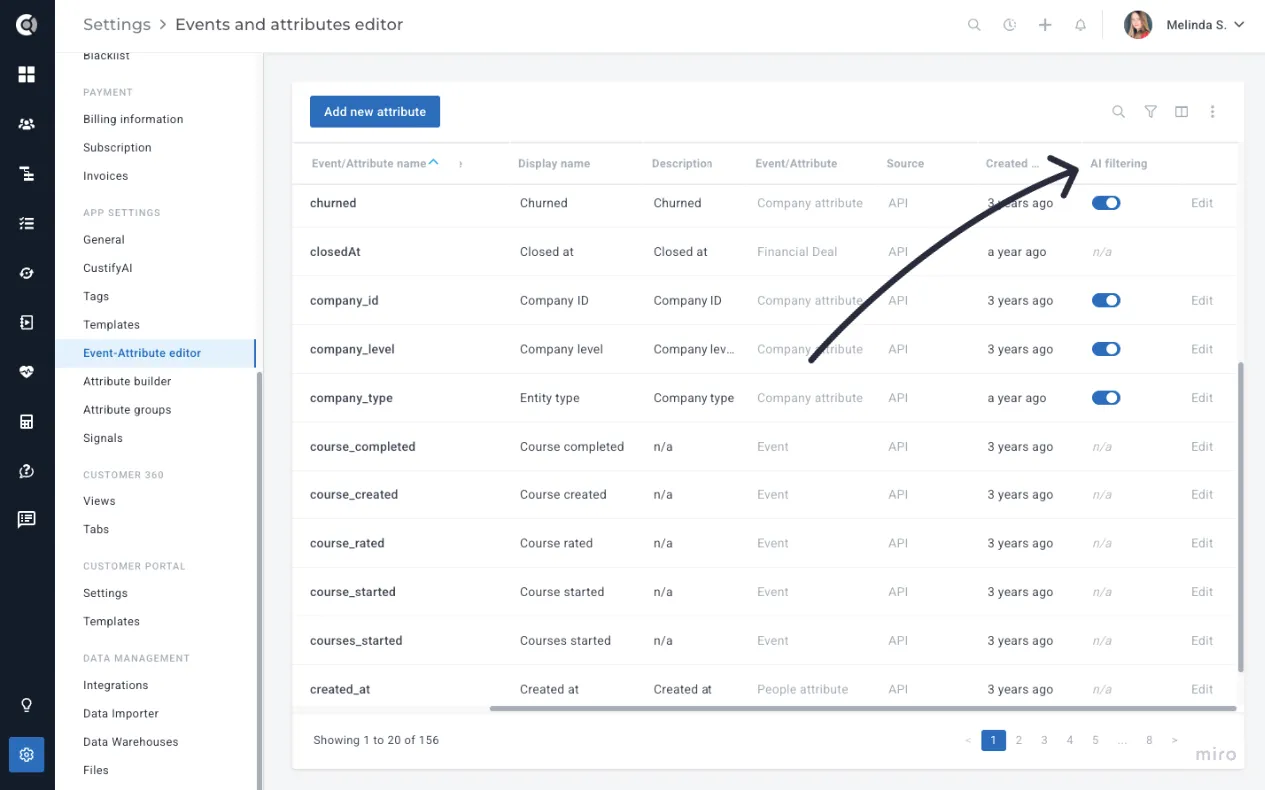
By clicking the Edit button next to any attribute, you can define its AI Context (providing additional details about the attribute’s purpose) and configure its Query Patterns, such as synonyms, related terms, example phrases, and usage notes. This helps CustifyAI better understand how the attribute should be interpreted during filtering and natural-language queries.
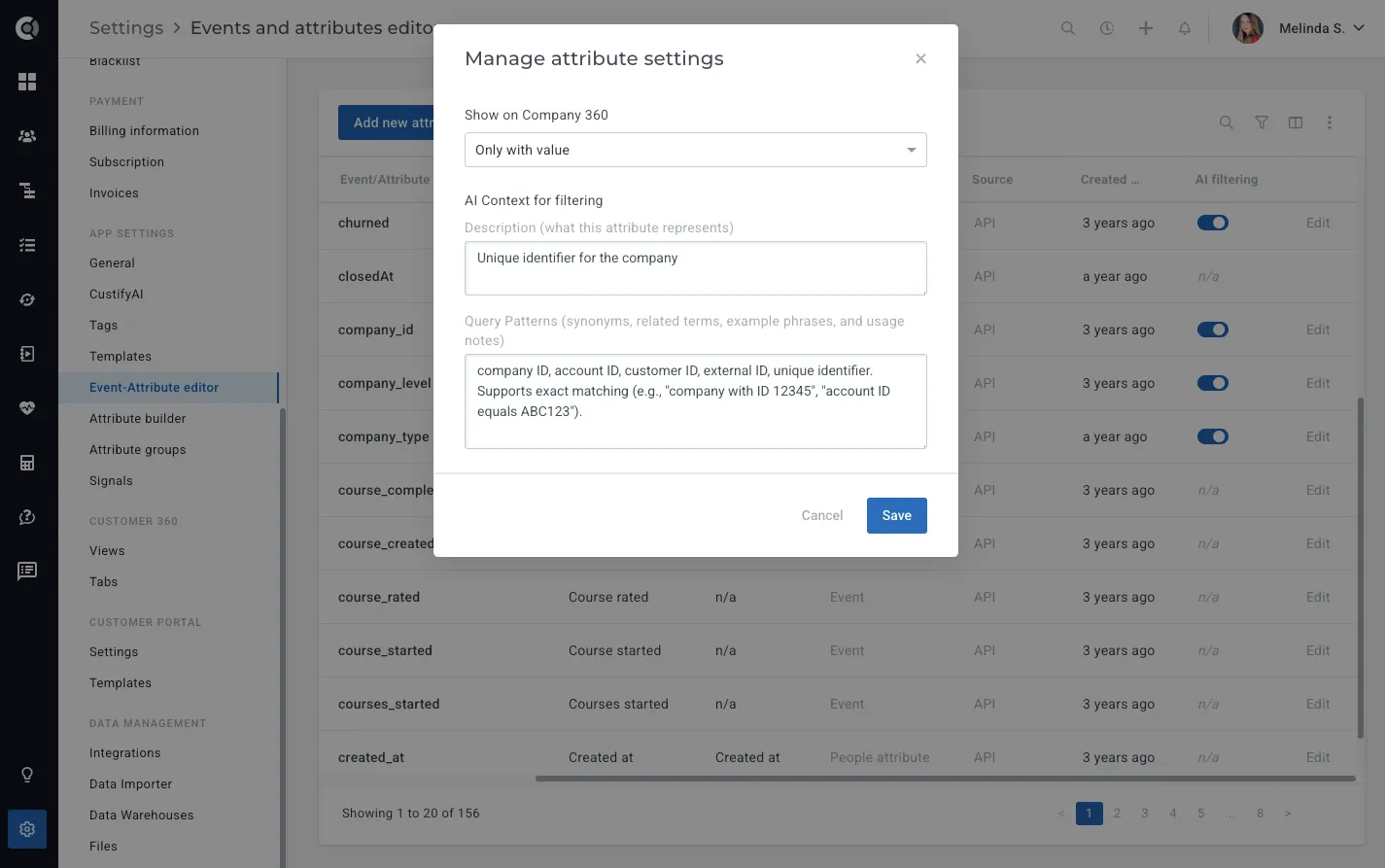
This ensures the AI works with the right information, reduces noise, and helps prevent confusion or inaccurate results.
Observation! CustifyAI will still interpret many default and financial attributes without added context, but defining context ensures the highest accuracy and the most reliable results.
AI Filtering context is available only for company-level attributes - it does not apply to people attributes or events.
The AI Filtering results are based on company attributes, tags, Health Scores, and different metrics.
CustifyAI Conditions in Playbooks
Company Playbooks can now include AI-based conditions that interpret unstructured data. Instead of a complex rule builder, you can ask a question like:
- “Has the customer mentioned budget concerns?"
- “Is the customer actively using the mobile app?”
- “Has anyone complained about onboarding recently?"
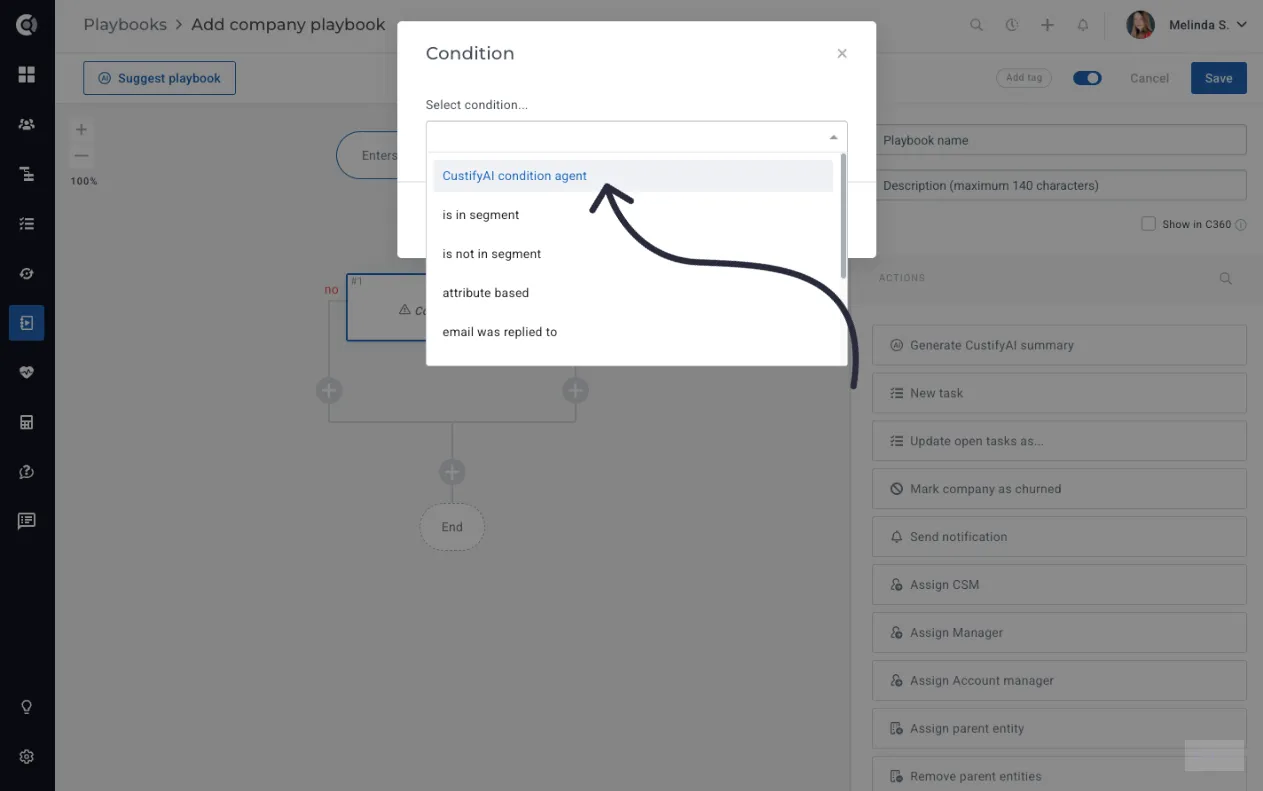
The CustifyAI will interpret attributes, health scores, segments, notes, past and future meetings details, subscription information and company tags to return a yes/no-style answer that the playbook can use for the branches. If the CustifyAI isn’t confident, you can define what happens next (continue on a default path, or choose a fallback branch), so automations remain predictable.
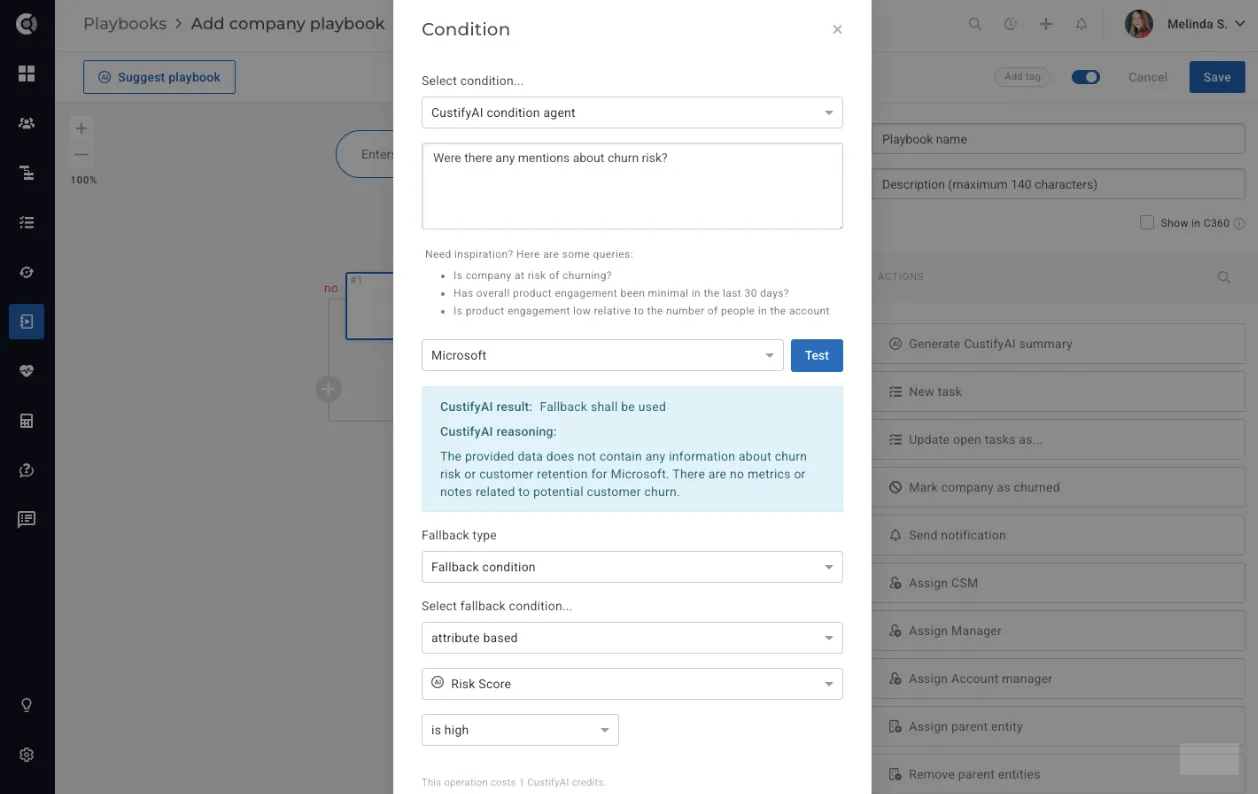
After entering your question, you can run a test on companies where you already know the expected outcome. This allows you to verify how the playbook condition behaves before enabling it in a live flow. Once the test succeeds, you’ll also need to configure a fallback option - either Default to No, Default to Yes, or Fallback Condition, which lets you define a more complex condition for the automation. Setting a fallback is essential, as there may be situations where the AI does not have enough data to return a confident answer.
Slack Integration
For teams using the Slack integration, Custify’s Conversational UI can be accessed directly from your Slack channels. CSMs can ask questions about a customer or segment during internal discussions and get instant answers - without switching back to Custify.
To enable the Slack CustifyAI Bot, ensure the Slack integration is active in Settings - Integrations - Slack, and add the CustifyAI bot to the channel where you want the responses to appear.
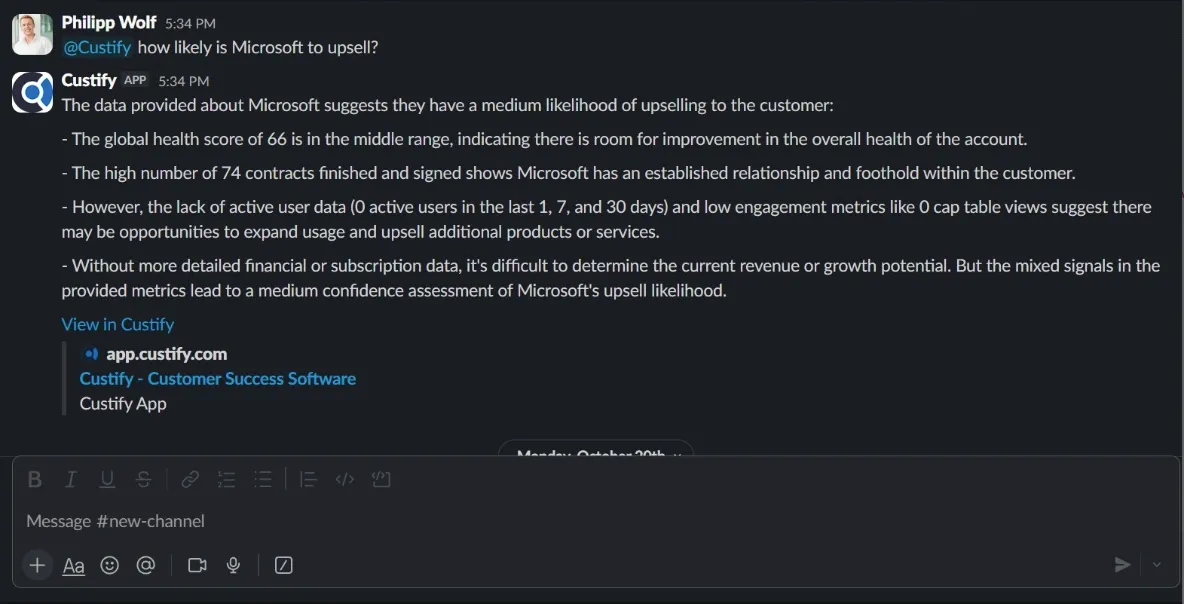
Note! Each query consumes 1 CustifyAI Credit.
Use case idea: Before a renewal meeting, you ask CustifyAI: “Give me a quick summary of this customer, key risks, and any open issues that might impact renewal.” In under a minute, you have a concise briefing that you can use as preparation for the call.
Conversation Analysis – Sentiment & Risk Scores Extracted from Customer Conversations
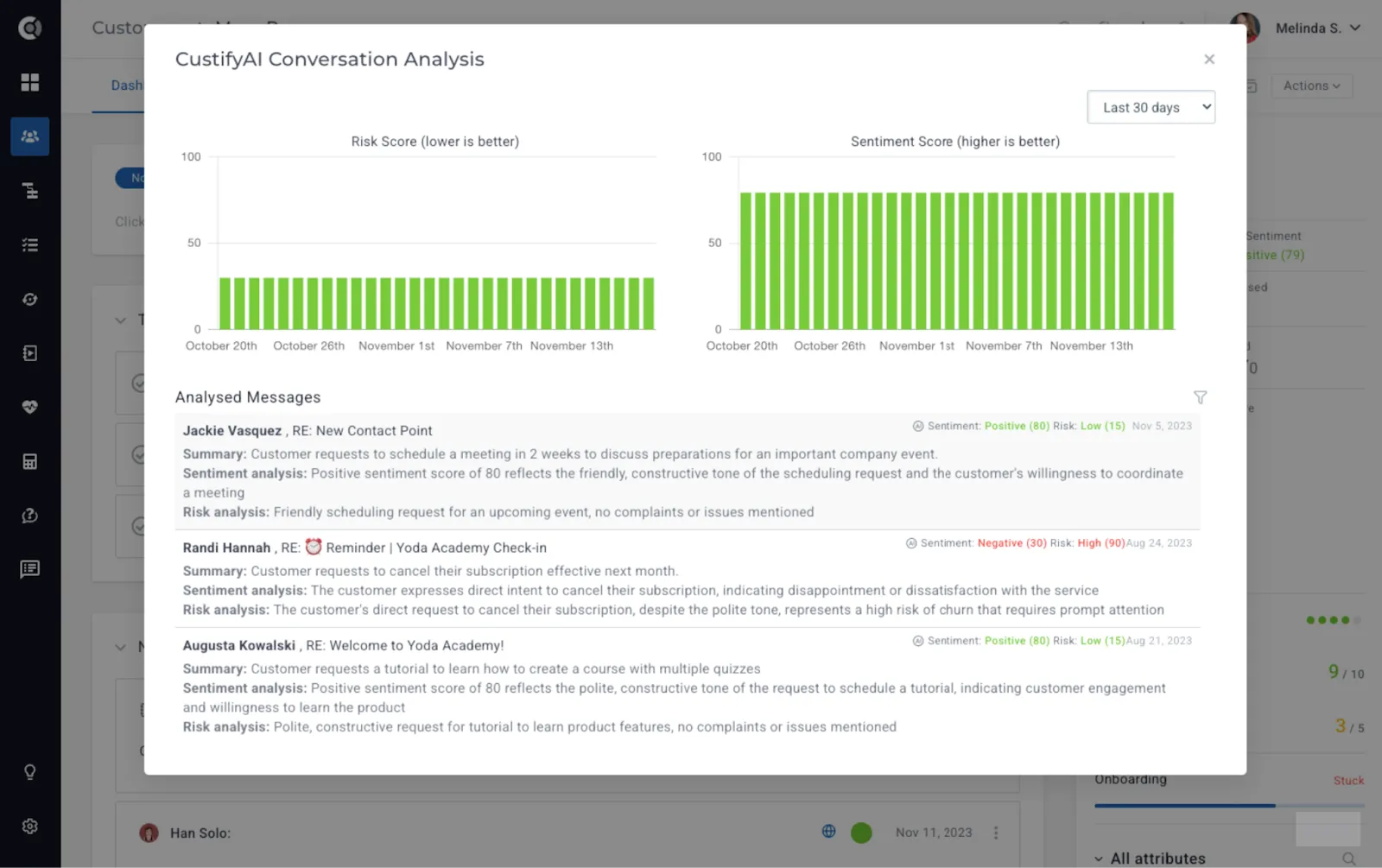
Conversation Analysis brings fully automated sentiment and risk scoring directly into Custify, helping teams understand customer tone, urgency, and emerging issues without manually reading through every email.
The system evaluates each message individually, rolls insights up to the conversation level, and then produces customer-level scores that update continuously as new conversations occur.
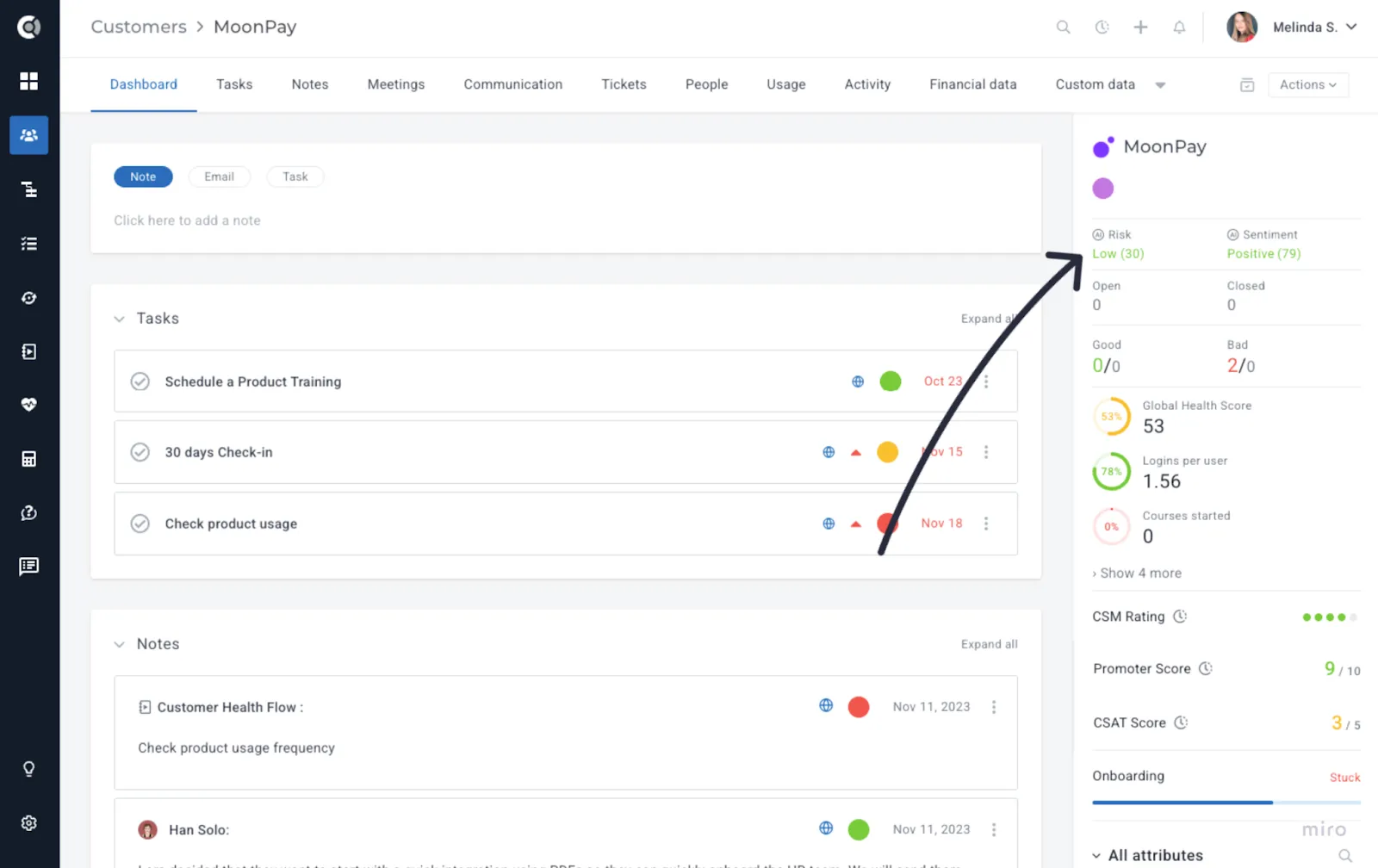
Sentiment indicates how happy or unhappy a customer sounds - it reflects the tone in which a message is written.
Risk, on the other hand, highlights whether anything in the message could jeopardize the relationship - it focuses on the actual content of the message.
For example, a customer might sound calm (neutral sentiment) but mention a blocker that stops them from using your product (high risk).
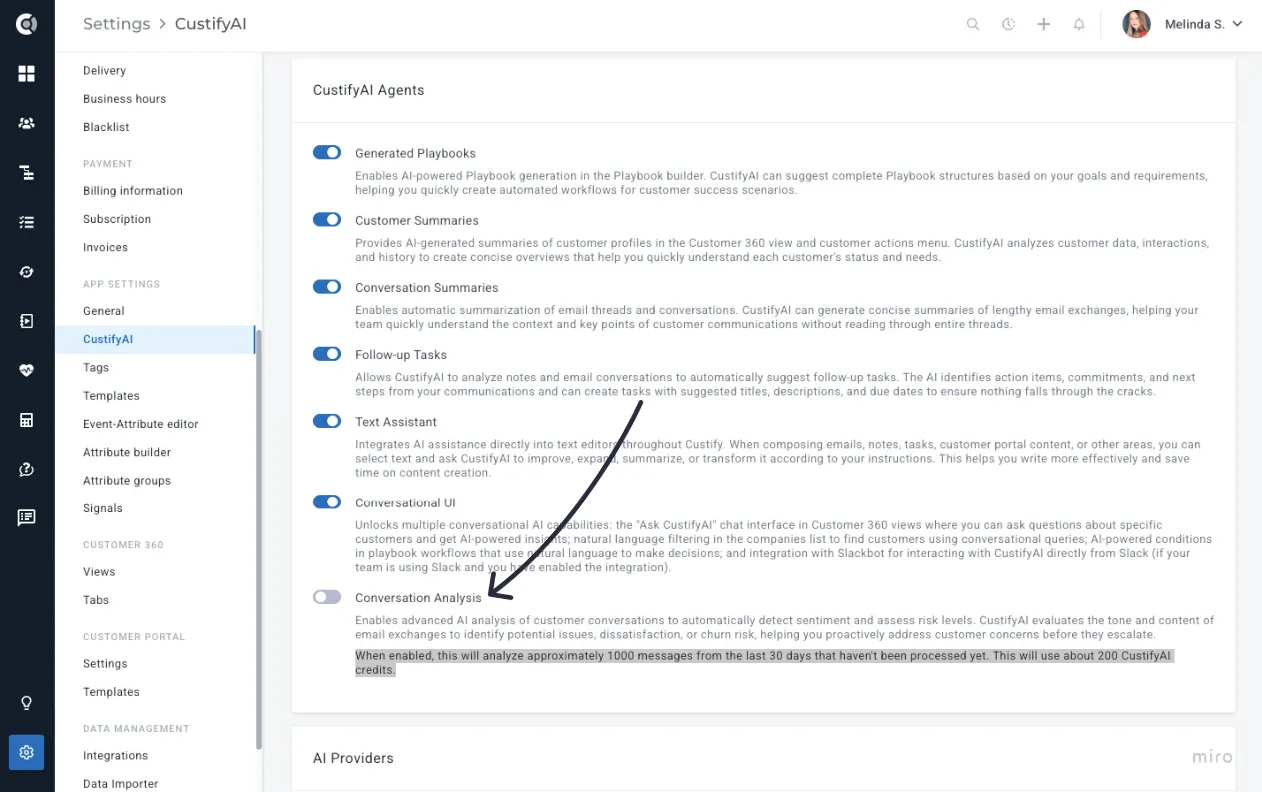
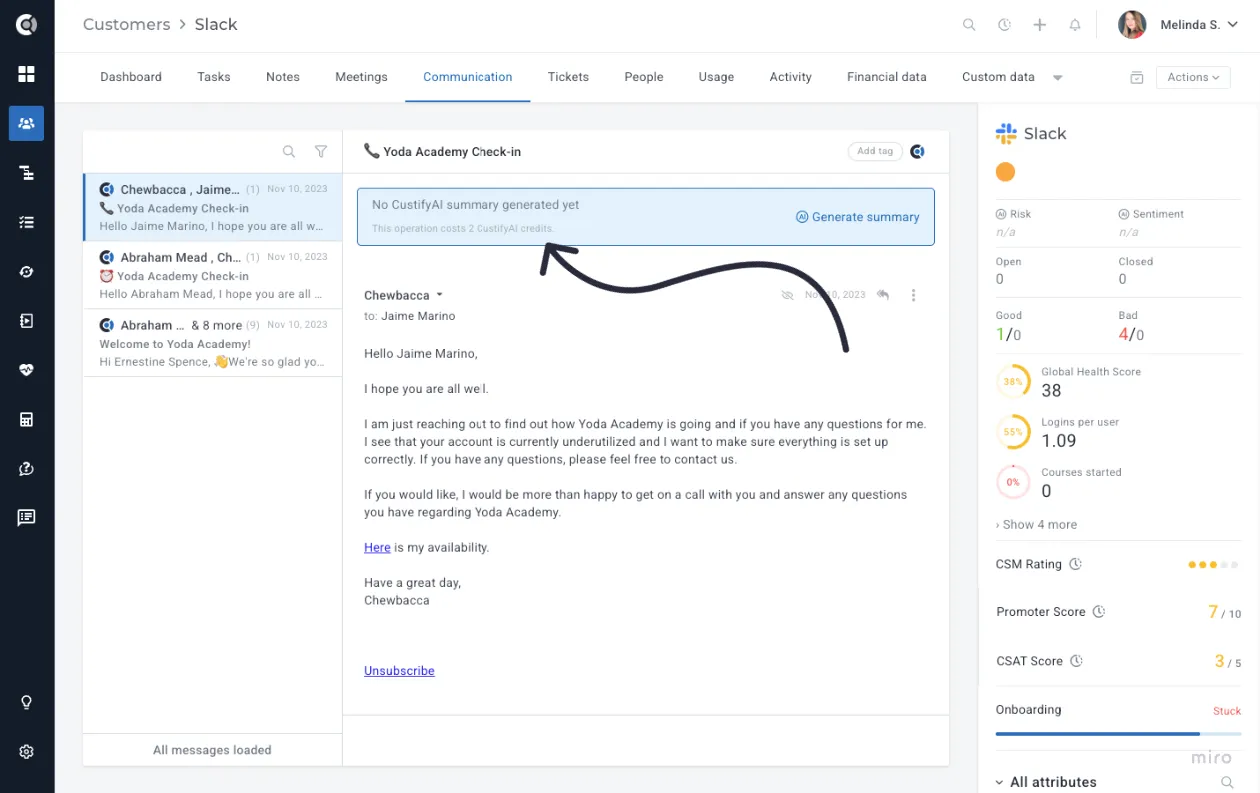
Important Note! The Conversation Analysis Agent is disabled by default for each account and must be manually enabled (otherwise, the scores in the screenshot above will not be available).
Once activated, the agent automatically analyses all incoming messages from the past 30 days to generate reliable Sentiment and Risk scores. Credit usage depends on the volume of messages processed - approximately 1,000 emails require 200 credits - and the credits are automatically consumed when the feature is enabled. The total number of messages and the corresponding credits are calculated automatically, as shown below.
How the scoring works
Conversation Analysis calculates sentiment and risk using a three-level structure:
- Message Level
Each email is analysed independently and receives its own sentiment score (0–100) and risk score (0–100).
- Conversation Level
All messages within a conversation are combined into a weighted score that reflects what matters most:
- Recent messages matter more - yesterday’s message influences the score more than one from a month ago.
- Longer messages matter more - detailed emails weigh more than short replies.
- Extreme sentiments matter more - very positive or very negative tones shift the score more strongly than neutral ones.
- Negative sentiment gets extra weight - negative messages count 20% more because they signal potential dissatisfaction.
- High-risk signals get exponential weight - critical risk messages can outweigh large volumes of neutral communication (15× for critical, 6× for high, 2.5× for medium).
- Customer Level
Conversation scores then roll up into customer-level sentiment and risk scores using the same intelligent weighting:
- Recent conversations influence the score more than older ones.
- Conversations with more messages carry more weight.
- Scores update automatically as new conversations arrive, giving you a living, dynamic view of customer health.
Conversation Analysis prioritizes recent, detailed, emotionally strong, and high-risk signals, and teams get accurate and actionable insights instead of averages that hide important context. A single concerning message from yesterday will not be buried under a month of neutral communication. The same logic is applied consistently across message, conversation, and customer levels, giving you predictable and trustworthy results.
CustifyAI Scores across Custify
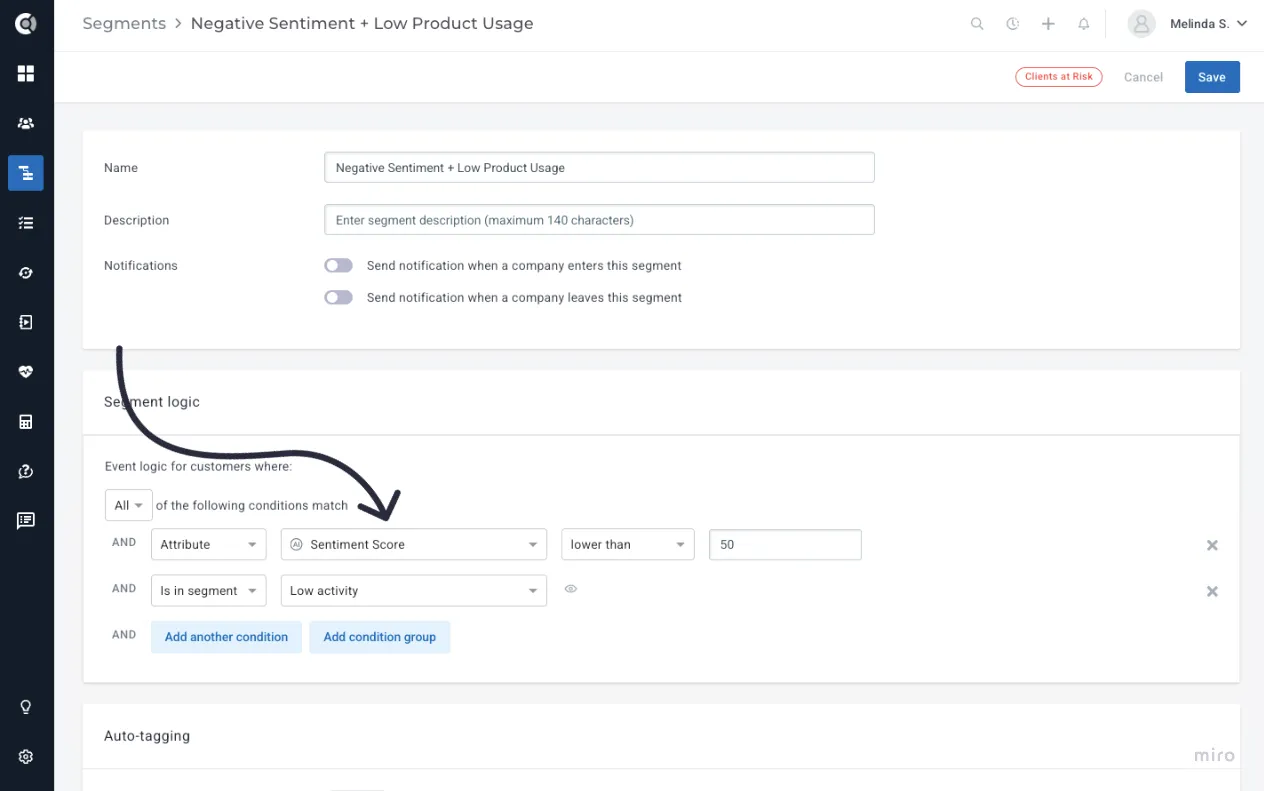
Sentiment and Risk scores now function as company-level attributes throughout the platform. This means you can filter, segment, sort, and automate using these scores anywhere you use customer data in Custify.
They can be used to:
- Filter customer lists by Sentiment or Risk.
- Build segments combining AI scores with revenue, usage, Health Score, or lifecycle data.
- Trigger playbooks based on Sentiment or Risk thresholds.
- Add these insights to dashboards, reports, and Calculated Metrics.
Common use cases:
- Create views such as “Customers with increasing risk in the last 7 days.”
- Build segments like “Detractors with high ARR” or “Negative sentiment + low product usage.”
- Trigger playbooks when Sentiment drops or Risk crosses a certain threshold.
- Monitor sentiment and risk trends across portfolios, lifecycle stages, or revenue tiers.
- Review the top messages influencing the score to understand what changed and why.
Customer Summaries – Custom Templates
The Customer Summaries agent now supports fully customizable templates, allowing different teams to generate summaries tailored to their specific needs. You can create multiple templates, define the chapters that make up each one, and choose from a set of built-in chapter types such as Summary, Health, Key Insights, or Potential Risks.
To help teams get started quickly, Custify includes four pre-built templates:
- General Customer Summary, a detailed, all-purpose overview
- Executive Brief, a short and high-level snapshot for leadership
- CSM Manager Review, focused on account management and team performance
- Revenue Snapshot, centered around renewal, expansion, and commercial health
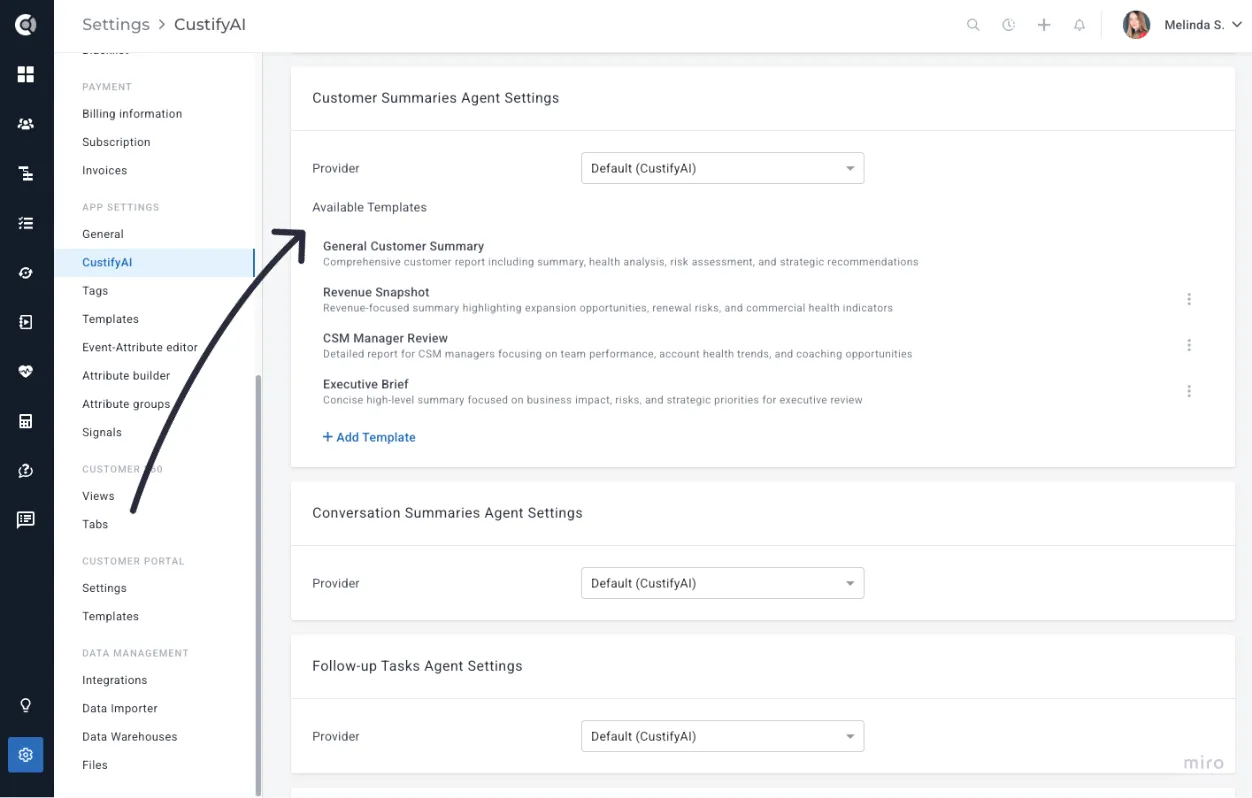
These templates offer immediate value while still giving you the flexibility to create your own.
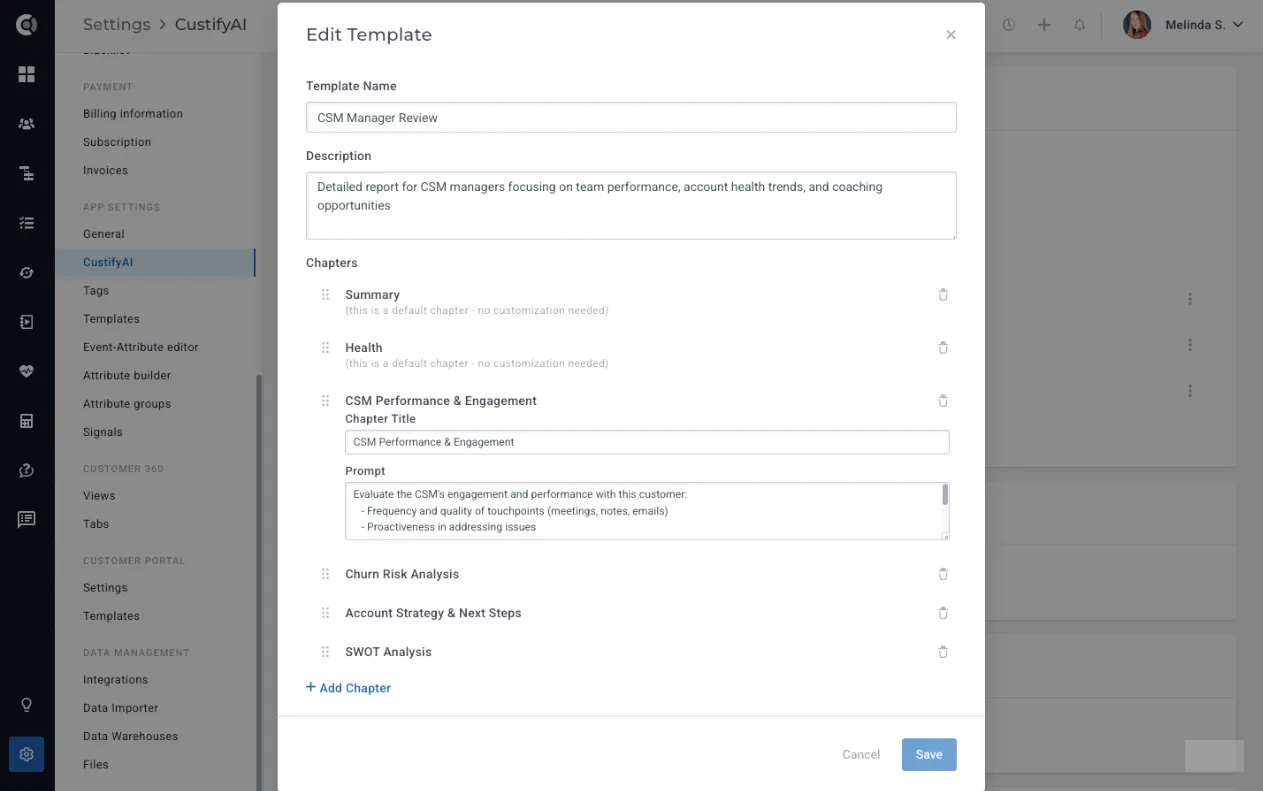
You can also add your own custom templates/chapters with custom prompts, giving you complete control over the structure and level of detail.
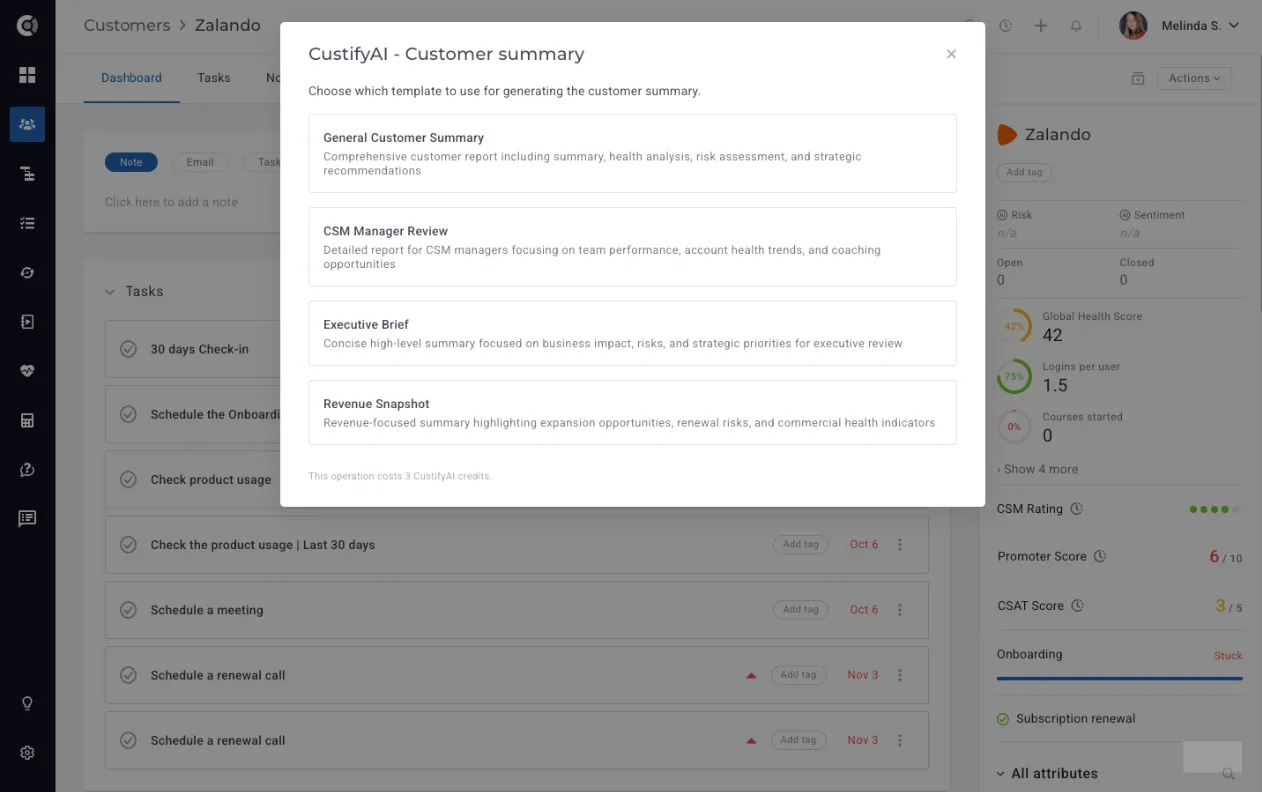
When generating a summary, simply select the template you want to use, and CustifyAI will produce a version aligned with that format.
Playbooks - CustifyAI Summaries Saved as Notes
Playbooks can now automatically generate AI-powered customer summaries and save them as notes on the customer record.
When configuring a playbook, you can add a Generate CustifyAI Summary step.
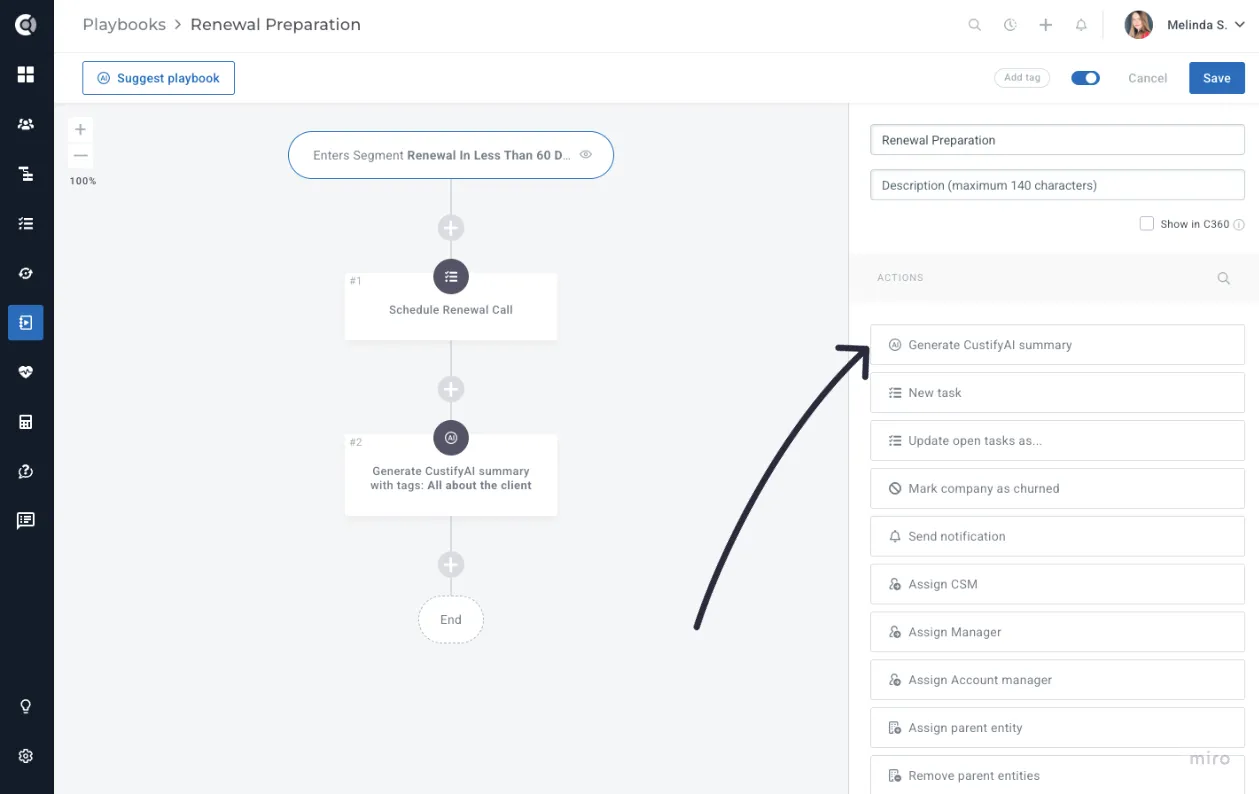
Select the template you want to use, and let CustifyAI create and attach the summary directly to the account.
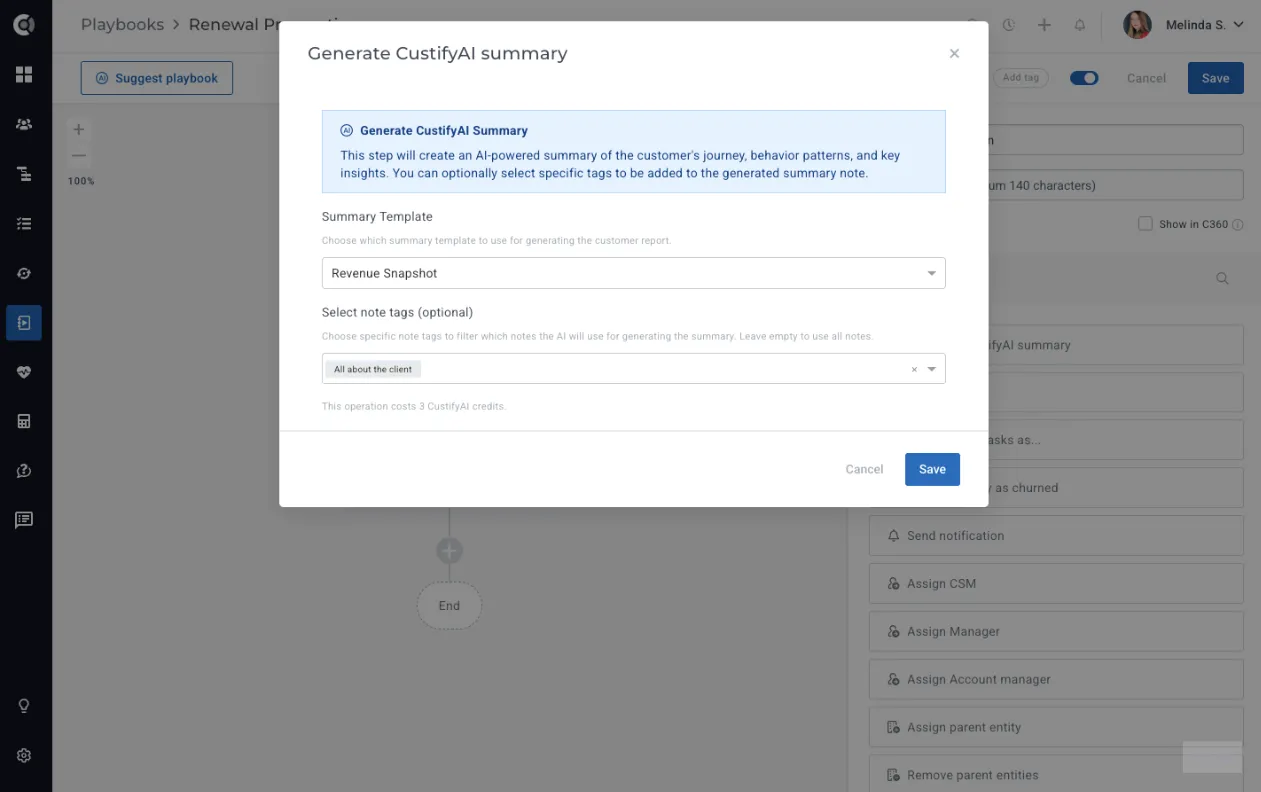
This capability is ideal for recurring cadences and periodic reviews, ensuring teams always have up-to-date, consistent context without needing to generate summaries manually. The playbook fully automates the summary creation and posting process, so teams simply review the information and use it in their customer calls.
Important Note! This action consumes 3 credits per summary generated. Before creating an automation that would post it for multiple companies, check your available credits and align with your CSM to ensure you have sufficient CustifyAI credits.
CustifyAI Settings
All CustifyAI configuration is now centralized under Settings - CustifyAI, giving you a single place to manage every AI-related capability.
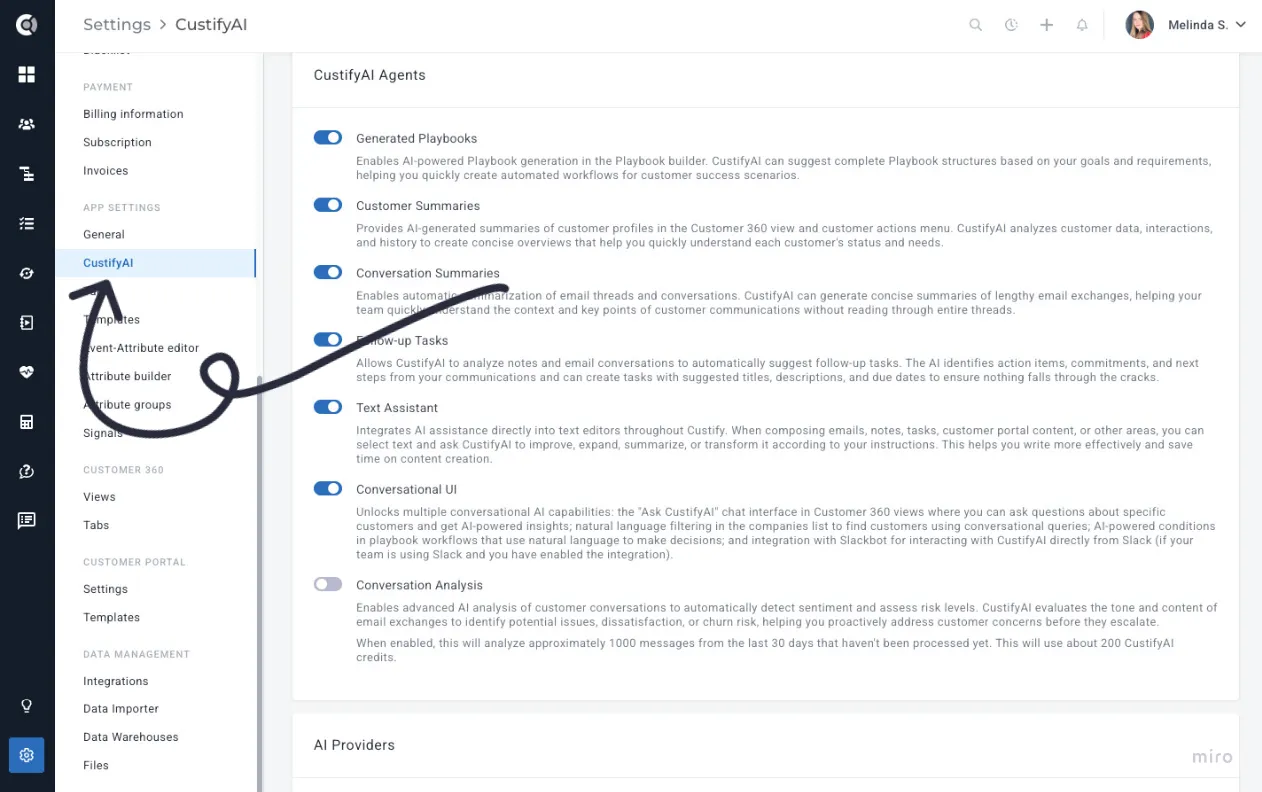
From this page, you can enable or disable individual AI agents, choose which AI provider each agent should use, set default providers, and fine-tune each agent’s behavior to match your team’s workflows. This unified configuration area makes it easy to control how CustifyAI operates across your entire Custify environment.
The default behavior for the new CustifyAI agents is as follows:
- At release, the Text Assistant and Conversational UI agents will inherit the settings of the Customer Summaries agent. If Customer Summaries was previously enabled for your account, these agents will be automatically enabled as well. Each agent can still be managed individually - for example, you can disable Summaries while keeping the Text Assistant active.
- The Conversation Analysis agent is disabled by default and must be manually enabled after acknowledging its higher credit consumption. Once activated, it automatically analyzes all incoming messages from the past 30 days to generate reliable Sentiment and Risk scores. Credit usage depends on the volume of messages processed - approximately 1,000 emails require about 200 credits.
CustifyAI Credits - Credits Consumption and History
With the rollout of the new CustifyAI agents, we’re introducing a credit-based system. This allows us to keep CustifyAI affordable, support automation, and cover the costs associated with the underlying AI provider. Additional information on how we handle AI and your data is available here.
You can choose whether your CustifyAI agents run on CustifyAI’s built-in provider or on your own (details are provided in the section below).
For customers using the CustifyAI provider, credit usage is made highly transparent across the platform.
- Every CustifyAI feature clearly shows the number of credits it consumes directly within the feature window. The only exception is Create Follow-up Tasks, which consumes 1 credit per run and doesn’t show credit usage in the UI due to being a single-click action.
- In the Settings - Subscription page, you can see how many remaining credits you have, you can Buy Credits, or View History of the credits.
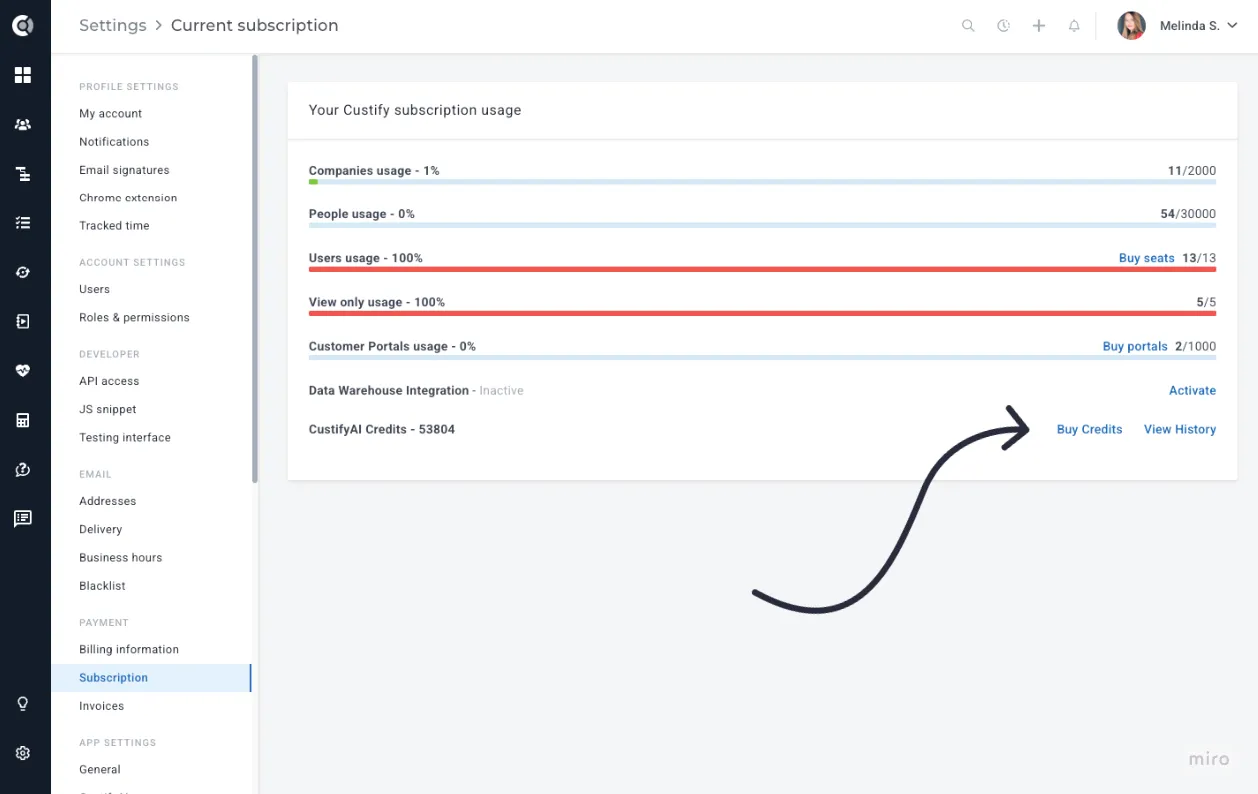
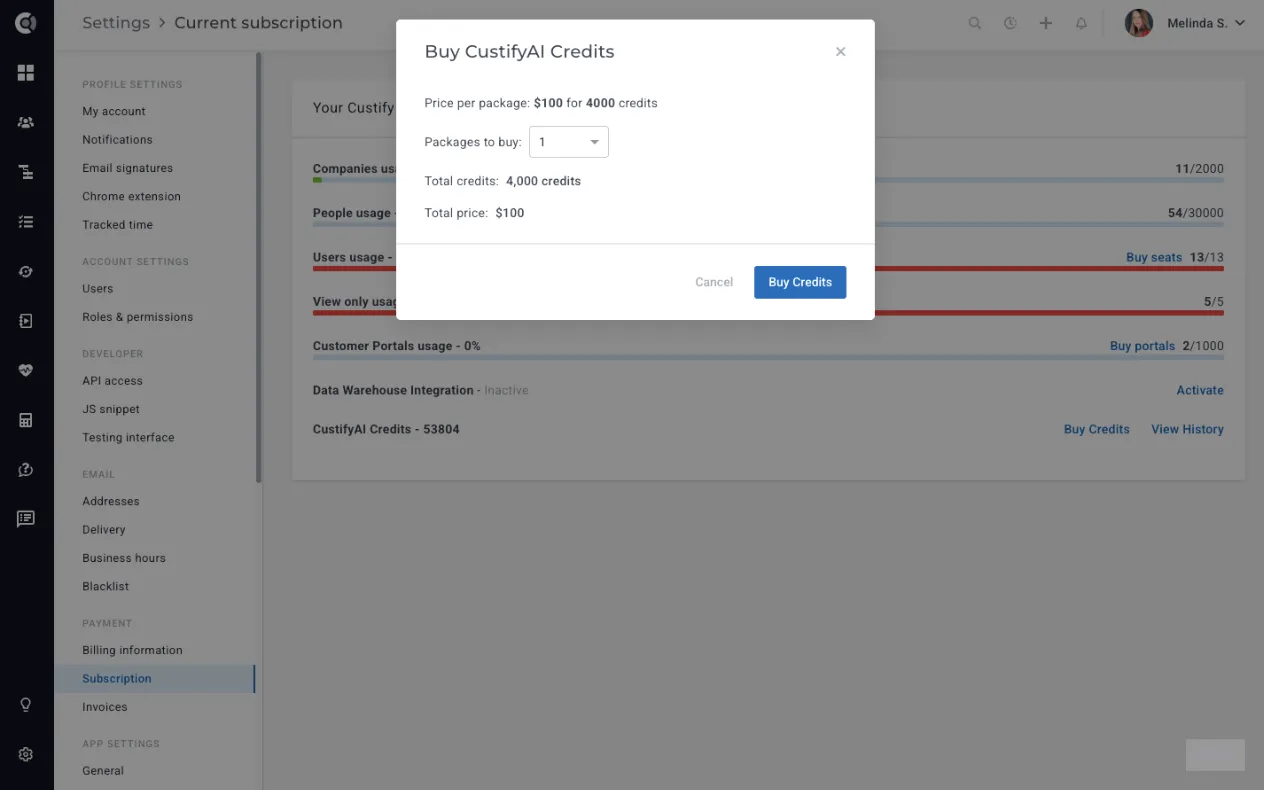
Each account includes a standard package of credits at no additional cost. When you run out, you can simply go to Buy Credits and purchase more as needed. A package of 4,000 credits costs $100, providing flexibility to use CustifyAI at a minimal cost.
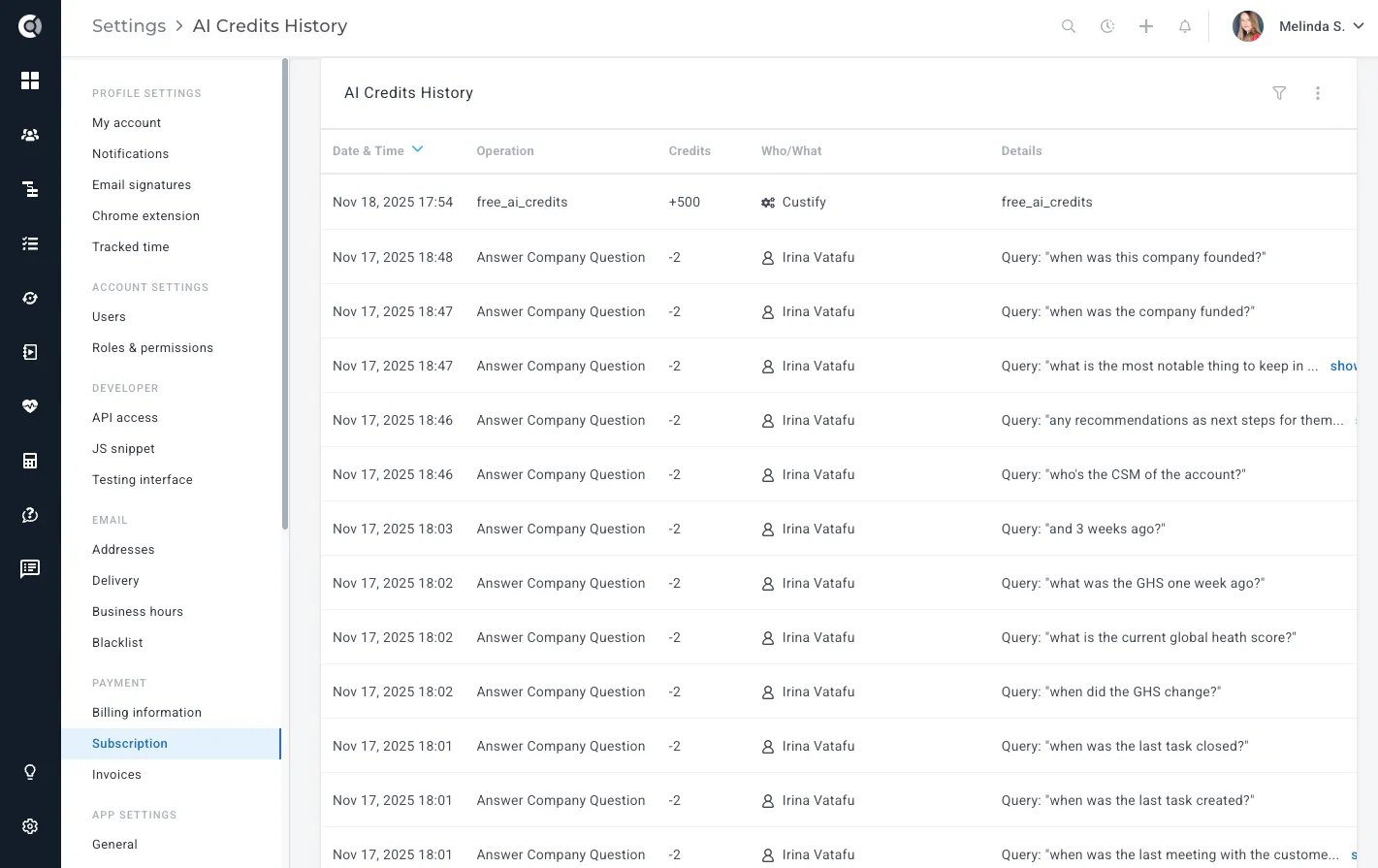
Under View History, you will see who triggered each AI action, which AI agent was used, how many credits were spent, and the usage over time, with the option to export it to .csv files.
Important Note: When you use your own custom AI providers (OpenAI, Anthropic, etc.), usage and billing are handled by those providers and do not consume CustifyAI credits.
Bring Your Own AI Provider
You now have full flexibility in how you use AI within Custify. You can choose between Custify’s built-in AI provider - which uses a simple credit-based cost model - or your own custom AI providers like OpenAI or Anthropic, which incur no additional Custify charges and are billed directly through your existing AI subscriptions. This gives you the freedom to use the models you prefer, optimize costs, and meet any compliance or data-handling requirements your organization may have.
You can manage all providers in Settings - CustifyAI - AI Providers.
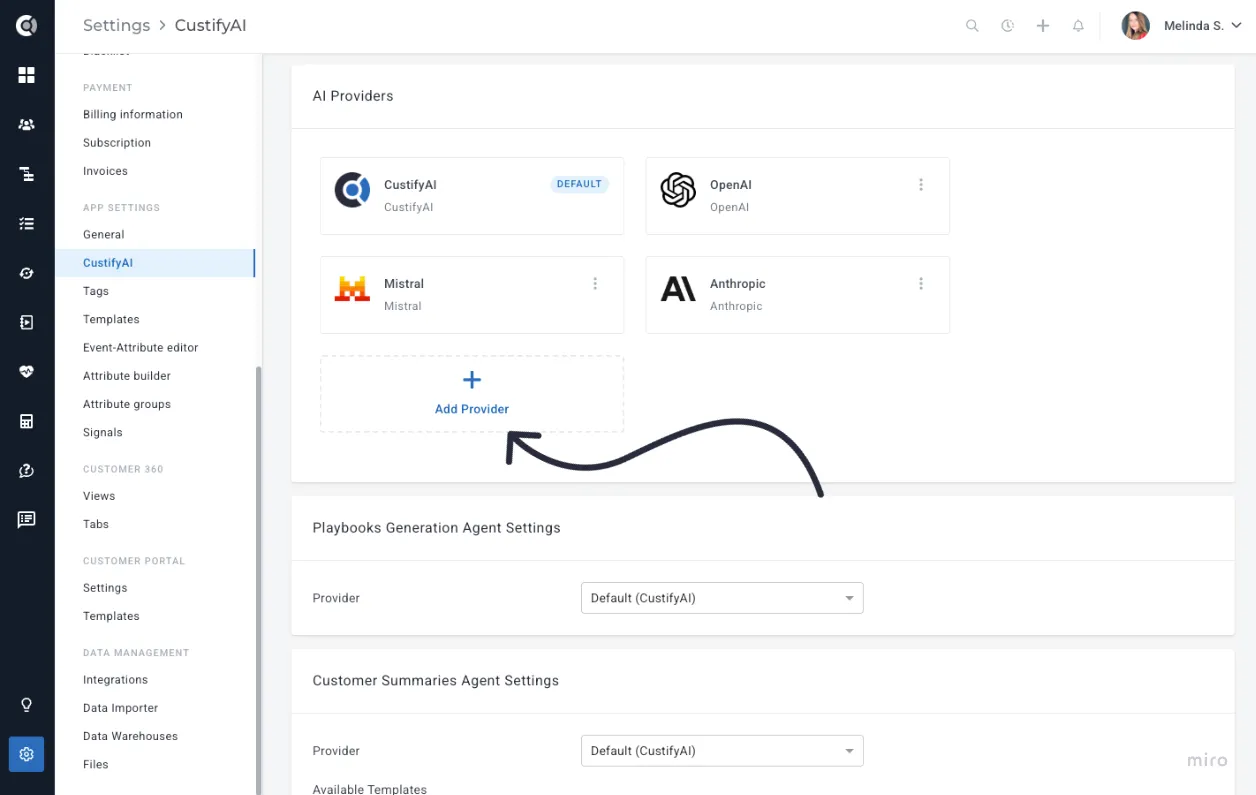
Select the provider, enter a name for the connection, add the API key (copied from the provider to establish the connection), specify the AI model (e.g., gpt-5.1), then Test & Save the connection.
Available AI Providers:
- OpenAI
- Anthropic
- Mistral
- OpenAI Compatible (meaning any provider designed to work with OpenAI’s APIs)
- OpenAI Azure
Each AI Agent has its own settings, and you can select the AI provider you want to use for each agent individually.
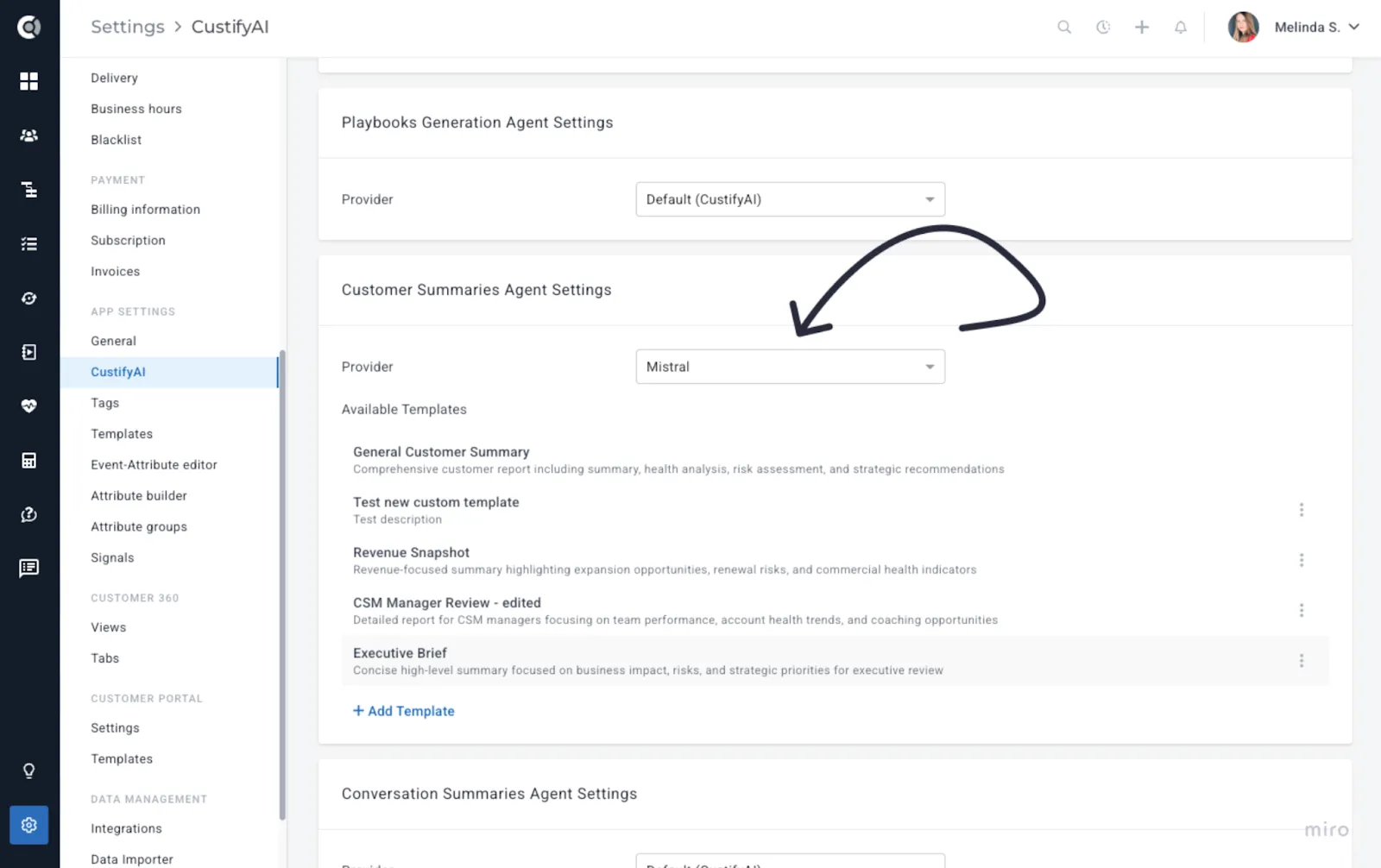
When you use your own AI provider (OpenAI, Anthropic, etc.), all usage is billed directly through your provider and does not consume CustifyAI credits. CustifyAI credit usage only applies when using Custify’s built-in AI provider.
Enhancements to Existing CustifyAI Features
Several existing AI-powered areas also benefit from the new architecture and provider flexibility:
- Generated Playbooks – can now use custom AI providers and produce more consistent results.
- Conversation Summaries – handle long email threads more robustly and can be powered by your own provider.
- Follow-up Tasks – benefit from improved task suggestions and can be driven by different AI providers per customer preference.
All the existing CustifyAI features are also described CustifyAIhere.