Branching Playbooks
Branching Playbooks make your CS workflows more intuitive, organized, and easier to manage by adding conditions and creating powerful automations based on them.
How to Set up Branching Playbooks
Navigate to Playbooks in the main menu and click on New Playbook. The initial triggers for the Playbook remain the same (manually started, based on segment logic, or scheduled).
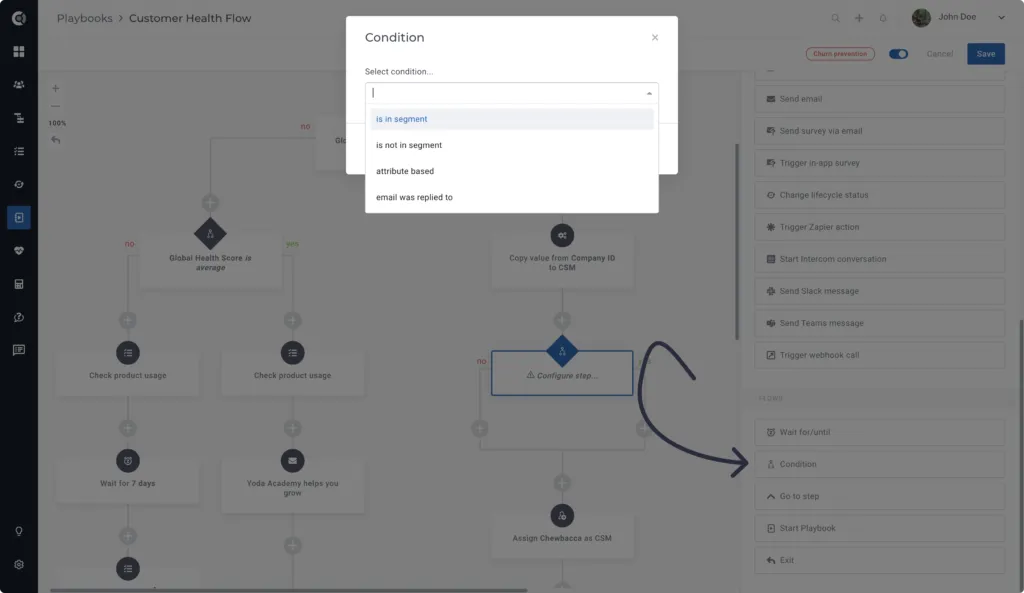
Playbook conditions can be found at the bottom of the action lists and can be based on:
- Segment logic — If the customer is in Segment A, perform action X.
- Attribute condition — If attribute B is [value], perform action Y.
- Email reply condition — if the customer replied to an email (you can only include emails that are part of the Playbook sequence), perform action Z.
Branching Playbooks Use Cases
Implement a Different Set of Tasks for Customers Based on the Global Health Score
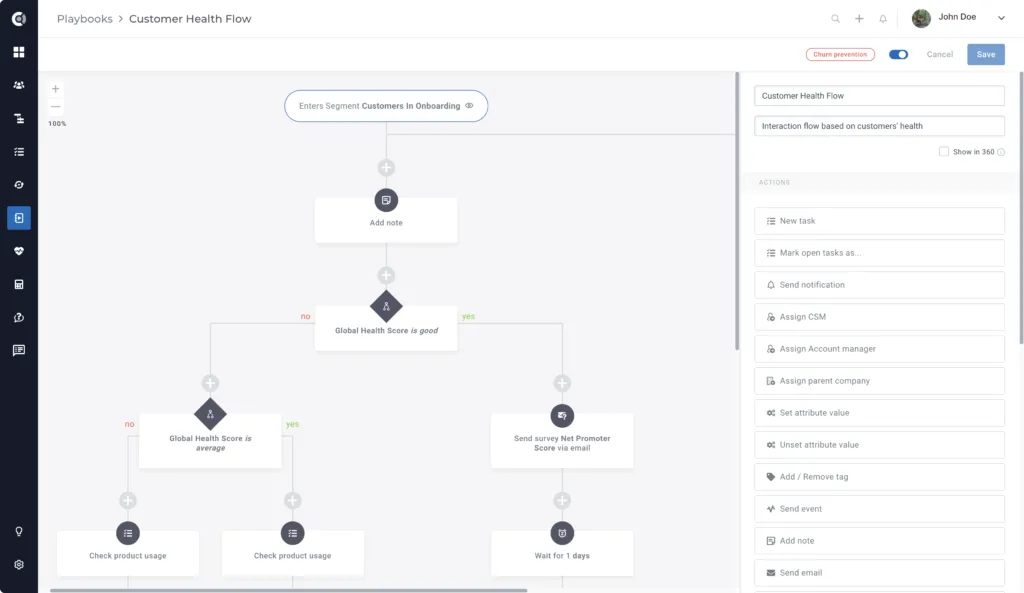
The example above is addressed to all Customers who are onboarded.
The Playbook generates different tasks for the assigned CSM depending on the Global Health Score. If the Global Health Score is good, the customer is qualified for a review, and a survey is emailed.
If the Global Health Score is bad, the CSM must review product usage, find out what is not working well, and schedule a call with the customer.
With branching playbooks, you can go even deeper and add conditions for customers with an average Global Health Score.
Based on the logic above, if the Global Health Score is NOT good, another condition is checked: “Is the Global Health Score average”? If YES, the path for the Average condition is followed. If NOT, the flow for bad Global Health Score will start.
Assign CSMs Based on Regions
Instead of having different Playbooks for each region, you can now have a Branching Playbook based on conditions.
If the customer is located in North America, the Playbook will assign Tom as the CSM. If not, another condition is added. If the customer is located in Asia, Mary will be assigned as the CSM, and so on. The process continues for all regions, so you can assign all CSMs to customer accounts with a single Playbook.
Build Different Engagement Models Depending on the Subscription Plan
The Engagement Model may vary depending on the customer’s subscription plan. To easily automate this process, you can create complex Playbooks and use branches for the different flows.
In the example below, the process is common for customers that finished Onboarding, but the Engagement Model differs depending on the plan.
Enhance the Renewal Process by Sending Targeted Reminders to Your Customers
The example below is addressed to companies that enter a renewal Segment (based on a renewal date in less than 60 days).
When a customer enters the Playbook, an email is sent automatically to the customer. After 7 days of waiting time, the Playbook verifies if the customer replied to this email and builds different flows according to this condition:
- If the customer replied, the process stops
- If the customer did not reply, a reminder is sent to them
This helps you avoid sending automated emails that could potentially be unwanted communication for your customers.