Zendesk Sell
Zendesk is a software company that offers solutions to help businesses with support, sales, and customer engagement. It’s a platform designed to make sales team activities simple and fast. It also provides reporting functions with insights on team performance and daily activities.
What can you do with Zendesk Sell in Custify?
- Stay updated on all incoming leads.
- See which of your app features your clients use.
- Segment your customers based on data from your Zendesk Sell (such as deal revenue, count of deals won, and amount of potential deals).
- Build customer success playbooks based on deal revenue and deal potential (e.g., sending automated follow-ups when deals stagnate).
Activation
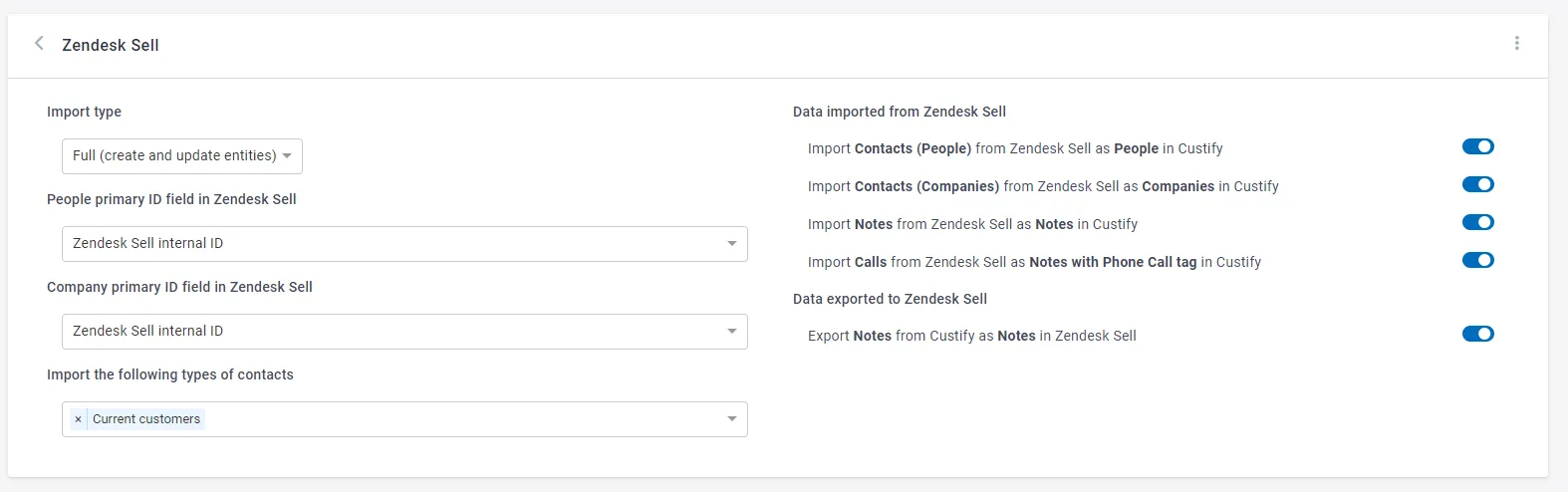
Zendesk Sell can be integrated in either full or enhanced mode:
- Full mode: turning on the integration in Full mode will create new companies and people in Custify when new entities (that are not existing yet in Custify) are added in the system and will also update the existing entities with new attributes
- Enhance mode: turning on the integration in Enhance mode will only update the existing Custify accounts. The primary source of truth will be your backend, you will continue updating the companies and people through API, but the data will be enhanced with new attributes from the system.
In order to successfully integrate with Zendesk Sell in enhanced mode, the first step is to make sure that you have a unique matching attribute in both Custify and Zendesk Sell.
Depending on how you store data in Zendesk Sell (user level, company level or both), the unique matching attribute that must be present in both systems should be:
- Company (Zendesk Sell Company ID*)
- Users (User ID or Email address)
We strongly recommend using an ID (e.g. Company ID) instead of a name (e.g. Company Name). In most cases, there are mismatched names (duplicates or typos) that prevent the integration from syncing for these accounts.
Here’s how you can bring the Zendesk Sell ID in Custify:
- Automatically imported via API (recommended)
- Manually added or using the CSV importer (not recommended)
Here’s how you can bring the Customer ID in Zendesk Sell:
- Automatically imported via API (recommended)
- Manually added (this can be done during the sales process)