Value Realization
Track the value each account is getting in real time, without rebuilding ROI slides every quarter.
Overview
Value Realization is an automated ROI tracking layer built directly on top of Customer Objectives. It turns the goals you already capture per account into a live, data-driven view of how much value each customer is getting — with auto-calculated progress, status indicators, trend charts, portfolio-level reporting, and customer-facing portal blocks. You no longer have to rebuild ROI slides for every QBR or chase down current numbers from each CSM.
Value Realization is available everywhere objectives already appear. CSMs see it on the Customer 360° Profile, CS leaders see it as a portfolio dashboard under Insights, and customers see their own progress through the Customer Portal when you choose to share it.
The feature builds on three things you already know:
- Numeric Customer Objectives, which now support a new value-based completion type alongside the existing attribute-based one.
- Aggregate progress across all numeric objectives on an account, expressed as a single Value Delivered % score.
- Value Delivered default attributes that can be used as triggers in Playbooks
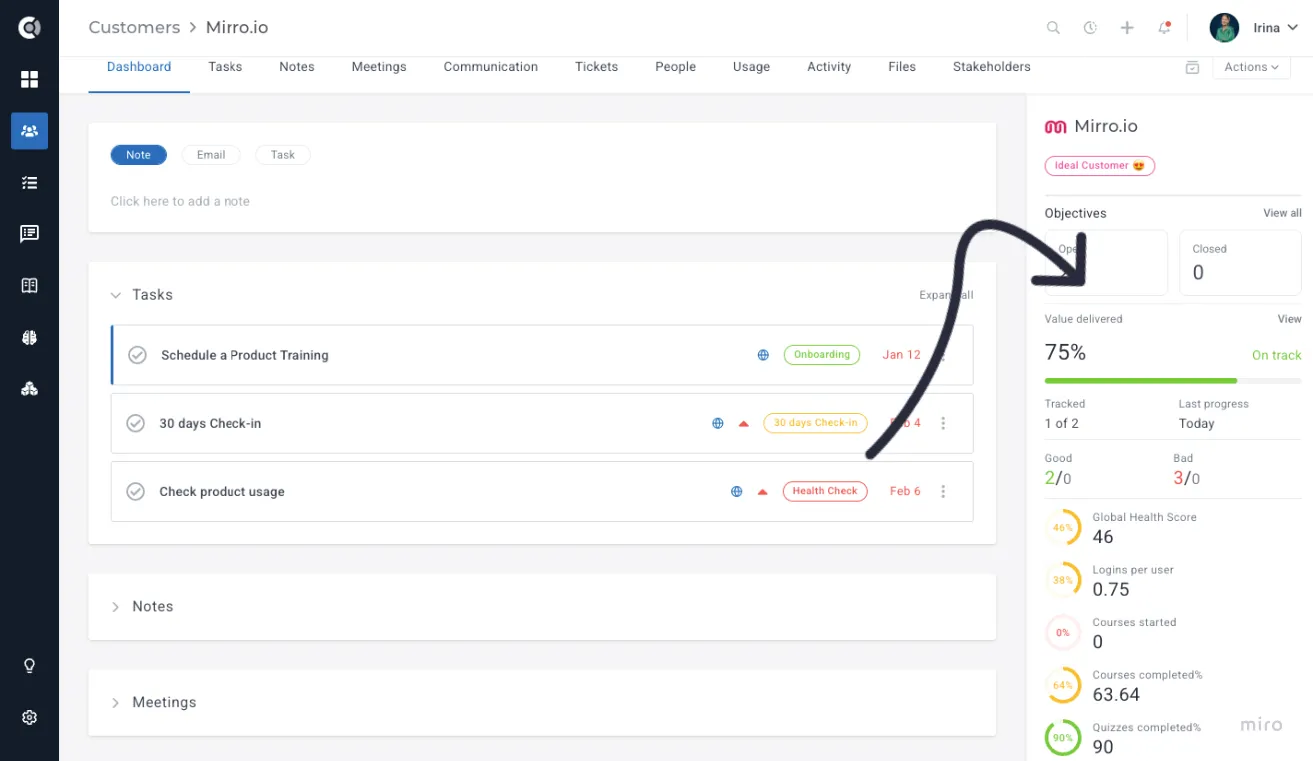
The key capabilities are:
- A Value Card on every account with an aggregate Value Delivered %, a status label, a sparkline trend, and per-objective progress bars showing baseline, current, and target numbers.
- A trend chart showing the value trajectory over 6 months for a single account.
- A portfolio Value Realization dashboard with KPI summary cards, a status distribution chart, a portfolio trend line, and a searchable accounts table sorted worst-first.
- A "Your Value Summary" portal block that lets customers see their own goals and overall value delivered.
- New Value Delivered % attributes that can be used as Playbook triggers to automate at-risk and exceeded outreach.
- Weekly value snapshots that power every trend chart; snapshots are taken weekly. every Sunday at 2 AM in the account's local timezone, one per tracked company, or whenever a tracked objective changes — manual edits, automatic attribute recalculations, and objective create / delete events. On-change snapshots are dated to the day the change occurred and only cover the affected company.
Setting up value-based objectives
Value Realization works automatically on any account with numeric Customer ObjectivesCustomer Objectives. There are now two completion types you can use to make an objective numeric:
- Attribute-based: the objective is linked to a company attribute or metric. The current value auto-syncs from your data — both the completion percentage and the live current number.
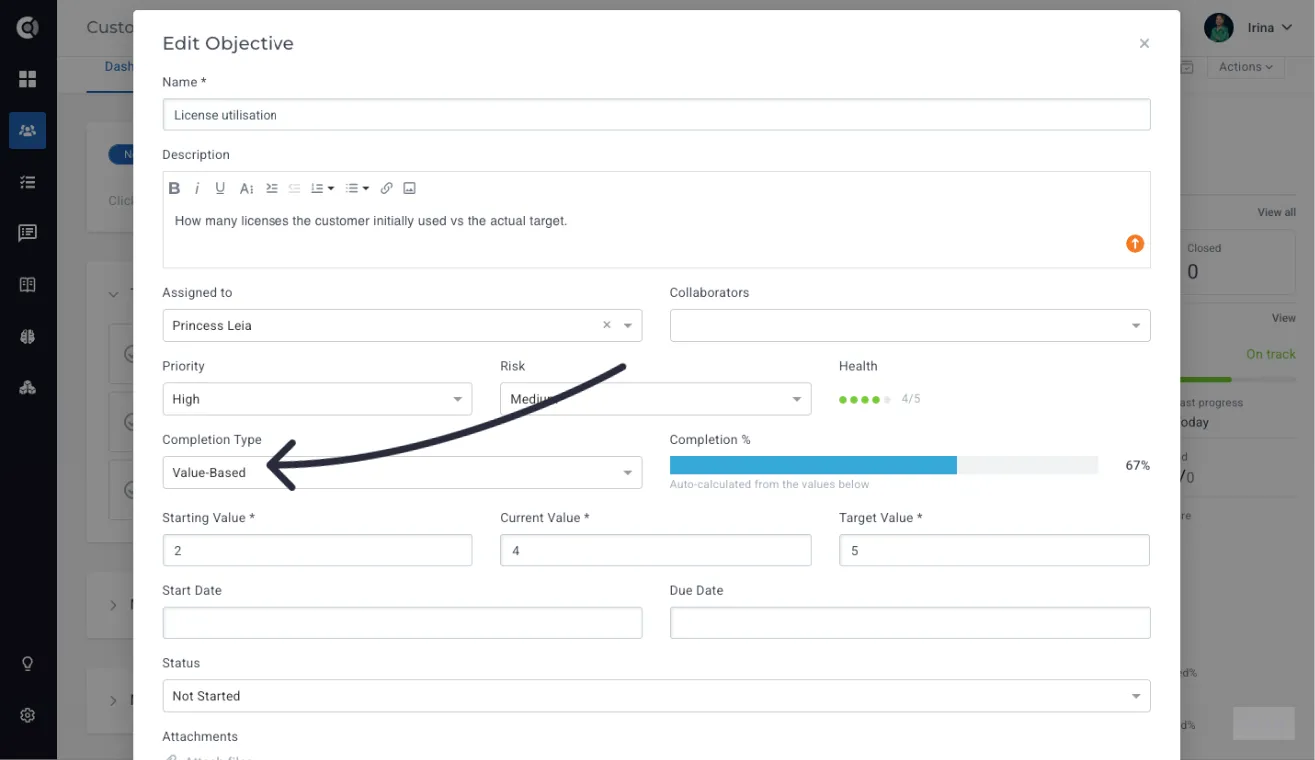
- Value-based (new): you enter the Baseline, Current, and Target numbers manually. The system auto-calculates completion percentage from those three values, including for decreasing targets like onboarding days.
To create a value-based objective, open any account in the Customer 360 Profile and go to the Objectives tab. Click New objective, fill in the title and details, and choose Value-Based as the completion type.
You then fill in the three numbers:
- Baseline: the starting value when work began. Used as the lower bound of progress.
- Current: the most recent value. This is the number you (or the data source) will keep updating.
- Target: the goal value the customer wants to reach.
Custify Tip: The completion formula handles both increasing and decreasing targets. If your Baseline is 14, Target is 7, and Current is 9, completion shows ~71% — meaning you have moved 71% of the way from where you started toward where you want to be.
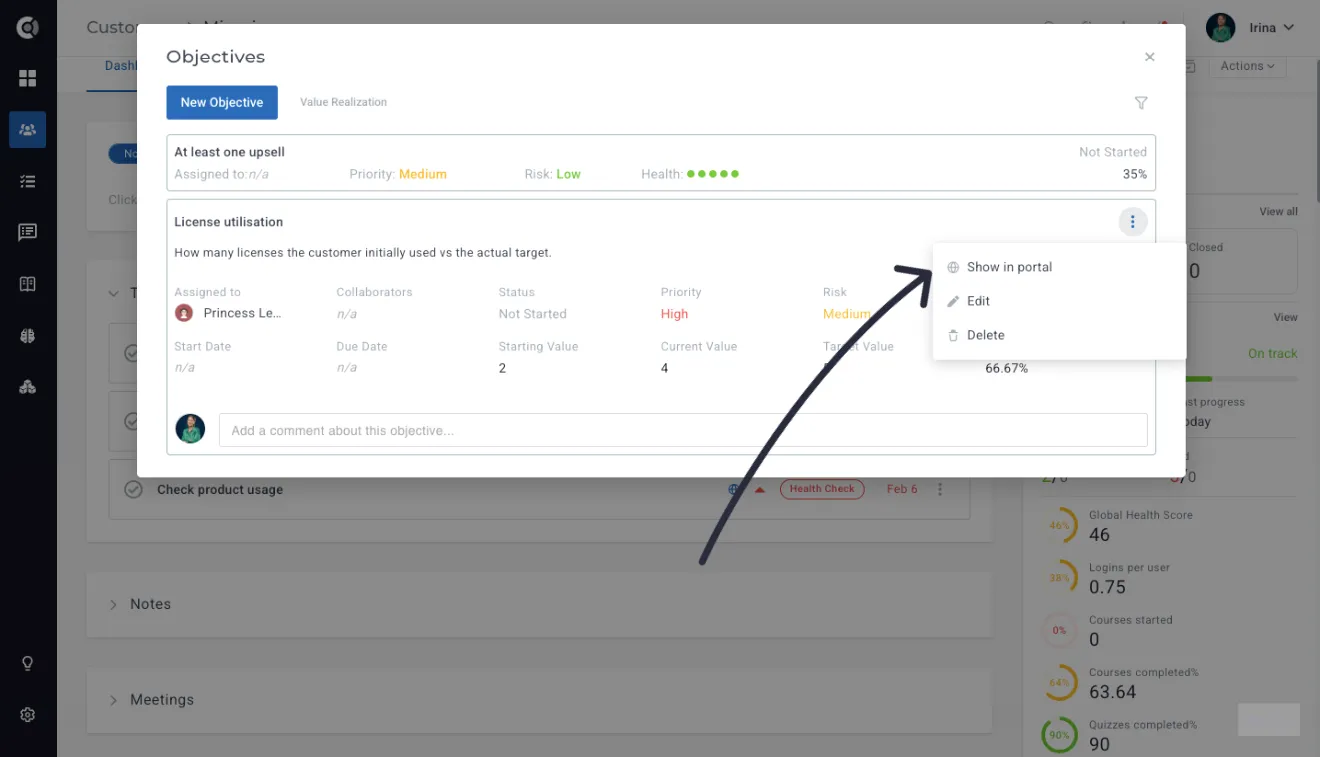
Toggle Show in Customer Portal on any objective if you want it to appear in the "Your Value Summary" portal block. Objectives without this toggle stay internal.
Observation: A value-based objective where Baseline equals Target cannot be saved and will not produce a completion percentage. Pick a meaningful starting point that is different from the goal.
You can mix attribute-based and value-based objectives on the same account. Both types feed into the same aggregate Value Delivered % score.
The Value Card on Customer 360
Open any account with at least one numeric objective. Scroll to the new Value Realization section in the Customer 360 Profile, just below the existing objective list.
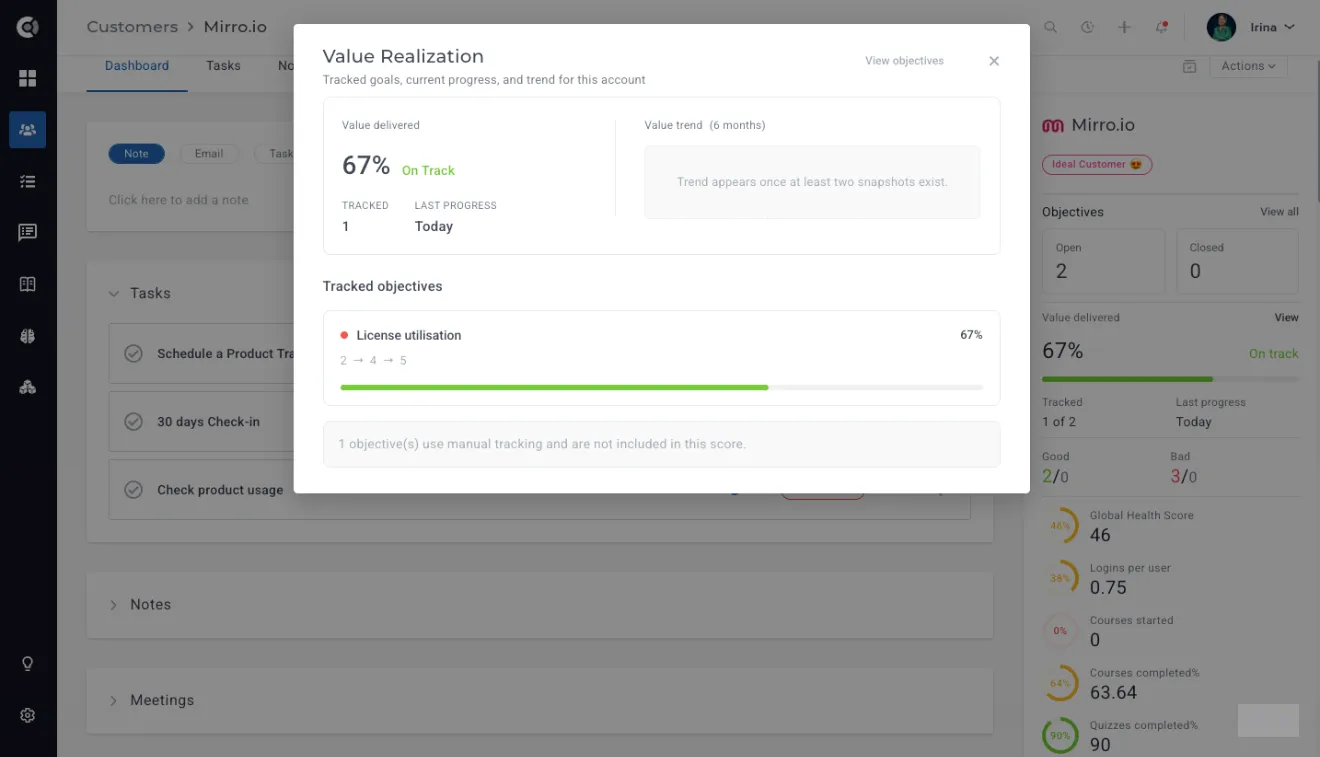
At the top of the card, you see the Value Delivered % — the aggregate score across all numeric objectives on the account — together with the status indicator (more on the labels below) and a sparkline showing recent trend.
Below that, every numeric objective has its own row with:
- The objective name.
- A horizontal progress bar from baseline to target, with the current value marked.
- The three numbers (baseline, current, target) are shown beneath the bar.
- The objective's individual completion percentage.
Custify Tip: The Value Card appears on any account with numeric objectives. You do not need to enable it manually — once the account has at least one attribute-based or value-based objective, the section becomes visible.
The Value Card score shown on the Customer 360 is computed in real time on read — it always reflects the latest objectiveStatus values. The trend chart and the portfolio-level dashboard, by contrast, use the weekly snapshots, so they only update after the Sunday run.
If you have more than five objectives on an account, the card shows the first five and provides an expand link for the rest. Values that exceed 100% display the actual number while the progress bar caps visually at 100%. Visually the progress bar caps at 100%, but the underlying aggregate score is intentionally uncapped — a value above 100% is a valid signal that the account has overdelivered on its objectives.
The portfolio Value Realization dashboard
Value Realization also has a portfolio-level dashboard for CS leaders. Navigate to Insights - Value realization in the sidebar to open it. The dashboard gives you the same view across every account in your book of business.
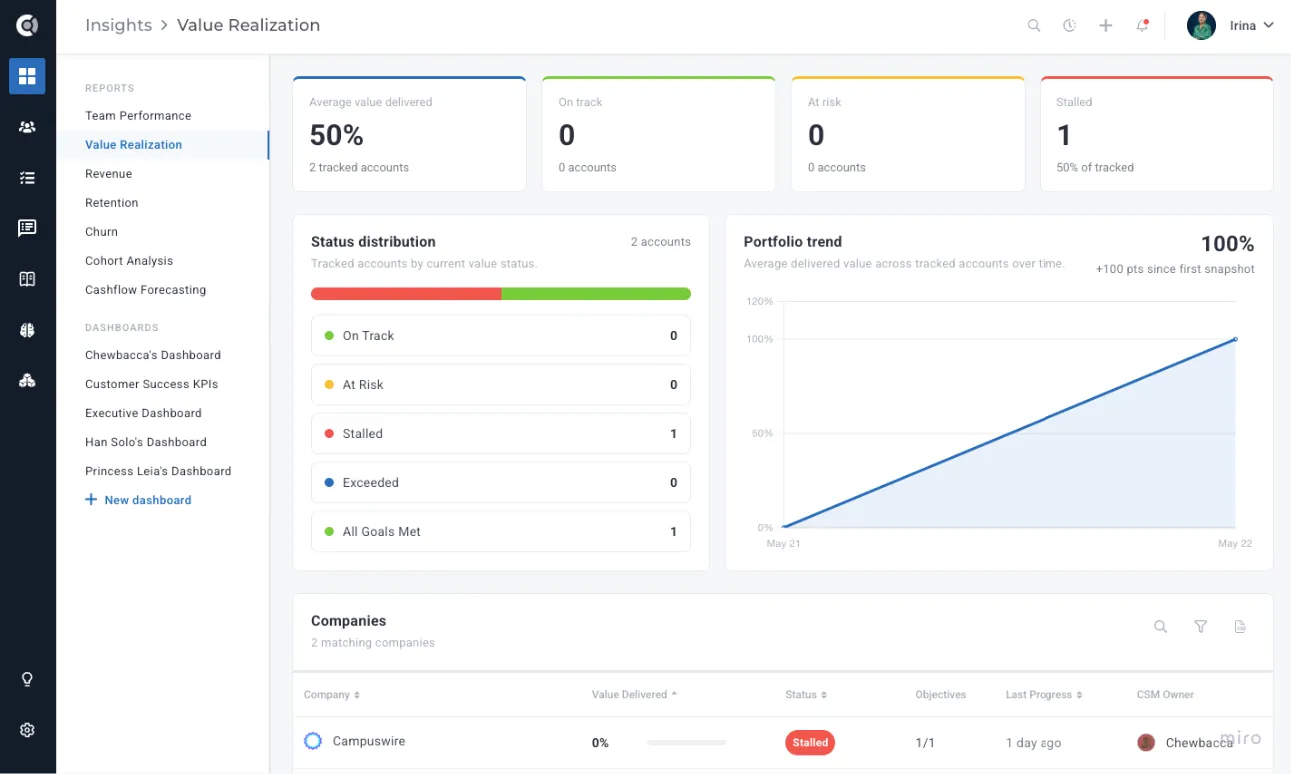
The dashboard contains four areas:
- KPI summary cards at the top: average Value Delivered %, plus counts of accounts that are On Track, At Risk, Stalled, Exceeded, and All Goals Met.
- A status distribution chart showing how your portfolio is split across the five status labels.
- A portfolio trend line showing how the average Value Delivered % across the portfolio has moved over time.
- A searchable, paginated accounts table sorted worst-first, with each row showing the account name, status, Value Delivered %, sparkline, and number of objectives.
Click any KPI card to filter the accounts table to that status. Use the search box to narrow down by account name. Export the filtered list to CSV when you need to share it outside Custify.
Observations:
Each trend point is the average across all tracked accounts at that point in time. For dates without a fresh snapshot for a given company, that company's most recent earlier snapshot value is carried forward into the average.
The 'Average value delivered' KPI card is computed live from current objective state. The trend's latest point uses snapshots. A small gap is expected when objectives have been edited since the latest snapshot; a large gap indicates the trend is stale and a recalculation or a manual snapshot would close it.
The "Your Value Summary" Customer Portal block
You can let customers see their own value progress through the Customer Portal. A new portal block called Your Value Summary is available in the portal template editor, alongside existing block types like notes, tasks, and meetings.
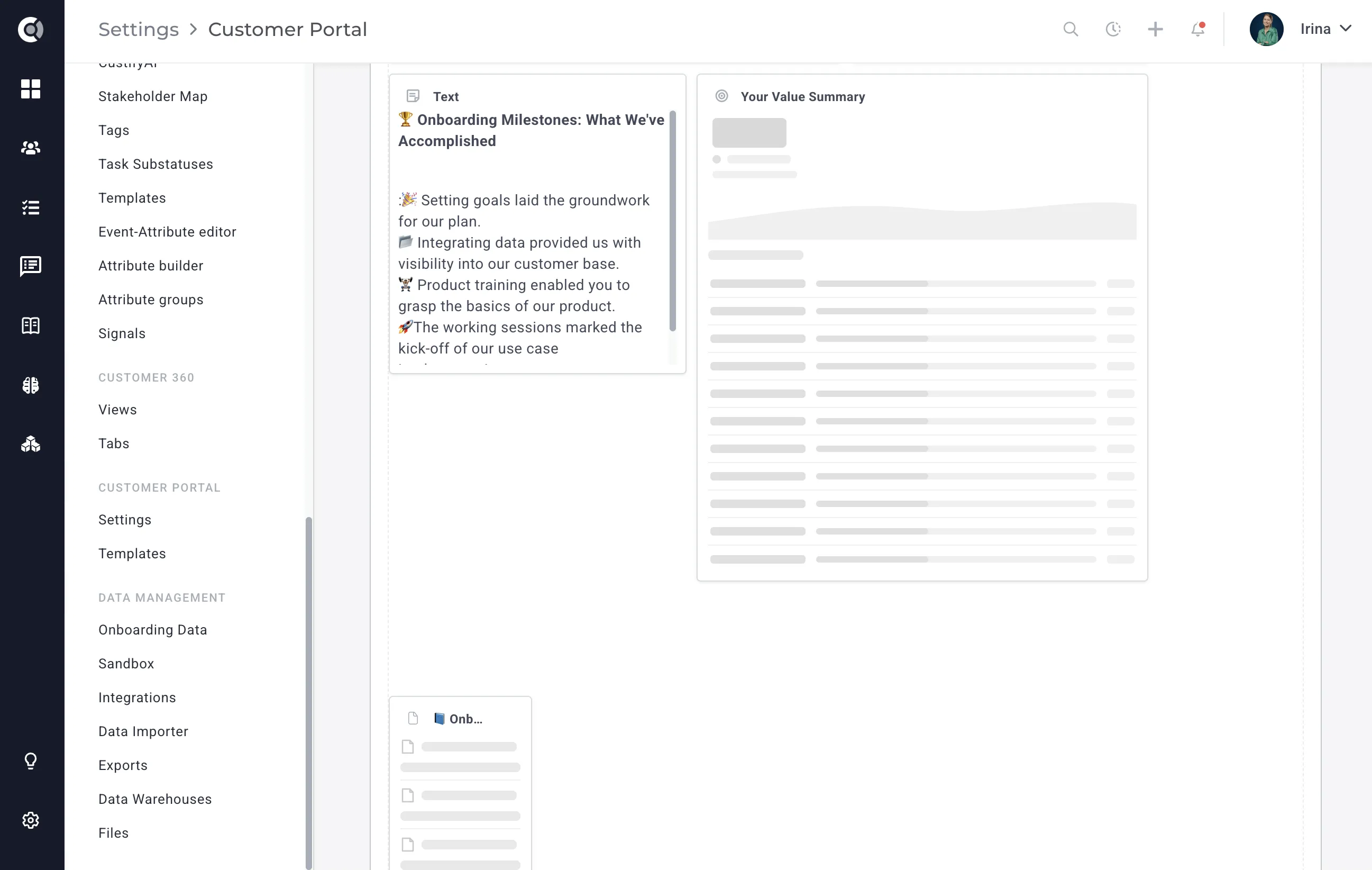
Add the block to your portal template and preview it. The block shows the customer's overall Value Delivered %, the same status label, and per-goal progress bars — but only for objectives where you toggled Show in Portal. Objectives marked internal stay hidden, and the aggregate score the customer sees reflects only the visible objectives.
To activate the customer-facing view, your portal admins need to add the Your Value Summary block to the portal template you use for customers. Existing portal templates do not include the block automatically — you have to drop it in.
Triggering Playbooks on Value Delivered %
Value Delivered % can be used in Playbook triggers, so you can automate outreach the moment an account's value score moves into a critical range.
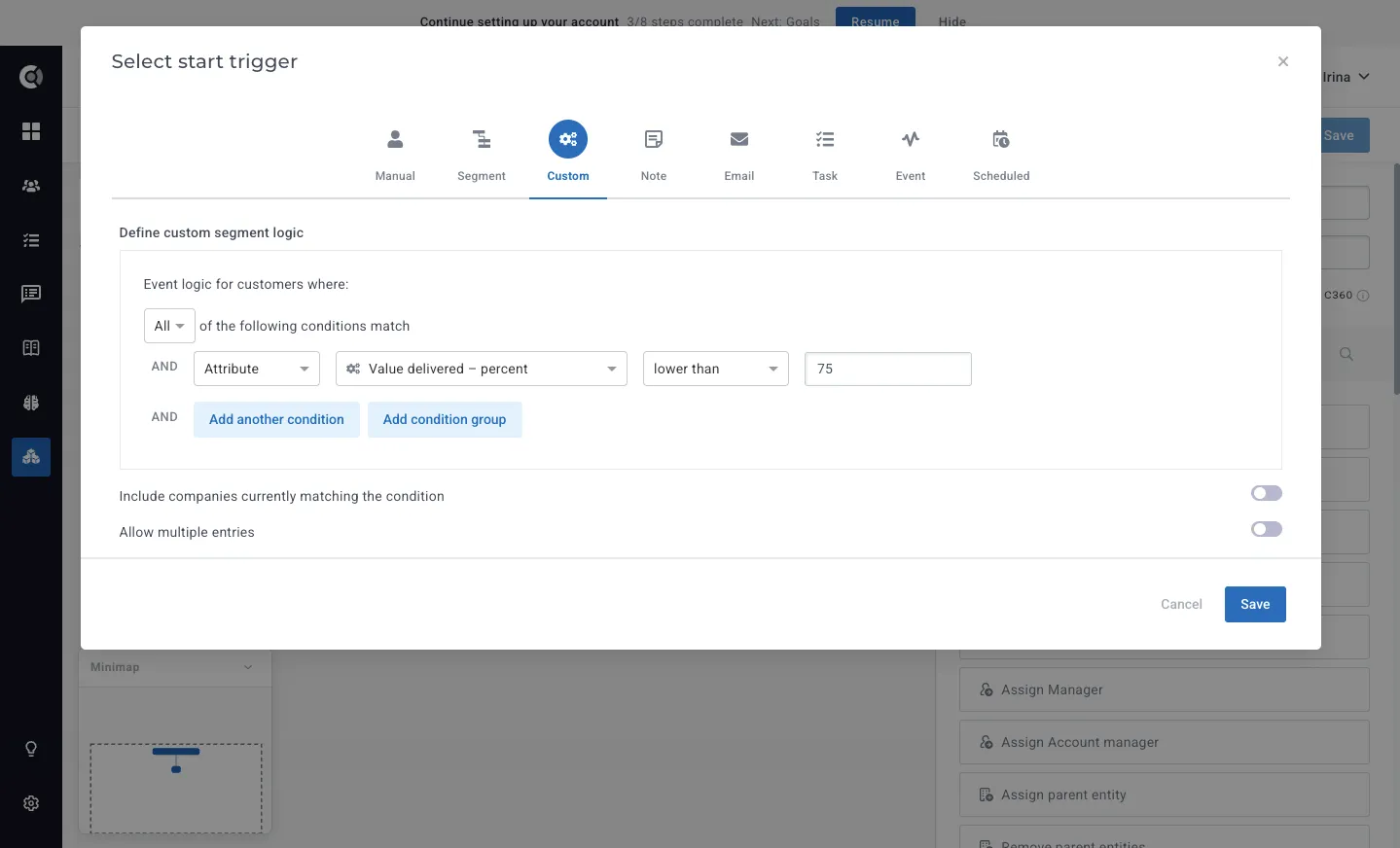
A playbook configured to fire when Value Delivered % drops below 75 will start running on any account whose aggregate score crosses that line. You can pair the trigger with the existing playbook actions: send the account owner a Slack message, create an internal task, send the customer an email, or generate a CustifyAI summary for review.
Custify Tip: Combine the drops below trigger with a playbook that creates a high-priority task for the CSM and sends an internal Slack notification — so the team can act on a slipping account before the customer notices.
You can also use the exceeds operator to celebrate wins: trigger a playbook when an account crosses 90% to send a thank-you note, request a referral, or surface the account as an expansion candidate.
Status logic and edge cases
Every account with numeric objectives gets one of five status labels. The labels are derived from the aggregate Value Delivered % and the recency of progress, using these rules:
- On Track: Value Delivered % is between 50 and 99, with progress recorded in the last 14 days.
- At Risk: Value Delivered % is between 25 and 49, OR the account has had no progress for 14 to 30 days.
- Stalled: Value Delivered % is below 25, OR the account has had no progress for 30 days or more.
- Exceeded: Value Delivered % is 100 or higher, but at least one objective is still below 100.
- All Goals Met: Every objective on the account is at 100% or higher.
Recency of progress is measured against the weekly snapshots, so an account that gets a single update on a Tuesday is considered to have recent activity all the way through the next snapshot.
A few behaviors are worth noting:
- Values above 100% display the actual number (for example, 123%), but the progress bar visually caps at 100% to keep the layout consistent.
- An attribute-based objective auto-syncs both the live current value and the completion percentage. You no longer have to refresh anything manually when the underlying attribute changes.
- A value-based objective where the baseline equals the current value or the target produces no completion percentage, and Custify will block you from saving it. Pick distinct numbers for baseline, current, and target.
- If an account has only manual (non-numeric) objectives, the Value Card shows a guidance message instead of a score. Switch the objectives to attribute-based or value-based to start tracking.
- The trend view is aggregate-only in v1 — there is no per-objective trend toggle yet.
Observation: Weekly snapshots run every Sunday at 2 AM and a monthly cleanup job runs on the 1st of each month at 3 AM. Trend data older than the snapshot retention window will not appear in the chart.
If you build composite metrics from objective progress, Calculated Metrics already support rolling up objective values into custom scores — and those scores can feed back into Health Scores, Segments, and additional Playbook triggers, so Value Realization plugs cleanly into the rest of your customer success setup.