Product Updates | February 25th
Insights
Dashboards - Resizable & Draggable Widgets
Dashboards now support a fully interactive layout that allows you to create, drag, reposition, and resize widgets freely. You can customize your dashboard by arranging widgets to best fit your workflow.
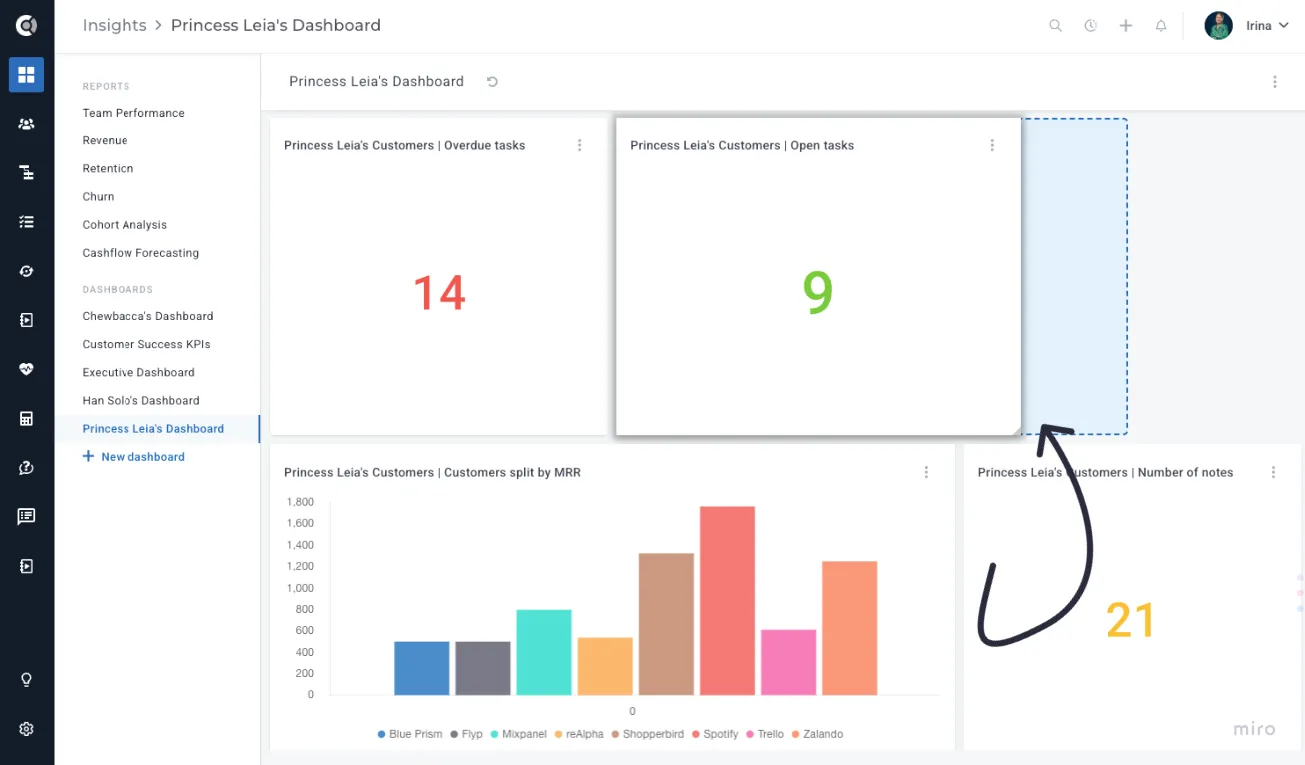
Each widget has minimum size requirements based on the amount of information it displays. For example, the Promoter Score widget requires at least a 2×2 grid space to keep charts and labels readable, while the Company List widget needs at least two rows to properly display multiple records. These constraints ensure that widgets remain clear and usable, even when resized.
This update gives you greater flexibility and control, making dashboards more personalized and easier to work with.
Customer List View
Kanban / Board View for Companies List
The Companies list now includes a Kanban-style view for managing companies in a visual pipeline format. This view is company-only and includes the same filters and bulk actions available in the standard Customer List view.
It provides a clear, visual overview of your portfolio, making it easier to track ownership, lifecycle progression, and revenue distribution at a glance, while enabling teams to manage accounts more proactively and move companies through operational stages efficiently.
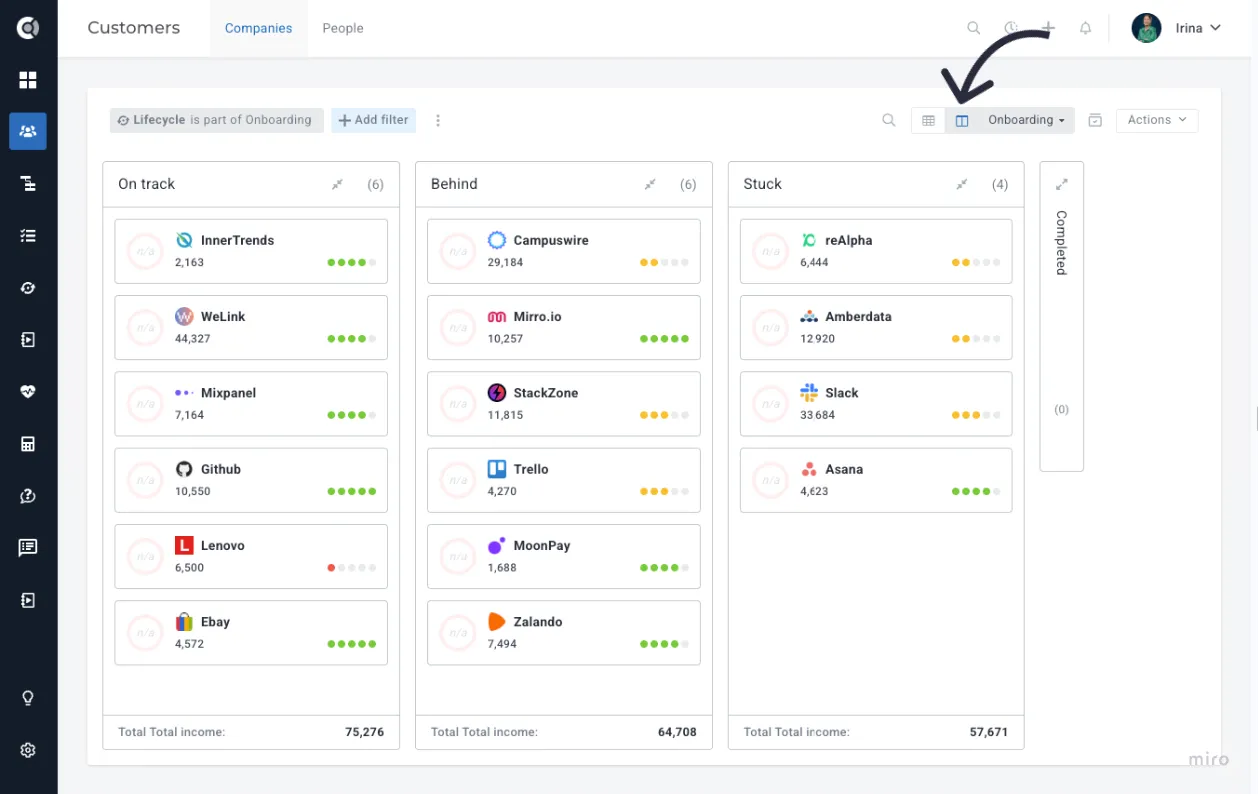
On the Companies List view, switch from Table View to Kanban View, then choose the attribute you want to split by. Lanes can be organized by assigned CSM/Manager, attribute values (dropdown and multi-select), or lifecycle stage - so you can structure the board around your team’s workflow.
In Kanban view, companies appear as cards inside their respective lanes. You can drag and drop cards between lanes to move accounts as they progress. A Lock/Unlock button lets you control whether cards can be moved.
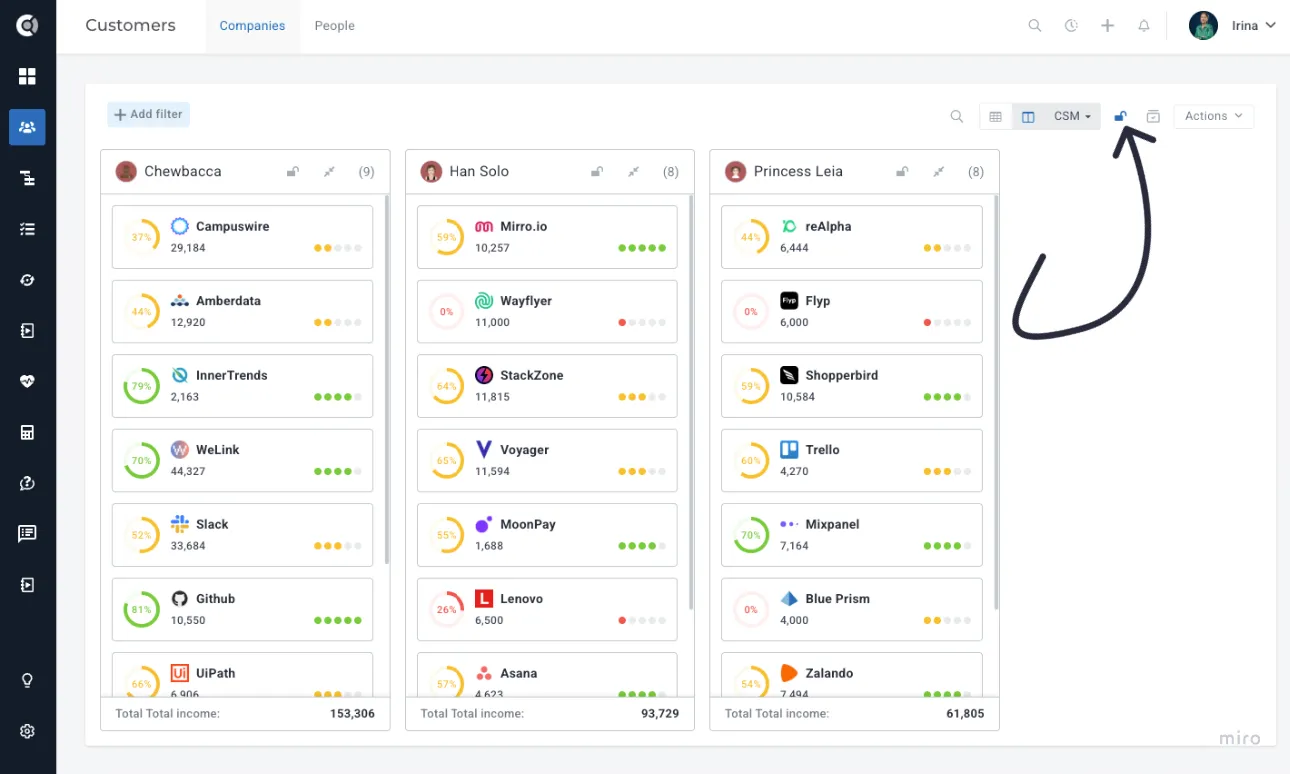
Observation! When a card is moved, the splitting attribute updates automatically (for example, moving a company to another CSM’s lane will reassign the CSM). If the selected attribute is not editable or if you’re splitting by lifecycle stage, the board becomes read-only, and the Lock option is not available.
Lanes are collapsible for easier navigation, and horizontal scrolling is supported when working with many lanes. You can select one or multiple companies directly from the board and apply the same bulk actions available in the Table View. Each lane can also be opened in a separate browser tab, with all applied filters preserved.
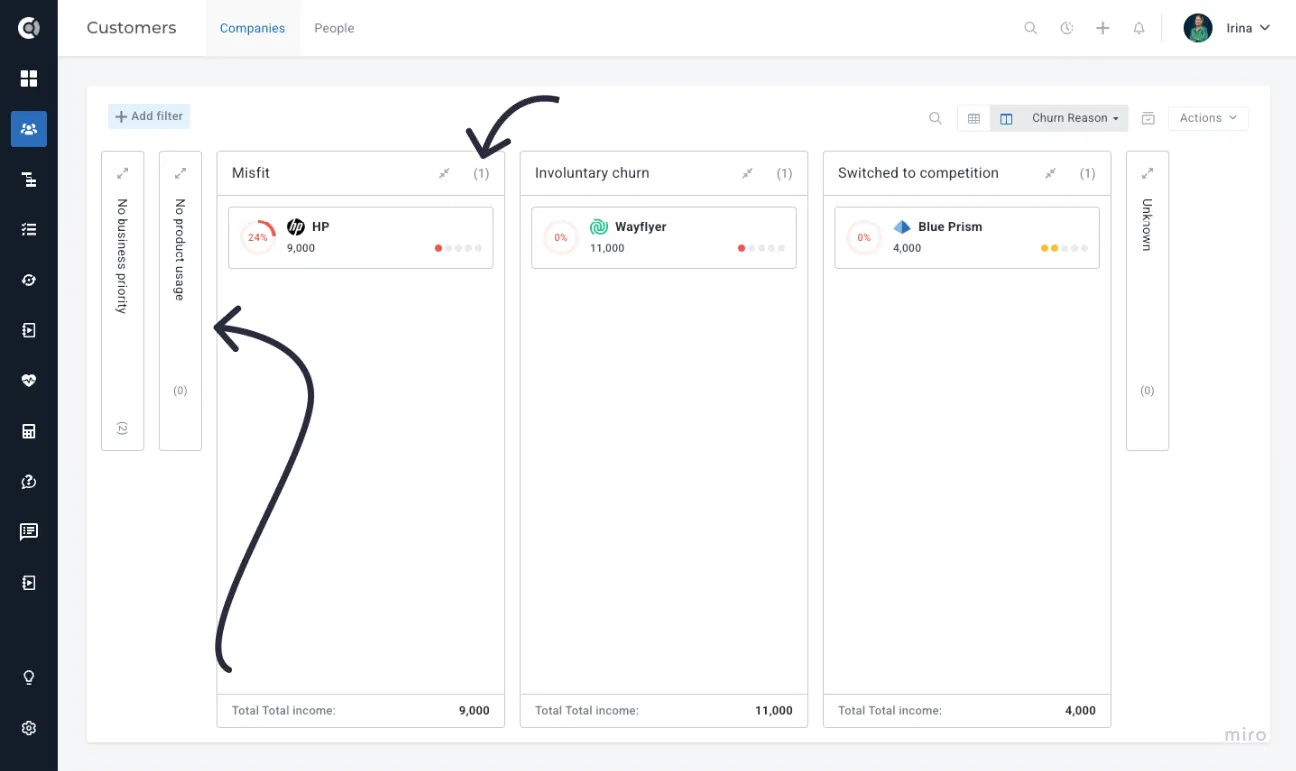
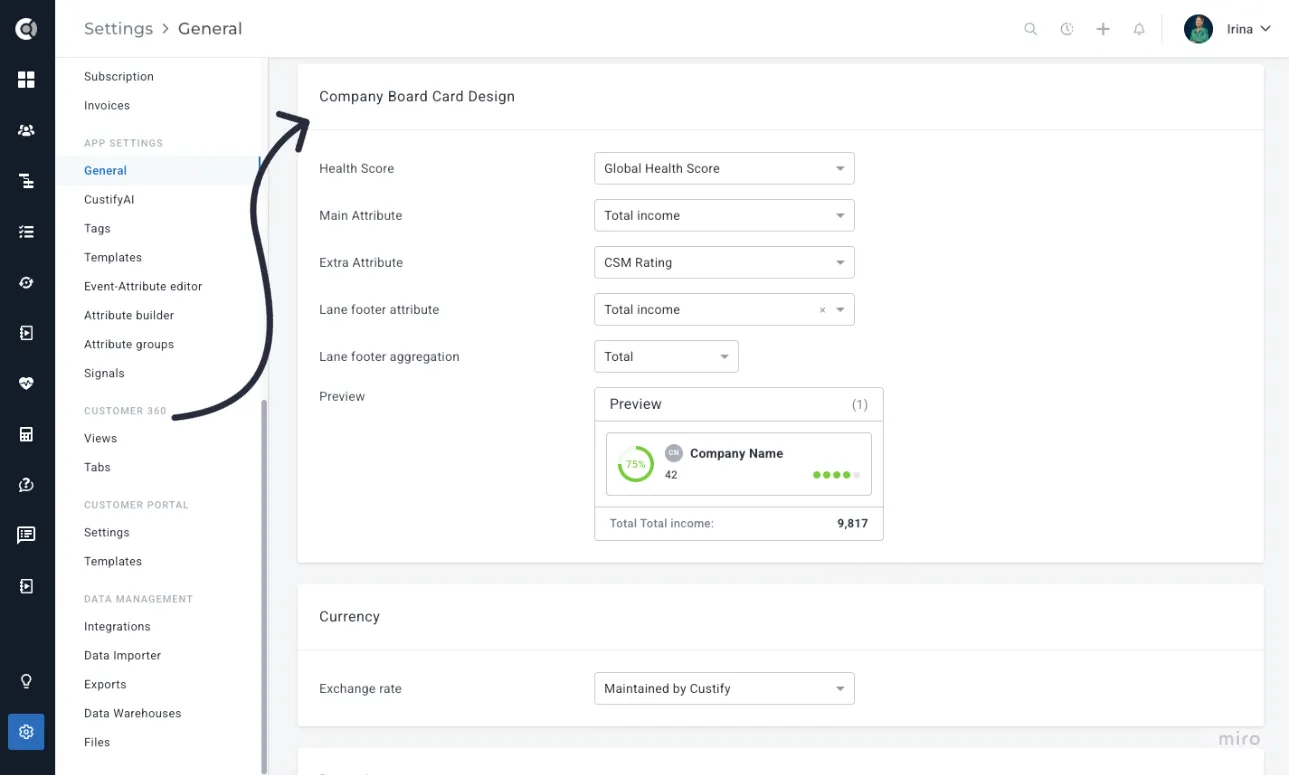
Under Settings - Company Board Card Design, you can customize what information appears on each card. The card structure is standardized and includes:
- Clickable Company Name
- Selected Health Score (displayed as the main account health indicator)
- Main Attribute (shown under the company name)
- Extra Attribute (displayed on the right side of the card)
- Lane Footer Attribute (optional) – shows the total or average of a selected numerical attribute (e.g., Total Income) for all companies in that lane
- Lane Footer Aggregation – defines whether the footer calculation is displayed as a total or an average
Async Export - Unlimited Company / People Exports
An enhanced export system is now available to handle large data exports without timeouts or browser limitations. When going to Customer List View - Actions - Export to .csv/.xlsx to export company or people data, the system automatically determines the appropriate processing method based on dataset size:
- Smaller exports (typically under 3,000 records) are generated instantly.
- Larger exports are processed asynchronously in the background. Once processing is complete, an email notification is sent with a download link valid for 24 hours. All export requests are recorded in the Export History section, where users can track status, download completed files, or retry failed or expired exports.
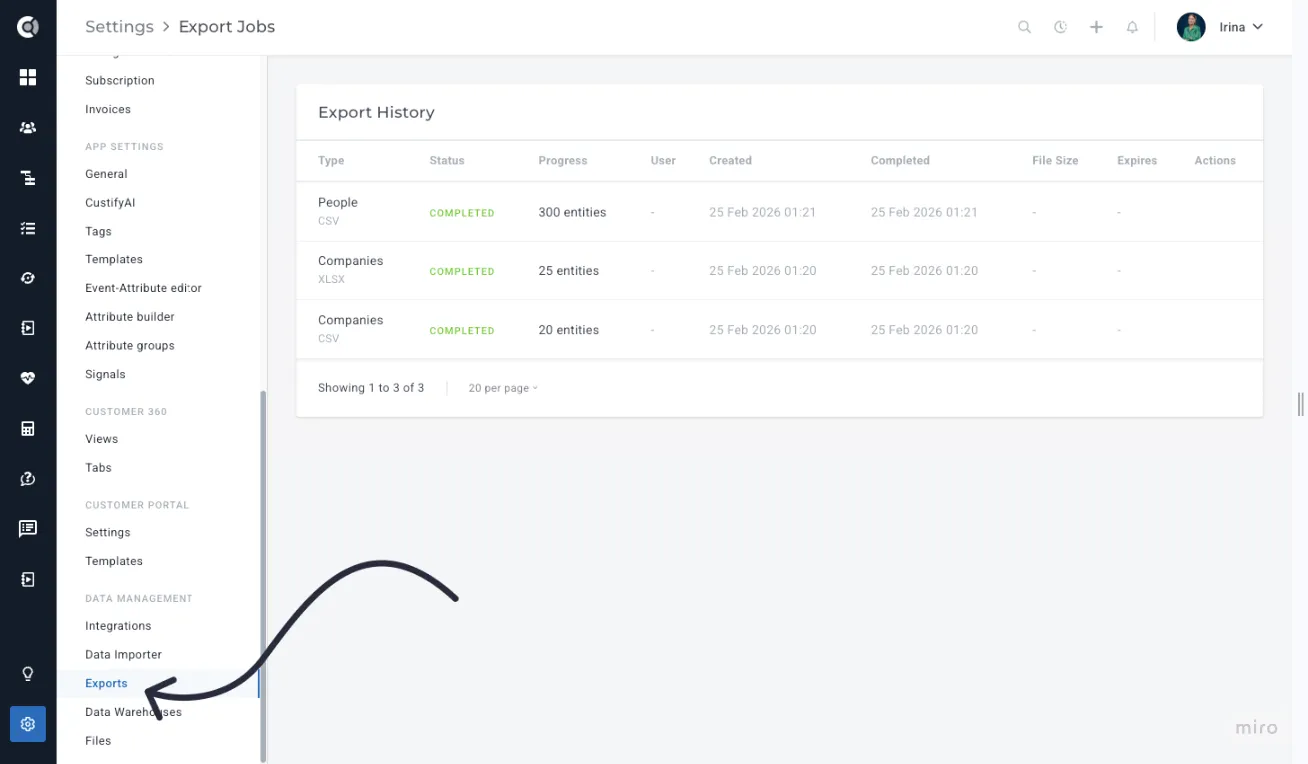
The export workflow remains unchanged - users apply filters, select columns and format (CSV or Excel), and start the export as usual. Processing, storage, and notifications are handled automatically, reducing timeouts, preventing data loss from interruptions, and maintaining a clear audit trail of export activity.
Bulk Task Creation via Actions Menu
You can now create bulk tasks directly from the Actions menu in the Companies list, without setting up a playbook. Simply select the companies, go to Actions - Create Task, and fill in the task details. The system will automatically detect the company name and generate tasks for all selected companies.
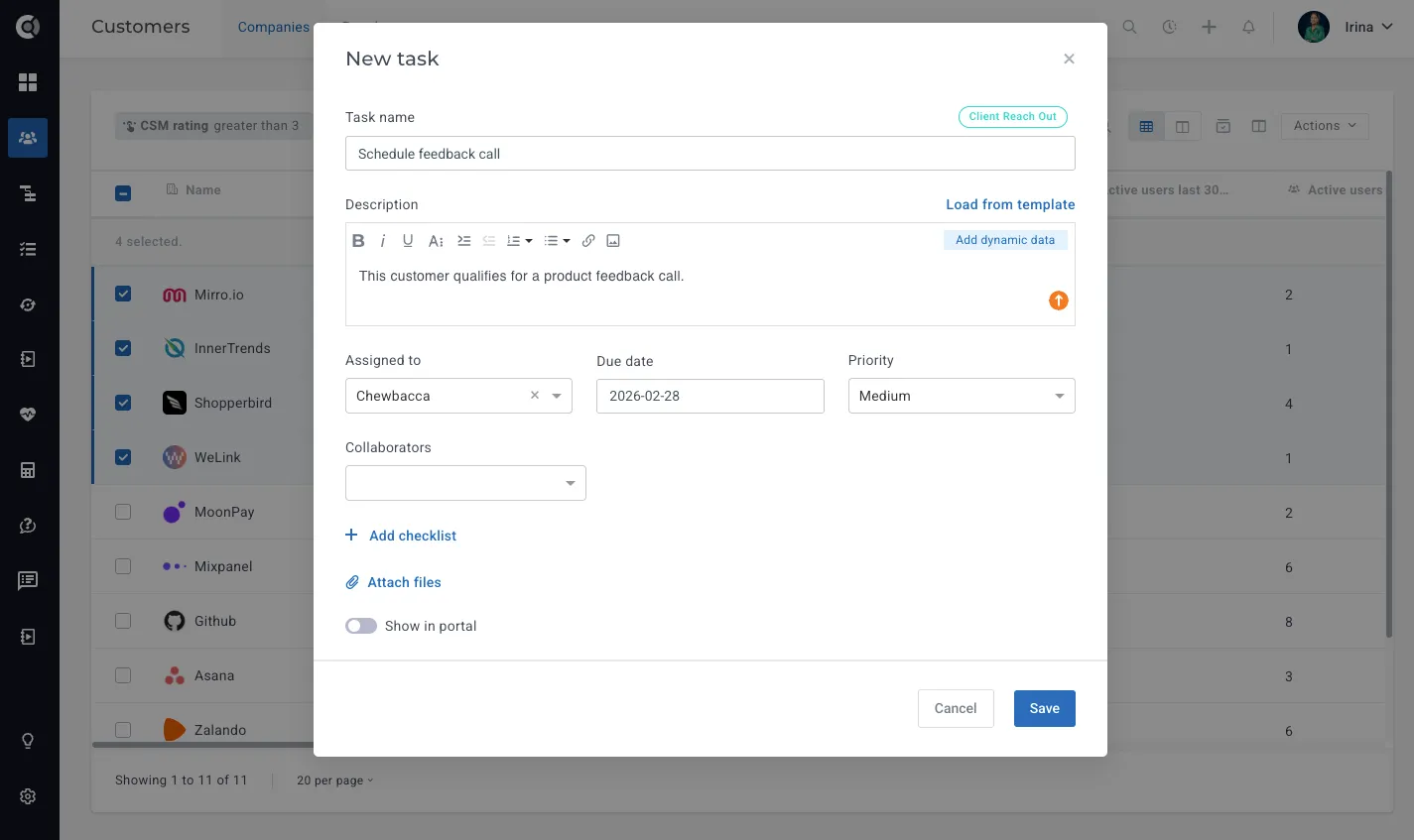
This is especially useful for ad-hoc scenarios where the same task needs to be assigned to multiple companies quickly, saving you the time and effort of creating a playbook for a one-time action.
Playbooks
Entity-Based Start Triggers
Playbooks can now be triggered by actions on entities - Notes, Tasks, Emails, and Events - in addition to the existing segment-based trigger. For example, a playbook can start automatically when a note with a specific tag is created, when a task is marked as done, when an email is received, or when a custom event fires.
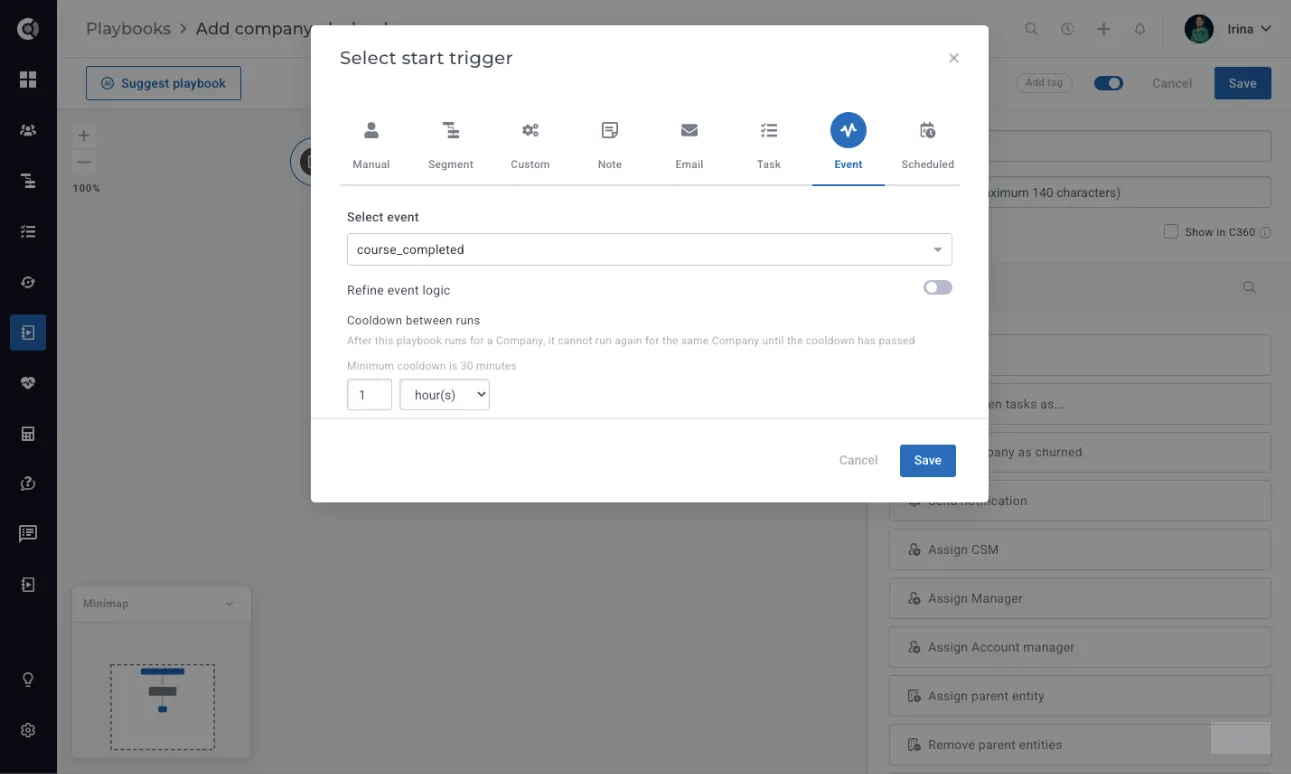
Each trigger type includes its own set of filterable conditions (such as note tags, task status, or email direction), ensuring precise control over when automation runs. A configurable cooldown period (default: 1 day, minimum: 30 minutes) prevents the same Playbook from triggering too frequently on the same company, maintaining relevance while avoiding repetitive actions.
By enabling action-based triggers, teams can move from passive, list-based automation to immediate, behavior-driven workflows. This supports faster follow-ups, more contextual engagement, and tighter alignment between customer activity and internal processes.
Condition Step - Entity Conditions
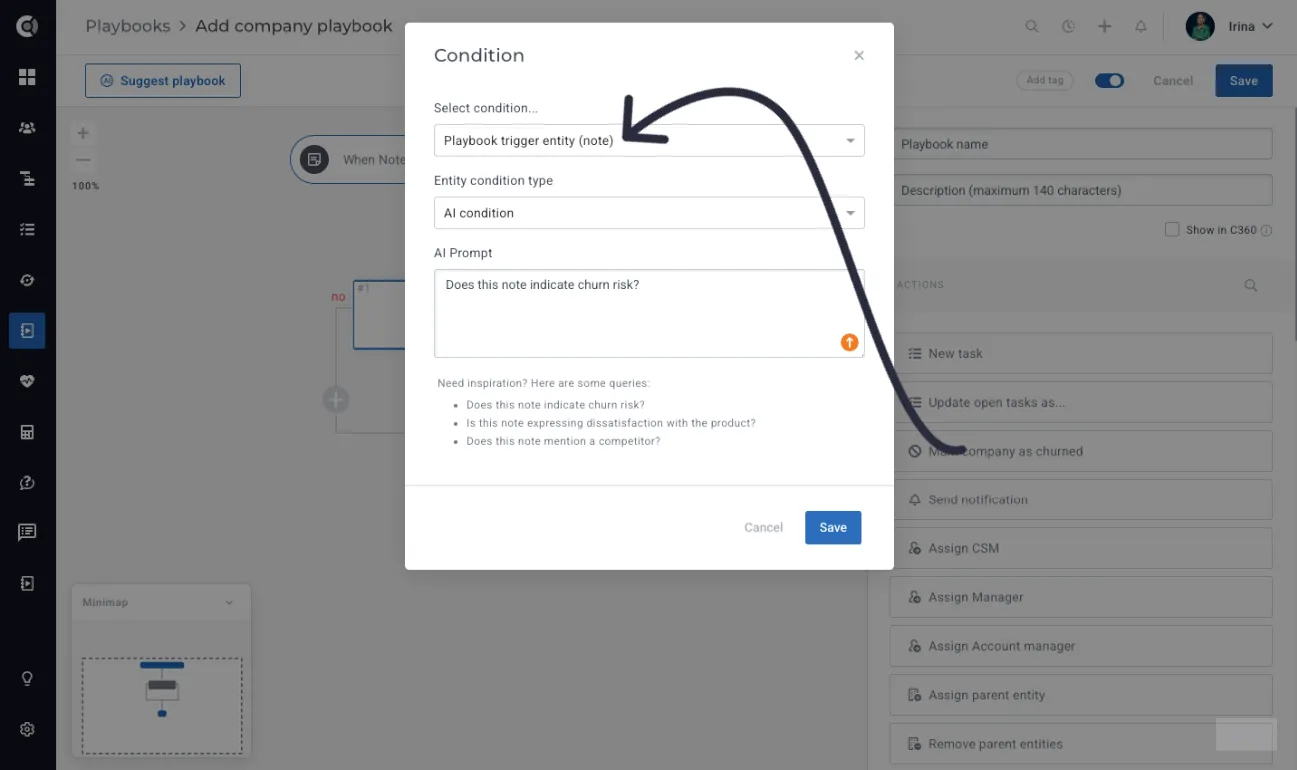
In addition to Entity-Based Triggers, Playbooks now support entity-based conditions within the flow, making automation more intuitive and context-aware. You can create branches based on Task, Event, Note, or Email conditions, allowing the Playbook to adapt dynamically to real-time customer activity.
Example use case: A Playbook starts when a note tagged “QBR” is added. From there, you can add a condition based on “Playbook trigger entity (Note)” to create different paths. For instance:
- If the note text contains indications of churn risk, trigger a risk management flow
- If the note text is positive, trigger a product adoption or expansion flow
Entity-based conditions are directly tied to the original Playbook trigger. This means the available conditions will always relate to the entity that triggered the Playbook (in this case, the note), ensuring relevant and precise branching logic.
AI-Derived Attribute Values from Notes
Playbooks using a Note entity trigger can now automatically analyze note content with AI and set structured attribute values on the related company or person. This allows teams to convert unstructured feedback, such as feature requests, sentiment, or churn signals, into filterable and reportable data without manual tagging.
For example, when a CSM tags a note as “Feature Request,” a Playbook can trigger, analyze the note text, and automatically update a dropdown or boolean attribute based on AI interpretation.
To configure this, add a Set Attribute Value step in the Note-triggered playbook and select Value Mode as AI-derived value, then provide clear instructions (for example, “Classify this feature request” or “Detect churn risk”).
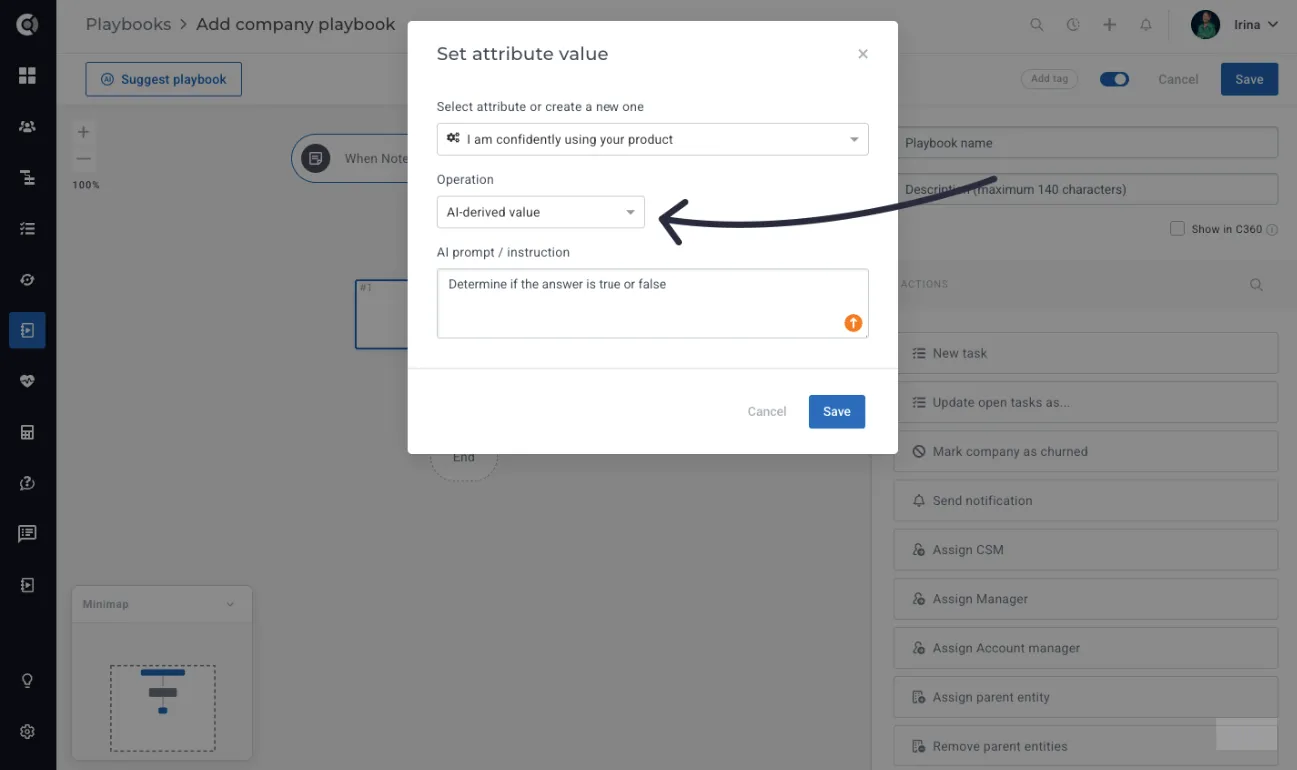
AI-derived values are currently supported for single-select dropdown, multi-select dropdown, and boolean attributes. Text, number, and date fields are not supported in this version. For dropdown attributes, you can choose whether AI should only match existing options or also create new ones if needed.
For multi-select fields, you can decide how AI updates the attribute: it can either add the new values to the existing ones (default behavior) or replace them entirely. If AI cannot determine a value, the step is automatically skipped based on the selected mode. For boolean attributes, AI evaluates the content and sets the value to true or false according to your instructions.
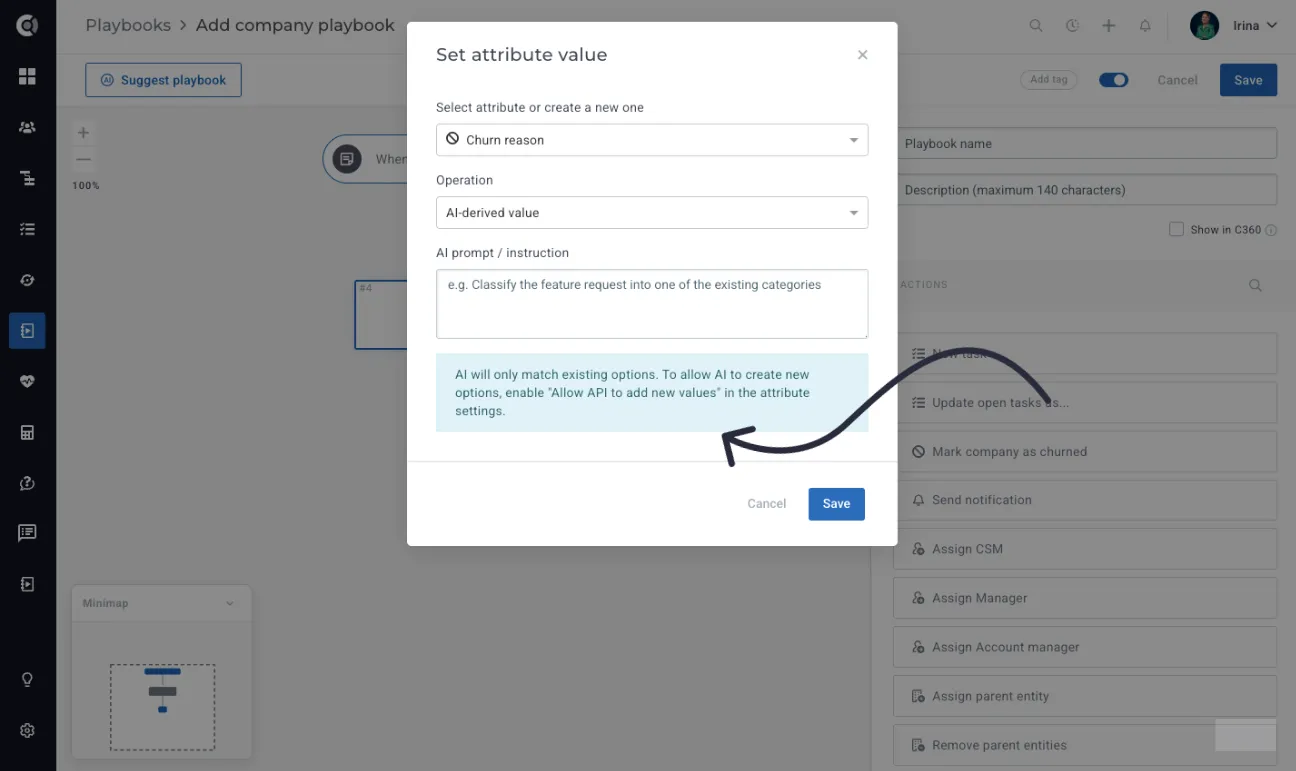
All AI decisions, such as identified values, updates made, or skipped steps, are recorded in the Playbook execution logs for full visibility. The system also includes safeguards: the step is skipped if the note is empty, no value can be determined, no matching dropdown option exists (and new option creation is disabled), or the attribute settings change before execution.
UI Improvements
The editor now includes a collapsible minimap (bottom-left) for navigating large playbooks.
CustifyAI
Multi-Tier Model Selection
When using the CustifyAI provider (credit-based AI), you can choose the model tier that best matches your use case, balancing cost and output quality.
Available options:
- Cost-Optimized (1× credit cost) Best for high-volume or simple tasks where efficiency matters most. May be slower compared to the other models.
- Balanced (2× credit cost) Provides improved accuracy and more consistent results, making it suitable for most common workflows. This is the recommended model for the best balance between performance and cost.
- Quality-Optimized (higher credit cost, ~6×) Designed for complex reasoning, nuanced analysis, or high-impact decisions where output quality is critical.
This flexibility allows you to control AI spending while selecting the appropriate performance level for each automation.
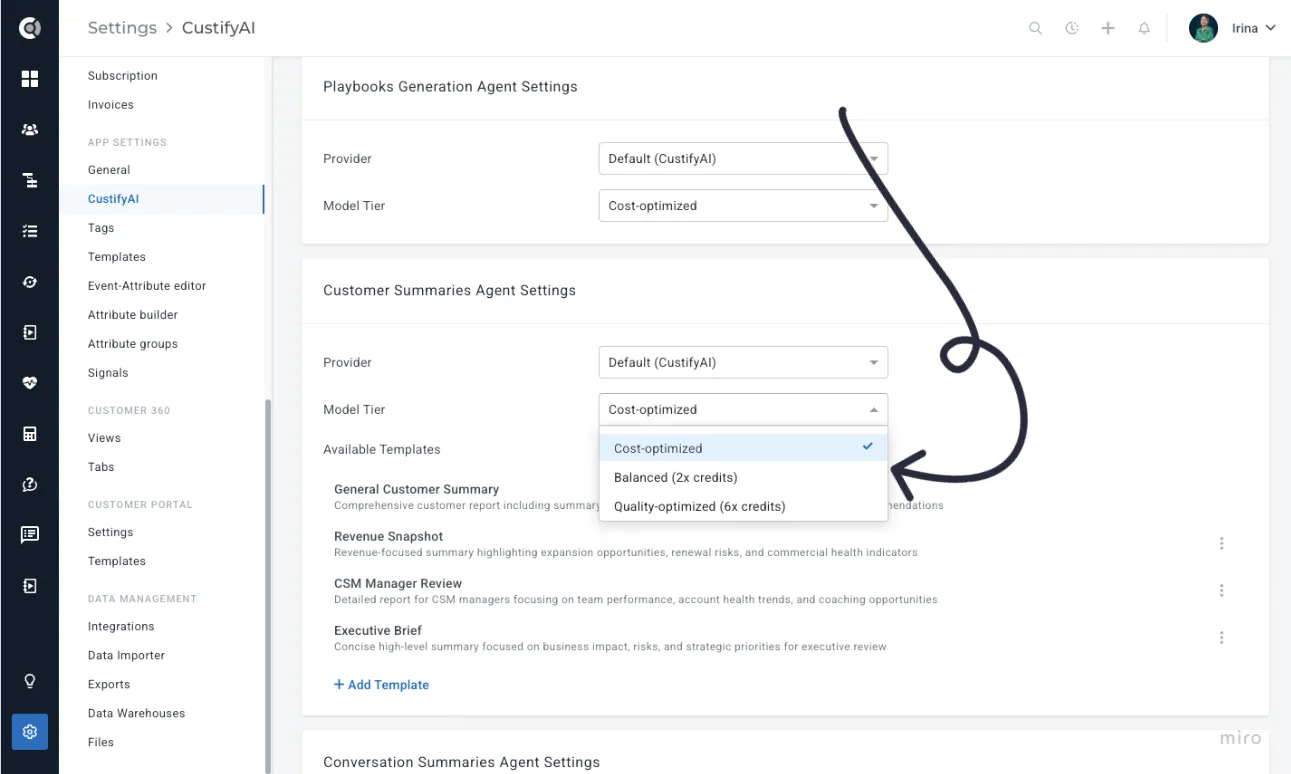
The model tier is configured per agent, allowing you to use lighter, cost-efficient models for simple automations while reserving higher-quality tiers for more complex workflows like churn analysis or executive-level summaries.
Segments
Unlimited Segment Nesting with Automatic Loop Prevention
You can now nest segments without the previous one-level limitation. This means segments can include other segments more flexibly, allowing you to build more advanced and structured segmentation logic.
To prevent configuration issues, circular dependency detection is handled automatically in the backend. If a segment setup would create a loop (for example, a segment indirectly referencing itself), the system will block the save action and return a clear error message. This ensures stability while enabling more powerful segmentation for complex customer bases.
Calculated Metrics
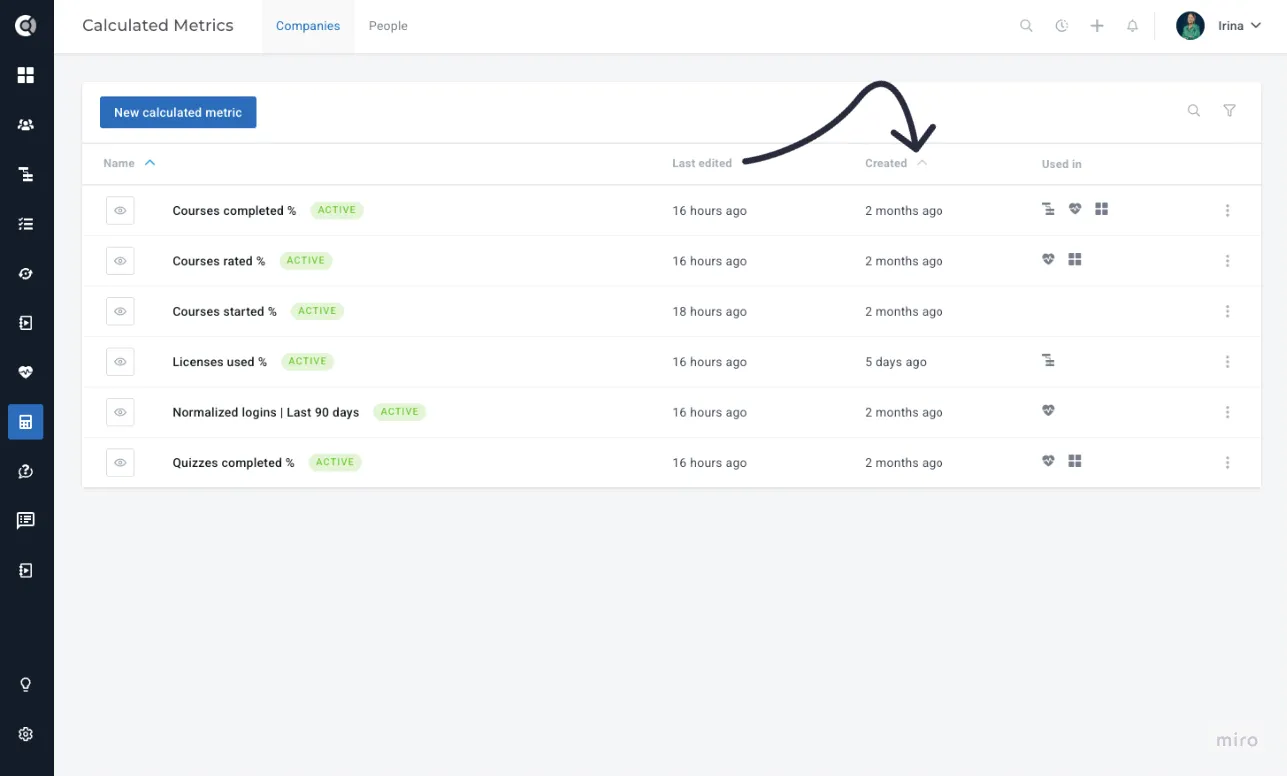
Sort by "Created At" / "Edited At"
The calculated metrics list now supports sorting by "Created At" and "Edited At" columns, consistent with the behavior already available in the Segments list. This makes it easier to find recently created or modified metrics in accounts with a large number of calculated metrics.
Display Name Instead of Raw Metric ID
When using the METRIC_VALUE function in the calculated metric editor, the selected metric now displays its display name instead of the internal metric ID. This improves clarity and consistency (as other functions already show display names) and helps reduce errors when building complex calculated metrics.
Surveys
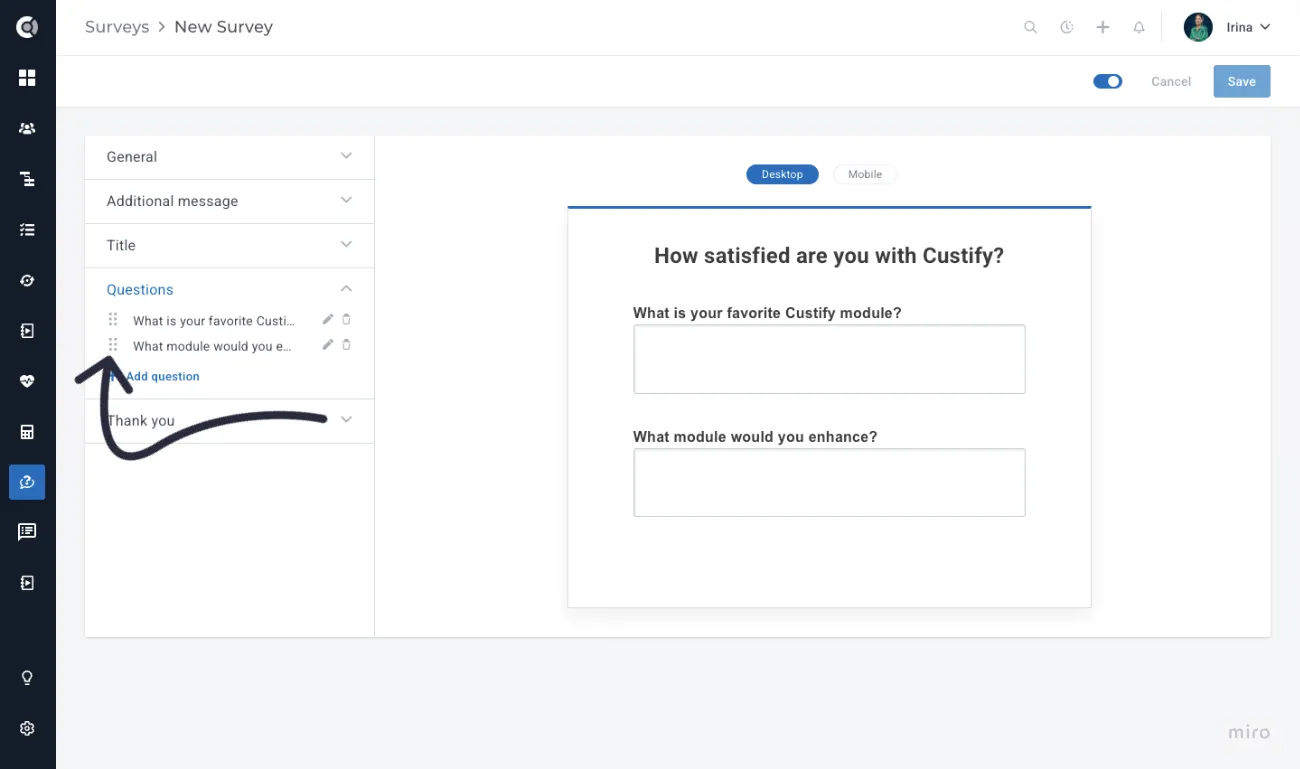
Multi-Question Surveys - Flexible Question Reordering
Multi-question surveys now support drag-and-drop reordering of questions, making it easy to reorganize survey structure without having to delete and recreate questions.
Keep Branding on Survey Webpage
When a custom survey email is sent and the recipient clicks through to the survey webpage, the page now displays the same logo/branding as the email. This ensures brand continuity for respondents who may return to the survey tab after a delay and need to recognize what they're responding to.
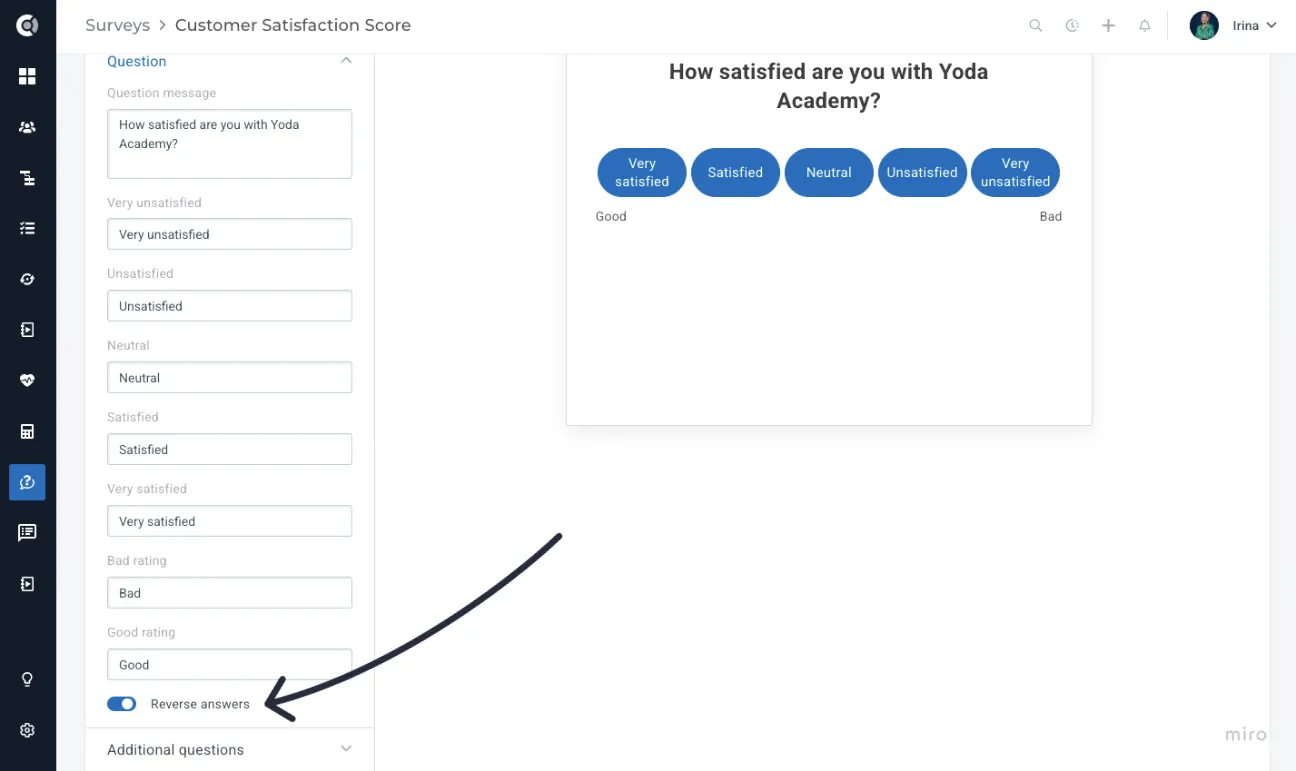
New Placement for “Reverse Answers”
The "Reverse Answers" option has been moved from the general survey settings to the individual question settings, making it more discoverable and contextually relevant.
Integrations
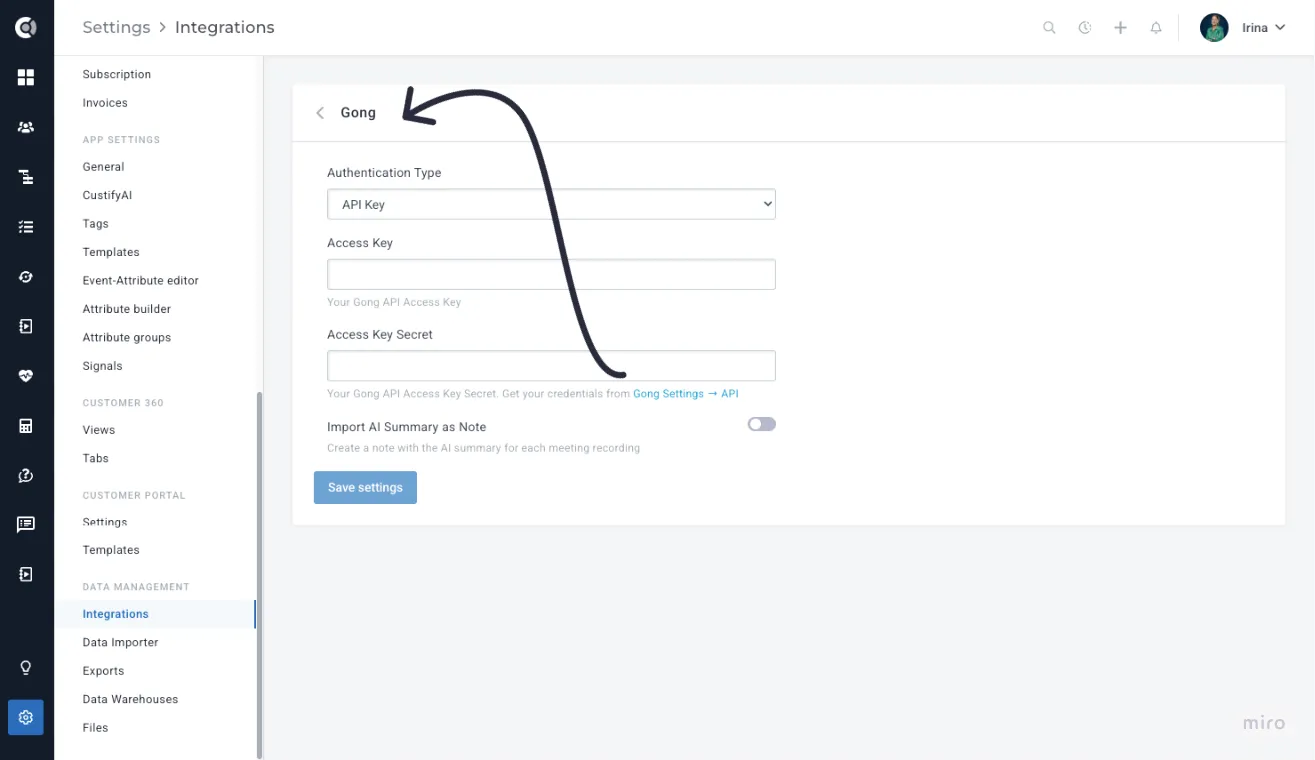
Gong Integration
Custify now integrates with Gong, bringing call data directly into the Company 360 view. When a new call is recorded in Gong, the relevant information surfaces in the customer timeline, giving CSMs full visibility into sales and success call activity without switching tools. More details about this integration can be found herehere.
Meeting Summaries Imported as Notes from Note-Taker Integrations
Meeting summaries from note-taker integrations (Fathom, Fireflies, tl;dv, Gong) can now be imported as Notes in Custify, in addition to enriching meeting details as before.
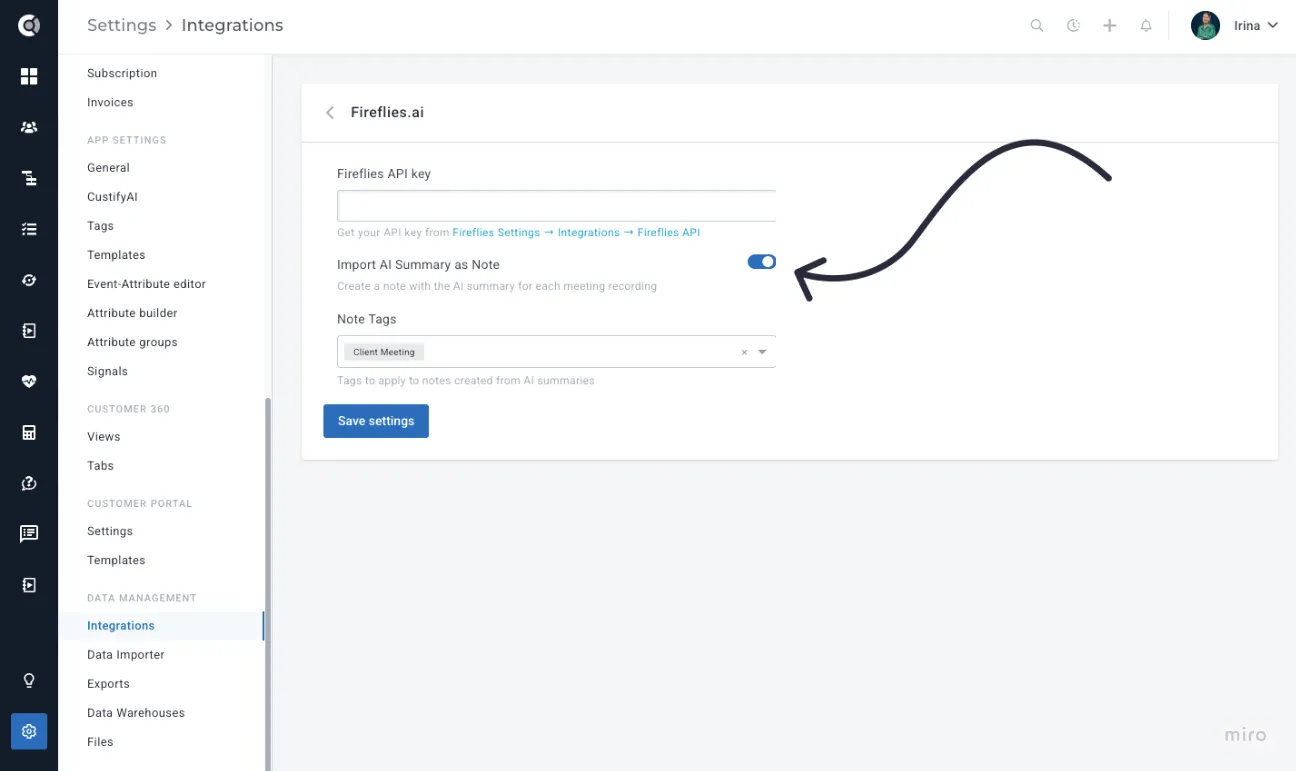
This makes meeting content fully searchable and visible in the Notes tab on the Company 360, helping CSMs keep track of conversation history without manually copying summaries. Having the summary saved as a note also makes it easier to generate follow-up tasks directly from the note when needed.
Financial Data Tab - Link to View Deal in Salesforce
The Company 360 Financial Data tab now includes a direct link to view the corresponding deal in Salesforce, matching the existing behavior for tickets. This enables quick navigation from Custify to Salesforce deals with a single click.
API Enhancements
Surveys API
A new API endpoint is now available for retrieving survey response data, allowing customers to export all survey results at the survey level - not just per person. This supports use cases such as exporting product-specific NPS scores across multiple surveys, which was not possible using the people endpoint alone. This enhancement supports customers who build external analytics platforms or AI-driven churn prediction models.
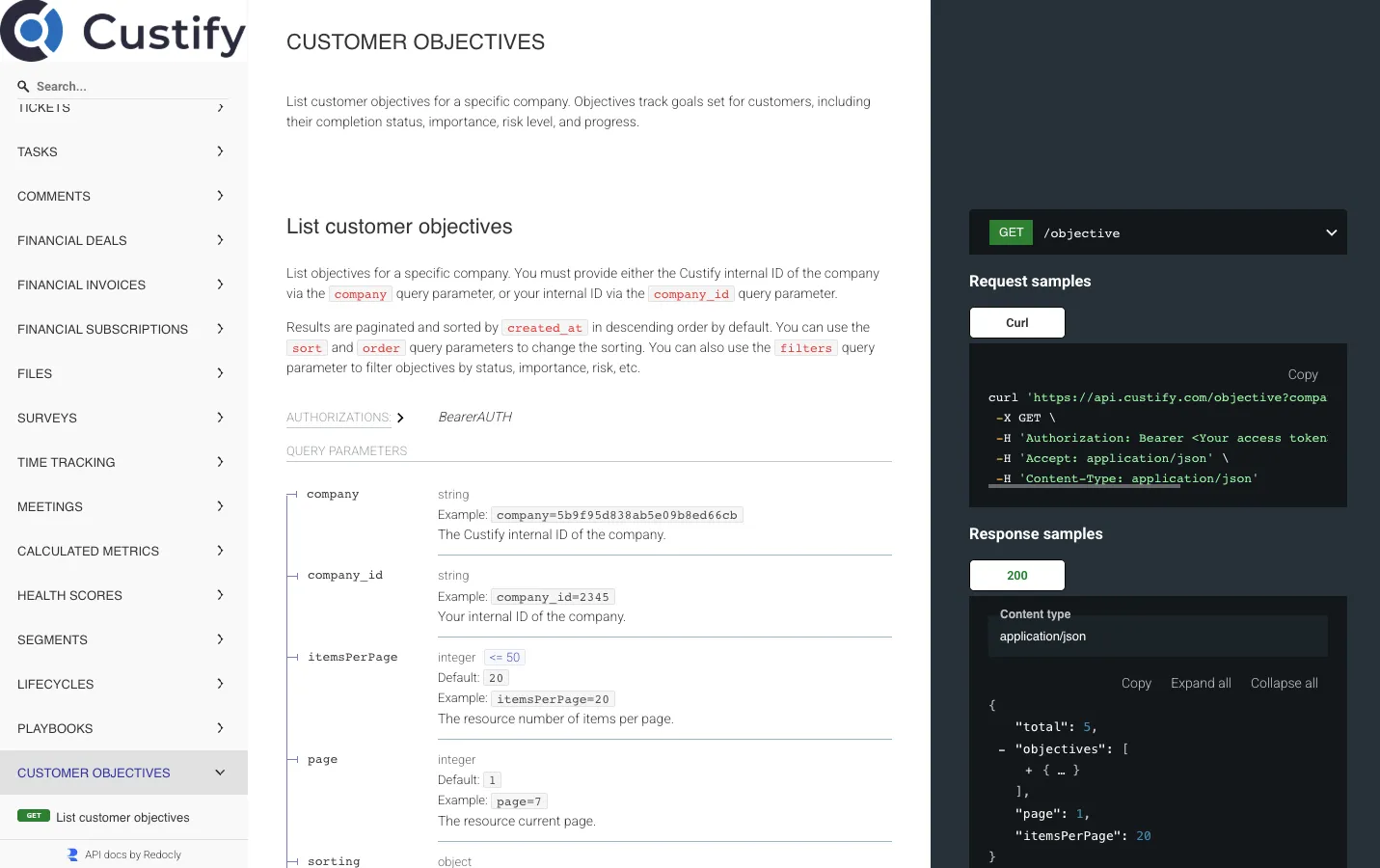
Customer Objectives API
Customer Objectives can now be retrieved (and created) via the Custify API, enabling customers to pull objective data into external systems for cross-account analysis and reporting.
Tickets API - GET Endpoint
A GET endpoint for Tickets is now available in the Custify API, bringing Tickets in line with other entities (Tasks, Notes, Tags) that already support programmatic retrieval. This allows customers to build automated workflows that read ticket data, integrate it with external systems, or trigger actions based on ticket state without manual exports.
More details about the enhancements above can be found under docs.custify.com.
Time Tracker
Pause Timer
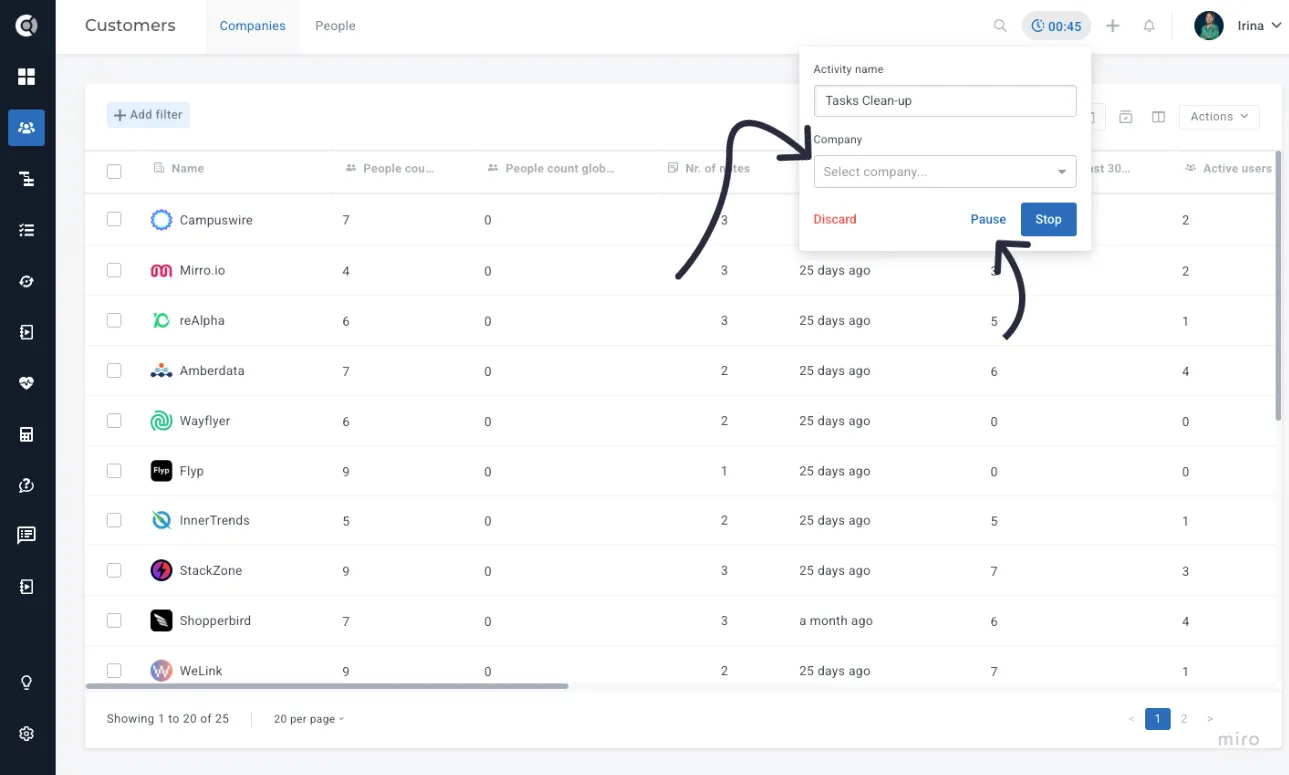
The Time Tracker feature now supports a "Pause" option in addition to the existing start/stop controls. CSMs can pause the timer when interrupted (e.g., by a call or meeting) and resume it when they return, resulting in more accurate time tracking without having to manually sum up separate sessions.
Track Time Without Linking to a Company
The Time Tracker can now be used without requiring a company to be selected, enabling CSMs to log time spent on cross-account activities such as internal reporting, multi-customer reviews, or team meetings. Previously, every time tracking session required a company association, which made it impossible to capture time for non-company-specific work.
Alerts and Notifications
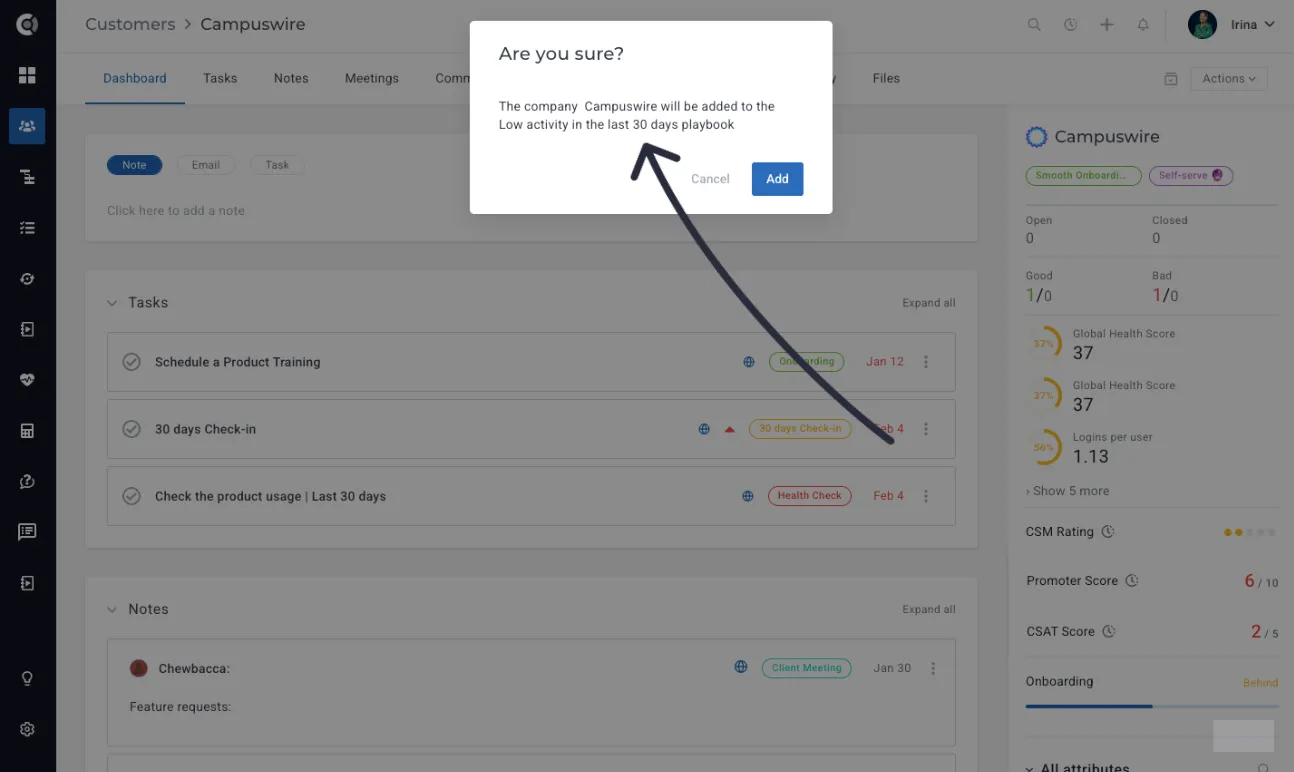
Confirmation Alerts - Show Object Name
Confirmation dialogs (e.g., when adding companies to a playbook from the Customer list view) now include the name of the target object (e.g., the playbook name), matching the behavior already present in the Company 360. This small but impactful change reduces the risk of accidentally triggering the wrong action and improves consistency across the platform.
Follow-Up Notifications for Unapproved Emails
We’ve improved notifications for emails that remain in Touchpoints - Pending Approval for an extended period.
A background job runs every 12 hours to identify emails that are still in Pending Approval status and were created more than 36 hours ago. For each qualifying email, the system determines the responsible CSM by first checking whether the replyTo address matches an existing Custify user. If a match is found, that user is notified. If not, the notification is sent to the company’s assigned CSM owner (owners_csm).
The responsible CSM receives a reminder email from [email protected] that includes the number of pending emails, the age of the oldest one, and a direct link to Touchpoints - Pending Approval for quick access.
To prevent notification fatigue, reminders are sent at most once every 3 days per user per account.