MCP Server & Activity
Connect Your AI Assistant to Custify
Chat with your Custify data using AI tools like Claude Desktop, Cursor, or VS Code. Ask questions, get instant answers, and take actions - without switching between apps.
We are continuously improving the functionality of the MCP Server. All recent updates and the changelog can be found here.
Why Use This?
Instead of navigating dashboards and clicking through filters, you just ask:
- "Show me accounts with health scores below 60"
- "What's the usage trend for Acme Corp?"
- "Create a follow-up task for Friday"
Your AI assistant pulls live data from Custify and can even create notes, tasks, or trigger playbooks on your behalf.
What You Can Ask
Get information
- List and search accounts
- List and filter contacts across all accounts
- Check health scores and trends
- View usage data
- Look up contacts
- See which segments an account belongs to
- View customer objectives for an account
- Look up tags, lifecycles, and calculated metric definitions
Take action
- Add notes to accounts
- Create tasks
- Trigger playbooks
- Update custom fields
- Add or remove tags on accounts or contacts
Real-World Examples
Start your day with what matters most
"Show me at-risk accounts with renewals this quarter"
You get a focused list in seconds. Follow up with "What's the usage trend for the top 3?" and you're prepped for outreach.
Log notes without switching apps
Just finished a customer call? Ask your AI assistant:
"Add a note to Acme Corp: Spoke with Sarah about API concerns. Schedule technical call next week."
Then:
"Create a task for Friday to set up that call"
Done. No tabs, no copy-pasting.
Prep for a QBR in seconds
Need a quick account summary?
"Give me Globex Inc's health score, usage trends for the last 90 days, and any open tasks"
Want more context? "Which playbooks have we run for them this year?"
Spot issues before standup
A quick check before your team meeting:
"Which accounts had a health score drop this week?"
You catch problems early without digging through reports.
Supported Tools
This works with:
- Claude Desktop
- Cursor
- VS Code
- Claude Code
- ChatGPT
- Other MCP-compatible tools
Not sure if your tool is supported? Check with your technical team - if it supports MCP (Model Context Protocol), it should work.
How to Set It Up
Setup takes about 5 minutes. You'll need help from someone technical if you're not comfortable editing configuration files.
Step 1: Get Your API Key
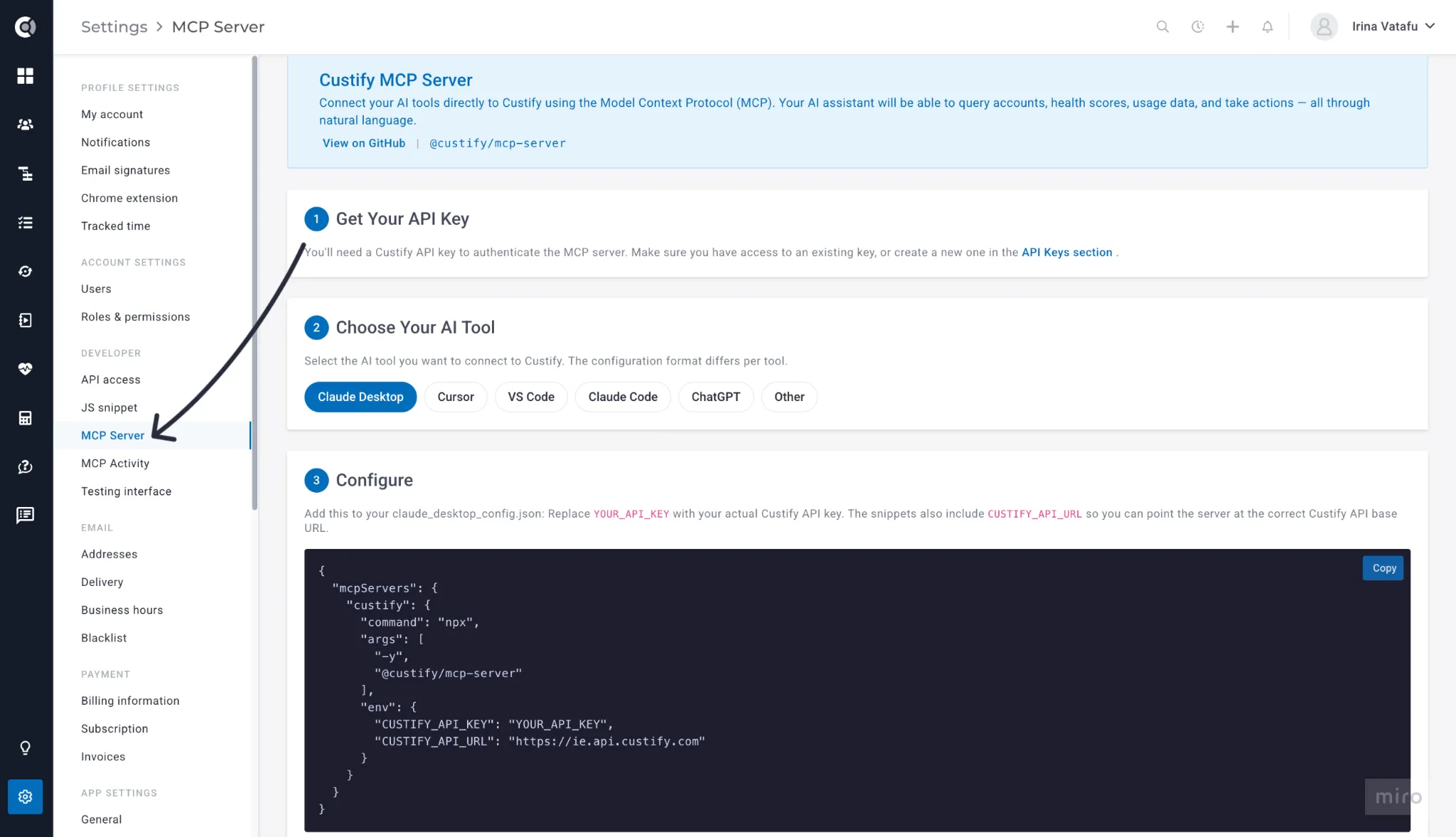
Go to Settings > Developer > API Access in Custify and copy your API key (or create one if you don't have it).
Step 2: Open the Setup Guide
Go to Settings > Developer > MCP Server. This page walks you through everything.
Step 3: Copy Your Configuration
Pick your AI tool from the list. The page shows a ready-to-use configuration snippet with your API key already filled in.
Step 4: Paste and Restart
Add the configuration to your AI tool and restart it. The setup guide tells you exactly where to paste it for each tool.
You're done - start chatting with your Custify data.
Track Usage
You can see all AI assistant activity in Settings > Developer > MCP Activity.
This shows:
- API Calls Today - how many requests were made
- Unique Tools Today - which actions were used (list accounts, create task, etc.)
- Active Keys (30d) - which API keys are being used
Filter by API key, tool, status, or date range to see specific activity.
Useful for:
- Checking if setup worked (you should see calls appearing)
- Monitoring team adoption
Requirements
- A Custify API key (created in Settings > Developer > API Access)
- An AI tool that supports MCP
No plan upgrades or account changes needed. The MCP server uses your existing permissions.
For Technical Teams
The MCP server is open-source and available as:
- npm package: @custify/mcp-server
- Docker image
Two connection modes are supported:
- STDIO - for local tools like Claude Desktop
- Streamable HTTP - for remote or hosted deployments
Source code is available for review or customization.