Groove
Groove is a simple, email-based help desk and shared inbox built for small teams to manage support conversations from one place. The Custify integration imports your Groove tickets so you can track support volume, surface at-risk accounts, and act on conversations alongside the rest of your customer data.
What can you do with Groove in Custify:
Once connected, the integration brings your Groove tickets and contact data into Custify so you can act on them next to your other customer signal:
- Import Groove tickets as Touchpoints on the matching person and company in Custify.
- Match Groove contacts to people in Custify by email, and roll tickets up to the company level so you see total, open, pending, and closed counts per account.
- Review the full Groove ticket history directly inside the Customer 360 Profile without switching tools.
- Segment customers by Groove activity, for example accounts with a high number of open tickets or no support contact in the last 30 days.
- Trigger Playbooks when ticket counts cross a threshold, so your CSMs get a task or alert at the right moment.
- Feed ticket data into Health Scores to factor support load into each customer's overall health.
Activation
For Groove, the email address is the primary identifier. Tickets from Groove are matched to people in Custify by email and aggregated up to the company level.
You will need admin access to your Groove account to generate an API token. The token is created under Settings - Organization - API in Groove.
- In Groove, go to Settings - Organization - API and generate a new API token. Copy the value.
- Sign in to your Custify account and go to Settings - Integrations.
- Find Groove in the list and click Connect.
- Paste your Groove API token into the connection form and click Save.
- Confirm the connection. Custify will pull existing tickets and run a sync every 30 minutes to keep them up to date.
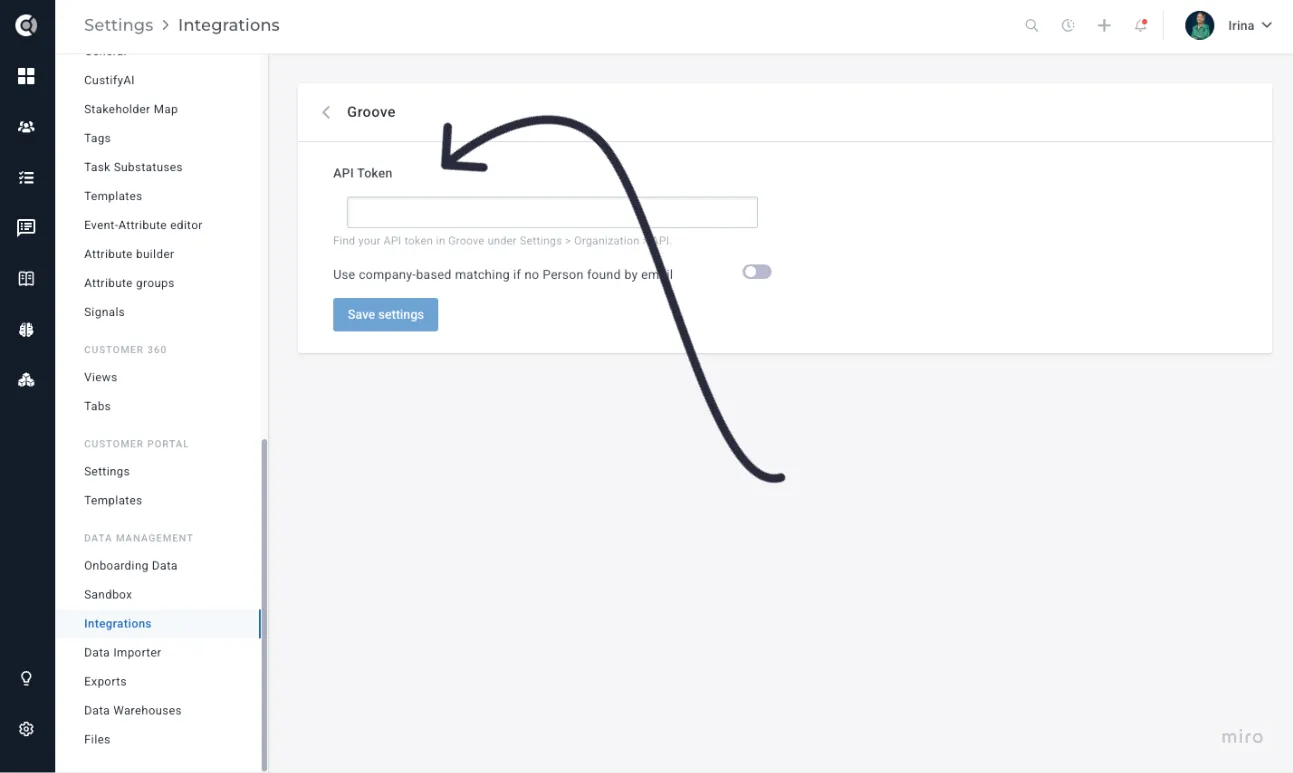
Custify Tip: You can also enable Use company-based matching if no Person is found by email. Tickets from email addresses with no matching person will then be linked to the company that owns the email domain, so unmatched contacts still roll up to the right account.